Overview
email digest is listed in HelloGrowthCRM's what customers see catalog as an planned or scaffolded integration. Creates a planned email digest integration page for HelloGrowthCRM so teams can discover what customers see workflows in the public integrations directory. Typical setup starts with Open HelloGrowthCRM and go to Settings → Integrations → email digest.
What data is involved
- email digest workflow data is organized under the What customers see category in HelloGrowthCRM's integrations directory.
- The page highlights the core email digest use case, setup path, and the CRM workflow context teams usually care about first.
- Before go-live, confirm which records, events, or credentials should move between HelloGrowthCRM and email digest.
Step-by-step setup
Setup at a glance (3-5 bullets)
- Open HelloGrowthCRM and go to Settings → Integrations → email digest.
- Review your implementation scope first, because this integration is currently marked as scaffolded.
- Add the required credentials, webhook details, or connection information for email digest.
- Map the fields or workflow events you want HelloGrowthCRM to exchange with email digest.
- Run a test connection and confirm data appears as expected before using it in production.
Sign in or sign up at HelloGrowthCRM. Open the login page, enter your credentials (or use Google), or choose Sign up if you need a new account. You must be signed in before you can open Settings and connect this integration.
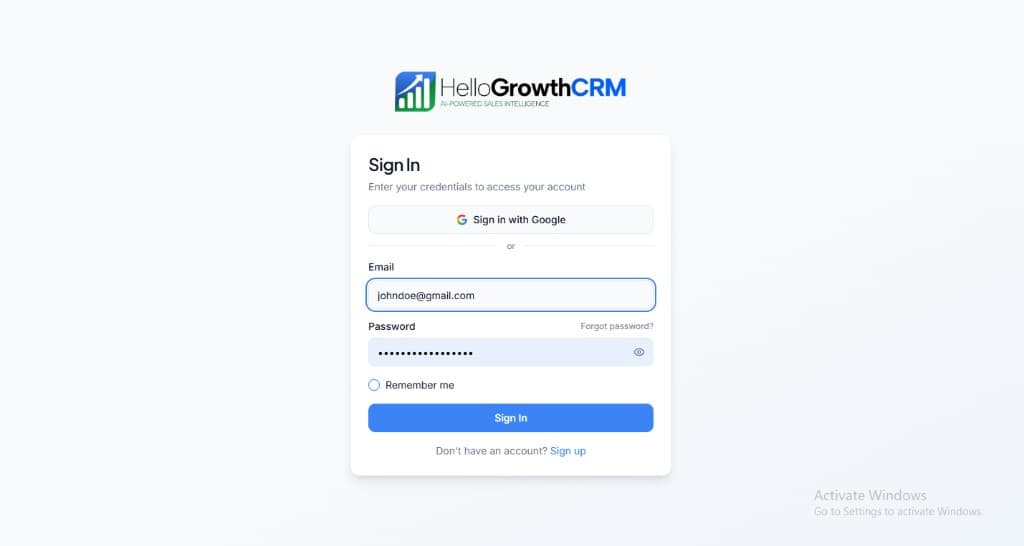
Open login page(opens in a new tab)app.hellogrowthcrm.com/login
Open Settings. In the left sidebar, under Admin, click Settings (you will land on the Settings area; the URL is app.hellogrowthcrm.com/settings).
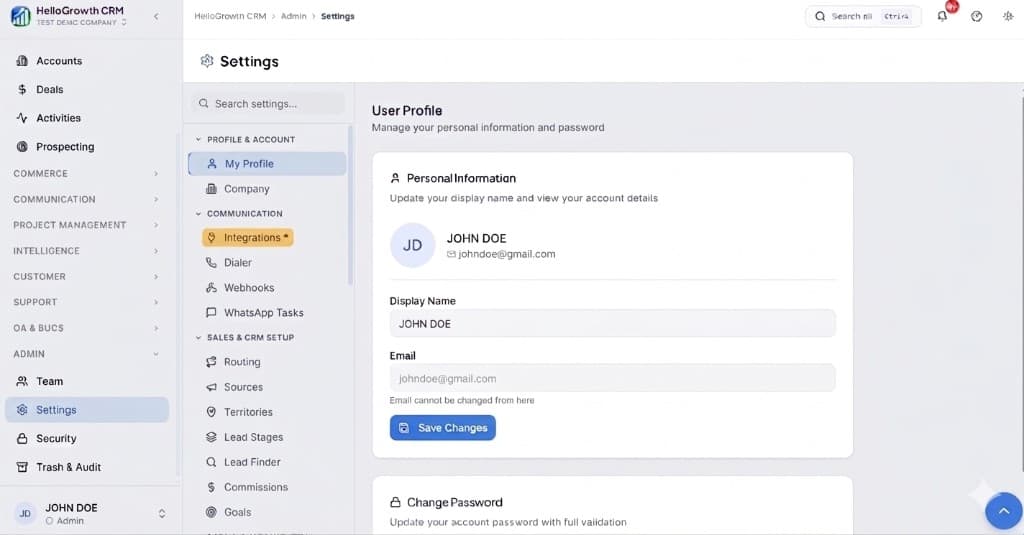
Open Settings(opens in a new tab)app.hellogrowthcrm.com/settings
Go to Integrations. On the Settings screen, use the middle settings menu. Under COMMUNICATION, click Integrations (star icon). Then find and configure this connector—the connector-specific steps below pick up from here.
Open Settings (Integrations)(opens in a new tab)app.hellogrowthcrm.com/settings
- Open HelloGrowthCRM and go to Settings → Integrations → email digest.
- Review your implementation scope first, because this integration is currently marked as scaffolded.
- Add the required credentials, webhook details, or connection information for email digest.
- Map the fields or workflow events you want HelloGrowthCRM to exchange with email digest.
- Run a test connection and confirm data appears as expected before using it in production.
Best practices
- Start with one narrow email digest workflow before expanding the integration to more teams or records.
- Validate field mapping, ownership rules, and alerting so email digest activity lands on the right CRM records.
- Keep API keys, OAuth credentials, and webhook secrets for email digest in your normal production secret-management process.
Best for & common use cases
Teams researching email digest in the context of what customers see use cases before implementation.
- Document email digest as part of your what customers see stack evaluation.
- Create a discoverable SEO landing page for email digest while implementation is still planned or partial.
Expected outcomes
- Faster lead handoff between tools and CRM owners
- Cleaner activity history for follow-up and reporting
- Lower manual copy-paste errors in the pipeline
FAQ
Governance
Treat API keys and webhooks as production secrets. Align field mapping with your privacy policy and regional regulations (GDPR, marketing consent, telemarketing rules). Your admin controls which roles can install or edit integrations.
Related integrations in this category
Creates a planned marks idle chat conversations integration page for HelloGrowthCRM so teams can discover what customers see workflows in the public integrations directory.
Creates a planned fixes stale call records integration page for HelloGrowthCRM so teams can discover what customers see workflows in the public integrations directory.
Creates a planned removes expired context integration page for HelloGrowthCRM so teams can discover what customers see workflows in the public integrations directory.
Creates a planned retries failed outbound webhooks integration page for HelloGrowthCRM so teams can discover what customers see workflows in the public integrations directory.
Creates a planned system integration page for HelloGrowthCRM so teams can discover what customers see workflows in the public integrations directory.
Creates a planned Tab integration page for HelloGrowthCRM so teams can discover # Integrations workflows in the public integrations directory.
Creates a planned CRM integration page for HelloGrowthCRM so teams can discover 8 workflows in the public integrations directory.
Creates a planned Email integration page for HelloGrowthCRM so teams can discover 4 workflows in the public integrations directory.