Automate Follow-Up Tasks So Nothing Falls Through the Cracks
Create, assign, and track tasks automatically as deals move through your pipeline. Built for teams that need accountability for follow-ups and a reliable system to ensure every next step is captured and completed on time.

Why teams evaluate task management
Task Management usually becomes important when a repeated part of the revenue workflow is creating too much manual work, too little visibility, or too much tool-switching. Teams are rarely shopping for a feature in isolation. They are usually trying to make one meaningful workflow cleaner, faster, and easier to inspect.
That is why buyers usually look beyond the headline capability and inspect the surrounding details: Auto-task creation from deal stage transitions, Team task assignment and routing, Due date alerts and reminders, Task completion tracking and reporting. Those details determine whether the feature actually improves day-to-day execution or simply adds another surface area to manage.
Where task management fits in the workflow
Most teams adopt this capability as part of practical motions such as follow-up automation, deal progression, team accountability. The value tends to show up fastest when the workflow is tied to a clear owner, a clear next action, and a visible outcome that managers can review later.
It also matters how this page connects to the rest of the stack. For many teams, tools such as Gmail, Google Calendar, Slack, Teams are what make the feature operational instead of theoretical because they keep data, communication, and handoffs in sync.
What a strong rollout looks like for task management
The best rollout usually starts small: one high-value workflow, one clear ownership model, and one review rhythm for adoption. Once the team is consistently using the feature, managers can expand into deeper automation, reporting, or cross-functional handoffs without rebuilding the foundation.
In practice, that means evaluating not only what the feature can do, but also whether the team can maintain the process around it. Ease of use, reporting trust, and manager visibility matter just as much as the feature checklist itself.
- Use it first for follow-up automation if that is the workflow creating the most friction today.
- Use it first for deal progression if that is the workflow creating the most friction today.
- Use it first for team accountability if that is the workflow creating the most friction today.
- Use it first for workflow standardization if that is the workflow creating the most friction today.
How It Works
Get started in three simple steps
Key Features
Use Cases
Follow-up automation
Create follow-up tasks automatically so reps never have to remember to send that proposal or make that call.
What teams care about
- Fast adoption with less manual cleanup for managers and reps.
- Clear visibility into workflow execution, outcomes, and accountability.
- Reliable handoffs into the CRM record so downstream teams keep full context.
Deep dive
Open the sections that matter most instead of scrolling through a long uninterrupted text block.
Why teams need CRM task management
Task management in CRM is essential because sales execution depends on consistent follow-up. When tasks are manual, they get forgotten or delayed. When task creation is tied to deal stages and assigned automatically, follow-ups happen on schedule and managers have visibility into what is getting done.
Good CRM task management removes the friction between knowing what should happen next and actually doing it. It creates accountability and ensures every step in your sales process is completed before moving to the next stage.
How automated tasks improve sales velocity
Automated task creation improves velocity because reps spend less time manually creating tasks and more time working deals. When tasks are templated and triggered by deal stage, the entire team follows the same process and nothing is skipped.
Managers benefit from task visibility because they can spot bottlenecks and see where work is piling up. That allows them to coach reps or reallocate work before delays impact the pipeline.
Task management and deal success
Task management directly impacts deal success because deals move forward when all the required steps are actually completed. Without visibility into task completion, deals can get stuck waiting for something that nobody remembers to do.
When tasks are automated, assigned clearly, and tracked visibly, the whole team understands the path forward and can work together to move deals through the pipeline.
Choosing the right task management system
The right task management system for sales teams is one that automates repetitive task creation, routes work to the right people, and gives managers visibility into completion. It should fit your sales process rather than forcing you to change how you work.
HelloGrowthCRM task management is built specifically for sales teams, so tasks are connected to deals, contacts, and your pipeline instead of existing in a separate productivity app.
Task management in CRM is essential because sales execution depends on consistent follow-up. When tasks are manual, they get forgotten or delayed. When task creation is tied to deal stages and assigned automatically, follow-ups happen on schedule and managers have visibility into what is getting done.
Good CRM task management removes the friction between knowing what should happen next and actually doing it. It creates accountability and ensures every step in your sales process is completed before moving to the next stage.
Buyer playbook
Compare, launch, and govern the workflow with an interactive overview instead of four long generic essays.
How teams evaluate task management
The best pages help buyers understand fit quickly instead of forcing them through long walls of copy.
Check whether the product covers the capabilities you actually care about, such as Auto-task creation from deal stage transitions, Team task assignment and routing, Due date alerts and reminders, Task completion tracking and reporting.
Test if it supports real execution scenarios like Follow-up automation, Deal progression, Team accountability.
Confirm the workflow stays connected to Gmail, Google Calendar, Slack, Teams so reporting and handoffs remain reliable.
Frequently Asked Questions
Explore More
Sales tasks on a shared task board
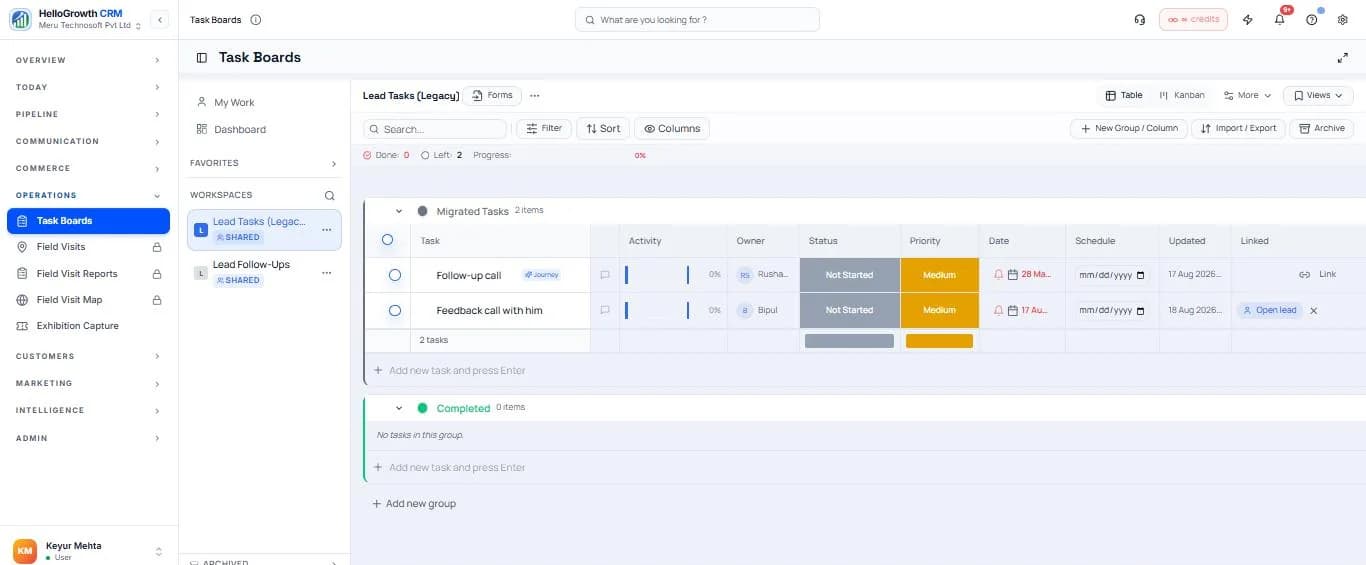
What automated tasks look like in a real sales week
The follow-ups that win deals are rarely difficult — they are just easy to forget. A quote goes out on Tuesday, the customer says “call me next week”, and by next week the rep is buried in new enquiries. Task automation removes that failure mode at the source: moving a deal to “Quote Sent” creates the three-day follow-up call automatically, a deal sitting quiet for seven days generates a check-in task for its owner, and a won deal spawns the onboarding checklist for whoever handles delivery. The rep's morning starts with a prioritised list of exactly these commitments — sorted by due date and lead score — rather than a scroll through the pipeline hoping nothing was missed.
A concrete example: a Jaipur interiors firm runs its whole project funnel on stage-triggered tasks. Enquiry received creates “site measurement visit” for the field rep; measurement done creates “send design and estimate” for the studio; estimate sent creates the follow-up call at day three and day seven. Nobody plans this each morning — the pipeline plans it. The owner's Friday review is a single team task view showing what was completed, what is overdue, and which stage is piling up work. Tasks connect naturally to the deals pipeline that triggers them, the activity timeline that records their completion, and Smart Lists like “overdue tasks by rep” that keep managers ahead of slippage.
Watch: Task Boards in Action

Key takeaways from this video
- The same tasks render as list, kanban, calendar, and more — teams keep one source of truth with different views per role.
- Stage-triggered automation creates follow-up tasks the moment a deal moves, so nothing depends on memory.
- Overdue and unassigned tasks surface in manager views before they become missed commitments.
- Tasks stay attached to the lead or deal record, so completing one logs to the customer timeline automatically.