Skip to content
Integration

Google Meet Integration for HelloGrowthCRM

Schedule Google Meet calls directly from HelloGrowthCRM. Auto-log meeting attendees, notes, and outcomes to deal records.

Quick answer

Do I need a Google Workspace plan to use this integration?

A personal Google account works for individual users. For teams sharing meeting links and calendars, Google Workspace is recommended to ensure reliable calendar sync and shared availability.
Last updated:
What you get

Scheduling a meeting should not require reps to jump between a calendar app, a CRM, and Gmail. Google Meet integration brings video meetings into HelloGrowthCRM so reps can schedule, join, and log calls without leaving the deal record. Meeting history stays attached to the opportunity so the full narrative of the sales relationship is visible in one timeline.

Reps can schedule a Google Meet directly from a contact or opportunity record in HelloGrowthCRM. The meeting invitation is sent through their Gmail with a Meet link, the calendar entry is created, and the meeting is logged to the CRM automatically. When the meeting happens, the rep records notes and outcomes—and those sync back to the CRM instantly.

Post-meeting automation saves time on manual CRM hygiene. After a call, HelloGrowthCRM can auto-create follow-up tasks, schedule the next meeting, enroll the contact in a sequence, or move the opportunity to the next stage—all based on the meeting outcome the rep logged. That discipline keeps pipeline moving without additional admin work.

Meeting analytics and insights help sales managers coach reps without sitting in on every call. HelloGrowthCRM can record meetings and generate transcripts so managers can review critical calls, identify objections, and spot communication patterns across the team. That visibility is especially valuable for onboarding and performance coaching.

For high-touch sales, meeting scheduling conflicts often slow down deal progression. With Google Meet integrated into HelloGrowthCRM, reps can check a prospect's availability, suggest times directly from the CRM, and close the loop without the back-and-forth email tennis that usually delays meetings by days.

Team meetings and internal alignment calls can also be scheduled and logged—when a team discusses a complex opportunity, those notes stay in the deal record so anyone picking up the account later understands previous decision logic and stakeholder context.

For remote and distributed sales teams, a unified meeting system matters. Reps use Google Meet across the company anyway. By integrating it with HelloGrowthCRM, you simplify the workflow and reduce toggling without asking the team to learn a new meeting tool.
Automation workflows

Automation workflows with Google Meet and HelloGrowthCRM

Attach a Meet link to every scheduled call

Booking a meeting from a CRM record generates the Google Meet link and calendar invite in one step. Prospects get one clean invite, and the meeting shows on the deal timeline from the moment it's booked.

Send reminders that cut no-shows

Scheduled Meet calls trigger reminder workflows — email the day before, WhatsApp an hour out. The reminder includes the Meet link so nobody digs through their inbox at start time.

Log meetings with AI summaries

After the call, the meeting logs against the deal with notes and an AI-generated summary of what was discussed and agreed. The next owner of the account reads three paragraphs instead of asking 'where did we leave this?'

Automate the post-meeting follow-up

Completing a meeting prompts the follow-up: a recap email template, tasks for promised actions, and a nudge if the deal doesn't move within a week. Momentum from good calls stops evaporating.

In practice

How distributed teams sell over Google Meet

Agency pitches across cities

A Pune agency pitches clients in three metros over Meet. Every pitch logs to the deal with a summary, so the founder reviews the week's pitches Friday morning without attending any of them.

SaaS onboarding calls

A customer-success team runs onboarding on Meet. Sessions log against the account, and skipped onboarding calls trigger re-engagement — the earliest churn signal they track.

Consultant discovery-to-proposal

A consultant's discovery calls feed AI summaries straight into proposal drafts. Proposals go out the same day while the conversation is fresh, and close rates reflect it.

Setup guide

How to connect — step by step

Takes about 10–15 minutes. No coding required.

Setup at a glance

  • Connect your Google Workspace account
  • Enable automatic meeting link generation
  • Sync your HelloGrowthCRM calendar with Google Calendar
  • Configure post-meeting follow-up tasks
  • Test by scheduling a meeting with a CRM contact
  1. 1

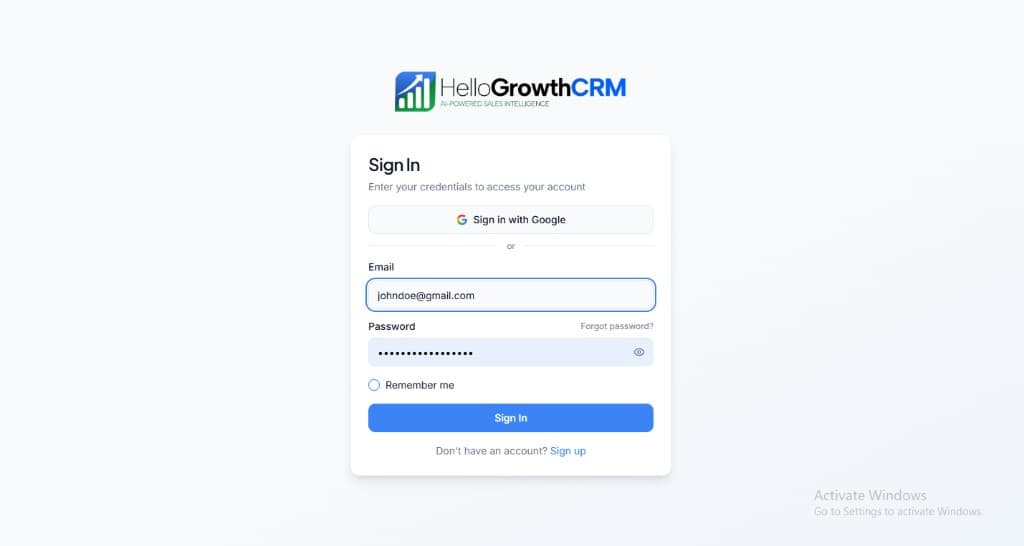
    Sign in or sign up at HelloGrowthCRM. Open the login page, enter your credentials (or use Google), or choose Sign up if you need a new account. You must be signed in before you can open Settings and connect this integration.

    HelloGrowthCRM login screen: Sign in with Google, email and password fields, Remember me, and Sign up link

    Open login page(opens in a new tab)app.hellogrowthcrm.com/login

  2. 2

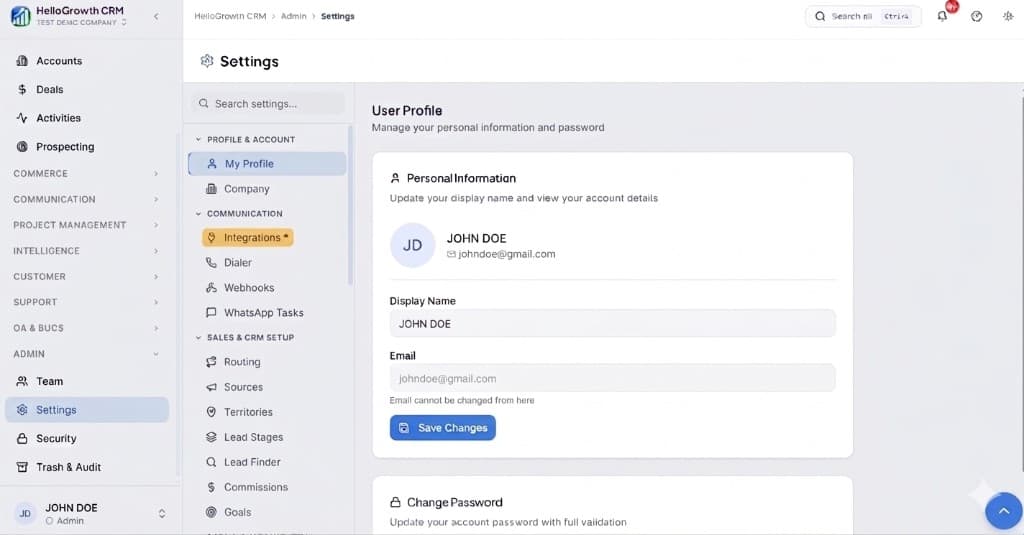
    Open Settings. In the left sidebar, under Admin, click Settings (you will land on the Settings area; the URL is app.hellogrowthcrm.com/settings).

    HelloGrowthCRM Settings: Admin sidebar with Settings selected, secondary menu with Communication and Integrations, and profile area

    Open Settings(opens in a new tab)app.hellogrowthcrm.com/settings

  3. 3

    Go to Integrations. On the Settings screen, use the middle settings menu. Under COMMUNICATION, click Integrations (star icon). Then find and configure this connector—the connector-specific steps below pick up from here.

    HelloGrowthCRM Settings menu highlighting COMMUNICATION and Integrations next to the Admin Settings sidebar

    Open Settings (Integrations)(opens in a new tab)app.hellogrowthcrm.com/settings

  4. 4

    Connect your Google Workspace account

    In HelloGrowthCRM, go to Settings → Integrations → Google Meet. Click 'Connect Google Account'. Approve calendar and Meet permissions. A Google Workspace account (not a personal Gmail) is recommended for team use.

  5. 5

    Enable automatic meeting link generation

    Toggle on 'Auto-generate Google Meet links for scheduled meetings'. When a rep books a meeting from inside HelloGrowthCRM, a unique Meet link is created and added to the calendar invite automatically.

  6. 6

    Sync your HelloGrowthCRM calendar with Google Calendar

    In Settings → Calendar, connect Google Calendar. Meetings booked in HelloGrowthCRM will appear in Google Calendar and vice versa, preventing double-bookings.

  7. 7

    Configure post-meeting follow-up tasks

    Set up automated tasks that trigger when a meeting ends: create a follow-up call task for 48 hours later, send a summary email template, or advance the deal to the next pipeline stage.

  8. 8

    Test by scheduling a meeting with a CRM contact

    Book a test meeting with a contact in HelloGrowthCRM. Confirm the Google Meet link appears in the meeting record, the Google Calendar event is created, and the post-meeting task is queued correctly.

Need help with setup? Book a 15-minute onboarding call — our team will connect it live with you.
FAQ

Frequently asked questions

Do I need a Google Workspace plan to use this integration?
A personal Google account works for individual users. For teams sharing meeting links and calendars, Google Workspace is recommended to ensure reliable calendar sync and shared availability.
Are meeting recordings stored in HelloGrowthCRM?
Meeting recordings stay in Google Meet or Google Drive depending on your Meet settings. HelloGrowthCRM logs the meeting event in the contact timeline but does not store recording files.
Can I generate a Meet link from a CRM deal record?
Yes. Open any deal and click 'Schedule Meeting'. A Google Meet link is generated instantly and attached to the meeting record on the deal timeline.
Do I need Google Workspace for Meet integration?
A Google account is required; Workspace is recommended for business features like longer group calls and recording, per Google's current plan limits as of 2026. The CRM side works with either.
Are Meet calls recorded by the CRM?
Recording stays a Google Meet feature governed by your Workspace settings and consent rules. The CRM logs the meeting, notes, outcomes, and summaries — and you can paste the recording link onto the record.

Want help evaluating the next step?

Book a demo to see HelloGrowthCRM in action, or start a free trial.