What referrals does
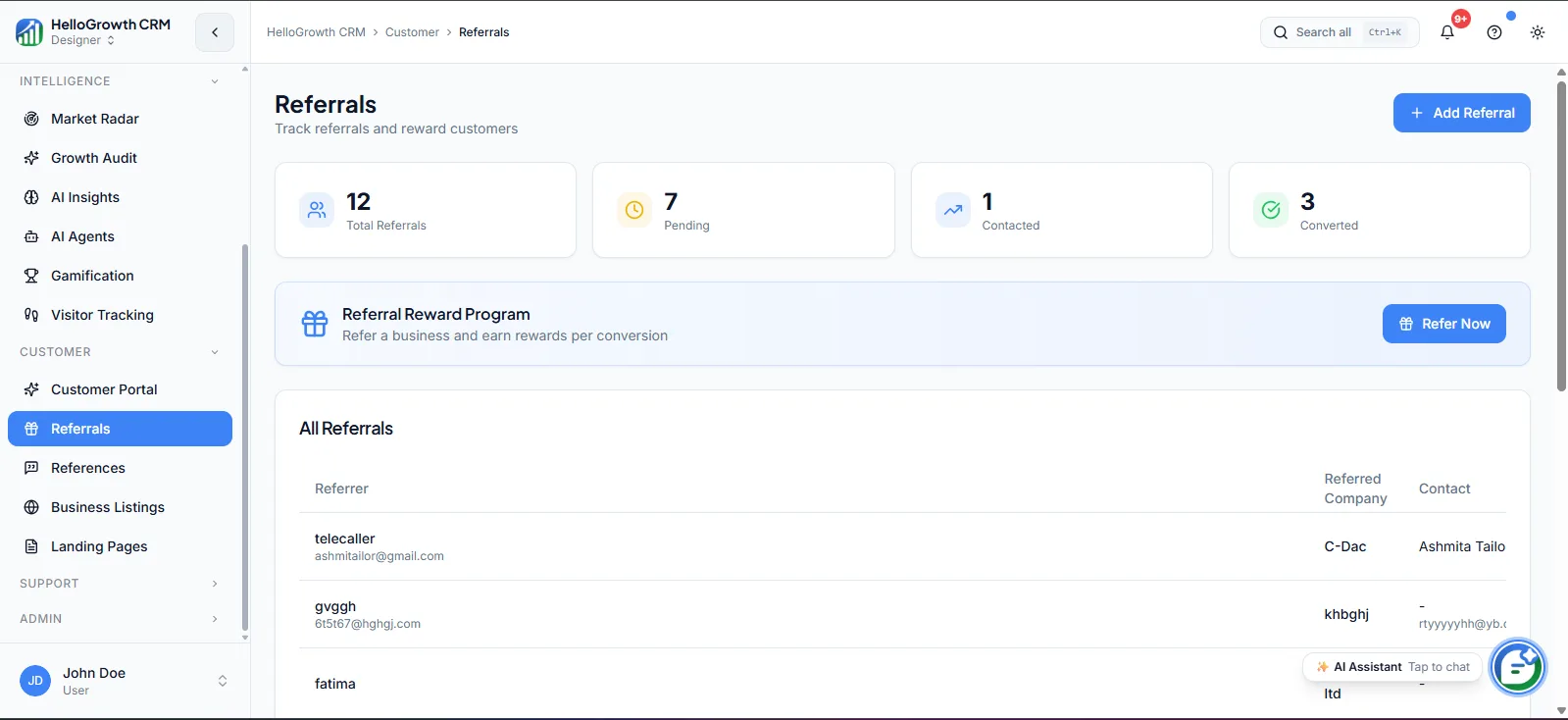
Referrals gives you a structured workflow for turning happy customers into a pipeline source: identify advocates, invite them to refer, capture each referral as a proper lead, and track it through to closed revenue — with the referring customer attached the whole way. Every introduction gets logged, routed, and followed up like any other lead, instead of living in someone's inbox.
Without a system, referrals arrive as forwarded emails and verbal mentions, get worked inconsistently, and nobody can say how much revenue introductions actually generate — so the channel never gets investment. Worse, advocates who refer someone and hear nothing back stop referring. Structured tracking means every referral gets a fast response, and the numbers finally show whether the program deserves more push.
How it works in HelloGrowthCRM
Referrals sits in the Customer module. You mark customers as advocates, and each referral they submit becomes a lead record linked back to the referrer. From there it follows your normal pipeline — routing, follow-up tasks, stage progression — while the referral link persists, so when the deal closes you can attribute the revenue and thank or reward the advocate.
It connects with lead management and automation: new referrals can trigger assignment and follow-up sequences like any inbound lead, and WhatsApp or email templates make thank-you and status updates to referrers a two-click job rather than an afterthought.
See it in action
How this capability is packaged by plan
| Plan | Availability |
|---|---|
| Free Forever | |
| Software Only | |
| Growth Engine | |
| RevOps Partner |
Setting it up — step by step
- 1
Identify your advocates
Shortlist customers who are happy, engaged, and well-connected in your target market segment.
- 2
Define the referral offer
Decide what referrers receive — a discount, service credit, or simple recognition — and state it plainly.
- 3
Set up capture and routing
Configure how referrals enter the CRM and which rep gets assigned for fast first response.
- 4
Create referrer updates
Prepare templates thanking advocates and updating them when their referral converts to a customer.
- 5
Review the channel monthly
Check referrals submitted, conversion rate, and revenue attributed to decide where to push harder.
Who uses referrals
Founder/owner
Runs the referral program as a low-cost pipeline channel, personally thanks advocates whose introductions close, and uses attributed revenue numbers to decide whether to formalize rewards or expand the program.
Sales rep
Works referral leads first because they convert warmer, keeps the referrer's name in the opening conversation, and closes the loop by telling the advocate when their introduction becomes a customer.
Sales manager
Tracks referral volume and conversion against other lead sources, ensures referred leads get same-day response, and coaches reps to ask satisfied customers for introductions at the right moments.
Referrals in practice — industry examples
Financial advisory
A financial advisory practice grows almost entirely on introductions. Each client referral is logged with the referring client attached, worked within a day, and the advisor sends a personal thank-you when the referred family signs. Quarterly, the practice sees exactly which clients generate introductions and deepens those relationships deliberately.
Salons
A salon chain offers existing clients a service credit for each friend who books a first appointment. Referrals are captured against the referring client, the credit is applied automatically when the friend's visit completes, and the owner can see which locations and stylists generate the most word-of-mouth bookings.
Coaching institutes
A coaching institute tracks parent and student referrals for new admissions. Each referred inquiry is linked to the referring family, counsellors prioritize these warm leads during admission season, and the institute rewards families whose referrals enroll — with a clear report of enrollments attributed to referrals each term.
Common mistakes to avoid
Asking every customer for referrals instead of targeting genuine advocates, which yields awkward asks and low-quality introductions.
Treating referral leads like cold leads with slow response, burning both the prospect and the advocate's goodwill at once.
Never closing the loop with referrers, so advocates assume their introduction went nowhere and quietly stop referring.
Tracking referrals in a side spreadsheet, losing attribution when deals close and making the channel impossible to justify.
What teams usually care about here
Turns happy customers into a structured source of qualified pipeline
Keeps referral tracking inside the CRM instead of relying on manual spreadsheets
Useful for relationship-driven businesses where trust transfers between buyers
How this fits the buying decision
Buyers usually do not evaluate referrals in isolation. They want to know whether it improves execution, reporting, handoffs, and accountability inside the broader CRM workflow. That is why this capability matters most when it is connected to records, ownership, activity history, and manager review rather than living in a separate point tool.
The real decision is often less about whether a box is checked and more about how much depth the team needs. Lower tiers may be enough when the workflow is simple or the volume is small. Higher tiers become more valuable when teams need governance, faster response expectations, specialist execution, or a repeatable operating cadence around the process.
If this capability is important to your rollout, compare it in the context of the whole plan. That includes related workflows, support level, reporting expectations, and whether your team will manage the motion itself or rely on managed RevOps help to keep it consistent.
Frequently asked questions
Which plans include the referrals feature?
Referrals is available on the Growth Engine and RevOps Partner plans. It is not included in Free Forever or Software Only. It is part of the Customer module alongside the customer portal and references.
How do I get started with a referral program?
Start small: shortlist ten happy customers, decide what referrers get, and set up capture so each introduction becomes a linked lead in the CRM. The mechanics take an afternoon — the discipline of fast follow-up and closing the loop is what makes it work.
Are referral leads tracked separately from other leads?
They flow through the same pipeline as every other lead, but each carries a link to the referring customer. That means normal routing and follow-up applies, while reports can isolate referral-sourced pipeline and attribute closed revenue back to specific advocates.
Can I automate thank-you messages to referrers over WhatsApp?
Yes. Because referrals are CRM records linked to the referring customer, you can use WhatsApp or email templates to thank advocates when they refer and update them when the referral converts — turning loop-closing from a forgotten chore into a standard step.
How do I know if the referral program is actually working?
Watch three numbers monthly: referrals submitted, their conversion rate versus other sources, and revenue attributed to referrers. Because every referral is linked from submission to close, these reports come from live pipeline data rather than a reconstructed spreadsheet.
Related Pricing Capabilities
Customer Portal
A branded self-service portal where customers can view their orders, invoices, project status, and communications without contacting support.
References
A managed reference library of satisfied customers that sales can use in late-stage deals to accelerate trust and reduce close friction.
Business Listings
Tools for managing and syncing your business presence across directories, review platforms, and local listing sources.
Landing Pages
CRM-connected landing page builder for campaign capture, event signups, and inbound conversion without needing a separate tool.