Skip to content
Integration

Make and Receive Kupe Calls Directly From Your CRM

Connect Kupe cloud telephony to HelloGrowthCRM. Click-to-call, call recording, and auto-logging from your CRM. Rs 899/user/month.

Quick answer

What is Kupe and why integrate it with HelloGrowthCRM?

Kupe is an Indian cloud telephony provider offering virtual numbers, IVR, and call recording for SMBs. Integrating Kupe with HelloGrowthCRM gives your team click-to-call from any lead record, automatic call logging, and recordings stored in the CRM — without a separate dialer dashboard.
Last updated:
What you get

Kupe is an Indian cloud telephony provider built for SMB sales and support teams. The HelloGrowthCRM Kupe integration connects your Kupe number directly to the CRM — so reps click to call from any lead record, calls are recorded automatically, and every conversation is logged without manual entry.

For teams already on Kupe, the integration eliminates the need to switch between the Kupe dialer and CRM. Click a number in HelloGrowthCRM, the call connects through Kupe, and when it ends the duration, outcome, and recording URL are stored against the lead record automatically.

Inbound calls routed through Kupe are matched to CRM records by caller ID. When a known contact calls, the rep sees their full CRM history — past calls, deals, WhatsApp messages, and notes — before answering. Unknown numbers create a new lead automatically.

Call routing rules configured in Kupe work alongside HelloGrowthCRM assignment rules. After-hours calls go to voicemail and create a follow-up task. Calls during business hours route to the assigned rep. Overflow routes to an available team member based on CRM availability status.

For sales managers, the Kupe-HelloGrowthCRM integration provides full call activity visibility: calls made per rep, average call duration, call-to-demo conversion rate, and recordings for coaching. All data lives in the CRM without a separate telephony dashboard.

NASSCOM Member. SOC 2 Type II. Rs 899/user/month includes the Kupe integration — no additional platform fee.
Automation workflows

Automation workflows you can build with Kupe calling and HelloGrowthCRM

Click-to-call from every record

Reps dial from the lead or deal with one click on their Kupe virtual number. No number juggling, no personal SIMs in the sales process — and every call logs to the record automatically with duration and outcome.

Auto-log and record for coaching

Calls record per your consent settings and attach to the timeline. Managers coach from real conversations, disputes settle by listening back, and 'did we actually call them?' has a truthful answer.

Route inbound calls to the owner

Incoming calls on the business number look up the caller and ring the assigned owner first, with the record on screen. Customers stop re-explaining their history to whoever picks up.

Work call queues from the pipeline

Telecallers work today's follow-up list straight from the CRM — dial, disposition, next — with attempts and outcomes feeding activity reports that reflect reality rather than diaries.

In practice

How Indian teams run Kupe telephony with the CRM

Admissions team on one number

A coaching institute's five counsellors share a Kupe number with owner-first routing. Parents reach the counsellor who knows their case, and the head sees connect rates per counsellor each week.

Field team without personal-number leakage

A services company moved rep calling onto Kupe numbers through the CRM. When a rep left, their relationships and call history stayed — the number and the record both belong to the business.

Telecalling with honest metrics

A real estate telecalling floor works portal leads from CRM queues. Attempts, connects, and site-visit bookings per caller come from call logs, not self-reported tallies.

Setup guide

How to connect — step by step

Takes about 10–15 minutes. No coding required.

Setup at a glance

  • Connect Kupe account
  • Assign numbers to reps
  • Enable click-to-call
  • Configure call recording
  • Test with a call
  1. 1

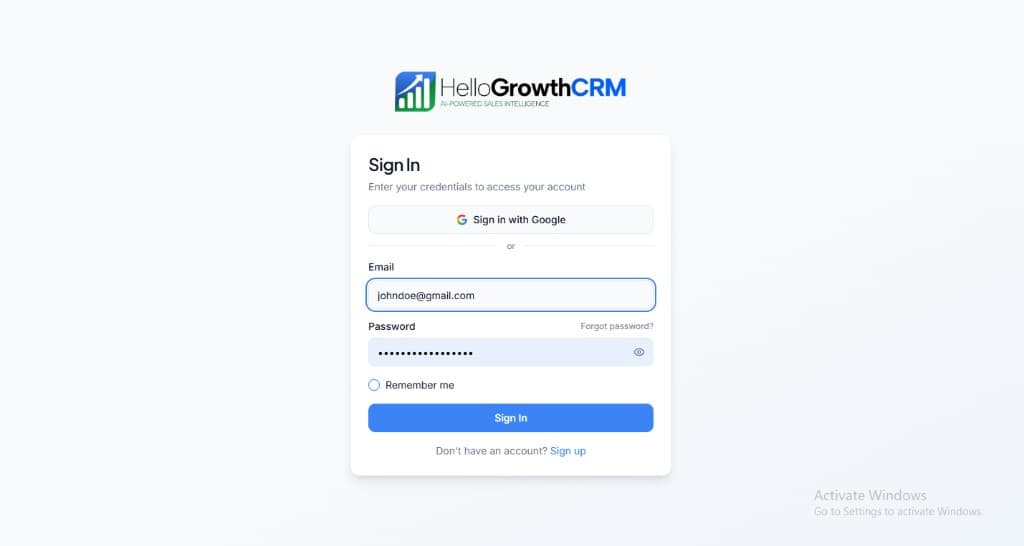
    Sign in or sign up at HelloGrowthCRM. Open the login page, enter your credentials (or use Google), or choose Sign up if you need a new account. You must be signed in before you can open Settings and connect this integration.

    HelloGrowthCRM login screen: Sign in with Google, email and password fields, Remember me, and Sign up link

    Open login page(opens in a new tab)app.hellogrowthcrm.com/login

  2. 2

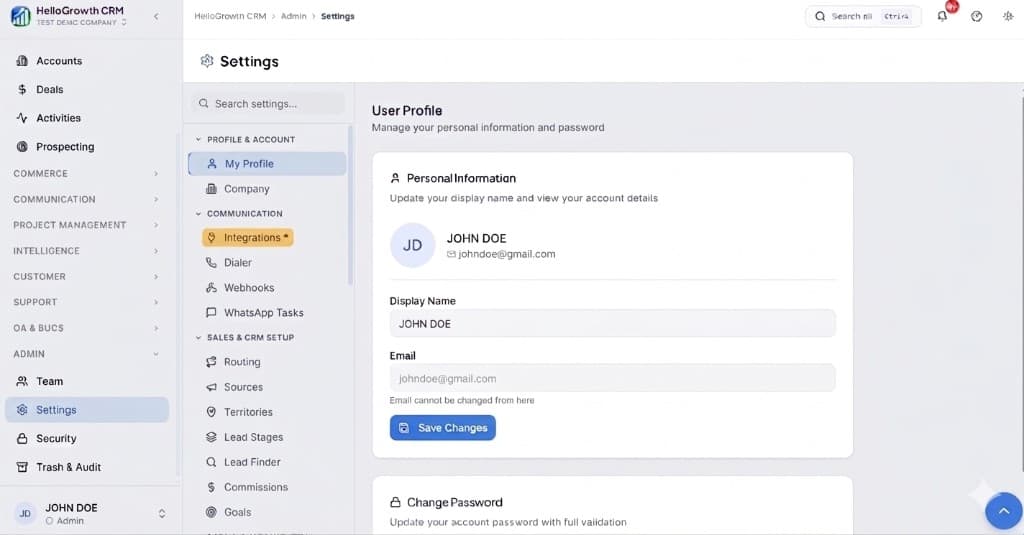
    Open Settings. In the left sidebar, under Admin, click Settings (you will land on the Settings area; the URL is app.hellogrowthcrm.com/settings).

    HelloGrowthCRM Settings: Admin sidebar with Settings selected, secondary menu with Communication and Integrations, and profile area

    Open Settings(opens in a new tab)app.hellogrowthcrm.com/settings

  3. 3

    Go to Integrations. On the Settings screen, use the middle settings menu. Under COMMUNICATION, click Integrations (star icon). Then find and configure this connector—the connector-specific steps below pick up from here.

    HelloGrowthCRM Settings menu highlighting COMMUNICATION and Integrations next to the Admin Settings sidebar

    Open Settings (Integrations)(opens in a new tab)app.hellogrowthcrm.com/settings

  4. 4

    Connect Kupe account

    In HelloGrowthCRM Settings → Integrations → Telephony, click Connect Kupe. Enter your Kupe API key and virtual number.

  5. 5

    Assign numbers to reps

    Map each HelloGrowthCRM user to their Kupe extension or virtual number. Inbound calls route to the matched rep.

  6. 6

    Enable click-to-call

    Turn on click-to-call in HelloGrowthCRM. A phone icon appears next to every mobile and phone field. Clicking it initiates a Kupe call.

  7. 7

    Configure call recording

    Enable automatic call recording in Kupe settings. HelloGrowthCRM retrieves recording URLs after each call and stores them on the lead record.

  8. 8

    Test with a call

    Click a lead phone number in HelloGrowthCRM, make a test call, end the call, and verify the activity is logged with duration and recording.

Need help with setup? Book a 15-minute onboarding call — our team will connect it live with you.
FAQ

Frequently asked questions

What is Kupe and why integrate it with HelloGrowthCRM?
Kupe is an Indian cloud telephony provider offering virtual numbers, IVR, and call recording for SMBs. Integrating Kupe with HelloGrowthCRM gives your team click-to-call from any lead record, automatic call logging, and recordings stored in the CRM — without a separate dialer dashboard.
Does the Kupe integration support inbound call routing?
Yes. Inbound calls to your Kupe number are matched to CRM contacts by caller ID. The rep sees the full contact history before answering. Unknown numbers create a new lead record automatically with the call as the first activity.
Are Kupe call recordings stored in HelloGrowthCRM?
Yes. After each call, HelloGrowthCRM retrieves the recording URL from Kupe and stores it on the lead record. Recordings are accessible by the rep and their manager from the activity timeline.
Does Kupe integration work alongside other dialers?
Yes. HelloGrowthCRM supports multiple telephony providers simultaneously. You can use Kupe for domestic calls and Twilio for international calls, with each provider configured per user or per campaign.
Is the Kupe integration included in the standard plan?
Yes. The Kupe telephony integration is included in HelloGrowthCRM paid plans from Rs 899/user/month. Kupe call charges apply separately based on your Kupe plan.
What does Kupe calling cost?
The Kupe integration is included in HelloGrowthCRM's Rs 899/user/month pricing with no additional platform fee; calling consumes your Kupe plan's minutes per its current rates.
Is call recording legal in India?
Business call recording with appropriate notice is standard practice in India; play a recording disclosure where required and align retention with your DPDPA obligations. Configure both in the telephony settings.

Want help evaluating the next step?

Book a demo to see HelloGrowthCRM in action, or start a free trial.