Skip to content
Integration

Meta Ads Integration for HelloGrowthCRM

Connect Meta Ads (Facebook/Instagram) with HelloGrowthCRM. Auto-import lead form submissions and track ad-to-deal attribution.

Quick answer

Does HelloGrowthCRM capture UTM parameters from Meta Ads?

Yes. Campaign name, ad set, and ad name from Meta are captured as source fields in the CRM lead record so you can track which specific ad creative generated each lead.
Last updated:
What you get

For businesses running lead-generation campaigns on Facebook and Instagram, the Meta Ads platform captures leads but the CRM doesn't see them automatically. That creates a manual sync problem and makes it impossible to track ad spend to actual deal closure. HelloGrowthCRM's Meta Ads integration brings lead form submissions directly into the CRM so you can measure true ROI from paid campaigns.

When someone fills out your Meta lead form on Facebook or Instagram, HelloGrowthCRM automatically creates a contact record with their details and ad campaign information so you know exactly which ad, audience, and campaign source generated each lead. That attribution is essential for optimizing ad spend.

Lead assignment and follow-up can start immediately. When a form submission arrives, HelloGrowthCRM routes it to the right sales rep, creates a task, and optionally triggers an automated first-touch email. Hot leads get attention the same day instead of waiting for manual list processing.

Campaign performance measurement becomes straightforward. HelloGrowthCRM tracks leads by ad campaign, ad set, and audience so you can compare cost-per-lead across different creative approaches, audiences, and campaign strategies. That insight guides where to allocate media budget for maximum efficiency.

Quality scoring helps prioritize follow-up. HelloGrowthCRM can score Meta Ads leads based on company size, industry, budget indicators, or other fit criteria so reps prioritize the most qualified prospects first instead of treating all form submissions equally.

For high-volume lead generation campaigns, automation prevents overwhelm. Multiple hot leads can arrive simultaneously; HelloGrowthCRM's distribution rules ensure they get assigned quickly and follow-up starts without manual coordination.

Closed-loop reporting connects ad spend to revenue. HelloGrowthCRM tracks Meta Ads leads through to deal closure so you can calculate true cost-per-acquisition, identify which campaigns generate the highest-quality customers, and prove media ROI to leadership.

Remarketing coordination is also possible. When a Meta Ads lead doesn't respond to initial follow-up, HelloGrowthCRM can trigger remarketing audiences in Meta Ads so you can serve them display ads while your sales team is still trying to connect via email or phone.

For B2B companies running account-based marketing (ABM) on Meta, the integration enables target account identification. When leads from your ABM target account list fill out forms, HelloGrowthCRM flags them as VIPs so they get priority follow-up and executive engagement.
Automation workflows

Automation workflows with Meta Ads and HelloGrowthCRM

Land ad leads in the pipeline with attribution

Leads from Facebook and Instagram campaigns arrive tagged with campaign, ad set, and ad. Every enquiry is a scored CRM lead with an owner — and you always know which creative produced it.

Trigger instant multi-channel first touches

A new ad lead gets a WhatsApp hello and an email within a minute, plus a call task ordered by AI lead score. Social leads cool fast; the machine keeps your response time flat at midnight and on Sundays.

Build audiences from CRM outcomes

Push segments back to Meta: won customers become the seed for lookalike audiences, open-deal contacts get excluded from cold prospecting ads, and lost-deal lists feed re-engagement campaigns.

Optimise campaigns on revenue, not lead counts

Closed-deal data per campaign shows which ads produce buyers versus form-fillers. Budget conversations shift from cost-per-lead to cost-per-customer — usually with surprising conclusions.

In practice

How advertisers connect Meta spend to sales

Clinic appointment campaigns

A dermatology clinic runs Instagram ads for consultations. Leads sync instantly, front desk calls within minutes, and no-show rates drop because WhatsApp confirmations go out automatically.

Real estate project launches

A developer's launch campaign floods in hundreds of leads over a weekend. Scoring ranks them by budget signals, and the sales team's Monday starts with a prioritised call list instead of chaos.

D2C to distributor pipeline

A foods brand runs consumer awareness ads that also attract distributor enquiries. Keyword rules route those to the B2B pipeline, where they get a completely different follow-up track.

Setup guide

How to connect — step by step

Takes about 10–15 minutes. No coding required.

Setup at a glance

  • Connect your Facebook Business account
  • Select your Facebook Pages and Ad Accounts
  • Map Meta Lead Ad form fields to CRM fields
  • Configure lead routing and pipeline entry
  • Test with a Meta Lead Ad test submission
  1. 1

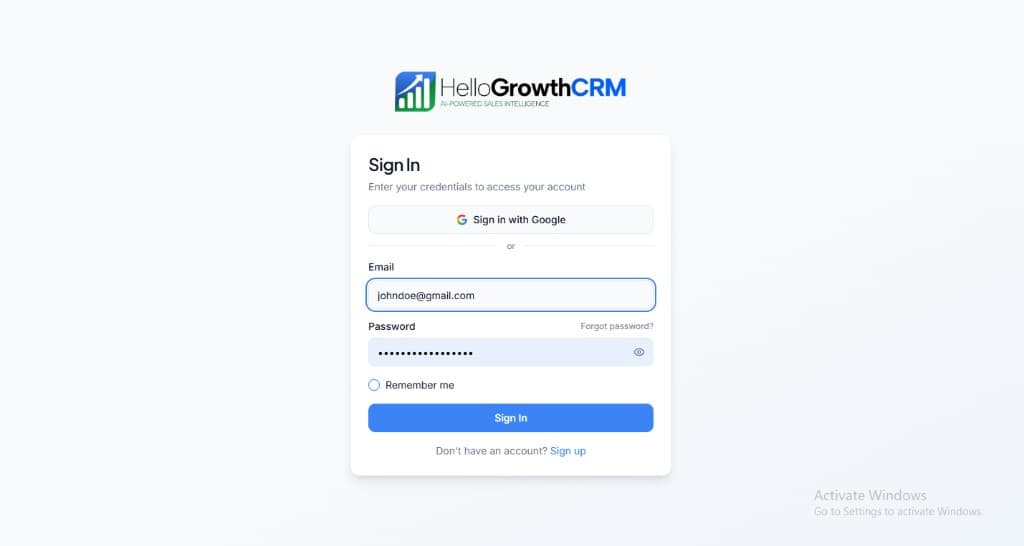
    Sign in or sign up at HelloGrowthCRM. Open the login page, enter your credentials (or use Google), or choose Sign up if you need a new account. You must be signed in before you can open Settings and connect this integration.

    HelloGrowthCRM login screen: Sign in with Google, email and password fields, Remember me, and Sign up link

    Open login page(opens in a new tab)app.hellogrowthcrm.com/login

  2. 2

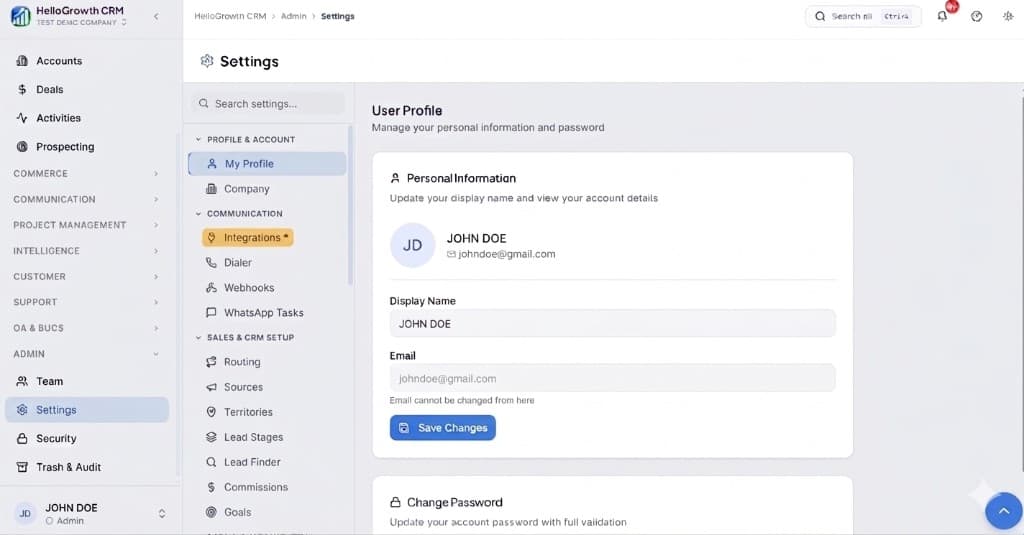
    Open Settings. In the left sidebar, under Admin, click Settings (you will land on the Settings area; the URL is app.hellogrowthcrm.com/settings).

    HelloGrowthCRM Settings: Admin sidebar with Settings selected, secondary menu with Communication and Integrations, and profile area

    Open Settings(opens in a new tab)app.hellogrowthcrm.com/settings

  3. 3

    Go to Integrations. On the Settings screen, use the middle settings menu. Under COMMUNICATION, click Integrations (star icon). Then find and configure this connector—the connector-specific steps below pick up from here.

    HelloGrowthCRM Settings menu highlighting COMMUNICATION and Integrations next to the Admin Settings sidebar

    Open Settings (Integrations)(opens in a new tab)app.hellogrowthcrm.com/settings

  4. 4

    Connect your Facebook Business account

    In HelloGrowthCRM, go to Settings → Integrations → Meta Ads. Click 'Connect Facebook'. Sign in with the Facebook account that manages your Business Manager and approve the requested permissions.

  5. 5

    Select your Facebook Pages and Ad Accounts

    Choose which Facebook Pages and Meta Ad Accounts should send leads to HelloGrowthCRM. You can connect multiple Pages if you run ads across different brands or product lines.

  6. 6

    Map Meta Lead Ad form fields to CRM fields

    For each Lead Ad form you run, map the form questions to CRM fields. Standard fields (name, email, phone) map automatically. Custom questions map to custom CRM fields you define.

  7. 7

    Configure lead routing and pipeline entry

    Set which pipeline and stage Meta leads enter, and how they are assigned. You can route by ad campaign, ad set, or form name to send different campaign leads to different sales teams.

  8. 8

    Test with a Meta Lead Ad test submission

    In Meta Business Manager, open your Lead Ad form and use the 'Preview Form' tool to submit a test lead. Verify it appears in HelloGrowthCRM within 60 seconds with correct field mapping.

Need help with setup? Book a 15-minute onboarding call — our team will connect it live with you.
FAQ

Frequently asked questions

Does HelloGrowthCRM capture UTM parameters from Meta Ads?
Yes. Campaign name, ad set, and ad name from Meta are captured as source fields in the CRM lead record so you can track which specific ad creative generated each lead.
How fast do Meta Lead Ad submissions appear in HelloGrowthCRM?
Meta delivers lead form submissions via webhook in near real-time — usually within 30 seconds of the prospect submitting the form.
Can I connect Instagram Lead Ads as well as Facebook Lead Ads?
Yes. Instagram Lead Ads connected to your Facebook Business Manager appear in the same integration setup. Select the Instagram page alongside your Facebook page during configuration.
Does this cover both Facebook and Instagram lead campaigns?
Yes. Both run through Meta's ads platform, so leads from either placement sync identically with their campaign attribution intact.
Can I send conversion events back to Meta for optimisation?
Yes — qualified and won outcomes can feed back so Meta's delivery optimises toward leads that resemble your actual buyers, which typically improves lead quality over time.

Want help evaluating the next step?

Book a demo to see HelloGrowthCRM in action, or start a free trial.