Skip to content
Integration

Push Won Deals From HelloGrowthCRM to Monday.com Automatically

Sync Monday.com boards with HelloGrowthCRM. Push won deals to project boards, sync tasks, and track delivery. Rs 899/user/month.

Quick answer

Does HelloGrowthCRM automatically create Monday.com items when a deal closes?

Yes. When a deal is marked Won (or moves to a configured stage), a new item is created on the mapped Monday.com board with the customer details, deal value, notes, and assigned rep. The delivery team sees it immediately without any hand-off communication.
Last updated:
What you get

Many businesses use HelloGrowthCRM for the sales process and Monday.com for project management and delivery. The integration connects the two — when a deal closes in HelloGrowthCRM, a Monday.com project item is created automatically with all the deal context, so delivery starts without a hand-off meeting.

Sales reps who close deals should not also need to fill in project briefs, onboarding forms, and Monday boards. The HelloGrowthCRM Monday.com integration pushes the deal data — customer name, product, value, timeline, requirements notes, and assigned delivery rep — directly to Monday.com at the moment of close.

For agencies, IT services companies, and implementation teams that use Monday.com for project tracking, this integration eliminates the gap between "we won the deal" and "the delivery team knows about it." Project setup time drops from days to seconds.

The sync is configurable per deal type or pipeline stage. A deal marked Closed Won in the Sales pipeline pushes to the Onboarding board. A deal moved to Implementation pushes to the Delivery board. Each deal type maps to a different Monday board and column configuration.

Status updates flow back from Monday.com to HelloGrowthCRM. When a project milestone is completed — kickoff done, first deliverable shipped, project closed — the CRM deal status updates. Account managers see delivery progress without accessing Monday.com.

SOC 2 Type II. NASSCOM Member. GCCI Member. Rs 899/user/month.
Automation workflows

Automation workflows you can build with Monday.com and HelloGrowthCRM

Turn won deals into delivery boards

When a deal reaches Closed Won, create an item on your Monday delivery board with client name, value, and scope notes. The project team starts from real context the same day the contract signs — no re-briefing thread required.

Keep sales informed of delivery status

Status changes on the Monday item reflect back to the CRM deal, so account owners answer 'how's my project going?' from the record instead of interrupting the delivery team's standup.

Escalate blocked projects to account owners

When a Monday item hits a Stuck status on a client project, the CRM raises a task for the account owner. The client hears about the delay from their contact with a plan attached — not by noticing the missed deadline themselves.

Feed intake forms into the pipeline

Teams that collect requests through Monday forms can push qualifying submissions into HelloGrowthCRM as leads, keeping Monday for work management while the revenue conversation runs in a real pipeline.

In practice

How teams run Monday.com beside a CRM

Marketing agency with a delivery board

Deals close in HelloGrowthCRM; a Monday item spawns per project with the brief attached. Sales stops maintaining a shadow copy of delivery status, and delivery stops asking sales what was actually sold.

Fit-out contractor tracking site phases

Each won contract creates a phased Monday board from a template. Phase completions post back to the CRM, so payment-milestone invoicing tasks fire on real progress rather than optimistic memory.

Team migrating off a Monday 'CRM' board

A startup that ran deals as a Monday board moved pipeline to HelloGrowthCRM for proper contact history and follow-up automation, keeping Monday for sprints. The one-time migration mapped status columns to stages in an afternoon.

Setup guide

How to connect — step by step

Takes about 10–15 minutes. No coding required.

Setup at a glance

  • Connect Monday.com
  • Select target boards
  • Map CRM fields to Monday columns
  • Configure trigger rules
  • Enable status feedback
  1. 1

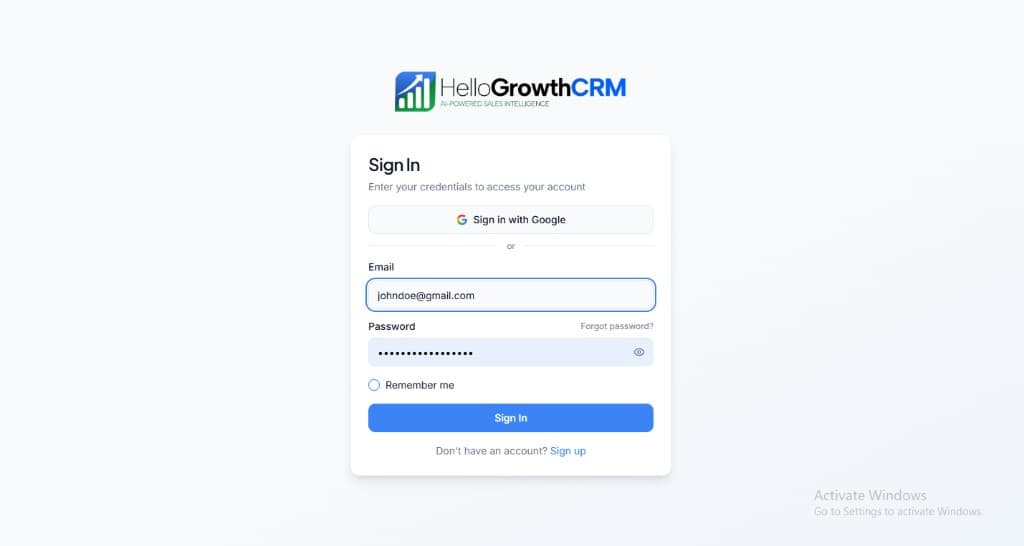
    Sign in or sign up at HelloGrowthCRM. Open the login page, enter your credentials (or use Google), or choose Sign up if you need a new account. You must be signed in before you can open Settings and connect this integration.

    HelloGrowthCRM login screen: Sign in with Google, email and password fields, Remember me, and Sign up link

    Open login page(opens in a new tab)app.hellogrowthcrm.com/login

  2. 2

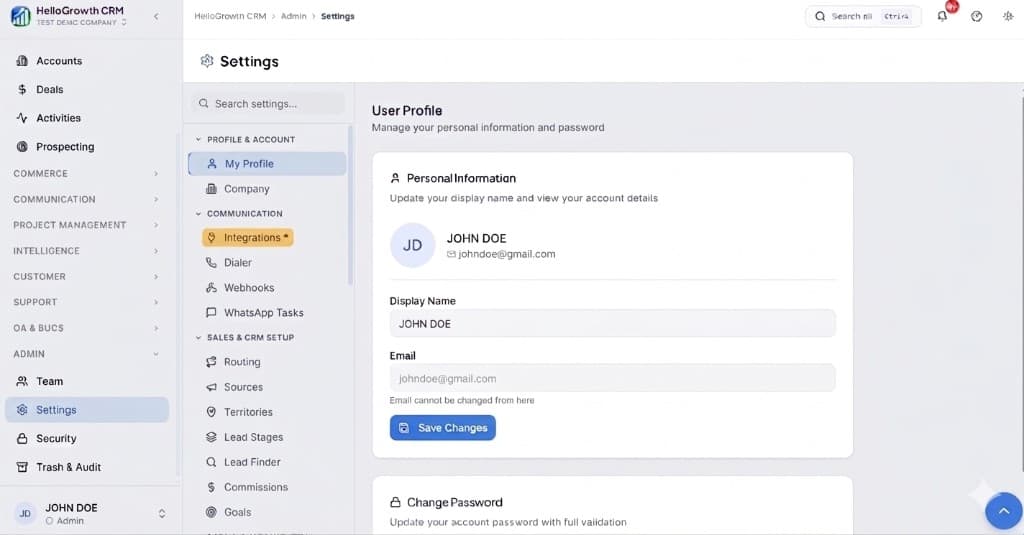
    Open Settings. In the left sidebar, under Admin, click Settings (you will land on the Settings area; the URL is app.hellogrowthcrm.com/settings).

    HelloGrowthCRM Settings: Admin sidebar with Settings selected, secondary menu with Communication and Integrations, and profile area

    Open Settings(opens in a new tab)app.hellogrowthcrm.com/settings

  3. 3

    Go to Integrations. On the Settings screen, use the middle settings menu. Under COMMUNICATION, click Integrations (star icon). Then find and configure this connector—the connector-specific steps below pick up from here.

    HelloGrowthCRM Settings menu highlighting COMMUNICATION and Integrations next to the Admin Settings sidebar

    Open Settings (Integrations)(opens in a new tab)app.hellogrowthcrm.com/settings

  4. 4

    Connect Monday.com

    In HelloGrowthCRM Settings → Integrations → Project Management, click Connect Monday.com. Authenticate via Monday OAuth.

  5. 5

    Select target boards

    Choose which Monday.com boards receive items from HelloGrowthCRM. Map deal types or pipeline stages to specific boards — Onboarding board, Delivery board, or Custom board.

  6. 6

    Map CRM fields to Monday columns

    Map HelloGrowthCRM deal fields to Monday board columns: deal name → item name, customer → person column, value → number column, close date → date column, requirements notes → text column.

  7. 7

    Configure trigger rules

    Set when Monday items are created: on deal stage change to Closed Won, on a specific pipeline stage, or manually triggered from the deal record.

  8. 8

    Enable status feedback

    Configure Monday.com to push status column changes back to HelloGrowthCRM. When a project status changes, the CRM deal record updates automatically.

Need help with setup? Book a 15-minute onboarding call — our team will connect it live with you.
FAQ

Frequently asked questions

Does HelloGrowthCRM automatically create Monday.com items when a deal closes?
Yes. When a deal is marked Won (or moves to a configured stage), a new item is created on the mapped Monday.com board with the customer details, deal value, notes, and assigned rep. The delivery team sees it immediately without any hand-off communication.
Can I map different deal types to different Monday boards?
Yes. Configure board mappings per deal type or pipeline. For example: Software deals go to the Implementation board, Consulting deals go to the Consulting Delivery board, Retainer deals go to the Client Success board.
Does project status from Monday.com sync back to HelloGrowthCRM?
Yes. Status column updates in Monday.com push to HelloGrowthCRM via webhook. Milestones like Kickoff Completed, In Progress, On Hold, and Project Closed update the CRM deal record. Account managers track delivery without logging into Monday.
Can I trigger a Monday.com item creation manually from a deal?
Yes. From any CRM deal record, click Push to Monday to create the board item immediately, regardless of pipeline stage. Useful for pre-sales project scoping or pilot programmes.
Is the Monday.com integration included in the standard plan?
Yes. The Monday.com integration is included in HelloGrowthCRM paid plans from Rs 899/user/month. Monday.com plan costs apply separately.
Is this a sync or a migration?
Both patterns are supported. Ongoing sync keeps won deals flowing to delivery boards and status flowing back; teams replacing a Monday-based pipeline can also do a one-time migration of boards into CRM pipelines with history preserved.
Do we need extra Monday seats for sales?
No — reps see delivery status on the CRM record via the sync. Only people actually managing work inside Monday need Monday seats, which is usually the point of the split.

Want help evaluating the next step?

Book a demo to see HelloGrowthCRM in action, or start a free trial.