What sequences does
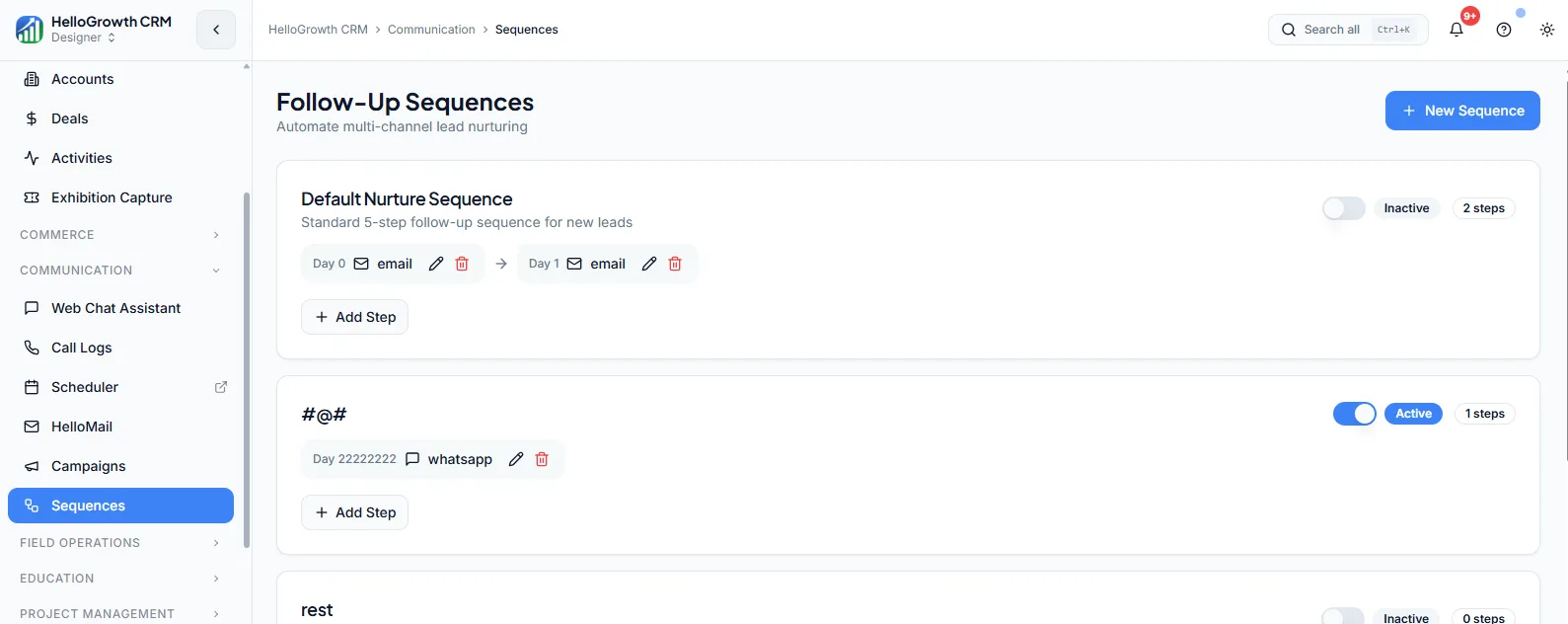
Sequences are automated multi-step outreach workflows. You enrol a lead or contact once, and HelloGrowthCRM sends a timed series of messages across email, SMS, and other channels — day 1 intro, day 3 nudge, day 7 case study — until the person replies or the sequence ends. Each step fires on schedule without the rep having to remember it, and a reply automatically pauses the sequence so nobody gets an awkward robot follow-up after they have already answered.
Without sequences, follow-up depends on rep memory and spare time, and it collapses first whenever the week gets busy. Prospects who needed a third or fourth touch simply never receive it, so warm interest goes cold in silence. Reps also improvise their own messaging, which means the team never learns which follow-up cadence or copy actually gets responses — every rep is running a private, untested experiment.
How it works in HelloGrowthCRM
Sequences live in the outreach area of HelloGrowthCRM and attach to leads and contacts. You build a sequence from steps — email, SMS, wait periods, and manual task steps like a call reminder — then enrol records individually, from a list, or automatically when a lead hits a trigger such as a new source or stage. Every send is logged as an activity on the record, so the timeline stays complete.
Sequences pair naturally with the built-in dialer and WhatsApp and SMS messaging: a sequence step can create a call task that opens in the dialer, and replies on any channel land back on the same record. Lead routing decides who owns the lead; the sequence keeps working it.
See it in action
How this capability is packaged by plan
| Plan | Availability |
|---|---|
| Free Forever | |
| Software Only | Basic |
| Growth Engine | Advanced + A/B testing |
| RevOps Partner |
Setting it up — step by step
- 1
Map your follow-up cadence
Decide how many touches, on which days, and across which channels before building anything in the tool.
- 2
Write the step messages
Draft each email and SMS with one clear ask per message, keeping the first touch short and specific.
- 3
Build the sequence
Add steps and wait times in the sequence builder, mixing automated sends with manual call tasks where a human touch matters.
- 4
Set enrolment and exit rules
Choose how records enter the sequence and confirm replies and bookings automatically stop remaining steps.
- 5
Enrol a small test batch
Run 20 to 30 leads through first, check timing and rendering, then open enrolment to the wider list.
Who uses sequences
SDR/telecaller
Enrols every new prospect the moment it lands, lets the sequence handle emails and reminders between calls, and works the reply queue instead of maintaining a personal follow-up spreadsheet.
Sales manager
Standardises the team's follow-up cadence in shared sequences, compares reply rates between versions, and coaches reps on the messages and timings that actually get responses rather than opinions.
Founder/owner
Runs a proven follow-up motion without hiring more people — inbound enquiries get five consistent touches automatically, and the founder only steps in when a prospect replies or books.
Sequences in practice — industry examples
Real estate
A property team enrols every portal enquiry into a seven-day sequence: instant SMS acknowledgement, project brochure email the same day, a call task on day two, and a site-visit invitation on day five. Buyers who reply or book a visit exit automatically; everyone else keeps getting touched until the sequence completes.
Recruitment agencies
A recruiter runs a candidate-outreach sequence for a hard-to-fill role: intro email, LinkedIn-touch task, follow-up SMS, and a final availability check across two weeks. Candidates who respond move straight into the interview pipeline, and the recruiter sees which message step generates the most replies for future searches.
Coaching institutes
An institute enrols demo-class attendees into a post-demo sequence — thank-you message that evening, fee structure and batch timings the next day, a counsellor call task on day three, and an enrolment-deadline reminder in the final week — so undecided parents get consistent follow-up instead of one forgotten call.
Common mistakes to avoid
Enrolling an entire cold list into an aggressive daily cadence, which burns sender reputation and trains prospects to ignore the brand.
Forgetting exit rules, so prospects who already replied or bought keep receiving automated chasers and lose trust in the company.
Writing every step as a pitch instead of varying the angle, so later touches add pressure but no new reason to respond.
Never reviewing step-level reply rates, leaving a weak message in position two that quietly kills the rest of the sequence.
What teams usually care about here
Keeps follow-up consistent without requiring reps to manually track every touchpoint
Higher tiers add A/B testing, branching logic, and advanced scheduling controls
Best for outbound prospecting, trial nurture, and structured onboarding flows
How this fits the buying decision
Buyers usually do not evaluate sequences in isolation. They want to know whether it improves execution, reporting, handoffs, and accountability inside the broader CRM workflow. That is why this capability matters most when it is connected to records, ownership, activity history, and manager review rather than living in a separate point tool.
The real decision is often less about whether a box is checked and more about how much depth the team needs. Lower tiers may be enough when the workflow is simple or the volume is small. Higher tiers become more valuable when teams need governance, faster response expectations, specialist execution, or a repeatable operating cadence around the process.
If this capability is important to your rollout, compare it in the context of the whole plan. That includes related workflows, support level, reporting expectations, and whether your team will manage the motion itself or rely on managed RevOps help to keep it consistent.
Frequently asked questions
Are sequences available on the Free Forever plan?
No. Sequences start on the Software Only plan at $10 per user per month, which includes basic sequences. The Growth Engine plan adds advanced sequences with A/B testing, and sequences are fully included in the RevOps Partner plan alongside managed execution support.
What is the difference between basic and advanced sequences?
Basic sequences on the Software Only plan cover linear multi-step cadences with timed sends. Advanced sequences on Growth Engine add A/B testing, branching logic, and finer scheduling controls, so you can test two message versions and route prospects down different paths based on behaviour.
How long does it take to set up a first sequence?
Most teams have a working five-step sequence live within an hour: map the cadence, write the messages, set wait times, and define exit rules. The slower part is writing copy worth sending — budget more time for the messages than for the tool configuration itself.
Do sequences work with WhatsApp and the built-in dialer?
Yes. Sequence steps can send SMS alongside email, and manual steps create call tasks that reps work through the built-in dialer. WhatsApp conversations and call outcomes log to the same record, so the full multi-channel history stays on one timeline regardless of channel.
What happens when a prospect replies mid-sequence?
A reply pauses or exits the prospect from the sequence, depending on your exit rules, so no further automated steps fire. The reply lands on the lead or contact record and the owning rep is notified, letting a human take over the conversation from there.
Related Pricing Capabilities
HelloMail inbox
A CRM-connected email workspace for tracking conversations, sending templated outreach, and giving managers visibility into inbox activity — so customer email lives on the record, not in a private inbox.
Web Chat Assistant
A website chat layer that answers questions, captures lead intent, and turns anonymous traffic into qualified records.
Built-in Dialer
Calling capability inside the CRM so reps can dial, log activity, and review call context without extra tools.
WhatsApp & SMS
Mobile messaging workflows that help teams engage leads and customers on the channels where they already respond.
Campaigns
Broadcast and multi-channel campaign tools that let teams run coordinated outreach to lists, segments, or full contact bases.
Scheduling & Booking
Meeting scheduling and booking pages that shorten the path from interest to conversation — a prospect picks a slot that fits your real availability, and the meeting lands on the CRM record automatically.