What web chat assistant does
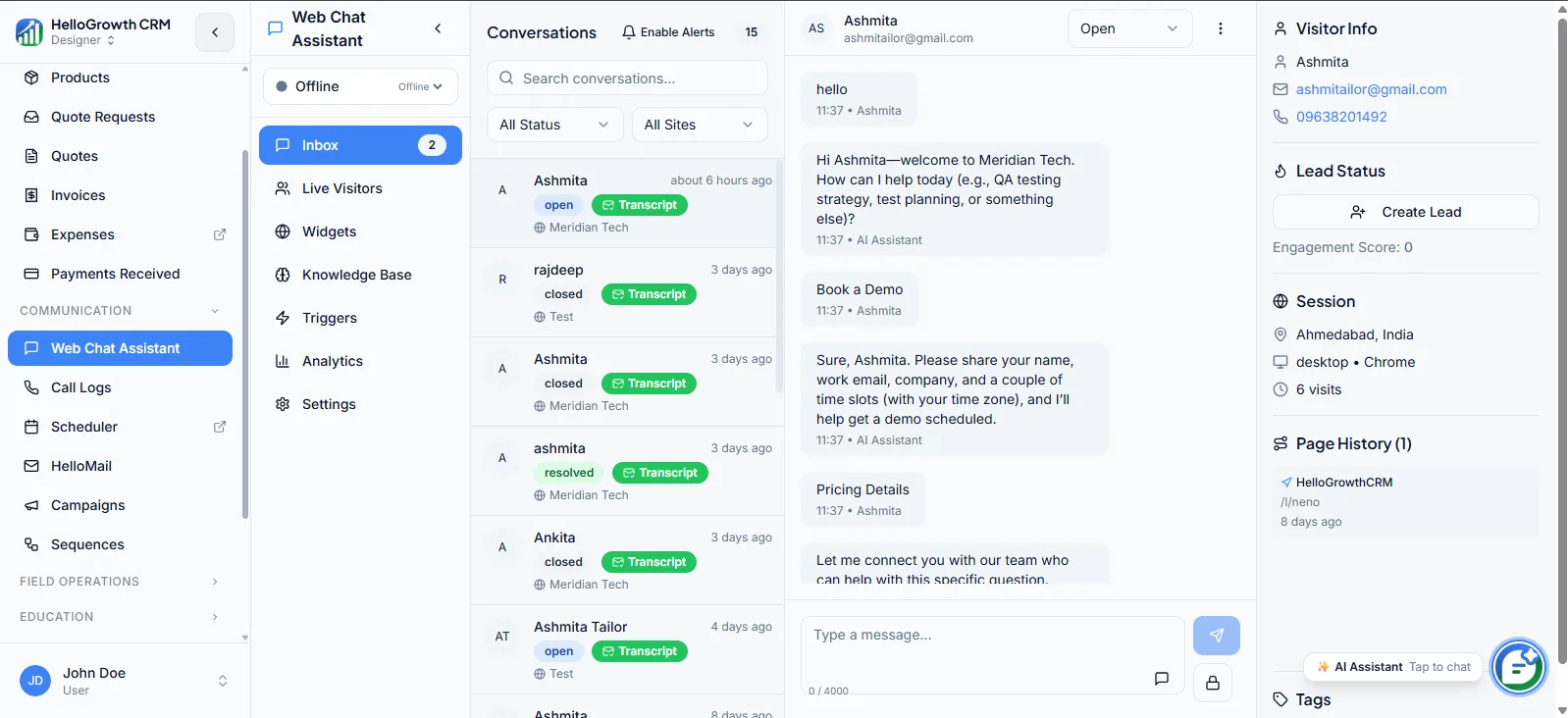
The Web Chat Assistant is a chat layer for your website that answers visitor questions, captures lead intent, and converts anonymous traffic into qualified CRM records. Instead of hoping a visitor fills in a static form, the assistant engages them in the moment — answering FAQs, collecting contact details and requirements, and creating a lead the team can follow up on.
Without it, your website works office hours only. Visitors with questions at 9pm bounce to a competitor who answered, forms convert a fraction of interested traffic, and the leads that do arrive carry no context about what the visitor actually wanted. First response happens the next morning at best — long after the buying moment has cooled.
How it works in HelloGrowthCRM
You install the chat widget on your site with a snippet, and it starts engaging visitors immediately. Conversations that produce contact details become lead records in HelloGrowthCRM automatically, carrying the chat transcript as context. The assistant handles FAQ coverage and after-hours qualification, so intent is captured whenever it appears. It is available from the Software Only plan onward.
It works best paired with visitor tracking for intent signals, lead routing so chat leads reach the right rep fast, and follow-up automation so a captured conversation turns into a scheduled next step rather than an unworked record.
See it in action
How this capability is packaged by plan
| Plan | Availability |
|---|---|
| Free Forever | |
| Software Only | |
| Growth Engine | |
| RevOps Partner |
Setting it up — step by step
- 1
Install the widget
Add the chat snippet to your website so the assistant appears on the pages visitors actually browse.
- 2
Load your FAQs
Feed the assistant your most common questions and answers so it resolves routine queries without a human.
- 3
Define qualification questions
Set the details the assistant should collect — name, contact, requirement — before creating a lead.
- 4
Route chat leads
Connect chat-created leads to your routing rules so a rep owns each conversation quickly.
- 5
Review transcripts weekly
Read chat transcripts each week to find unanswered questions and improve the assistant's coverage.
Who uses web chat assistant
Marketing manager
Turns existing website traffic into more captured leads without buying more traffic, and mines chat transcripts for the questions and objections that should shape landing-page copy.
SDR/telecaller
Works chat-captured leads with the transcript in hand, so the first call opens with what the visitor already asked about instead of a cold rediscovery of their requirement.
Founder/owner
Gets after-hours and weekend inquiries captured and qualified automatically, so the business stops losing the visitors who browse outside office hours — often the serious ones researching quietly.
Web Chat Assistant in practice — industry examples
Real estate
A property firm's evening website traffic peaks after working hours. The assistant answers project and pricing questions at 10pm, captures the visitor's budget and preferred location, and creates a lead — so the sales team opens the morning with qualified site-visit prospects, not an empty inbox.
Dental clinics
A dental clinic's assistant fields treatment and insurance questions, then collects the patient's contact details and concern. Front-desk staff follow up to book the appointment, and the transcript tells them whether the inquiry is a routine cleaning or an implant consultation worth prioritising.
Coaching institutes
A coaching institute gets parents browsing course pages during admission season. The assistant answers batch-timing and fee questions, captures the student's grade and target exam, and routes the lead to the right counsellor — who calls back while the family is still comparing institutes.
Common mistakes to avoid
Launching with an empty FAQ base, so the assistant deflects nothing and visitors abandon the chat unimpressed.
Collecting contact details without a requirement question, producing leads with no context for the follow-up call.
Leaving chat leads outside routing rules, so they age unowned while form leads get worked within minutes.
Never reviewing transcripts, missing both the unanswered questions and the objection patterns hiding in them.
What teams usually care about here
Supports inbound conversion without forcing visitors into static forms only
Useful for after-hours qualification, FAQ coverage, and faster first response
Works best when paired with visitor tracking, routing, and follow-up automation
How this fits the buying decision
Buyers usually do not evaluate web chat assistant in isolation. They want to know whether it improves execution, reporting, handoffs, and accountability inside the broader CRM workflow. That is why this capability matters most when it is connected to records, ownership, activity history, and manager review rather than living in a separate point tool.
The real decision is often less about whether a box is checked and more about how much depth the team needs. Lower tiers may be enough when the workflow is simple or the volume is small. Higher tiers become more valuable when teams need governance, faster response expectations, specialist execution, or a repeatable operating cadence around the process.
If this capability is important to your rollout, compare it in the context of the whole plan. That includes related workflows, support level, reporting expectations, and whether your team will manage the motion itself or rely on managed RevOps help to keep it consistent.
Frequently asked questions
Which plans include the Web Chat Assistant?
It is available from the Software Only plan onward — included on Software Only, Growth Engine, and RevOps Partner. The Free Forever plan does not include it, so teams wanting website chat capture should start at Software Only.
How hard is installation?
It is a snippet added to your website, so most teams are live the same day. The real setup work is loading FAQs and defining qualification questions — plan a couple of hours for that, then refine weekly from real transcripts.
Do chat conversations become CRM leads automatically?
Yes. When a conversation captures contact details, a lead record is created with the transcript attached, so the rep who follows up can read exactly what the visitor asked before making contact.
Can chat leads feed routing and follow-up automation?
Yes, and they should. Connect chat-created leads to your routing rules so ownership is assigned fast, and pair with follow-up tasks or sequences so every captured conversation gets a scheduled next step instead of waiting in a queue.
Does it handle after-hours inquiries?
Yes — that is one of its main jobs. The assistant qualifies visitors and captures their details around the clock, so inquiries that arrive at night or on weekends are waiting as context-rich leads when the team starts the day.
Related Pricing Capabilities
Invoices
CRM-native invoice creation that links billing directly to won deals so sales and operations share a single view of what has been sent.
Expenses
Expense logging inside the CRM so teams can track costs against the deals that drove them and keep deal-level margin visible — instead of discovering cost-of-sale only at month-end.
Payments Received
Payment status tracking that gives sales and operations a shared view of what has been collected against sent invoices.
Revenue tracking
A consolidated view of revenue across won deals, invoices, and payment status so leaders can see pipeline health and cash reality in one place.
HelloMail inbox
A CRM-connected email workspace for tracking conversations, sending templated outreach, and giving managers visibility into inbox activity — so customer email lives on the record, not in a private inbox.
Built-in Dialer
Calling capability inside the CRM so reps can dial, log activity, and review call context without extra tools.