What tickets does
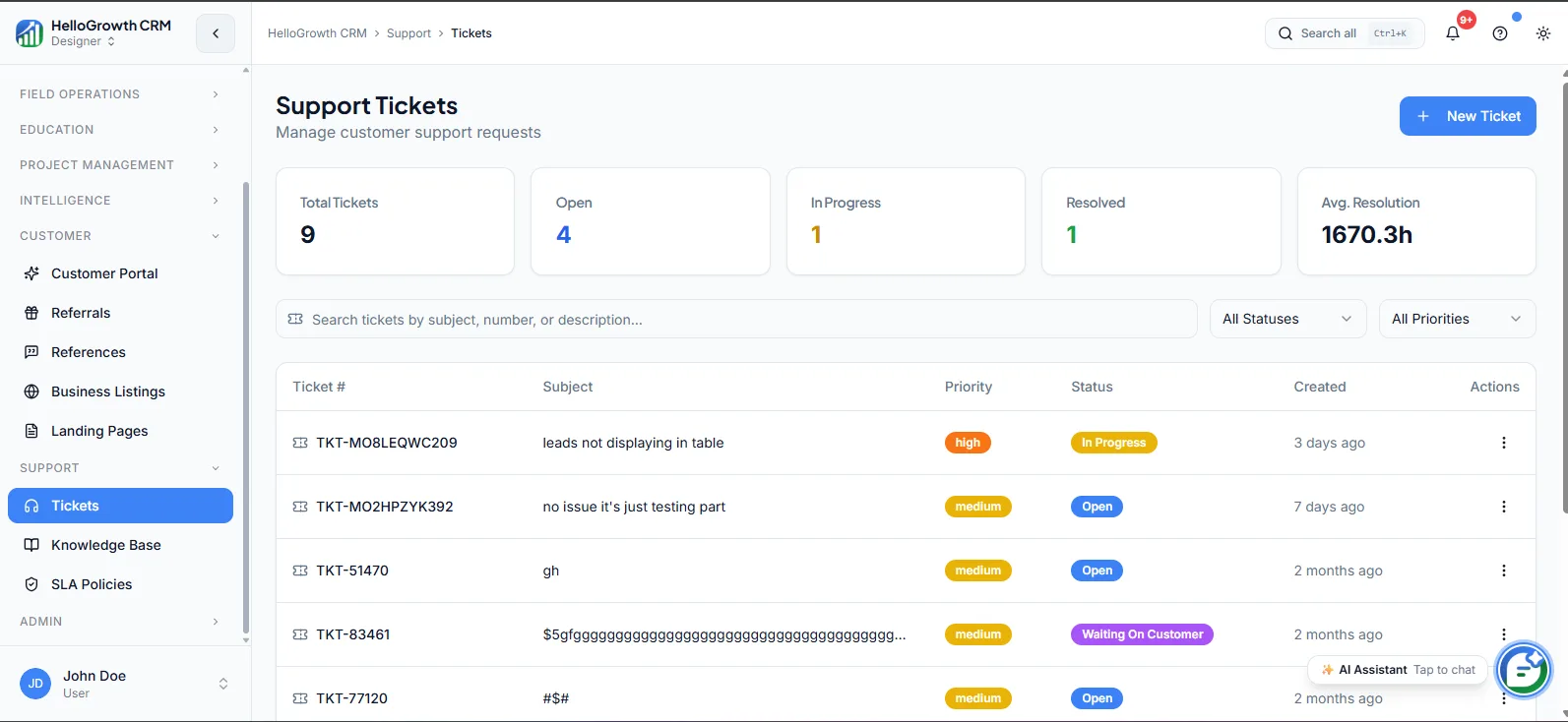
Tickets gives you a support queue inside the CRM, so every customer issue is logged, assigned, prioritized, and resolved on the same customer record that holds the sales history. An agent opening a ticket sees who the customer is, what they bought, what they were promised, and every prior conversation — without switching tools or asking the customer to repeat themselves.
When support lives in a disconnected helpdesk, context splits: sales cannot see open complaints while pitching a renewal, support cannot see what the rep promised during the deal, and customers explain their history to every new agent. Issues raised over email or WhatsApp without a ticket system simply get lost. Tickets on the customer record close both gaps at once.
How it works in HelloGrowthCRM
Tickets lives in the Support module. Issues become ticket records linked to the customer, each with a status, priority, owner, and full conversation thread. Tickets can arrive from email, the customer portal, or manual creation after a call or WhatsApp exchange, and the queue view shows every open issue by age, priority, and assignee.
It pairs with the knowledge base — agents surface articles to answer consistently or deflect repeat questions — and with SLA policies on the RevOps Partner plan, which add response and resolution targets with escalation on breach.
See it in action
How this capability is packaged by plan
| Plan | Availability |
|---|---|
| Free Forever | |
| Software Only | |
| Growth Engine | |
| RevOps Partner |
Setting it up — step by step
- 1
Define ticket categories
Create a short list of issue types — billing, product, delivery — that mirrors how problems actually arrive.
- 2
Set priorities and ownership
Decide what counts as urgent and which agent or team owns each category by default.
- 3
Connect intake channels
Route support email into the queue and enable ticket creation from the customer portal.
- 4
Write response norms
Agree target first-response and resolution times per priority so the queue has shared expectations.
- 5
Review the queue weekly
Check aging tickets, reassign stuck ones, and look for repeat categories worth a knowledge base article.
Who uses tickets
Support lead
Runs the queue daily — watching ticket age, reassigning around absences, spotting repeat issue categories — and reports resolution trends with data instead of the loudest recent complaint.
Sales rep
Checks for open tickets before renewal and upsell conversations, so they walk in knowing about the unresolved delivery complaint instead of being ambushed by it mid-pitch.
Founder/owner
Scans open tickets by priority to keep a pulse on service quality, and steps into escalations for key accounts with the full issue history already in front of them.
Tickets in practice — industry examples
Hotels
A hotel group logs guest complaints — billing disputes, booking errors, facility issues — as tickets tied to the guest record. When a corporate client's travel desk calls about a recurring invoicing problem, the manager sees all three prior incidents and their resolutions before picking up, and answers accordingly.
Distributors
A distributor handles retailer complaints about short shipments and damaged stock as tickets linked to each retailer account. The sales rep planning next month's order call sees two open damage claims first — and resolves them before asking for a bigger order, protecting the relationship.
Startups
A SaaS startup with two support-handling teammates replaces a shared inbox with tickets. Issues stop vanishing into read-but-forgotten email, each has an owner and status, and the founder can finally answer "what are our top recurring problems?" from category data when planning the product roadmap.
Common mistakes to avoid
Letting issues raised over WhatsApp or phone bypass ticket creation, so the queue shows a fraction of real support load.
Creating a taxonomy of twenty ticket categories that agents ignore — five categories used consistently beat twenty used randomly.
Leaving tickets unassigned in a shared pool, where everyone assumes someone else is handling the angry customer.
Closing tickets without a resolution note, destroying the history the next agent needs when the same issue recurs.
What teams usually care about here
Prevents support context from living in a separate tool disconnected from the deal timeline
Useful for teams combining sales, onboarding, and customer success in a shared system
Pairs with knowledge base and SLA policies for a complete support layer
How this fits the buying decision
Buyers usually do not evaluate tickets in isolation. They want to know whether it improves execution, reporting, handoffs, and accountability inside the broader CRM workflow. That is why this capability matters most when it is connected to records, ownership, activity history, and manager review rather than living in a separate point tool.
The real decision is often less about whether a box is checked and more about how much depth the team needs. Lower tiers may be enough when the workflow is simple or the volume is small. Higher tiers become more valuable when teams need governance, faster response expectations, specialist execution, or a repeatable operating cadence around the process.
If this capability is important to your rollout, compare it in the context of the whole plan. That includes related workflows, support level, reporting expectations, and whether your team will manage the motion itself or rely on managed RevOps help to keep it consistent.
Frequently asked questions
Which plans include tickets?
Tickets is available on the Growth Engine and RevOps Partner plans. It is not part of Free Forever or Software Only. Related Support-module features follow their own availability — the knowledge base ships with Growth Engine and above, while SLA policies are RevOps Partner only.
Why use CRM tickets instead of a separate helpdesk?
Context. Tickets on the customer record sit next to deals, invoices, and conversation history — so support sees what sales promised, and sales sees open complaints before a renewal call. A separate helpdesk splits that context across two systems and two logins.
How long does ticket setup take?
The essentials — categories, priorities, default ownership, and connecting intake channels like support email and the portal — typically take a day or less. The habit that matters more is logging every issue as a ticket, including ones that arrive by phone or WhatsApp.
Can customers raise tickets themselves?
Yes, through the customer portal — customers can submit issues and track resolution status without emailing anyone. Tickets can also arrive via support email or be created manually by an agent after a call or WhatsApp conversation, so every channel lands in one queue.
Do tickets work with SLA policies?
Yes, on the RevOps Partner plan, SLA policies add response and resolution time targets to tickets, with escalation rules and breach alerts. On Growth Engine, teams typically manage expectations with agreed response norms and a weekly review of ticket age.
Related Pricing Capabilities
Knowledge Base
A searchable knowledge base — internal and customer-facing — for capturing answers, SOPs, and product documentation, so the same question does not get re-answered from scratch every time.
SLA Policies
Service level agreement configuration that sets response and resolution time targets for support tickets across customer tiers.