What knowledge base does
The knowledge base is a searchable library for the answers your business gives repeatedly — customer-facing help articles that deflect tickets, and internal SOPs and product documentation that keep the team consistent. Instead of the same question being re-answered from scratch by whoever happens to pick it up, the answer is written once, kept current, and found in seconds.
Without one, knowledge lives in the heads of two senior people and a scatter of chat threads. Customers wait in a ticket queue for answers that could have been self-served, new hires interrupt colleagues for weeks, and different agents give different answers to identical questions. Every departure takes institutional knowledge with it. A maintained knowledge base converts that fragility into an asset.
How it works in HelloGrowthCRM
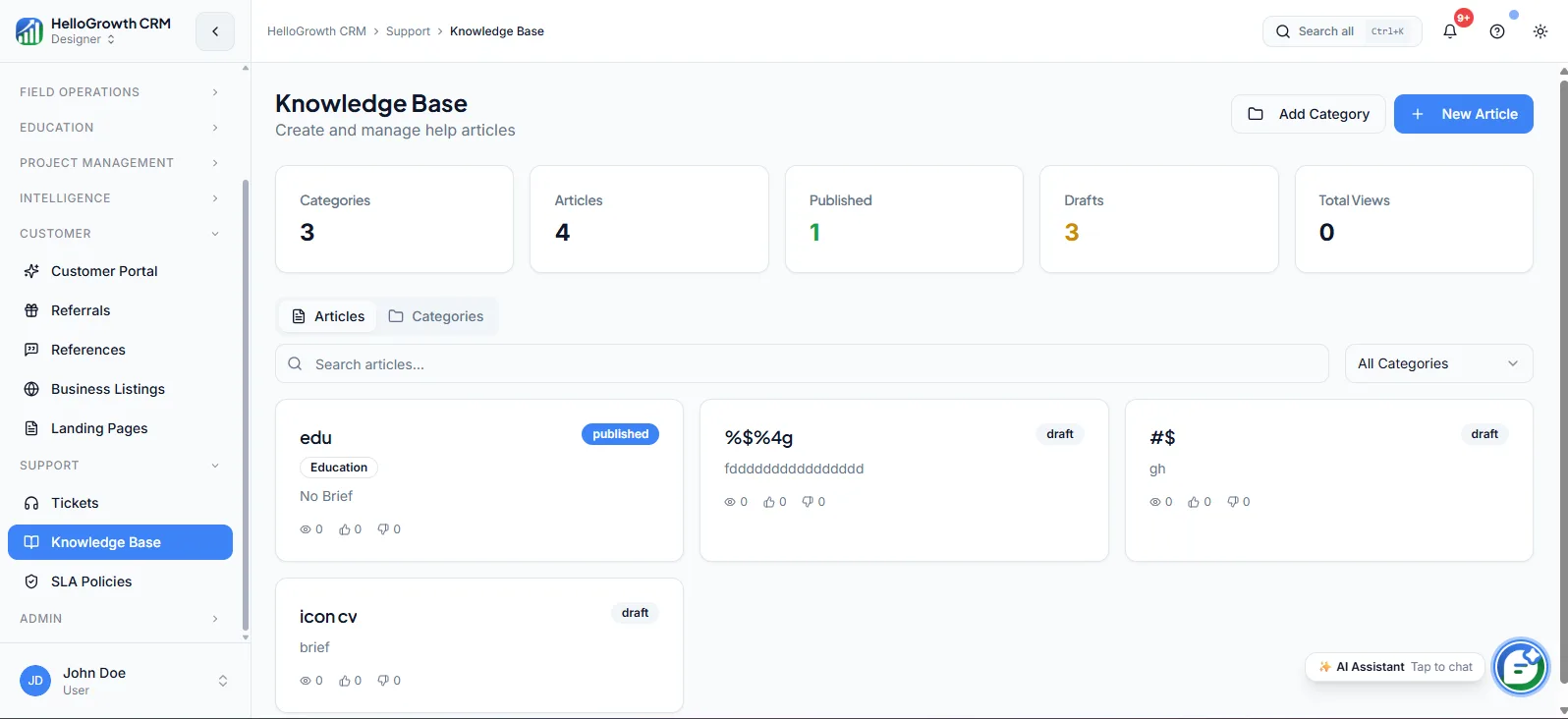
The knowledge base lives in the Support module with two audiences: a customer-facing help centre where customers search before raising a ticket, and an internal library of SOPs and product docs for the team. Articles are organized and searchable, and usage tracking shows which articles get used — and where gaps need new documentation.
It pairs tightly with tickets and chat: agents surface the right article inside a conversation to answer consistently, and recurring ticket categories become the priority list for what to write next. Deflection compounds — every good article prevents its question indefinitely.
See it in action
How this capability is packaged by plan
| Plan | Availability |
|---|---|
| Free Forever | |
| Software Only | |
| Growth Engine | |
| RevOps Partner |
Setting it up — step by step
- 1
Mine your repeat questions
Pull the ten most frequent questions from recent tickets, email, and WhatsApp threads as your first articles.
- 2
Write answers, not essays
Keep each article to one question, direct answer first, with steps and screenshots where useful.
- 3
Separate audiences
Mark articles as customer-facing help content or internal SOPs so each library stays clean.
- 4
Publish the help centre
Make customer-facing articles available so customers can self-serve before opening a ticket.
- 5
Assign maintenance ownership
Give someone explicit responsibility for reviewing usage data and updating stale articles monthly.
Who uses knowledge base
Support lead
Turns every recurring ticket category into an article, tracks which articles deflect volume, and measures success as the queue shifting from repetitive questions toward issues that genuinely need investigation.
SDR/telecaller
Searches internal articles mid-call to answer product and pricing questions accurately on the spot, instead of promising a callback and hunting for someone senior who knows.
Founder/owner
Writes down the answers currently living only in their head, so the business can onboard hires and serve customers consistently without every hard question routing back to the founder.
Knowledge Base in practice — industry examples
Healthcare
A clinic network publishes help articles covering appointment rescheduling, report collection, insurance documentation, and preparation instructions for common procedures. Front-desk phone volume drops as patients self-serve routine questions, and internal SOP articles ensure every receptionist across locations gives identical guidance on billing and documentation.
Immigration consulting
An immigration consultancy answers the same document-checklist and timeline questions dozens of times weekly. Publishing per-visa-category articles lets applicants self-serve checklists, while internal articles keep every counsellor's advice consistent with current process — critical in a field where an outdated answer can derail an application.
Small business
A small business owner is the only person who knows how to handle warranty claims, custom orders, and refund exceptions. Writing each process as an internal article means a new hire handles these correctly in week one, and the owner takes a holiday without the phone ringing.
Common mistakes to avoid
Writing twenty articles at launch and never updating them, so the knowledge base decays into confidently wrong answers.
Documenting what the team finds interesting instead of what tickets show customers actually ask about.
Mixing internal SOPs into the customer-facing help centre, exposing process details customers were never meant to see.
Building the library but never linking it from ticket replies, so customers never learn self-service exists.
What teams usually care about here
Reduces repetitive support volume by making answers self-serve for customers
Useful for onboarding reps and standardizing responses across the support team
Pairs with tickets and chat to create a deflection-first support workflow
Publish a customer-facing help centre so common questions are answered without a ticket
Keep internal SOPs and product docs in one place to ramp new reps faster
Surface the right article inside a ticket or chat so agents reply consistently
Track which articles get used to find gaps where new documentation is needed
How this fits the buying decision
Buyers usually do not evaluate knowledge base in isolation. They want to know whether it improves execution, reporting, handoffs, and accountability inside the broader CRM workflow. That is why this capability matters most when it is connected to records, ownership, activity history, and manager review rather than living in a separate point tool.
The real decision is often less about whether a box is checked and more about how much depth the team needs. Lower tiers may be enough when the workflow is simple or the volume is small. Higher tiers become more valuable when teams need governance, faster response expectations, specialist execution, or a repeatable operating cadence around the process.
If this capability is important to your rollout, compare it in the context of the whole plan. That includes related workflows, support level, reporting expectations, and whether your team will manage the motion itself or rely on managed RevOps help to keep it consistent.
Frequently asked questions
Which plans include the knowledge base?
The knowledge base is available on the Growth Engine and RevOps Partner plans. It is not included in Free Forever or Software Only. It is part of the Support module alongside tickets, which shares the same availability.
How do I decide what to write first?
Let your tickets decide. Pull the ten most frequent questions from recent tickets, emails, and WhatsApp threads and write those articles first — direct answer at the top, steps below. Ten well-chosen articles typically cover a large share of repetitive volume.
Is the knowledge base internal, customer-facing, or both?
Both. You can publish a customer-facing help centre where customers self-serve before raising a ticket, and keep a separate internal library of SOPs and product docs for the team. Audience separation is part of the setup, so internal process notes never leak.
How does the knowledge base work with tickets and chat?
Agents can surface the right article inside a ticket or chat to answer consistently and faster, and recurring ticket categories become the writing priority list. Over time the queue shifts: routine questions get deflected to articles, and agents spend time on issues that need humans.
How do I know if articles are actually being used?
Usage tracking shows which articles get used, which makes two things visible: the articles worth keeping polished, and the gaps where questions keep arriving with no matching documentation. Review that data monthly and let it drive what gets written or retired next.