What sla policies does
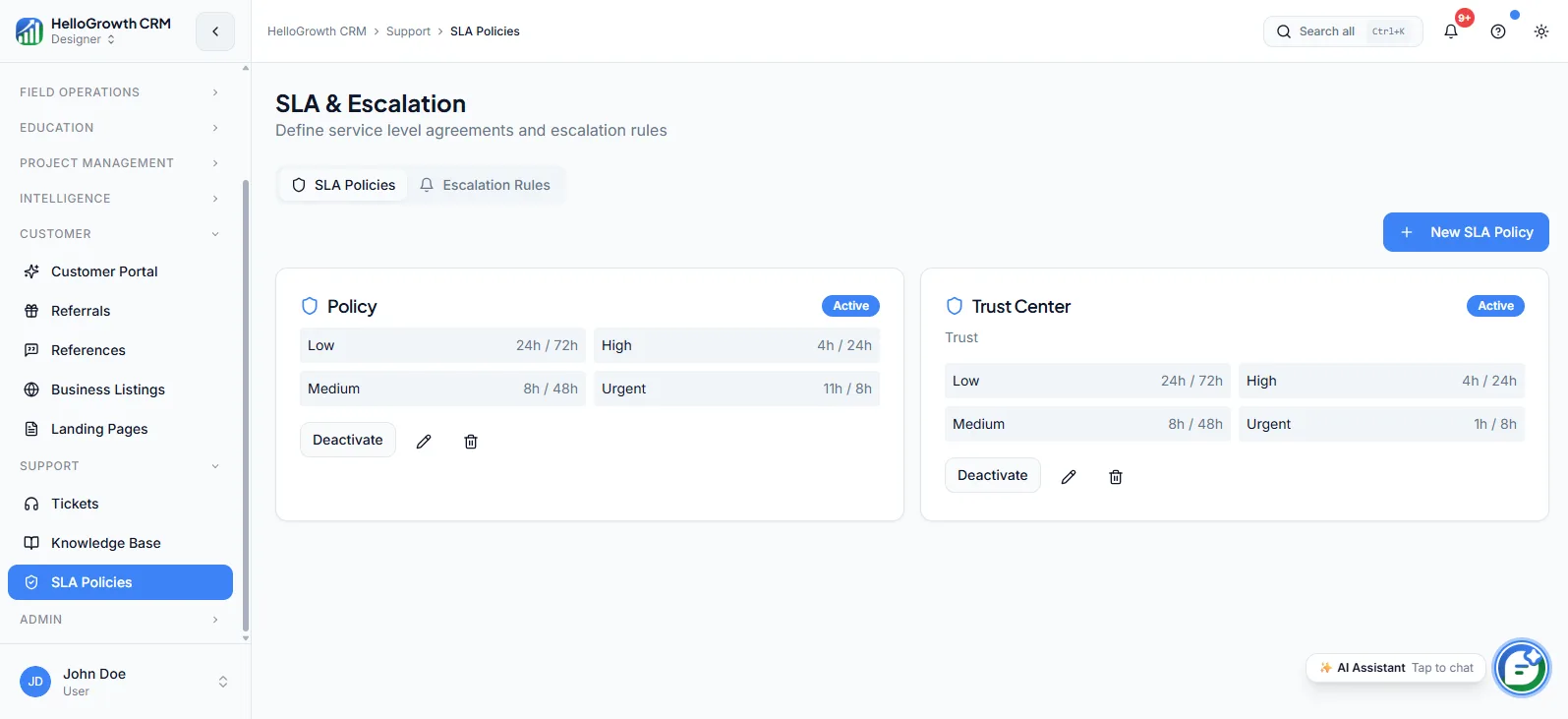
SLA policies let you define response and resolution time targets for support tickets — how fast a priority-one issue gets a first reply, how quickly a billing problem must be resolved — and have the system enforce them with timers, escalation rules, and breach alerts. Targets can differ by customer tier, so contractual commitments to key accounts are tracked automatically rather than remembered.
Without SLAs, response time is whatever the queue happens to allow that day. An urgent issue from your biggest customer can sit behind routine requests because nothing distinguishes them, and contractual support commitments are honoured on trust and memory. Breaches surface only when the customer complains — the most expensive way to find out. SLA policies replace hoping with measured, escalated targets.
How it works in HelloGrowthCRM
SLA policies live in the Support module, layered on top of tickets. Each policy defines response and resolution targets by priority and customer tier; when a ticket is created, the matching policy attaches its clocks. As deadlines approach, escalation rules alert the owner and then the manager, and breaches are flagged and reported rather than passing silently.
It depends on tickets as its foundation and shows up in support reporting: attainment by priority, by agent, and by customer tier. For accounts with contractual commitments, the SLA policy is the operational enforcement of what the contract promised.
See it in action
How this capability is packaged by plan
| Plan | Availability |
|---|---|
| Free Forever | |
| Software Only | |
| Growth Engine | |
| RevOps Partner |
Setting it up — step by step
- 1
Define customer tiers
Decide which accounts get premium targets — contractual commitments first, then your strategically important customers.
- 2
Set achievable targets
Base response and resolution targets on current actual performance, then tighten them gradually.
- 3
Configure escalation rules
Choose who gets alerted as deadlines approach and who is notified when a breach occurs.
- 4
Map policies to tickets
Ensure priorities and customer tiers are set correctly at intake so the right policy attaches.
- 5
Review attainment monthly
Check breach patterns by category and agent, and fix staffing or targets where misses cluster.
Who uses sla policies
Support lead
Configures targets and escalation chains, works the daily queue by SLA clock rather than arrival order, and uses monthly attainment reports to justify staffing or adjust targets that are consistently missed.
RevOps lead
Translates contractual support commitments into enforceable policies per customer tier, and reports SLA attainment to leadership as a service-quality metric alongside pipeline and revenue numbers.
Founder/owner
Receives escalation alerts when key-account tickets approach breach, stepping in before the customer feels ignored — and walks into renewal conversations with attainment numbers instead of anecdotes.
SLA Policies in practice — industry examples
Pharma distribution
A pharma distributor commits hospital clients to fast resolution on supply discrepancies, where a delayed answer can affect patient care. SLA policies put tight clocks on hospital-tier tickets, escalate to the operations head as deadlines near, and give the account manager attainment numbers at contract review.
Exporters
An exporter's overseas buyers raise shipment and documentation issues across time zones, where a slow reply means a missed vessel cutoff. SLA policies guarantee first response within hours on documentation tickets, and escalation alerts wake the right owner before a container misses its sailing.
Construction
A construction supplier promises priority handling to active-project accounts, where a delayed materials-issue resolution can idle an entire site crew. Project-tier tickets carry tighter clocks, breaches escalate to the sales head, and quarterly attainment reports back the premium the supplier charges for priority service.
Common mistakes to avoid
Setting aspirational targets far below current actual performance, generating constant breach alerts the team learns to ignore.
Applying one uniform SLA to every customer, leaving no operational difference between contractual commitments and routine accounts.
Configuring escalations that alert everyone about everything, so genuine imminent-breach warnings drown in noise.
Tracking response time only, letting tickets receive a fast first reply and then sit unresolved for weeks.
What teams usually care about here
Creates accountability in support workflows with escalation rules and breach alerts
Useful for teams with contractual support commitments or tiered customer plans
RevOps Partner tier unlocks full SLA policy management for enterprise-ready support
How this fits the buying decision
Buyers usually do not evaluate sla policies in isolation. They want to know whether it improves execution, reporting, handoffs, and accountability inside the broader CRM workflow. That is why this capability matters most when it is connected to records, ownership, activity history, and manager review rather than living in a separate point tool.
The real decision is often less about whether a box is checked and more about how much depth the team needs. Lower tiers may be enough when the workflow is simple or the volume is small. Higher tiers become more valuable when teams need governance, faster response expectations, specialist execution, or a repeatable operating cadence around the process.
If this capability is important to your rollout, compare it in the context of the whole plan. That includes related workflows, support level, reporting expectations, and whether your team will manage the motion itself or rely on managed RevOps help to keep it consistent.
Frequently asked questions
Which plans include SLA policies?
SLA policies is available on the RevOps Partner plan only — it is not included in Free Forever, Software Only, or Growth Engine. Growth Engine teams typically manage expectations with agreed response norms on tickets until they need enforced targets and escalations.
What do I need in place before setting up SLA policies?
A working ticket system with consistent priorities and customer tiers set at intake, since the matching policy attaches based on those fields. Then define tiers, set targets based on current actual performance, and configure escalation rules — tightening targets gradually from there.
What happens when an SLA is about to be breached?
Escalation rules fire as deadlines approach — alerting the ticket owner first, then the manager — so intervention happens before the breach, not after. Actual breaches are flagged and appear in attainment reporting rather than passing silently.
Can different customers have different SLA targets?
Yes, that is central to the feature. Targets vary by customer tier and ticket priority, so a contractual key account gets tighter response and resolution clocks than a routine account — and the system enforces the difference automatically at ticket intake.
How do SLA policies help with renewals and contracts?
Attainment reporting turns service quality into evidence: you can show a key account their actual response and resolution performance over the contract period. That replaces anecdotes in renewal conversations and substantiates premium support commitments you charge for.
Related Pricing Capabilities
Tickets
A support ticket system inside the CRM that keeps issue resolution tied to the customer record and sales history.
Knowledge Base
A searchable knowledge base — internal and customer-facing — for capturing answers, SOPs, and product documentation, so the same question does not get re-answered from scratch every time.