

Skip to content
Replace Spreadsheets

Replace Your Sales Spreadsheets: When Manual Tracking Starts Costing You Deals

Spreadsheets break down at 10 active prospects. Here is exactly what goes wrong, how to migrate in a few hours, and how most teams recover the switch cost within 90 days.

Free Forever • No Credit Card Required

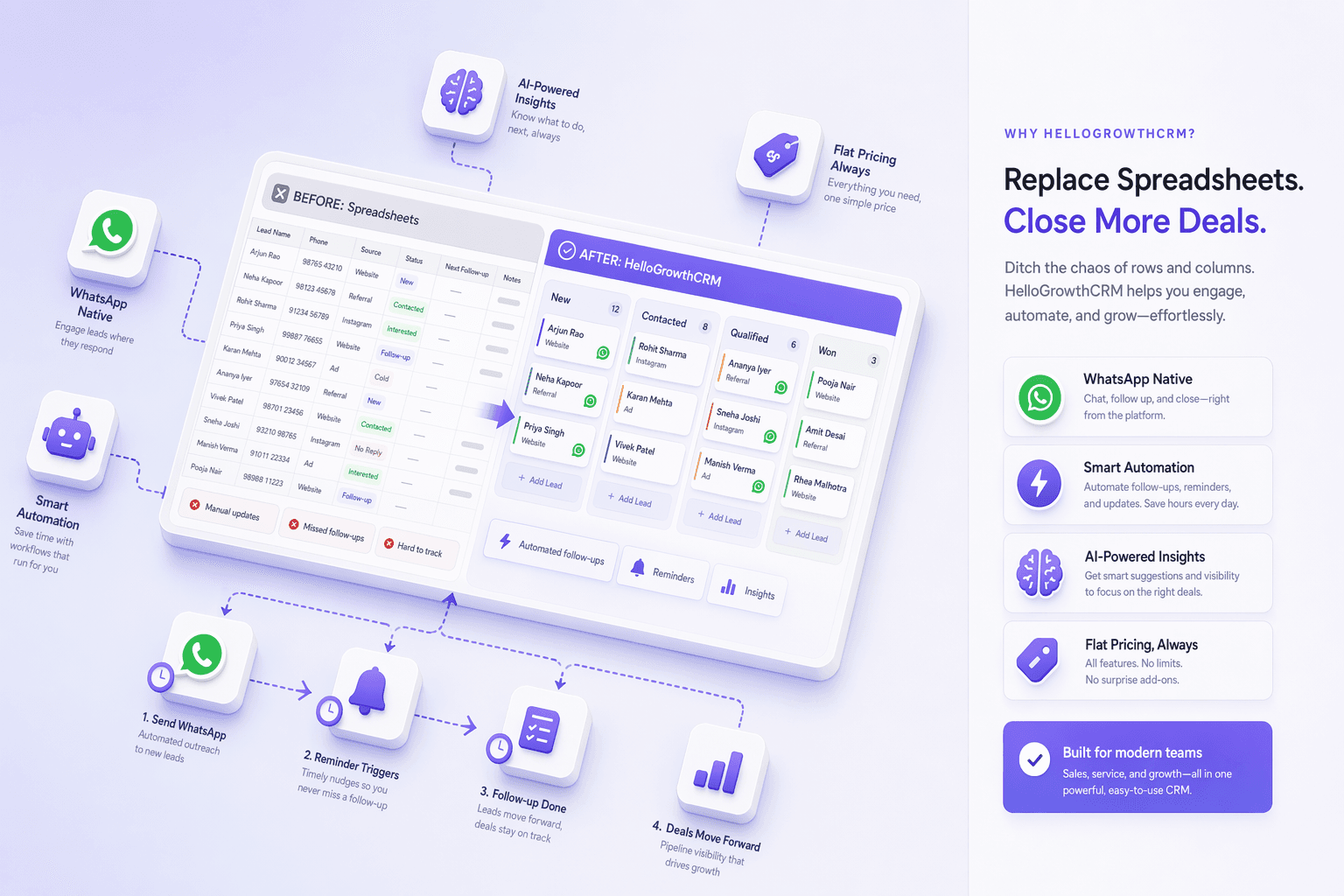
HelloGrowthCRM pipeline view replacing a sales spreadsheet — contacts, stages, and deal value visible

Quick answer

Is HelloGrowthCRM right for Replace Spreadsheets?

Yes. HelloGrowthCRM gives Replace Spreadsheets a single system to capture every lead, automate follow-up across phone, WhatsApp, and email, prioritise leads with AI scoring, and forecast revenue — with calling and messaging built in instead of sold as add-ons.
  • Import contacts from Excel, Google Sheets, or CSV — cleaned and deduplicated before it lands in the pipeline
  • Pre-built pipeline templates for the most common small business sales processes — ready in minutes, not days
  • Shared pipeline visibility so the whole team sees the same data without sending files around

See pricingBook a demo

01

The five ways spreadsheets silently cost you deals

Spreadsheets do not fail dramatically — they fail gradually. A deal falls through the cracks when the follow-up row gets buried. A forecast is wrong because someone forgot to update their column. A new rep cannot ramp up because the knowledge is in the senior rep's personal file. A hot lead goes cold because the shared spreadsheet shows it as active but nobody has touched it in three weeks. None of these failures show up in a report. They just show up in your monthly revenue.

HelloGrowthCRM replaces the spreadsheet with a live system: every contact has a history, every deal has a next action, and every forecast reflects what is actually in the pipeline today — not what someone remembered to update last Thursday.

02

The migration takes less time than you think

Most small businesses spend 2-3 hours on the actual migration. Export your spreadsheet as a CSV. The import wizard maps your columns to the right fields and flags any duplicates. Your pipeline stages take 15 minutes to configure. Your team is working from the CRM by end of day. Compared to the ongoing cost of spreadsheet-related deal losses, this is a small investment with fast payback.

03

The 90-day ROI case for switching

In the first 90 days after switching from a spreadsheet, most small business teams see three measurable improvements: fewer deals falling through due to missed follow-up, faster response to inbound leads because routing is automatic, and a pipeline value number you can actually use for forecasting. The typical team of 3-5 reps recovers 1-2 lost deals per month — at their average deal value, the CRM pays for itself several times over within the first quarter.

04

What the switch looks like for three real business types

A renovation contractortracking quotes in a workbook has one tab per month and no way to see which of last quarter's quotes are still winnable. After moving to a pipeline, every open quote sits in a stage — Quoted, Site Visit Booked, Negotiating — with an automatic reminder if a quote goes seven days without contact. The owner stops re-reading old tabs on Sunday nights and starts working a short list of quotes that actually need attention.

A marketing agencyrunning new business from a shared Google Sheet has three people editing the same rows, and nobody knows which version of the proposal went out. In the CRM, each prospect has one record with every email, call note, and proposal attached. When the founder hands a lead to an account manager, the full history goes with it — no forwarded email chains, no "what did we quote them?" messages.

A real estate teamloses track of buyers between site visits because updates live on paper and memory. With the mobile app on iOS and Android, agents log a visit outcome in the car park in seconds, and the Kanban pipeline with AI deal-risk alerts flags buyers who have gone quiet before they slip away entirely. If your team runs on WhatsApp, conversations flow into the same record through the native WhatsApp integration built on Meta's Cloud API.

05

A step-by-step migration plan you can run this week

Step 1 — Clean the export (30-60 minutes). Export your spreadsheet to CSV. Delete dead rows, standardise phone and email columns, and mark which rows are active deals versus past customers. Imperfect data is fine — the import wizard flags duplicates — but ten minutes of cleanup saves an hour later.

Step 2 — Import and map (15-30 minutes).Upload the CSV, map each column to a CRM field, and let the wizard deduplicate. Custom columns like "referral source" or "quote value" become custom fields, so nothing from your spreadsheet gets lost in translation.

Step 3 — Build your pipeline stages (15 minutes). Start from a template and rename stages to match how you actually sell. Fewer stages beat more: five or six clear stages your team agrees on outperform twelve nobody uses.

Step 4 — Switch the team over (week one). Pick a hard cutover date, archive the old spreadsheet as read-only, and run stand-ups from the pipeline view. When the Monday meeting happens inside the CRM, adoption stops being a policy and becomes a habit.

Step 5 — Layer in automation (weeks two to four). Once the team is comfortable, add follow-up automation— email sequences for new enquiries, reminders on stalled deals, and AI lead scoring (included on all paid plans) so the hottest prospects rise to the top of each rep's day.

06

How to judge a spreadsheet replacement before you commit

Not every CRM is a good exit from spreadsheets — some are so heavy that teams retreat to Excel within a month. Check four things before you commit. First, import quality: you should be able to bring your data in yourself, without a consultant, and see it correctly mapped the same day. Second, speed to first value: HelloGrowthCRM's core setup takes 15-30 minutes, so you can judge fit before investing real time. Third, whether the tools reps touch daily — mobile app, dialer with call recording and AI call summaries, task lists — are genuinely fast, because reps abandon anything slower than the spreadsheet was. Fourth, honest pricing: HelloGrowthCRM has a free plan for one user and up to 200 leads, and paid plans at $12/user/month ($10 on annual billing, Rs.899/user/month in India), so a small team can switch without a procurement cycle. For a deeper walkthrough of moving off Excel specifically, see the switch from Excel guide, and explore how the deals pipeline replaces your tracking tabs with a live board.

What you get

Why teams choose HelloGrowthCRM

AI-powered CRM with the features you need to close more deals.

  • Import contacts from Excel, Google Sheets, or CSV — cleaned and deduplicated before it lands in the pipeline
  • Pre-built pipeline templates for the most common small business sales processes — ready in minutes, not days
  • Shared pipeline visibility so the whole team sees the same data without sending files around
  • Automatic activity logging: every email, call, and meeting recorded against the right contact
  • Mobile app so your field reps can update deals from their phone between visits
  • Reminders and follow-up tasks that come to you — rather than you having to remember to check
  • Revenue forecasting from live pipeline data — not manually updated cells that go stale by Tuesday
  • 30-day CRM adoption guarantee: we help you set it up so your team actually uses it

Frequently Asked Questions

Common questions about using HelloGrowthCRM in your industry.

More CRM guides to explore

Browse related HelloGrowthCRM guides and see how different teams run their pipelines.

Ready to grow?

Join small businesses that close more deals with HelloGrowthCRM.

Free Forever • No Credit Card Required

Take the next step

Free Forever • No Credit Card Required

Prefer email? Write to sales@hellogrowthcrm.com