See Every Deal in a Visual Pipeline — Nothing Falls Through
HelloGrowthCRM deals pipeline gives you a complete view of every opportunity — by stage, value, probability, and close date. Drag deals between stages, get AI forecasts, and never wonder where your revenue is coming from.
Why teams evaluate deals pipeline
Deals Pipeline usually becomes important when a repeated part of the revenue workflow is creating too much manual work, too little visibility, or too much tool-switching. Teams are rarely shopping for a feature in isolation. They are usually trying to make one meaningful workflow cleaner, faster, and easier to inspect.
That is why buyers usually look beyond the headline capability and inspect the surrounding details: Visual kanban pipeline — drag deals between stages with one click, Custom pipeline stages — configure stages to match your exact sales process, Multiple pipelines — separate pipelines for different products, teams, or regions, Deal value, probability, and expected close date per deal. Those details determine whether the feature actually improves day-to-day execution or simply adds another surface area to manage.
Where deals pipeline fits in the workflow
Most teams adopt this capability as part of practical motions such as b2b sales teams, real estate developers, manufacturing b2b. The value tends to show up fastest when the workflow is tied to a clear owner, a clear next action, and a visible outcome that managers can review later.
It also matters how this page connects to the rest of the stack. The strongest implementations keep data, communication, and handoffs in sync instead of forcing the team to rebuild the process across disconnected tools.
What a strong rollout looks like for deals pipeline
The best rollout usually starts small: one high-value workflow, one clear ownership model, and one review rhythm for adoption. Once the team is consistently using the feature, managers can expand into deeper automation, reporting, or cross-functional handoffs without rebuilding the foundation.
In practice, that means evaluating not only what the feature can do, but also whether the team can maintain the process around it. Ease of use, reporting trust, and manager visibility matter just as much as the feature checklist itself.
- Use it first for b2b sales teams if that is the workflow creating the most friction today.
- Use it first for real estate developers if that is the workflow creating the most friction today.
- Use it first for manufacturing b2b if that is the workflow creating the most friction today.
- Use it first for professional services if that is the workflow creating the most friction today.
How It Works
Get started in three simple steps
Key Features
Use Cases
B2B sales teams
Replace the Excel deal tracker with a visual pipeline every rep and manager sees in real time.
What teams care about
- Fast adoption with less manual cleanup for managers and reps.
- Clear visibility into workflow execution, outcomes, and accountability.
- Reliable handoffs into the CRM record so downstream teams keep full context.
Buyer playbook
Compare, launch, and govern the workflow with an interactive overview instead of four long generic essays.
How teams evaluate deals pipeline
The best pages help buyers understand fit quickly instead of forcing them through long walls of copy.
Check whether the product covers the capabilities you actually care about, such as Visual kanban pipeline — drag deals between stages with one click, Custom pipeline stages — configure stages to match your exact sales process, Multiple pipelines — separate pipelines for different products, teams, or regions, Deal value, probability, and expected close date per deal.
Test if it supports real execution scenarios like B2B sales teams, Real estate developers, Manufacturing B2B.
Confirm the workflow stays connected to the rest of your sales stack so reporting and handoffs remain reliable.
Frequently Asked Questions
Explore More
Related Products
Free Tools & Calculators
SOC 2 Type II · NASSCOM Member · GCCI Member · Rs 899/user/month
Watch: Set Up a Sales Pipeline in 10 Minutes
See how to build your pipeline in HelloGrowthCRM from scratch — creating stages that match your sales process, adding deals, and setting the follow-up rules that keep every deal moving.

Frequently Asked Questions
What the deals pipeline looks like inside the app
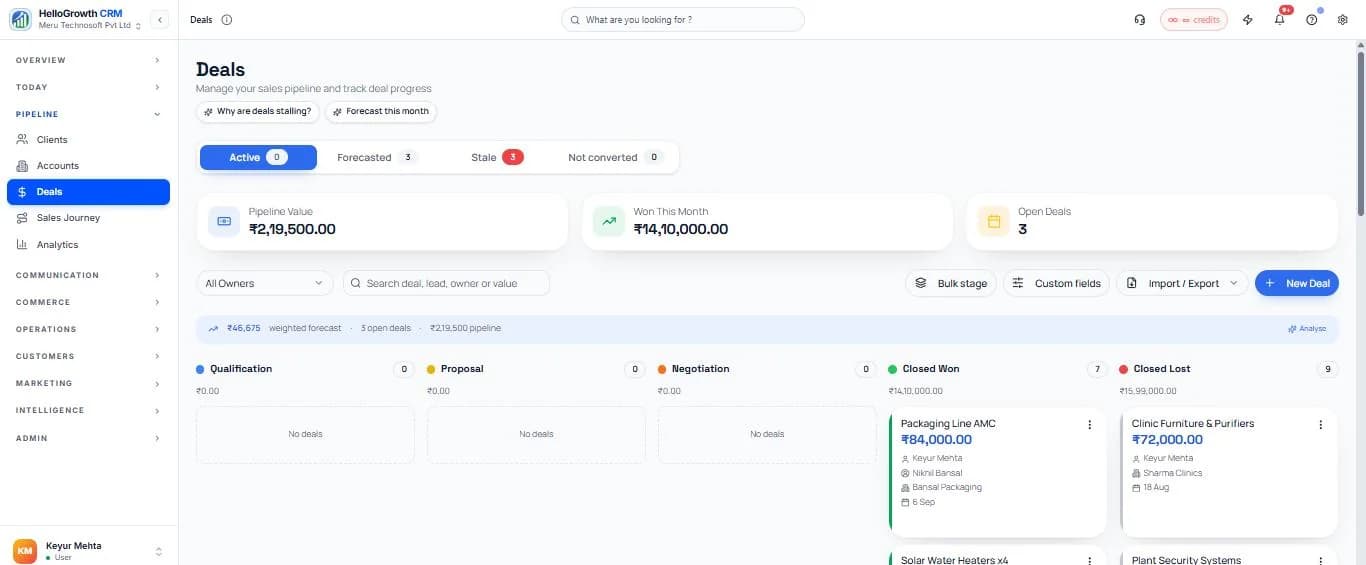
Designing stages that reflect how you actually sell
A pipeline fails quietly when its stages describe wishful thinking instead of observable progress. “Hot lead” is an opinion; “quotation sent” is a fact. The practical test for every stage: could two different reps look at the same deal and agree instantly which column it belongs in? Build stages around the customer's actions — enquiry received, requirements discussed, quote sent, negotiation, verbal yes, closed — and the board becomes a truthful map of the business rather than a mood ring. The same stages work whether a rep prefers a Kanban board or a spreadsheet-style layout; the Kanban vs list view comparison covers when each is the easier way to work.
A worked example: a Coimbatore machinery dealer ran one vague pipeline for years — Enquiry, Follow Up, Hot, Closed — and the Follow Up column held sixty deals nobody could explain. Rebuilding around verifiable events (Specs Received, Quote Sent, Trial Scheduled, Commercial Negotiation) shrank the mystery column to zero, because every deal's position now answered the only question that matters: what has to happen next? The owner's Monday review went from interrogating reps to reading the board.
Multiple pipelines earn their place when the sales processes genuinely differ — domestic dealer sales and export enquiries move at different speeds through different steps, and forcing them into one board distorts both. Keep the number of pipelines as small as honesty allows, and let stage-specific automation do the chasing: entering “Quote Sent” schedules the follow-up call, and thirty quiet days in any stage raises a flag.
What the pipeline feeds downstream
A well-kept board powers everything built on top of it. Stage history drives deal velocity metrics that show where deals stall; sales forecasting turns stage probabilities into a monthly revenue expectation the owner can plan against; and loss reasons collected at close feed win-loss analysis. Upstream, qualified enquiries arrive from lead management, and every stage change can create the right next step in task management — which is how a board of cards becomes a team that always knows its next move.
Deals Pipeline by industry
The same capability, written for the fields, follow-ups and reports each vertical actually runs on.