HelloGrowthCRM software
Built for real small-business sales teams
HelloGrowthCRM helps reps qualify faster, follow up on time, and close more deals—with practical automation in one place.
- AI lead scoring and pipeline visibility
- Built-in dialer, WhatsApp, and email automation
- Sales forecasting and RevOps-ready reporting
A customer purchase order (PO) is a formal document your customer sends to confirm and authorize an order with your business. It serves as a contract specifying the products or services requested, quantities, prices, delivery dates, and payment terms. Proper handling of purchase orders ensures clear communication, reduces errors, and provides legal proof of the transaction.
Why this comes up / what goes wrong
Small business owners often face challenges with customer purchase orders because they may lack a clear process or system to track and manage them. If your sales run on text messages, emails, or spreadsheets, you risk losing PO numbers, missing order details, or failing to confirm terms with customers. This can cause delays, disputes over payments, and lost sales opportunities. Without organized tracking, follow-up can be slow and inefficient, and after-sale service requests may get disconnected from the original order.
Step-by-step
- Receive the Purchase Order: Request the customer to send the PO in writing, usually via email or a customer portal. Check that it includes essential details: PO number, buyer’s name, item descriptions, quantities, prices, delivery dates, and payment terms.
- Verify the Details: Compare the PO against your sales agreement or quote. Confirm product availability, pricing, and delivery schedules. Contact the customer immediately if any information is unclear or missing.
- Record the Purchase Order: Enter the PO details into your order management system, CRM, or spreadsheet. Link it to the correct customer record and sales deal to keep information organized.
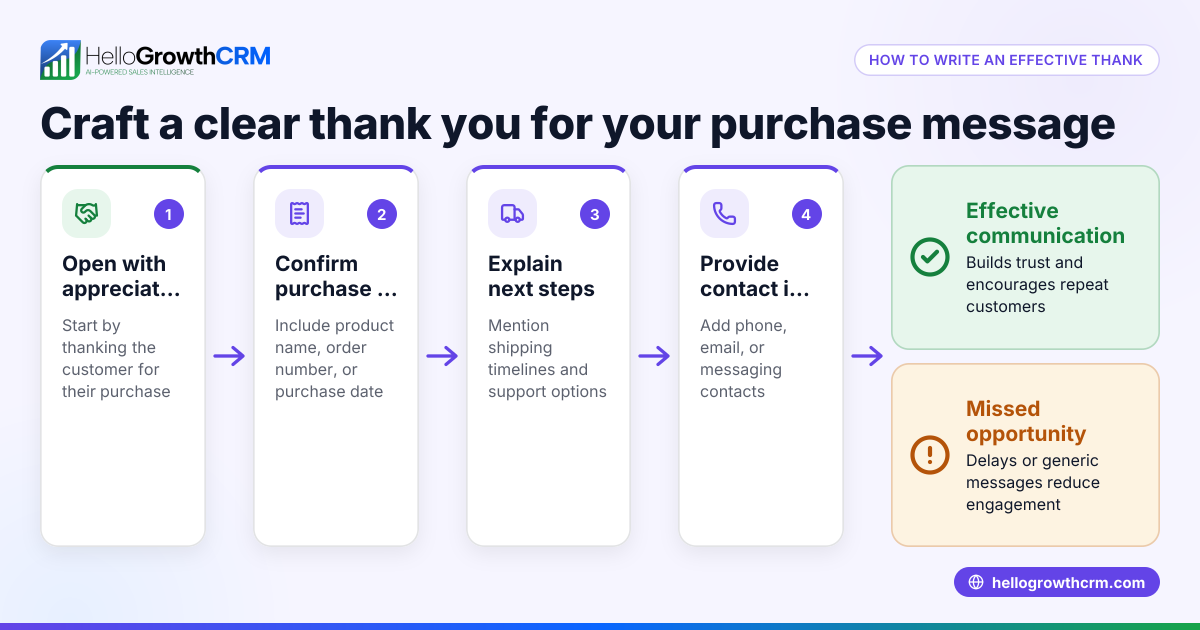
- Acknowledge the PO: Send a confirmation email or message to the customer acknowledging receipt and confirming the terms. This builds trust and prevents misunderstandings.
- Fulfill the Order: Deliver the products or services according to the PO terms and agreed schedule.
- Invoice the Customer: After delivery, issue an invoice referencing the PO number. This helps the customer match the invoice with their records and facilitates payment.
- Track Payment and Follow Up: Monitor payment status and follow up promptly if payment is overdue. Keep all communication and documents linked to the original PO.
- Manage After-Sale Service Requests: If the customer submits service requests or support tickets, keep them linked to the same customer record as the PO and sales deal for easy tracking.
Example (fictional figures)
Phoenix Home Realty, a residential real estate team in Phoenix, Arizona, receives a purchase order for marketing services.
- PO received on 04/10/2026 with PO number 5678
- Services requested: Online advertising campaign
- Quantity: 1 campaign
- Agreed price: $5,000
- Delivery date: 05/01/2026
Steps:
- Verify PO details match the quote agreed on 03/20/2026.
- Record PO 5678 in the sales tracking spreadsheet under client "Phoenix Home Realty."
- Confirm receipt by email on 04/11/2026.
- Deliver campaign by 05/01/2026.
- Invoice $5,000 referencing PO 5678 on 05/02/2026.
- Follow up on payment due 05/15/2026.
Calculations:
$5,000 × 1 campaign = $5,000 total price
This clear process ensures smooth transactions and clarity for both parties.
Common mistakes
- Ignoring PO details or missing information: Prevent this by verifying all PO fields carefully before processing.
- Not linking POs to customer records: Always connect POs to the correct customer and sales deal to streamline communication and reporting. Using a CRM with a customer portal helps here (/product/customer-health-score).
- Delaying acknowledgment of the PO: Confirm receipt quickly to reassure the customer and avoid confusion.
- Mixing up PO numbers or orders: Maintain organized records and use software tools to prevent errors.
- Failing to follow up on payment referencing PO: Track invoices with PO numbers to speed payment processing.
- Neglecting after-sale service requests: Keep service tickets linked to the original PO and customer record for efficient support (/product/whatsapp-sms-crm).
Doing this in HelloGrowthCRM
HelloGrowthCRM includes a branded self-service customer portal where customers can submit service requests and referrals. After the sale, support tickets and knowledge base articles stay linked to the same customer record as the sales deal, helping you manage ongoing customer needs efficiently. Learn more about these features at HelloGrowthCRM for the United States.
Frequently asked questions
What is the difference between a purchase order and an invoice? A purchase order is issued by the buyer to authorize a purchase, detailing what they want to buy. An invoice is sent by the seller after delivery to request payment, referencing the PO for clarity.
Do I always need a purchase order to sell to a customer? Not always. Some customers require POs for internal control, especially larger companies. For small businesses, a PO helps formalize the order and avoid disputes.
How can I track purchase orders efficiently? Using a CRM or order management system to record and link POs to customer records and deals keeps everything organized. HelloGrowthCRM’s customer portal and ticketing features support this process (/product/customer-health-score).
What should I do if the PO has errors or missing information? Contact the customer immediately to clarify and request a corrected PO before proceeding to avoid confusion or contract issues.
Can I automate purchase order acknowledgments? Yes, many CRMs allow setting up automated email sequences to confirm PO receipt, saving time and improving customer communication.
How do after-sale service requests relate to purchase orders? After-sale service requests should be linked to the same customer record as the PO and sales deal to maintain a complete history. HelloGrowthCRM supports this linkage for better customer service (/product/whatsapp-sms-crm).
Key takeaways
- A customer purchase order authorizes a purchase and details the order terms.
- Verify and record PO details carefully to avoid errors.
- Acknowledge receipt promptly to build trust.
- Link POs to customer records for organized tracking and follow-up.
- Keep after-sale service requests connected to the original PO and deal.
- Use tools like HelloGrowthCRM to manage orders and customer service efficiently.
Start managing your customer purchase orders and service requests more effectively with HelloGrowthCRM. Start on the Free Forever plan (200 leads, no credit card).
Ready to put this into practice?
Set up your pipeline, WhatsApp follow-ups, and AI lead scoring in minutes — free, no credit card.
Try HelloGrowthCRM freeGet CRM tips in your inbox
Join thousands of sales professionals who get weekly insights on CRM strategy, AI automation, and pipeline optimization.

The HelloGrowthCRM team publishes guides on CRM strategy, AI sales tools, and revenue operations for small business sales teams.