HelloGrowthCRM software
Built for real small-business sales teams
HelloGrowthCRM helps reps qualify faster, follow up on time, and close more deals—with practical automation in one place.
- AI lead scoring and pipeline visibility
- Built-in dialer, WhatsApp, and email automation
- Sales forecasting and RevOps-ready reporting
A CASL consent tracker template for Canada using QuickBooks Online is a structured CRM workflow that records express and implied consent, proof of source, expiry windows, unsubscribe status, and billing-linked contact context so Canadian SMBs can send compliant outbound email while keeping finance, customer, and outreach records aligned.
Key Takeaways
- HelloGrowthCRM gives Canadian SMBs a practical CASL consent tracker template tied to contact, company, and invoice data.
- The template helps teams document consent history for CASL, while organizing personal information practices with PIPEDA and Quebec Law 25 in mind.
- Toronto and Montreal teams can use bilingual EN/FR fields, audit notes, and source tracking in one record.
- Connecting QuickBooks helps sales and finance teams keep customer, billing, and outreach data in sync.
- HelloGrowthCRM works best when consent rules, email automation, and unsubscribe handling are built into one repeatable process.
- For Canadian SMBs with lean ops teams, a CRM-based template is safer than spreadsheets and easier to audit.
What is the HelloGrowthCRM CASL consent tracker template?
The HelloGrowthCRM CASL consent tracker template is a CRM-based record structure for Canadian SMBs that captures who consented, how they consented, when consent expires, what language preference applies, and how that contact connects to billing records in QuickBooks Online Canada for audit-ready outbound email operations.
This is not just a contact list with a checkbox. It is a working compliance layer inside your sales system. In HelloGrowthCRM, the template sits inside your AI CRM and links outreach eligibility to real data fields, workflow rules, and contact timelines.
For most Canadian SMBs, the core problem is simple. Sales has contacts. Marketing has lists. Finance has customer records. Nobody has one trusted consent history. That gap creates risk under Canada's anti-spam rules and slows follow-up.
The Canadian Radio-television and Telecommunications Commission states that CASL applies to commercial electronic messages sent to or from Canada and sets rules around consent and unsubscribe requirements, as outlined by the CRTC.
What the template typically tracks
- Contact name and company
- Work email and phone
- Consent type: express or implied
- Consent capture source
- Consent capture date
- Implied consent expiry date
- Unsubscribe status
- Preferred language: English or French
- Province or region
- Privacy notice version accepted
- Linked customer and invoice status from QuickBooks
In one rollout we did with a 12-person sales team, the biggest issue was not sending without consent. It was proving why the team believed consent existed. Once we added source, date, owner, and evidence fields, audit prep became much faster.
Why does CASL consent tracking matter for Canadian SMBs?
CASL consent tracking matters for Canadian SMBs because outbound email compliance depends on evidence, not memory, and teams need a reliable way to show consent source, timing, unsubscribe handling, and business relationship context while keeping personal data organized under Canadian privacy expectations.
Small teams often treat compliance as a legal issue only. In practice, it is an operations issue. If reps cannot see consent status inside the CRM, they guess. If finance data is separate, implied consent windows tied to purchases get missed. If language preference is absent, Montreal outreach gets clumsy fast.
CASL, PIPEDA, and Quebec Law 25 intersect in daily operations
You do not need a law degree to build a safer workflow. You do need clear fields, rules, and ownership.
Here is the practical overlap:
- CASL: governs commercial electronic messages and consent logic
- PIPEDA: shapes how organizations handle personal information in commercial activity, per the Office of the Privacy Commissioner of Canada
- Quebec Law 25: raises the bar for privacy governance and documentation for Quebec-connected businesses
- Internal controls: decide whether reps can send, automate, or enroll contacts in sequences
A consent tracker helps teams keep these controls together. That matters if you use Email Automation, a Smart Inbox, and customer billing records in parallel.
Why spreadsheets usually break
Spreadsheets fail when several people update contacts, finance creates new customer records, and sales starts outreach before consent fields are checked. They also make version control and audit history weak.
When I have audited pipelines like this, I usually find three problems:
- Duplicate contacts with different consent statuses
- No expiry tracking for implied consent
- No shared source of truth between finance and sales
That is why this template belongs in your CRM, not in a static sheet.
Which fields should a CASL consent tracker template include?
A CASL consent tracker template should include identity fields, consent classification fields, proof and source fields, expiry logic, bilingual communication preferences, and linked billing markers so your team can decide quickly whether a contact is safe to message and can prove why.
The best template is not the longest one. It is the one your team actually updates. I recommend starting with required fields, then adding workflow-only fields that sales does not need to touch manually.
Required template fields
| Field | Purpose | Example |
|---|---|---|
| Contact ID | Unique record key | HG-CA-1042 |
| Full Name | Identify recipient | Marie Tremblay |
| Company Name | Account matching | Tremblay Distribution Inc. |
| Work Email | Outreach destination | marie@company.ca |
| Province | Regional handling | Quebec |
| Language Preference | EN/FR communication | FR |
| Consent Type | Express or implied | Express |
| Consent Source | Proof of collection | Website form |
| Consent Capture Date | Audit record | 2026-02-14 |
| Consent Evidence Link | Source proof | Form submission URL |
| Implied Consent Expiry | Time-based control | 2027-02-14 |
| Unsubscribe Status | Sending eligibility | Active |
| Privacy Notice Version | Policy record | CA-2026-01 |
| Linked QBO Customer | Billing relationship | Yes |
| Last Invoice Date | Relationship context | 2026-05-02 |
| CRM Owner | Accountability | SDR - Toronto |
Helpful advanced fields
- Last compliant outreach date
- Legal basis note
- Product line interest
- Source campaign
- Consent notes in EN/FR
- Data retention review date
- Record created by integration or user
- Sync status with QuickBooks
If you want to score who should be prioritized after compliance checks, pair this with AI Lead Scoring so only eligible, high-fit contacts enter active sequences.
How does HelloGrowthCRM connect CASL tracking with QuickBooks Online Canada?
HelloGrowthCRM connects CASL tracking with QuickBooks Online Canada by linking contact and company records to customer, invoice, and billing events, which helps teams identify active commercial relationships, document implied consent context, and keep sales, finance, and compliance actions tied to the same customer record.
This matters because many SMBs already use QuickBooks as the closest thing they have to a customer ledger. If your CRM ignores that data, your reps work blind. If your CRM connects to it, you can see whether a billing event supports a current business relationship and whether outreach should continue.
What the integration actually does
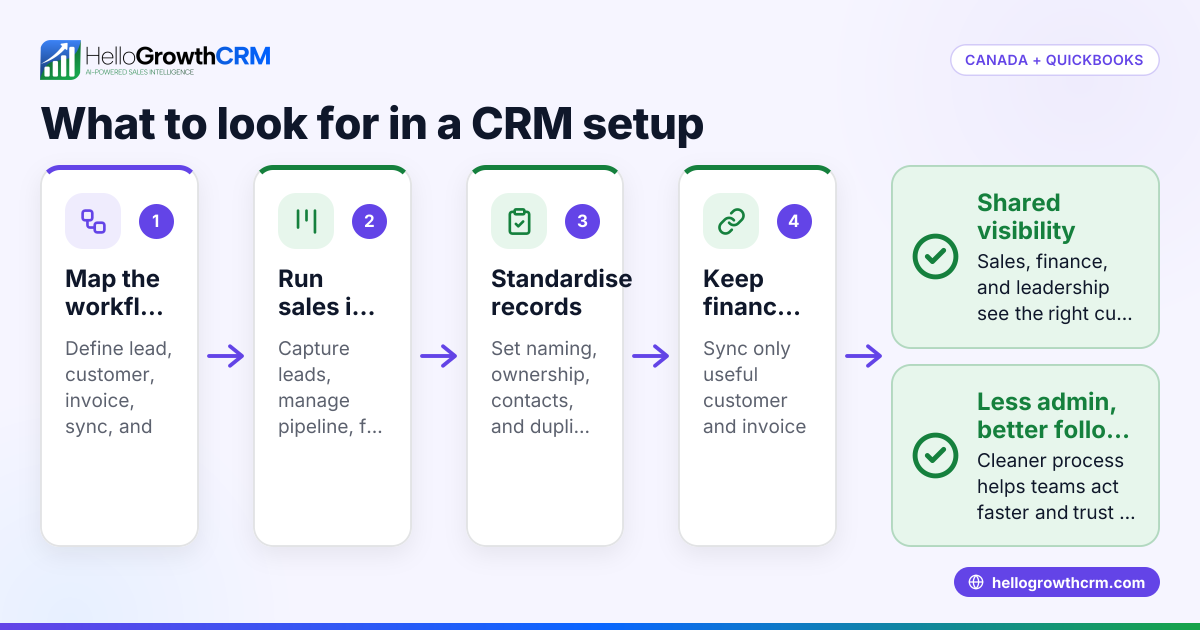
With the QuickBooks integration, HelloGrowthCRM can support workflows such as:
- Syncing customer names and billing entities
- Matching invoice dates to account timelines
- Flagging accounts with recent transactions
- Giving finance and sales a shared record
- Storing CAD-based customer context in one place
This does not replace legal review. It gives your team a better operating view.
Practical Toronto and Montreal workflow
A Toronto sales rep creates a contact from a form. The form captures express consent and English preference. The contact enters Email Automation only if consent fields are complete.
A Montreal account manager later links the same company to a QuickBooks customer record after a CAD invoice is paid. The record now shows billing relationship context, French preference, and an updated account timeline. If outreach changes from prospecting to customer success, the history stays intact.
For teams with tighter handoffs, Revenue Attribution also helps connect source, pipeline, and closed revenue across one lifecycle.
HelloGrowthCRM template vs spreadsheet vs generic CRM custom fields
HelloGrowthCRM’s template is better than a spreadsheet or generic CRM custom fields when your team needs audit history, bilingual fields, finance sync, and rule-based sending controls, because compliance tracking only works when contact data, outreach workflows, and billing context live in the same operational system.
To be fair, a spreadsheet may work for a very small founder-led team. A generic CRM can also work if you have strong admin resources. But most SMBs want a faster setup with less manual policing.
Comparison table
| Option | Best for | Main strengths | Main limitations |
|---|---|---|---|
| HelloGrowthCRM CASL consent tracker template | Canadian SMBs that want sales, compliance, and finance alignment | Built for CRM workflows, QuickBooks connection, EN/FR fields, audit history, automation controls | Best fit for teams willing to standardize process inside one platform |
| Spreadsheet template | Very small teams with low outreach volume | Cheap, simple, easy to start | Weak audit trail, duplicate risk, no send blocking, poor multi-user control |
| Generic CRM custom fields | Teams with in-house admin support | Flexible data model | More setup work, more room for bad logic, finance sync often fragmented |
Because HelloGrowthCRM is our product, that comparison is biased toward the workflows we support. The useful test is simple: can your team prove consent, see expiry risk, and stop unsafe sends without checking three systems first?
How to set up a CASL consent tracker template in HelloGrowthCRM: Step-by-Step
Setting up a CASL consent tracker template in HelloGrowthCRM means defining consent fields, mapping billing data from QuickBooks Online, building bilingual contact preferences, setting send rules, and training reps on one clean workflow so every commercial email decision is based on visible, current record data.
- Create your consent data model
Add core fields for consent type, source, capture date, expiry, unsubscribe status, and privacy notice version. Keep required fields short so reps do not skip updates. - Add bilingual EN/FR communication fields
Create language preference and message-language fields for English and French workflows. This is especially useful for Montreal and Quebec-based contacts. - Map customer and invoice context from QuickBooks Online
Connect QuickBooks so customer records, invoice dates, and account status can appear inside the CRM. This helps teams review commercial relationship context without switching tabs. - Build compliant send gates
Use Email Automation and Sales Task Boards rules so contacts cannot enter outbound sequences if consent is missing, expired, or unsubscribed. - Store proof on the record timeline
Attach form submissions, import notes, call outcomes, or meeting notes using the CRM activity feed. If a rep claims consent exists, the evidence should be one click away. - Create expiry and review alerts
Trigger reminders when implied consent windows approach expiry. Pair alerts with the Pipeline Health Score if you want managers to catch at-risk segments early. - Train sales, marketing, and finance together
Run one short enablement session with all teams. The point is shared definitions, not legal theory. Everyone should know which fields matter and who owns updates. - Audit monthly
Review bounced contacts, unsubscribes, duplicate records, and contacts missing evidence. In one Canadian SMB rollout, a 30-minute monthly audit prevented a lot of messy list cleanups later.
Recommended operating rules for SMBs
- One primary contact record per person
- One owner for consent updates
- No sequence enrollment without visible consent status
- All unsubscribe requests logged immediately
- Finance sync reviewed weekly
- Quebec contacts checked for French preference when relevant
If your team wants more support, Managed RevOps can help design the workflow and rollout.
What are the limits and best-fit use cases for this template?
This template works best for Canadian SMBs with small to mid-sized sales teams that need practical compliance controls inside daily workflow, but it is not a substitute for legal advice, and larger organizations may need more formal governance, data mapping, and enterprise-grade approval processes.
That limitation matters. For teams under 50 reps, a CRM-based template with clear ownership is often enough to improve compliance and audit readiness. Above that, expect more complexity around territory rules, multiple business units, and legal review cycles.
Best-fit use cases
- B2B services firms in Toronto
- SaaS companies selling across Canada
- Distributors with finance records in QuickBooks Online
- Agencies with outbound prospecting and customer upsell motions
- Montreal teams that need bilingual record handling
Less ideal use cases
- Companies with no CRM discipline
- Firms needing deep legal workflow approvals
- Very large enterprises with custom compliance stacks
- Teams sending from disconnected inboxes outside the CRM
If outbound is a major growth channel, you should also look at CRM Dialer, Meeting Scheduler, and AI Pipeline Management so compliant outreach turns into booked meetings and cleaner revenue execution.
Canadian SMBs that want one place for CASL consent tracking, bilingual contact fields, and QuickBooks-linked customer context should try HelloGrowthCRM. You can review Features, see Pricing, or start a Free Trial to test the consent tracker workflow with your own Toronto, Vancouver, or Montreal data in CAD-based operations.
About the author
Jordan Beaulieu is a Revenue Operations Lead at HelloGrowthCRM with 10 years of experience in B2B SaaS sales systems, CRM design, and compliance-aware automation. He has led CRM rollouts for Canadian SMB teams using outbound email, bilingual contact workflows, and QuickBooks-connected customer records. One project that informed this article was a consent and lifecycle data cleanup for a 12-person Toronto and Montreal sales team that needed CASL-safe outreach rules tied to invoice history and unsubscribe audits.
Frequently Asked Questions
Q: What is a CASL consent tracker template in Canada?
A: A CASL consent tracker template in Canada is a structured record used to document email consent type, source, date, expiry, and unsubscribe status for commercial electronic messages. It helps Canadian SMBs prove why a contact was eligible for outreach and when that status changed.
Q: Does QuickBooks Online Canada track CASL consent by itself?
A: No, QuickBooks Online Canada does not track CASL consent by itself in the way sales teams usually need. It can show customer and invoice context, but most SMBs still need a CRM like HelloGrowthCRM to manage outreach eligibility, proof, and audit history.
Q: How does HelloGrowthCRM help with CASL compliance?
A: HelloGrowthCRM helps with CASL compliance by storing consent fields, source evidence, unsubscribe history, and billing-linked customer context in one CRM workflow. That gives reps and managers a clearer view of who can be contacted and why.
Q: Can I use this template for Montreal and Quebec contacts?
A: Yes, you can use this template for Montreal and Quebec contacts because it supports bilingual EN/FR fields and stronger privacy documentation practices. That makes it easier to respect language preference and align your workflow with Quebec-focused privacy requirements.
Q: What fields should I include in a CASL consent tracker?
A: The fields you should include in a CASL consent tracker are consent type, source, capture date, expiry date, unsubscribe status, language preference, and owner. You should also add linked customer and invoice context if your team uses QuickBooks Online.
Q: Is a spreadsheet enough for CASL consent tracking?
Frequently Asked Questions
Ready to put this into practice?
Set up your pipeline, WhatsApp follow-ups, and AI lead scoring in minutes — free, no credit card.
Try HelloGrowthCRM freeGet CRM tips in your inbox
Join thousands of sales professionals who get weekly insights on CRM strategy, AI automation, and pipeline optimization.

The HelloGrowthCRM team publishes guides on CRM strategy, AI sales tools, and revenue operations for small business sales teams.