HelloGrowthCRM software
Built for real small-business sales teams
HelloGrowthCRM helps reps qualify faster, follow up on time, and close more deals—with practical automation in one place.
- AI lead scoring and pipeline visibility
- Built-in dialer, WhatsApp, and email automation
- Sales forecasting and RevOps-ready reporting
Maketing software in Chennai is essential for businesses that want to improve lead follow-up and sales efficiency. Many small businesses in Tamil Nadu’s manufacturing, textile trading, and auto-component sectors struggle with slow responses and scattered customer data. This guide explains how to pick the right software, what to look for, and how to avoid common mistakes.
Why this comes up / what goes wrong
Small businesses in Chennai often rely on WhatsApp and spreadsheets for sales and customer management. This leads to lost leads, delayed follow-ups, and poor sales visibility. Without proper software, telecalling teams can’t track call outcomes or manage large lead lists effectively. Businesses also face language diversity—Tamil, English, and Hindi—which requires software supporting multi-language communication. Choosing the wrong software wastes money and time, so clear evaluation is crucial.
Step-by-step
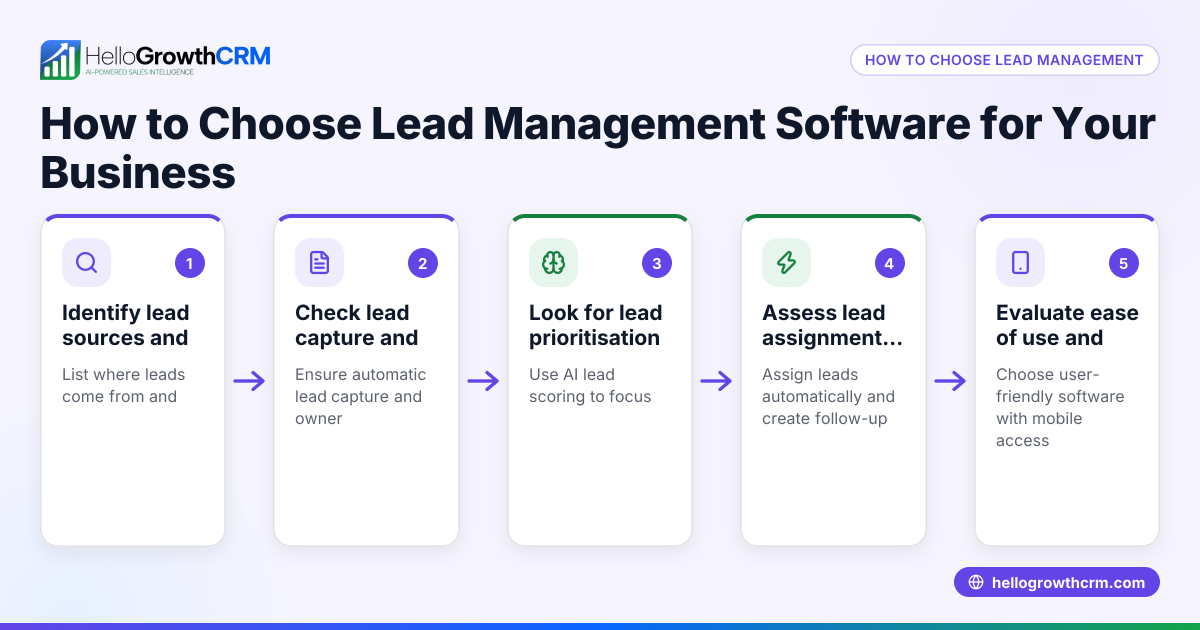
- Identify your business needs: List tasks you want to improve, like capturing leads from IndiaMART or JustDial, managing calls, or sending WhatsApp messages.
- Check software features: Look for built-in dialers, lead capture, AI lead scoring, and messaging sequences. Confirm support for Tamil and English communication.
- Evaluate ease of use: The software should be simple for telecallers and sales teams to adopt without heavy training.
- Consider integration options: Ensure it can connect with your existing tools or web forms.
- Review pricing and plans: Compare what features come with each plan and whether there are limits on leads or users.
- Test customer support: Good support is vital for smooth onboarding and problem-solving.
- Request a trial or demo: Use this to assess real-world usability and language support.
- Check data security and compliance: Especially important if you handle sensitive customer data.
For telecalling efficiency, a built-in CRM dialer is very helpful as it lets reps call leads directly within the software and log outcomes instantly, avoiding manual records built-in CRM dialer.
Example (fictional figures)
A textile trading company in Chennai starts using maketing software on 01/07/2023. They pay ₹15,000 per month for a plan with a built-in dialer and lead capture.
- Monthly software cost = ₹15,000
- Leads captured monthly = 500
- Conversion rate before software = 2% (10 sales)
- Conversion rate after software = 5% (25 sales)
- Average sale value = ₹50,000
Revenue before software:
10 sales × ₹50,000 = ₹5,00,000
Revenue after software:
25 sales × ₹50,000 = ₹12,50,000
Increase in revenue:
₹12,50,000 − ₹5,00,000 = ₹7,50,000
Return on software cost:
₹7,50,000 ÷ ₹15,000 = 50 times
This example shows how investing in the right maketing software quickly pays off by improving follow-up and conversions.
Common mistakes
- Choosing software with too many unused features: Focus on what your team needs to avoid complexity and wasted cost.
- Ignoring language support: Ensure the software supports Tamil and English for better communication.
- Not testing the dialer functionality: A built-in dialer helps telecallers work efficiently; test it during trials built-in CRM dialer.
- Skipping data security checks: Confirm the software follows data protection best practices.
- Overlooking customer support quality: Poor support can delay issue resolution; ask for references or reviews.
- Not setting clear goals before buying: Define what success looks like to measure software impact.
Doing this in HelloGrowthCRM
HelloGrowthCRM includes a built-in dialer that lets telecallers call leads directly from inside the CRM and log call outcomes automatically. This feature helps sales teams in Chennai manage their lead lists efficiently without switching apps or manually recording results. It supports lead capture from IndiaMART, JustDial, and web forms, and runs WhatsApp and SMS sequences for follow-up. Learn more about HelloGrowthCRM’s telecalling features built-in CRM dialer and its fit for Indian SMBs HelloGrowthCRM for India.
Frequently asked questions
What is the difference between CRM and maketing software? CRM focuses on managing customer relationships and sales pipelines, while maketing software may include lead generation and communication tools. Many CRMs combine both to streamline sales.
Can maketing software handle WhatsApp messaging in Tamil? Yes, many modern maketing software support multilingual messaging, including Tamil, allowing personalised communication with local customers.
Is a built-in dialer necessary for my telecalling team? A built-in dialer improves efficiency by enabling calls and logging outcomes within one system, reducing errors and saving time. This feature is available in HelloGrowthCRM built-in CRM dialer.
How do I choose between different maketing software providers in Chennai? Compare features, pricing, ease of use, language support, integration options, and customer service. Testing demos and reading user feedback helps make an informed choice.
Can I integrate maketing software with my existing website or IndiaMART leads? Many maketing software solutions offer lead capture from IndiaMART, JustDial, and web forms, centralising leads for follow-up.
Does maketing software support SMS sequences for follow-up? Yes, many maketing software include SMS sequences to automate follow-ups, which is helpful for reaching customers who prefer text messages.
Key takeaways
- Choose maketing software that fits your business needs and supports Tamil and English communication.
- Prioritise features like built-in dialers and lead capture for better sales follow-up.
- Test the software with your team before committing to ensure usability.
- Avoid overpaying for unnecessary features and check customer support quality.
- A built-in dialer helps telecallers manage calls and outcomes efficiently.
- Integration with lead sources like IndiaMART and JustDial centralises leads for faster follow-up.
Start improving your sales follow-up today. Start on the Free Forever plan (200 leads, no credit card).
Ready to put this into practice?
Set up your pipeline, WhatsApp follow-ups, and AI lead scoring in minutes — free, no credit card.
Try HelloGrowthCRM freeGet CRM tips in your inbox
Join thousands of sales professionals who get weekly insights on CRM strategy, AI automation, and pipeline optimization.

The HelloGrowthCRM team publishes guides on CRM strategy, AI sales tools, and revenue operations for small business sales teams.