HelloGrowthCRM software
Built for real small-business sales teams
HelloGrowthCRM helps reps qualify faster, follow up on time, and close more deals—with practical automation in one place.
- AI lead scoring and pipeline visibility
- Built-in dialer, WhatsApp, and email automation
- Sales forecasting and RevOps-ready reporting
No code automation tools allow small-business owners to automate routine tasks like lead follow-up, data entry, and communication workflows without needing programming skills. They help save time, increase consistency, and reduce errors in sales and operations. This article covers why small businesses seek these tools, a step-by-step evaluation guide, a practical example, common mistakes, and how HelloGrowthCRM supports automation.
Why this comes up / what goes wrong
Small-business owners often juggle many roles, including sales, customer support, and operations. They may rely on manual processes like spreadsheets, email, and text messages to manage leads and follow-ups. This approach leads to slow response times, lost leads, and inconsistent customer experiences. Hiring developers to build custom automation can be costly and slow, so owners look for no code automation tools that non-technical staff can use to streamline workflows quickly.
No code tools promise to automate sales outreach, lead routing, task management, and communication sequences without coding. However, the market is crowded and confusing, with varying features, pricing, and ease of use. Business owners need a clear evaluation process to choose tools that fit their team’s skills, sales processes, and budget.
Step-by-step
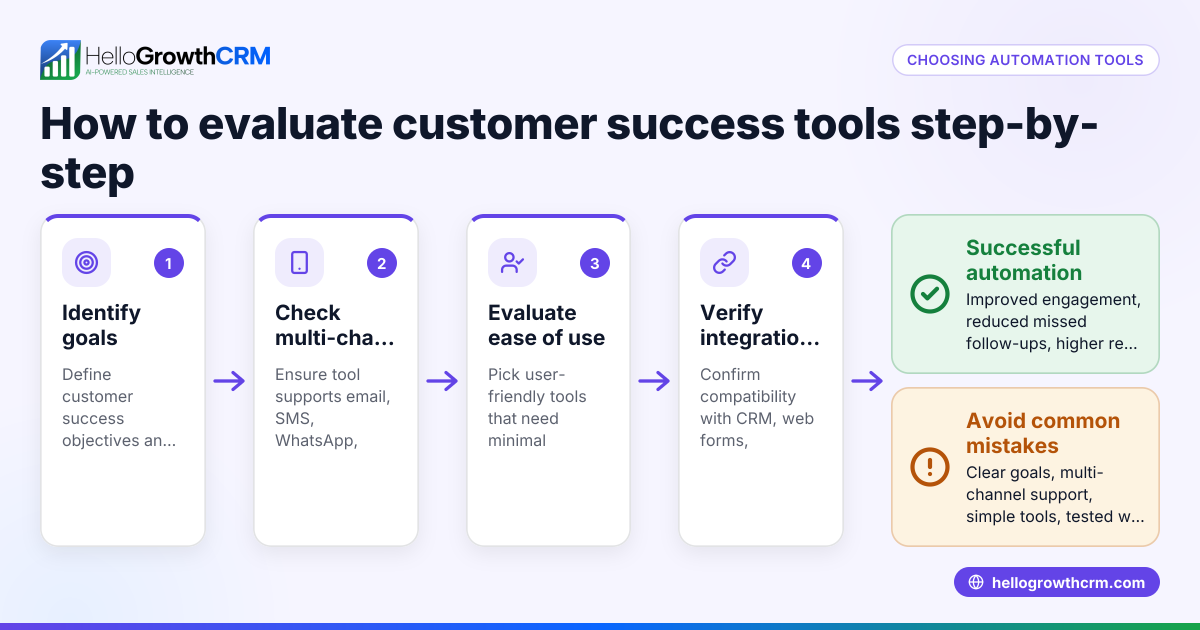
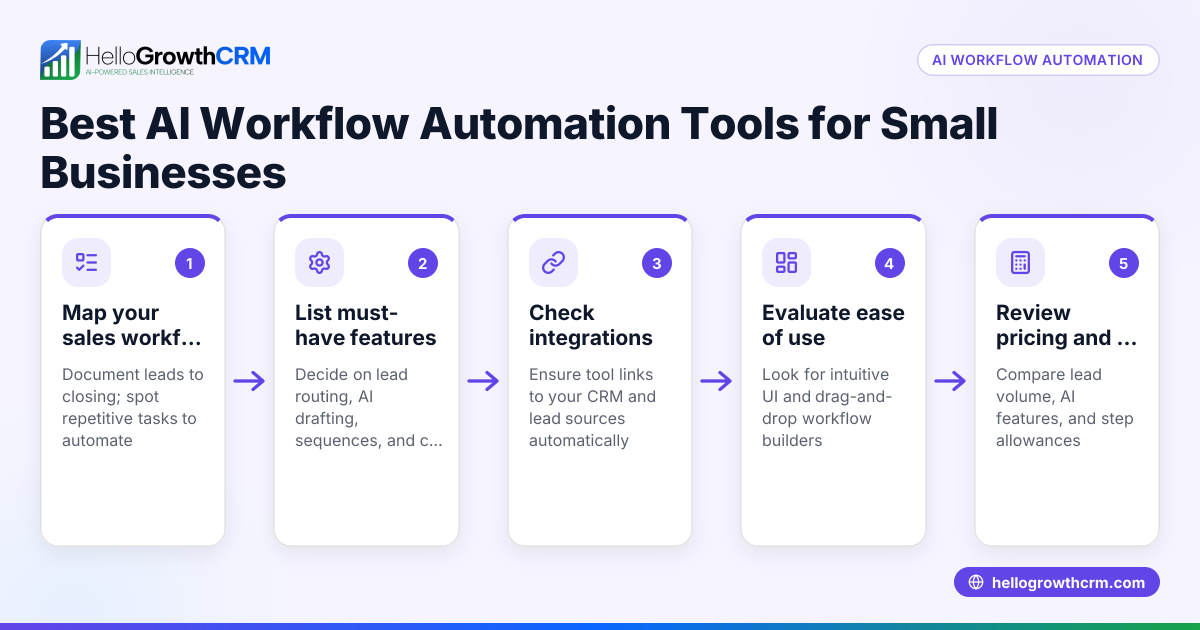
- Identify the tasks to automate. List repetitive tasks like lead capture, follow-up messages, appointment scheduling, or data updates. Check which tasks consume the most time or cause errors.
- Check integration options. Confirm the tool connects with your existing platforms such as your website, email, SMS, or WhatsApp. Integration ensures data flows automatically and reduces manual entry.
- Evaluate ease of use. Test the interface for building workflows or sequences. Look for drag-and-drop builders and pre-made templates that require no coding skills.
- Assess automation features. Verify if the tool supports multi-step sequences, triggers based on customer actions, lead routing rules, and validation checks.
- Consider communication channels. Ensure the tool can automate outreach via email, SMS, WhatsApp, or calls, as relevant to your business.
- Review reporting and analytics. Look for features that track automation performance and sales pipeline health.
- Test customer support and training. Good onboarding and support are vital to get your team using the tool effectively.
- Compare pricing and limits. Check if the pricing fits your budget and whether there are limits on contacts, messages, or automation steps.
- Pilot with a small team. Run a trial to see how automation improves your sales process and where adjustments are needed.
- Plan for scaling. Choose a tool that can grow with your business, adding more advanced features as needed.
For more tools and calculators to help with sales and automation decisions, see free sales tools and calculators.
Example (fictional figures)
GreenLeaf Landscaping in Charlotte, North Carolina, wants to automate lead follow-up. They get about 200 leads monthly from their website and Facebook ads. Currently, follow-up is manual via email and text, taking 10 hours weekly.
They estimate saving 7.5 hours weekly with automation.
Current weekly hours on follow-up = 10
Hours saved = 7.5
Assuming an hourly cost of $25 for sales staff:
Weekly cost saved = 7.5 × $25 = $187.50
Monthly cost saved = $187.50 × 4 = $750
Annual cost saved = $750 × 12 = $9,000
They budget $1,200 annually for a no code automation tool subscription.
Net annual savings = $9,000 − $1,200 = $7,800
This example shows how automating follow-up can free staff time and reduce costs.
Common mistakes
- Choosing tools without integration options. Prevent by confirming integrations with your email, SMS, WhatsApp, or website before buying.
- Overcomplicating workflows. Keep automation simple initially; complex workflows can confuse teams and cause errors.
- Ignoring user training. Prevent by scheduling onboarding sessions and using available tutorials.
- Not testing automation before full rollout. Run pilots to catch issues early.
- Neglecting data accuracy. Use validation rules to ensure data entered into workflows is correct.
- Forgetting to monitor automation results. Regularly review reports and adjust workflows to improve outcomes.
For more on automation workflows and lead routing, see HelloGrowthCRM for the United States.
Doing this in HelloGrowthCRM
HelloGrowthCRM offers no code automation features designed for small and mid-sized US businesses. Its Sequences and campaigns run automated five-step follow-ups over two weeks that stop immediately when a prospect replies. AI agents draft follow-up messages after calls for quick review and sending. Workflows, lead routing, and validation rules automate lead assignment and task creation, such as assigning new enquiries round-robin and creating first-call tasks automatically. Learn more about these features at AI CRM.
Frequently asked questions
What are no code automation tools? No code automation tools let you create automated workflows and tasks without programming. They use visual builders and templates so non-technical users can set up automation for sales, marketing, and operations.
How do I choose the right no code automation tool? Start by listing tasks to automate, then check for integrations, ease of use, multi-step sequences, supported communication channels, and pricing. Pilot the tool with your team before full adoption.
Can no code automation tools handle multiple communication channels? Yes, many tools support email, SMS, WhatsApp, and sometimes calls. Make sure the tool you choose covers your main customer contact methods.
Are no code automation tools secure? Security varies by vendor. Check for data encryption, compliance certifications, and access controls. Ask the vendor for security details.
Will automation replace my sales team? No code automation tools assist your sales team by handling repetitive tasks and ensuring timely follow-up. They free your team to focus on selling rather than administrative work.
For more answers and tools, visit free sales tools and calculators.
Key takeaways
- No code automation tools save time and reduce errors by automating sales and operational tasks without coding.
- Evaluate tools based on integration, ease of use, automation features, communication channels, and pricing.
- Start simple, test with a pilot, and monitor results to improve workflows.
- Avoid common mistakes like ignoring training, overcomplicating workflows, and neglecting data accuracy.
- HelloGrowthCRM supports no code automation with sequences, AI agents, and workflows tailored for US small businesses.
Start streamlining your sales and follow-up today. Start on the Free Forever plan (200 leads, no credit card).
Ready to put this into practice?
Set up your pipeline, WhatsApp follow-ups, and AI lead scoring in minutes — free, no credit card.
Try HelloGrowthCRM freeGet CRM tips in your inbox
Join thousands of sales professionals who get weekly insights on CRM strategy, AI automation, and pipeline optimization.

The HelloGrowthCRM team publishes guides on CRM strategy, AI sales tools, and revenue operations for small business sales teams.