Delete Your HelloGrowthCRM Account
We're sorry to see you go. Here's how you can proceed with account deletion.
How to Request Account Deletion
1. In the app
The most straightforward way to delete your account is directly within the HelloGrowthCRM application.
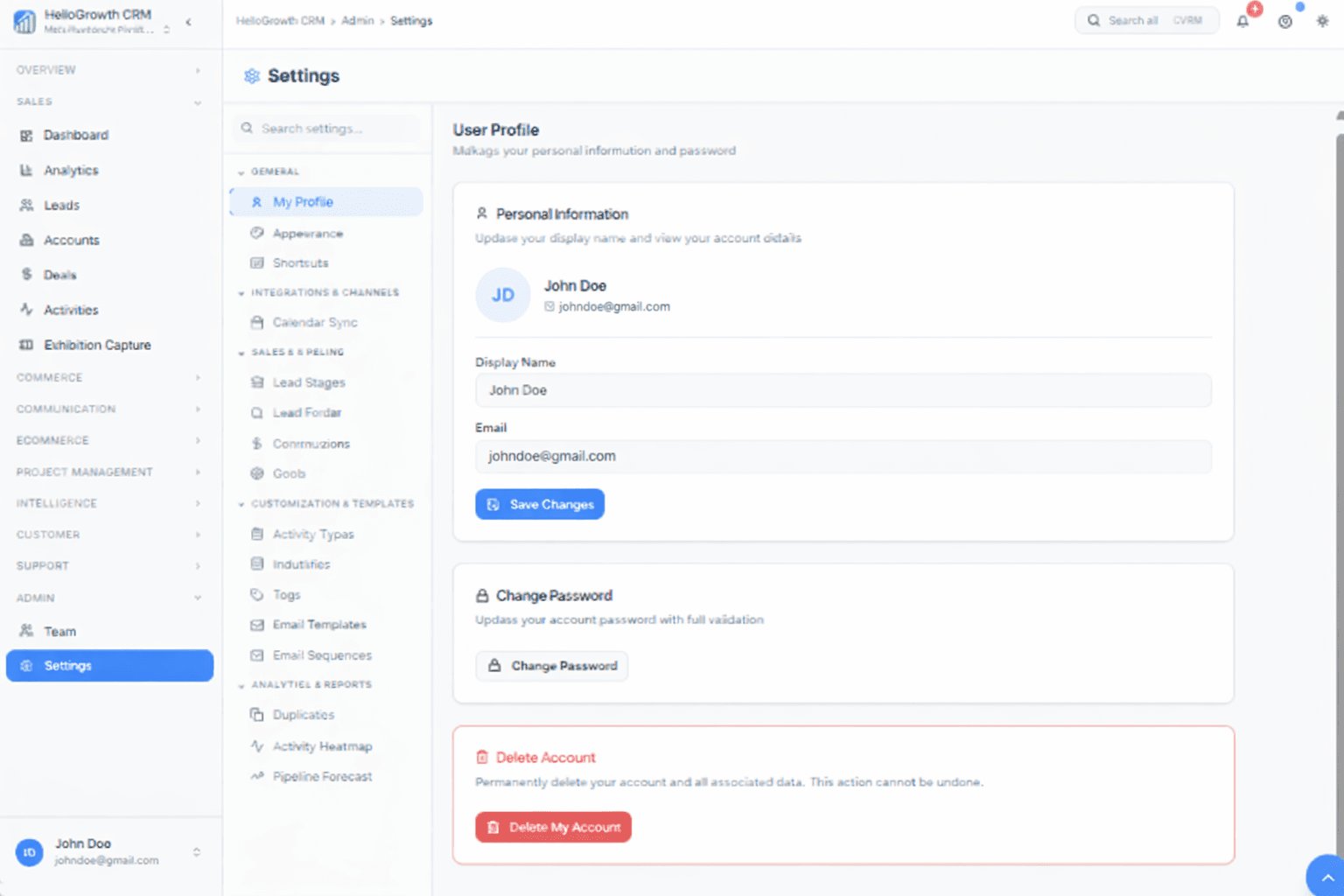
- Open Admin, then Settings, and select My Profile under General.
- Scroll to the Delete Account section and choose Delete My Account.
- Follow the on-screen prompts to confirm the deletion.
- Your account and associated personal and workspace data will be scheduled for permanent deletion in line with our retention policy (see below).
2. Request via email
If you prefer, you can request deletion by sending an email to our team at sales@hellogrowthcrm.com.
- Use the subject line: "Delete My Account".
- Important: Please send the request from the same email address you used to register your HelloGrowthCRM account so we can verify ownership.
Data We Delete
After your workspace is closed out, we remove the sales data and configuration that lived under your HelloGrowthCRM account. That typically includes everything you would see across the product — for example:
- People & companies: leads, accounts, and related contact profiles
- Pipeline & revenue: deals, stages, forecasts, and deal-linked notes
- Engagement history: activities, tasks, calls, meetings, and message threads stored in the CRM
- Commerce (where enabled): quotes, orders, or other commerce records your team created in the product for that workspace
- Insights & prospecting: saved reports, dashboards, analytics views, and prospecting lists or sequences tied to your workspace
- Files & integrations: uploads and attachments on records, plus integration credentials, webhooks, and API keys for connected tools
If a small subset of information must be kept for legal reasons, it is handled as described in Data we may retain below — not as an ongoing CRM database you can log into.
Data We May Retain
Shutting down a CRM workspace does not always erase every trace the same day. We sometimes keep a narrow set of records so we can meet tax, accounting, fraud, and security obligations. Where the law allows a window, we may retain certain items for up to seven (7) years, including:
- Commercial records: invoices, payment confirmations, and subscription or refund correspondence for HelloGrowthCRM fees
- Operational & security logs: limited technical records (for example sign-in or abuse signals) kept only as long as needed to investigate incidents or defend a legal claim
- Irreversibly anonymized metrics: high-level product analytics that can no longer be tied back to you or your company
When those periods end, we delete or anonymize what remains. Nothing here is meant to keep your pipeline, contacts, or deals online — that CRM content is covered under Data we delete.
Questions about deletion timing, exports, or this page? Email sales@hellogrowthcrm.com.
Common Questions
Can I export my data before deleting my account?
Yes, and we recommend it. Export your leads, contacts, deals, and notes from the app before you confirm deletion — once the deletion is processed, your workspace data cannot be recovered. If you need help with an export, email us first and we will walk you through it.
How long does account deletion take?
Once you confirm in-app or we verify an email request, your account is scheduled for permanent deletion in line with the retention policy above. Access ends immediately; removal of stored data then completes across our systems and backups. Email us if you need written confirmation for your records.
What happens to my team members' access?
Deleting a workspace closes access for every user in it, not just the requester. If you only want to remove one person, remove that user from Admin settings instead of deleting the whole account — the rest of the team keeps their pipeline and history.
Contact
If you have any questions or run into issues during the deletion process, contact us at sales@hellogrowthcrm.com.
This page is provided for convenience. Our Privacy Policy and Terms of Service govern how we process data.