What ai agents does
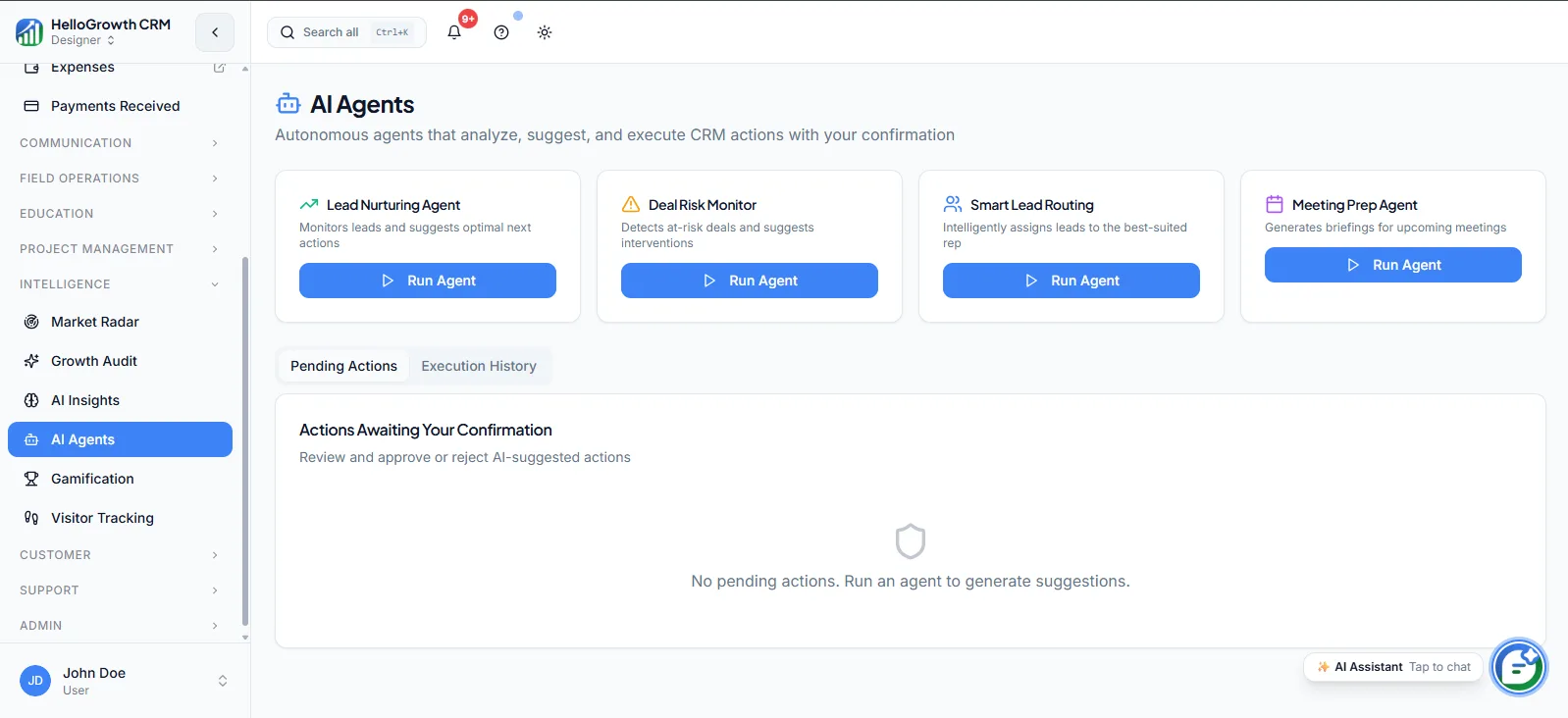
AI Agents are autonomous workers inside the CRM that carry out defined jobs without a rep clicking through screens. An agent can draft a follow-up email from the deal context, update record fields after a stage change, or execute the routine steps of a workflow — the CRM upkeep that consumes rep hours but requires no judgement. The rep reviews and approves where it matters; the agent handles the mechanical part.
Without agents, every one of those small jobs is either done manually or not done at all. Reps spend evenings updating fields and drafting near-identical follow-ups, or the records simply rot — missing next steps, stale fields, unsent follow-ups. Either the team pays a busywork tax on every deal, or data quality decays until reporting and automation built on top of it stop being trustworthy.
How it works in HelloGrowthCRM
AI Agents operate inside your HelloGrowthCRM workspace, acting on leads, deals, contacts, and activities. You point an agent at a job — keeping follow-ups drafted for deals entering a stage, filling gaps in record data — and it executes when its trigger conditions occur, logging what it did on the record so there is always a visible trail of agent actions.
Agents compound the rest of the stack: they can draft the messages your sequences send, prepare follow-ups after dialer calls, and keep the field data clean that AI Insights and Pipeline Forecast depend on. On the RevOps Partner plan, agents can be custom-configured to your process.
See it in action
How this capability is packaged by plan
| Plan | Availability |
|---|---|
| Free Forever | |
| Software Only | |
| Growth Engine | Beta |
| RevOps Partner | + custom agents |
Setting it up — step by step
- 1
Choose one narrow job
Start with a single well-defined task, like drafting follow-ups after demos, rather than automating everything at once.
- 2
Document the process first
Write down how a human does the job today, because agents execute defined processes, not vague intentions.
- 3
Configure the agent and trigger
Set what the agent does, what event starts it, and which records it is allowed to touch.
- 4
Run with human review
Keep a rep approving agent output for the first weeks and note where drafts or updates need correction.
- 5
Expand scope gradually
Once one job runs reliably, add the next task, keeping the action log under regular review.
Who uses ai agents
Sales rep
Finishes a call and finds the follow-up already drafted from deal context, edits two lines, and sends — reclaiming the admin hour after each selling block for actual conversations.
RevOps lead
Deploys agents against the recurring hygiene backlog — incomplete fields, missing next steps — and reviews the action log weekly, turning cleanup from a quarterly project into a continuously handled background process.
Founder/owner
Uses agents as leverage instead of an admin hire: the routine record-keeping and drafting that used to eat evenings runs automatically, while the founder keeps approval on anything customer-facing.
AI Agents in practice — industry examples
E-commerce
A D2C brand's B2B wholesale team lets an agent draft reorder follow-ups whenever an account's last order passes its usual reorder window, pulling order history and account context into the draft. Reps review a queue of ready messages each morning instead of hunting through accounts for who has gone quiet.
Travel agents
A travel agency runs an agent that updates enquiry records after each interaction — destination, travel dates, budget band — and drafts itinerary follow-ups for quotes that have not received a reply in three days. During peak season the team handles more enquiries without records falling out of date.
Agencies
A marketing agency uses an agent to prepare post-discovery follow-up drafts summarising the prospect's stated goals and proposed next steps from the deal notes. Account directors edit rather than write from scratch, and the deal record gets its next-step field set at the same time — the field their forecast reviews depend on.
Common mistakes to avoid
Pointing agents at a messy, undefined process and expecting them to fix it, when they can only execute what is clearly specified.
Skipping the human-review period and letting unvetted drafts reach customers, spending trust the brand cannot easily recover.
Automating ten jobs at once, so when something goes wrong nobody can tell which agent did what or why.
Never checking the agent action log, missing drift where an agent's output quality degrades as the process around it changes.
What teams usually care about here
Reduces manual busywork so reps can focus on conversations instead of CRM upkeep
Growth tier provides Beta access; RevOps Partner tier unlocks custom agent configuration
Most effective when pipeline data is clean and processes are well-defined
How this fits the buying decision
Buyers usually do not evaluate ai agents in isolation. They want to know whether it improves execution, reporting, handoffs, and accountability inside the broader CRM workflow. That is why this capability matters most when it is connected to records, ownership, activity history, and manager review rather than living in a separate point tool.
The real decision is often less about whether a box is checked and more about how much depth the team needs. Lower tiers may be enough when the workflow is simple or the volume is small. Higher tiers become more valuable when teams need governance, faster response expectations, specialist execution, or a repeatable operating cadence around the process.
If this capability is important to your rollout, compare it in the context of the whole plan. That includes related workflows, support level, reporting expectations, and whether your team will manage the motion itself or rely on managed RevOps help to keep it consistent.
Frequently asked questions
Which plans include AI Agents?
AI Agents are available in Beta on the Growth Engine plan, and the RevOps Partner plan adds custom agent configuration tailored to your process. They are not included on the Free Forever or Software Only plans, and Beta status means capabilities are still expanding.
What does "custom agents" on RevOps Partner mean?
On Growth Engine you work with the Beta agent capabilities as provided. On RevOps Partner, agents can be configured specifically to your sales process — your stages, your follow-up rules, your data standards — with the managed-service team helping define and tune what each agent does.
How should we set up our first agent?
Pick one narrow, well-documented job — drafting post-demo follow-ups is a common start. Write down how a rep does it today, configure the agent with clear triggers, and keep human approval on all output for the first few weeks before widening its scope or adding more agents.
Do agents send messages without approval?
You control that. The recommended pattern, especially during Beta, is agents draft and humans approve anything customer-facing, while low-risk internal actions like field updates run automatically. Every agent action is logged on the record, so you can always audit what was done.
How do agents relate to workflows and sequences?
Workflows and sequences execute fixed steps you define in advance; agents handle work that needs content generated from context, like drafting a follow-up that references the specific deal. They combine well — an agent can draft the message that a sequence or rep then sends.
Related Pricing Capabilities
AI Insights
AI-generated analysis surfaced inside the CRM to help teams understand pipeline health, rep performance, and revenue signals without manual reporting.
Pipeline Forecast
AI-assisted revenue forecasting that projects expected close amounts based on current pipeline stage, velocity, and historical conversion patterns.
Market Radar
Market intelligence tooling that monitors competitive signals, keyword trends, and demand shifts so teams can adjust positioning and targeting.
Growth Audit
A structured funnel audit that identifies where leads drop off, where conversions stall, and which channels are delivering real pipeline value.
Visitor Tracking
Website visitor intelligence that identifies which companies are browsing and maps anonymous traffic to CRM records for timely follow-up.
Gamification
Sales performance gamification that turns CRM activity and results into competitive scoreboards reps can see in real time.