What ai insights does
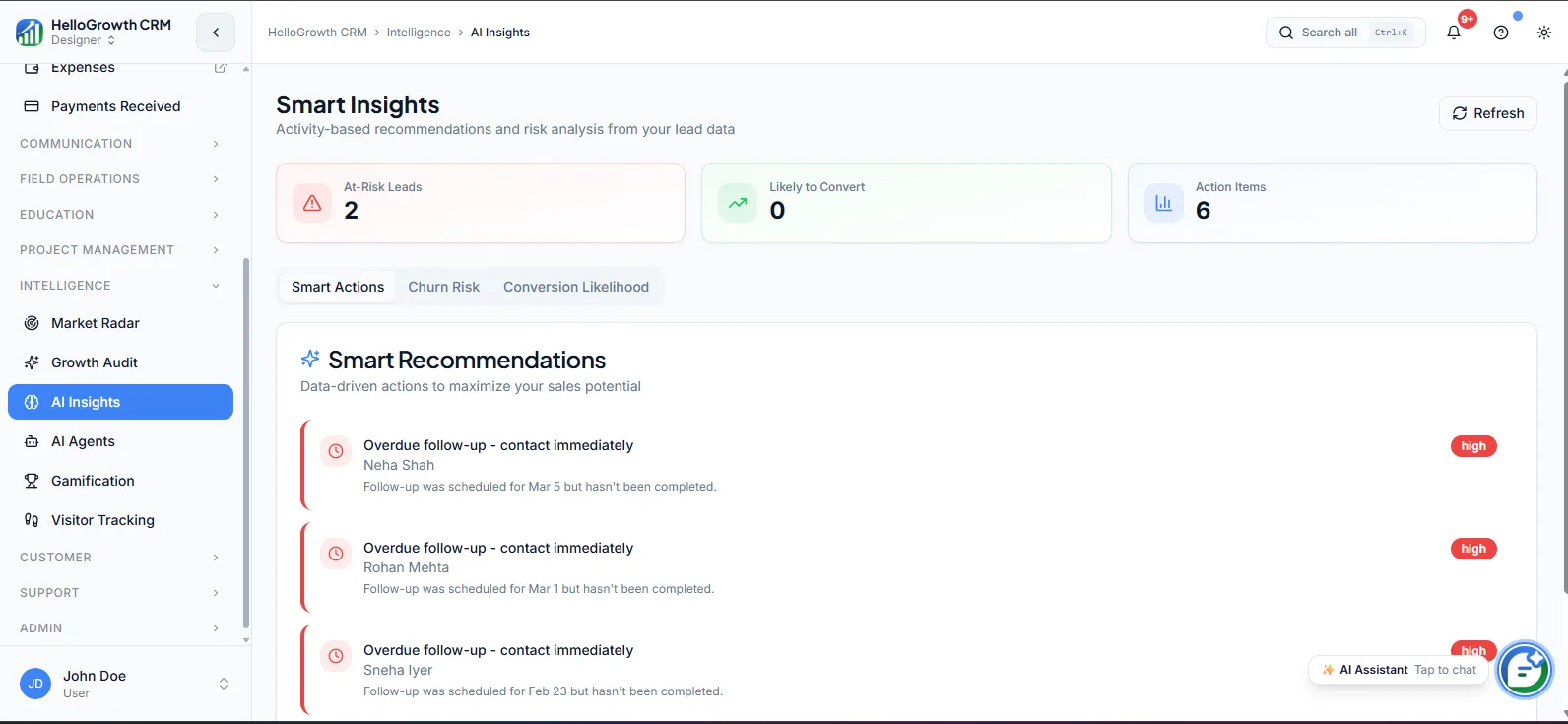
AI Insights reads the pipeline, activity, and revenue data already sitting in your CRM and surfaces the analysis a good ops analyst would produce — which deals are stalling, which reps are behind on activity, where conversion is slipping against recent norms. The findings appear inside the CRM as readable observations rather than raw charts, so a manager gets context on pipeline health without building a single report.
Without it, spotting these patterns means someone manually pulling data, cross-referencing dashboards, and hoping they looked at the right cut. Most small teams simply do not do that work, so problems announce themselves late: the quarter misses, and only afterwards does someone find the cohort of deals that went quiet in week three. Anomalies that were visible in the data went unread because nobody had time to read it.
How it works in HelloGrowthCRM
AI Insights lives in the Intelligence Module and draws on deals, activities, and lead data across the workspace. It runs continuously in the background, comparing current pipeline movement, activity levels, and conversion behaviour against historical patterns, and surfaces notable findings — stalled deals, unusual drop-offs, rep-level activity gaps — as insights a manager can review before one-on-ones or pipeline meetings.
It works best alongside clean pipeline practice: accurate stages, logged activities, and honest close dates give it better signal. Insights pair naturally with Pipeline Forecast for the forward view and with dashboards and analytics for drilling into anything it flags.
See it in action
How this capability is packaged by plan
| Plan | Availability |
|---|---|
| Free Forever | |
| Software Only | |
| Growth Engine | |
| RevOps Partner |
Setting it up — step by step
- 1
Clean your stage and activity data
Fix mis-staged deals and get reps logging calls and meetings, since insight quality tracks data quality.
- 2
Enable AI Insights
Turn on the Intelligence Module features for your workspace on an eligible plan and confirm data is flowing.
- 3
Set your review points
Decide where insights get read — before one-on-ones, pipeline reviews, or a Monday leadership check.
- 4
Act on the first findings
Take two or three surfaced insights and work them to conclusion so the team sees the loop close.
- 5
Feed outcomes back
Keep stages and outcomes updated as you act, so future insights sharpen against what actually happened.
Who uses ai insights
Sales manager
Opens insights before every one-on-one to arrive with specifics — the three deals that went quiet, the rep whose call volume halved — instead of generic "how's the pipeline?" questions.
Founder/owner
Uses the surfaced findings as a substitute for the analyst they have not hired, catching stalling revenue and slipping conversion weeks earlier than a monthly spreadsheet review would.
RevOps lead
Treats insights as a triage queue: validates what the AI flags, digs into root causes in analytics, and turns recurring findings into process fixes like stage-gate rules or routing changes.
AI Insights in practice — industry examples
Insurance agents
An insurance agency gets flagged that renewal-linked deals created last month are moving noticeably slower than the prior cohort. The manager digs in, finds a new telecaller has been skipping the second follow-up call, and fixes the cadence before renewal season peaks — a pattern nobody was manually tracking.
Startups
A startup founder sees an insight that trial-sourced deals are stalling at the proposal stage at twice the usual rate. Investigating, they find pricing changed two weeks earlier and the proposal template still shows old numbers. One template fix recovers a stage-conversion problem that would otherwise have surfaced at the board meeting.
Manufacturing
A manufacturer's sales head is alerted that a key rep's activity volume has dropped for three straight weeks while their pipeline value stayed flat — a classic sign of neglected accounts behind big headline deals. The resulting conversation redistributes two accounts before the quarter is at risk.
Common mistakes to avoid
Running insights on top of dirty pipeline data, then dismissing the feature because it faithfully reflected the mess it was given.
Reading insights but never acting on them, so the team learns the findings are decoration and stops opening them at all.
Treating every surfaced anomaly as an emergency instead of a prompt to investigate, causing alert fatigue and knee-jerk process changes.
Expecting insights to replace pipeline reviews entirely, rather than using them to make those reviews shorter and better targeted.
What teams usually care about here
Surfaces patterns and anomalies that would otherwise require manual data pulls
Useful for managers who want automated context before one-on-ones or pipeline reviews
Creates the most value when connected to clean activity and deal stage data
How this fits the buying decision
Buyers usually do not evaluate ai insights in isolation. They want to know whether it improves execution, reporting, handoffs, and accountability inside the broader CRM workflow. That is why this capability matters most when it is connected to records, ownership, activity history, and manager review rather than living in a separate point tool.
The real decision is often less about whether a box is checked and more about how much depth the team needs. Lower tiers may be enough when the workflow is simple or the volume is small. Higher tiers become more valuable when teams need governance, faster response expectations, specialist execution, or a repeatable operating cadence around the process.
If this capability is important to your rollout, compare it in the context of the whole plan. That includes related workflows, support level, reporting expectations, and whether your team will manage the motion itself or rely on managed RevOps help to keep it consistent.
Frequently asked questions
Which plans include AI Insights?
AI Insights is available on the Growth Engine and RevOps Partner plans. It is not included on the Free Forever or Software Only plans, since it sits in the Intelligence Module alongside features like Pipeline Forecast and Market Radar that build on richer workspace data.
Is there any setup required to get useful insights?
The feature itself needs little configuration — enable it and it starts analysing your workspace. The real setup is data hygiene: accurate deal stages, logged activities, and honest close dates. Teams with clean pipelines get sharp findings almost immediately; messy pipelines get noise until they are cleaned.
How is this different from the analytics dashboards?
Analytics shows you the numbers when you go looking; AI Insights does the looking for you. It scans for patterns and anomalies — stalled cohorts, activity drops, conversion shifts — and presents them as findings, which you can then verify and explore in the analytics views.
Does AI Insights use my call and messaging activity?
Insights draw on the activity data logged in the CRM, which includes calls made through the built-in dialer and logged messaging touches. The more of your team's real work is captured on records, the more accurately insights can spot when effort or engagement changes.
Will it tell my reps what to do next?
Insights are aimed at understanding — what is stalling, who is behind, where conversion moved. Acting on them stays with managers and reps. For AI that takes actions directly, such as drafting follow-ups or updating records, that is the separate AI Agents capability on Growth Engine and above.
Related Pricing Capabilities
Leaderboard
A real-time team performance leaderboard that shows activity counts, deal progress, and revenue contribution across the sales team.
AI Agents
Autonomous AI agents that take actions inside the CRM — drafting follow-ups, updating records, and executing workflow steps without rep intervention.
Pipeline Forecast
AI-assisted revenue forecasting that projects expected close amounts based on current pipeline stage, velocity, and historical conversion patterns.
Market Radar
Market intelligence tooling that monitors competitive signals, keyword trends, and demand shifts so teams can adjust positioning and targeting.
Growth Audit
A structured funnel audit that identifies where leads drop off, where conversions stall, and which channels are delivering real pipeline value.
Visitor Tracking
Website visitor intelligence that identifies which companies are browsing and maps anonymous traffic to CRM records for timely follow-up.