HelloGrowthCRM software
Built for real small-business sales teams
HelloGrowthCRM helps reps qualify faster, follow up on time, and close more deals—with practical automation in one place.
- AI lead scoring and pipeline visibility
- Built-in dialer, WhatsApp, and email automation
- Sales forecasting and RevOps-ready reporting
Account management in CRM means organising and tracking your customer accounts to improve follow-up, sales and retention. It involves capturing leads, assigning ownership, scheduling next steps and logging communications in one system. This article explains why UK small businesses seek CRM for account management, step-by-step actions to evaluate CRM options, a worked example, common pitfalls, and how HelloGrowthCRM supports efficient account management.
Why this comes up / what goes wrong
Many UK small business owners run sales using WhatsApp, email and spreadsheets, which leads to lost or slow follow-up on leads and accounts. Without a central system, enquiries can slip through the cracks, and the sales process becomes inconsistent. This results in missed revenue and poor customer experience. Owners often look for CRM software that their teams will actually use to organise leads, assign responsibility, track communications and manage next steps.
Step-by-step
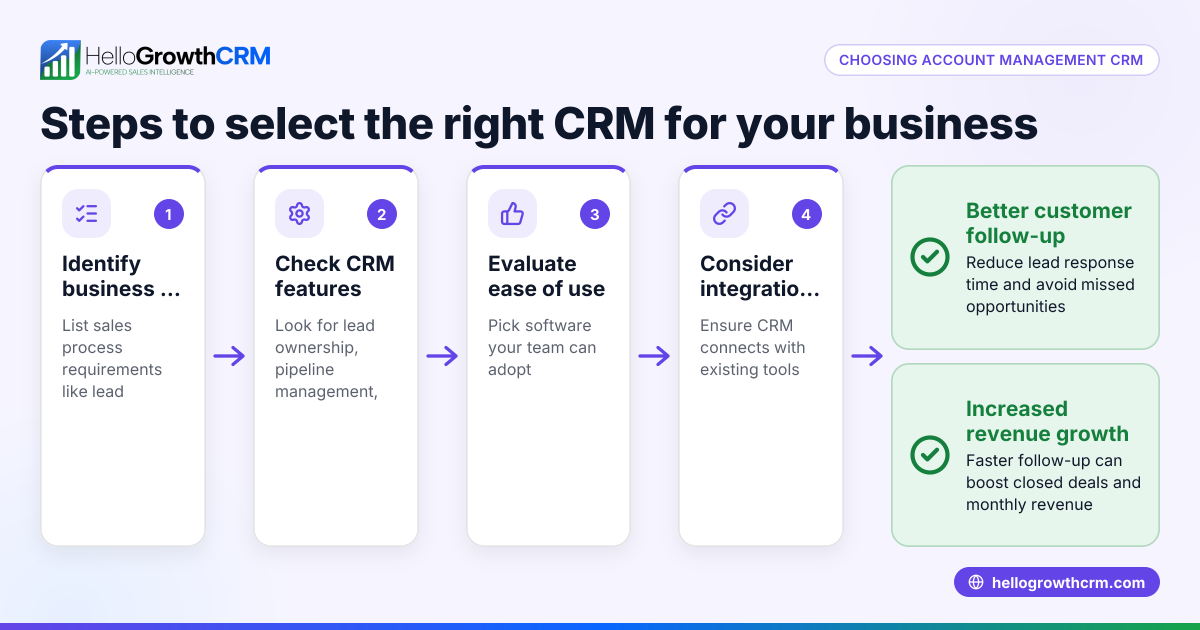
- Identify your account management needs: List what you want from a CRM, such as lead capture, communication logging, task reminders, and pipeline visibility. Check if it supports channels like WhatsApp and calls.
- Check lead capture capabilities: Ensure the CRM can automatically capture leads from your web forms, calls, or WhatsApp chats. Leads should be assigned an owner and a clear next step to avoid lost enquiries.
- Evaluate communication logging: Confirm the CRM logs all interactions, including WhatsApp messages and phone calls, against each customer account to keep a full history.
- Assess follow-up and task management: Look for features that let you set and track follow-up tasks or sequences via email, SMS or WhatsApp to keep prospects engaged.
- Test the calling features: If your team calls leads, check for a built-in dialer that lets reps call directly from the CRM and log call outcomes without switching apps. See built-in CRM dialer.
- Review pipeline and reporting tools: The CRM should clearly show where each account is in the sales process and provide reports or forecasts to prioritise efforts.
- Consider ease of use and adoption: The CRM must be simple enough for your team to actually use daily, avoiding the trap of data stuck in notebooks or spreadsheets.
- Check integration options: Verify it integrates with your existing tools like web forms, email, and WhatsApp. For messaging, see WhatsApp and SMS CRM.
- Trial the software: Use a free or trial plan to test lead capture, communication logging and task management in real conditions.
- Plan onboarding and training: Ensure your team knows how to enter leads, update statuses and log communications consistently.
Example (fictional figures)
A recruitment consultancy in Bristol receives enquiries via its website and WhatsApp. On 15/03/2024, they receive 50 new leads.
- Each lead is automatically captured and assigned to a recruiter.
- The recruiter plans a follow-up call within 2 days.
Calculations:
50 leads × £1,000 average placement fee = £50,000 potential revenue
If 10 placements result from leads, revenue = 10 × £1,000 = £10,000 actual revenue
Without CRM, 15 leads are lost due to slow follow-up:
50 leads − 15 lost leads = 35 leads followed up
Lost revenue:
15 lost leads × £1,000 fee = £15,000 lost
With CRM, timely follow-up reduces lost leads to 3:
50 leads − 3 lost leads = 47 leads followed up
Lost revenue:
3 lost leads × £1,000 fee = £3,000 lost
Saving:
£15,000 − £3,000 = £12,000 additional revenue by improving account management.
Common mistakes
- Not assigning lead ownership: Leads remain unclaimed and uncontacted. Prevent by ensuring every lead has an owner and next step.
- Using multiple disconnected tools: Leads spread across WhatsApp, email and spreadsheets cause confusion. Prevent by centralising in one CRM.
- Failing to log communications: Losing track of conversations leads to repeated or missed follow-ups. Use CRM features that log WhatsApp and call interactions.
- Ignoring follow-up tasks: Without reminders, leads go cold. Use task boards and sequences to automate follow-ups.
- Choosing complex CRM software: If too complicated, teams avoid using it. Pick a CRM designed for easy daily use by your team.
- Not testing integrations: Leads may not flow automatically into CRM. Check integrations with web forms and messaging channels.
See HelloGrowthCRM for the United Kingdom for a CRM addressing these points.
Doing this in HelloGrowthCRM
HelloGrowthCRM helps UK small businesses manage accounts by capturing every enquiry from forms, calls or WhatsApp as a lead with an assigned owner and next step, avoiding lost leads. Its built-in dialer lets telecallers work lists inside the CRM and log call outcomes directly on leads. WhatsApp conversations with a lead are logged on the lead record and follow-ups can be sent as WhatsApp or SMS messages. Learn more about these features at WhatsApp and SMS CRM and built-in CRM dialer.
Frequently asked questions
What is account management in CRM? Account management in CRM involves organising customer accounts and leads in one system, assigning ownership, tracking communications, and scheduling follow-ups to improve sales and retention.
How does a CRM improve account management for small businesses? A CRM centralises lead capture, communication logs and task management so teams can follow up quickly and consistently, reducing lost leads and improving conversion.
Can I manage WhatsApp conversations in a CRM? HelloGrowthCRM logs WhatsApp conversations on lead records and allows follow-ups via WhatsApp or SMS messages, keeping customer communication organised.
What should I look for in a CRM for account management? Look for automatic lead capture, assigned ownership, communication logging (calls, WhatsApp), task and follow-up management, pipeline visibility, and ease of use.
How does a built-in dialer help with account management? A built-in dialer lets your team call leads directly from the CRM, logging call outcomes immediately to keep accurate records and streamline follow-up.
Is it worth switching from spreadsheets and WhatsApp to a CRM? For growing small businesses, yes. A CRM reduces lead loss, improves team coordination and provides better sales visibility than manual tools.
Key takeaways
- Account management in CRM means centralising leads, communications and follow-ups to improve sales.
- Assigning ownership and next steps prevents leads from being lost or forgotten.
- Logging WhatsApp and call interactions keeps a clear history for each account.
- Built-in dialers and messaging sequences streamline outreach and follow-up.
- Choose a CRM that integrates with your existing tools and is easy for your team to use.
- Trial software like HelloGrowthCRM to see how it supports account management in practice.
Start managing your accounts better today. Start on the Free Forever plan (200 leads, no credit card) with HelloGrowthCRM.
Ready to put this into practice?
Set up your pipeline, WhatsApp follow-ups, and AI lead scoring in minutes — free, no credit card.
Try HelloGrowthCRM freeGet CRM tips in your inbox
Join thousands of sales professionals who get weekly insights on CRM strategy, AI automation, and pipeline optimization.

The HelloGrowthCRM team publishes guides on CRM strategy, AI sales tools, and revenue operations for small business sales teams.