HelloGrowthCRM software
Built for real small-business sales teams
HelloGrowthCRM helps reps qualify faster, follow up on time, and close more deals—with practical automation in one place.
- AI lead scoring and pipeline visibility
- Built-in dialer, WhatsApp, and email automation
- Sales forecasting and RevOps-ready reporting
A B2B RevOps reporting dashboard consolidates sales, marketing, and customer data into one view to track revenue operations effectively. Building one involves defining key metrics, choosing data sources, designing the dashboard layout, and setting up regular updates. This article covers why small businesses need such dashboards, step-by-step building instructions, a worked example, common pitfalls, and how HelloGrowthCRM can help.
Why this comes up / what goes wrong
Small and mid-sized Australian businesses often struggle to track their revenue operations because their sales, marketing, and customer success data live in separate tools like spreadsheets, emails, and messaging apps. Without a unified reporting dashboard, founders and sales leaders lose visibility on deal progress, lead follow-up, and revenue forecasts. This leads to slow responses, missed opportunities, and unclear pipeline health. Many also find manual spreadsheet reports time-consuming and error-prone, making it harder to make informed decisions quickly.
Step-by-step
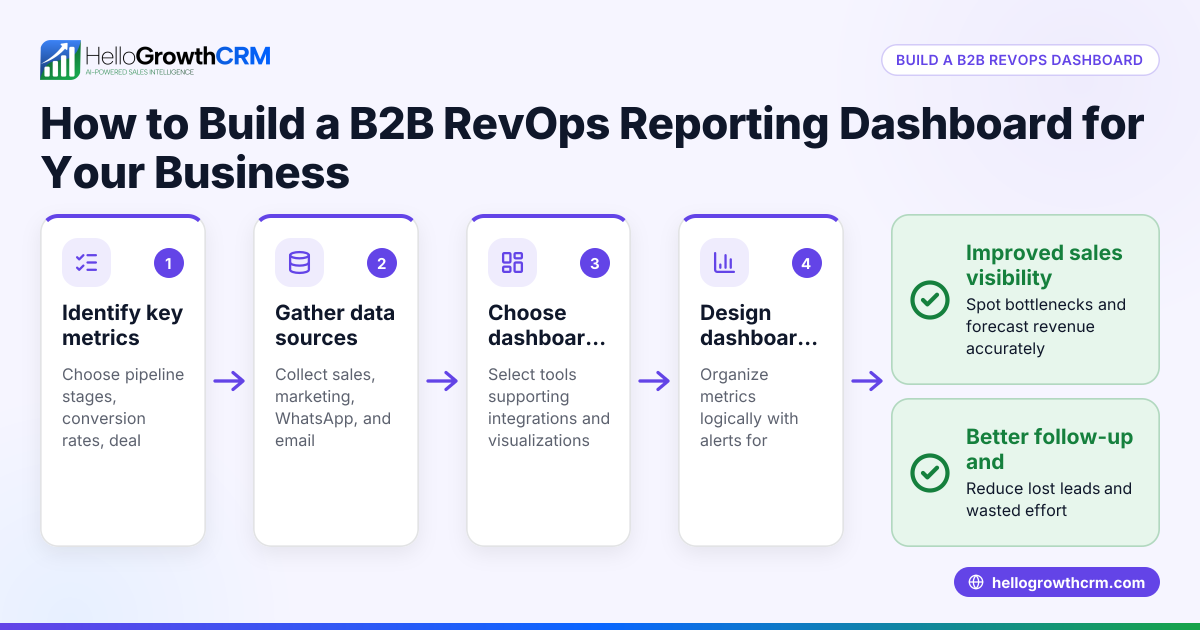
- Define your key RevOps metrics: Identify what you want to track, such as lead volume, conversion rates, deal velocity, pipeline stages, and revenue forecasts. Check these align with your business goals.
- Identify data sources: List where your sales and marketing data currently reside—web forms, emails, WhatsApp messages, CRM entries, spreadsheets.
- Choose your dashboard tool: Decide whether to build your dashboard in Excel, Google Sheets, a BI tool, or within your CRM if it supports reporting.
- Design the dashboard layout: Plan a clear view showing pipeline stages, deal values, forecasted revenue, and activity metrics side by side.
- Integrate data feeds: Connect your data sources to your dashboard, either manually or via automation tools, to ensure real-time or regular updates.
- Set up pipeline forecasting: Use historical data to project expected deal closures and revenue by pipeline stage.
- Create alerts and task boards: Include notifications for stalled deals and follow-up tasks to keep your team accountable.
- Review and iterate weekly: Regularly check the dashboard accuracy and update metrics or data connections as your business evolves.
- Train your team: Make sure sales and operations teams understand how to use the dashboard for daily decision-making.
- Monitor outcomes: Use the dashboard insights to improve lead response times, prioritise deals, and forecast revenue confidently.
For more on sales forecasting and pipeline management, see built-in CRM dialer and WhatsApp and SMS CRM.
Example (fictional figures)
A landscaping company in Newcastle, NSW, wants to build a RevOps dashboard to track its sales pipeline and forecast revenue for the quarter starting 01/07/2024.
- Total leads captured in June: 120
- Average deal size: A$5,000
- Conversion rate from lead to customer: 25%
- Average sales cycle: 30 days
Step 1: Calculate expected deals closing this quarter:
120 leads × 25% conversion = 30 deals
Step 2: Calculate forecasted revenue:
30 deals × A$5,000 = A$150,000
Step 3: Break down by pipeline stages:
- Prospecting: 40 leads (A$200,000 potential)
- Qualification: 30 leads (A$150,000 potential)
- Proposal: 20 leads (A$100,000 potential)
- Negotiation: 10 leads (A$50,000 potential)
Step 4: Use pipeline velocity and historical close rates to adjust forecast:
Assuming 60% of proposals close, 40% of negotiations close:
Proposals closing: 20 × 60% = 12 deals Negotiations closing: 10 × 40% = 4 deals
Forecasted revenue:
(12 + 4) deals × A$5,000 = 16 deals × A$5,000 = A$80,000
This dashboard helps the owner see where deals stall and forecast realistic revenue, enabling better resource allocation.
Common mistakes
- Overcomplicating the dashboard: Avoid tracking too many metrics initially. Focus on key revenue drivers to keep the dashboard clear. Review and add metrics gradually.
- Ignoring data quality: Poor or outdated data leads to wrong conclusions. Regularly clean your pipeline and update lead statuses. Using tools like HelloGrowthCRM’s managed RevOps can help maintain hygiene.
- Not automating data updates: Manual data entry causes delays and errors. Automate data capture from web forms and messaging apps where possible.
- Neglecting team training: A dashboard is useless if the team doesn’t use it. Provide training and integrate dashboard reviews into weekly meetings.
- Failing to act on insights: Reporting is only valuable if it drives action. Set up alerts for stalled deals and assign follow-up tasks.
- Using multiple disconnected tools: Scattered data across email, spreadsheets, and messaging apps slows reporting. Consolidate into a single CRM platform.
Learn how to centralise communication with WhatsApp and SMS CRM.
Doing this in HelloGrowthCRM
HelloGrowthCRM offers Pipeline forecast and AI insights that show which pipeline stages deals are stalling in without building spreadsheets. This helps owners quickly identify bottlenecks. For founders without a sales manager, the Managed RevOps service assigns a revenue specialist to work the follow-up queue weekly, clean the pipeline, and provide KPI reports. This support ensures consistent lead engagement and pipeline hygiene. Learn more about these features at HelloGrowthCRM for Australia.
Frequently asked questions
What metrics should I include in a B2B RevOps dashboard? Focus on lead volume, conversion rates, deal velocity, pipeline stage values, and revenue forecasts. These metrics help track sales health and identify bottlenecks.
How often should I update my RevOps dashboard? Weekly updates are ideal to keep data current and actionable. Automate data capture to reduce manual work and ensure timely insights.
Can I build a RevOps dashboard without technical skills? Yes. Start with simple tools like Excel or Google Sheets, or use CRM platforms with built-in forecasting and reporting features. Training your team on dashboard use is key.
How does pipeline forecasting improve sales performance? Forecasting projects expected deal closures based on current pipeline data and past trends. This helps prioritise high-value deals and allocate resources effectively.
What is Managed RevOps and how can it help my business? Managed RevOps is a done-for-you service where a revenue specialist manages follow-up tasks, cleans the pipeline, and provides reports. This support keeps your sales process running smoothly without needing a full-time sales manager.
Key takeaways
- Define clear RevOps metrics aligned with your business goals.
- Consolidate sales and marketing data into one dashboard.
- Automate data updates for accuracy and timeliness.
- Use pipeline forecasting to anticipate revenue and spot stalled deals.
- Train your team to use the dashboard for daily decision-making.
- Consider Managed RevOps support to maintain pipeline hygiene and follow-up.
Start simplifying your revenue operations today. Start on the Free Forever plan (200 leads, no credit card).
Ready to put this into practice?
Set up your pipeline, WhatsApp follow-ups, and AI lead scoring in minutes — free, no credit card.
Try HelloGrowthCRM freeGet CRM tips in your inbox
Join thousands of sales professionals who get weekly insights on CRM strategy, AI automation, and pipeline optimization.

The HelloGrowthCRM team publishes guides on CRM strategy, AI sales tools, and revenue operations for small business sales teams.