HelloGrowthCRM software
Built for real small-business sales teams
HelloGrowthCRM helps reps qualify faster, follow up on time, and close more deals—with practical automation in one place.
- AI lead scoring and pipeline visibility
- Built-in dialer, WhatsApp, and email automation
- Sales forecasting and RevOps-ready reporting
A buggy rental CRM causes lost leads, confused bookings and frustrated teams. To avoid this, check software stability, user feedback, integrations and support before buying. This article explains why buggy rental CRM issues happen, steps to vet rental CRM systems, a worked UK example, common pitfalls, and how HelloGrowthCRM can help streamline your rental business.
Why this comes up / what goes wrong
Small UK rental businesses often search for rental CRM software to organise bookings, customer contacts and follow-ups. However, many rental CRM products are buggy — meaning they crash, lose data, or have unreliable features. This leads to missed rental opportunities, double bookings, slow lead follow-up, and wasted staff time. Owners may have tried free or cheap software that wasn’t designed for rentals or wasn’t tested thoroughly, or they rely on multiple disconnected tools like WhatsApp, email and spreadsheets. The frustration grows when bugs appear during busy periods or software updates cause new problems.
Step-by-step
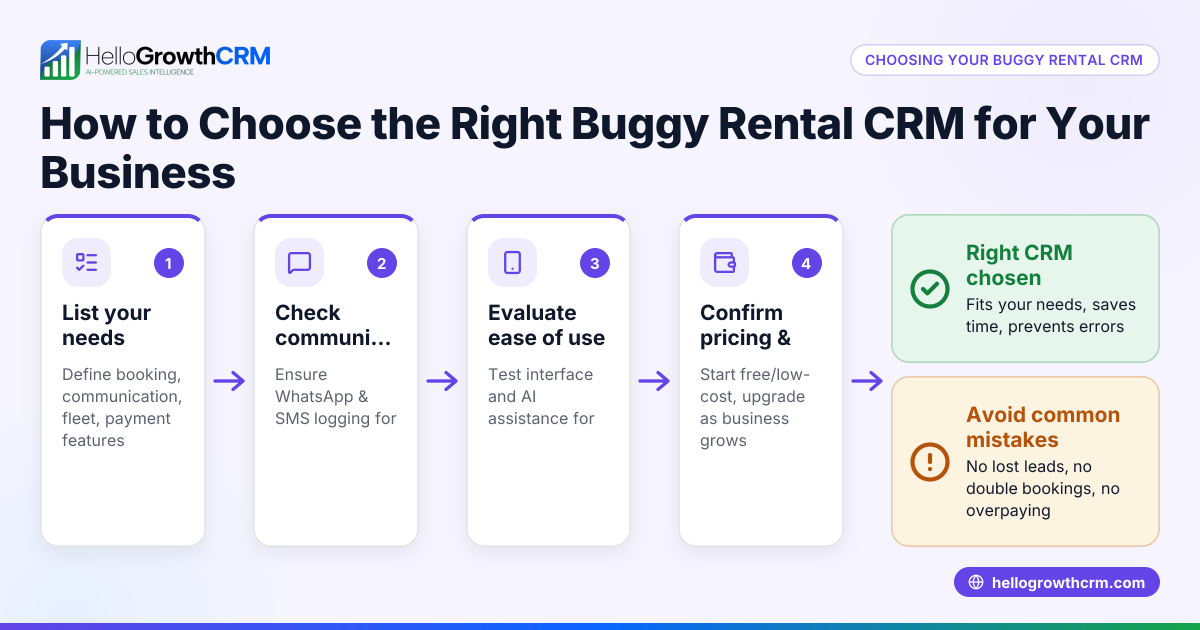
- Identify your rental business needs clearly: List must-have features such as booking management, lead capture, calendar sync, customer messaging, and reporting. Check if you need WhatsApp or SMS communication integrated.
- Research CRM options with a focus on rental businesses: Look for software that explicitly supports rental workflows and has positive reviews from similar UK businesses.
- Test software stability and bug history: Ask vendors for a demo and trial period. During trials, deliberately test booking creation, cancellation, and lead follow-up to spot glitches.
- Check integration capabilities: Confirm the CRM can connect with your existing tools like web forms, WhatsApp, email, or accounting software. Poor integration often causes bugs.
- Evaluate user experience and team adoption: A buggy CRM often has a confusing interface causing errors. Get your team involved in testing to ensure they find it intuitive.
- Review vendor support and update policies: Ensure there is responsive UK-based support and regular software updates that fix bugs rather than introduce new ones.
- Consider automation features cautiously: Automation like AI drafting follow-ups can save time but test these features carefully to avoid errors in customer communication.
- Check pricing and contract terms: Avoid long contracts if the software is unproven. Opt for a Free Forever plan or short-term subscriptions to reduce risk.
Example (fictional figures)
A Birmingham-based buggy rental company, "Birmingham Buggy Rentals Ltd", manages 150 active leads monthly. They trialled two CRMs before choosing one.
- Monthly leads: 150
- Average booking value: £120
- Conversion rate with buggy CRM: 20%
- Conversion rate with stable CRM: 30%
Calculations:
Leads converted with buggy CRM: 150 × 20% = 30 bookings
Revenue with buggy CRM: 30 × £120 = £3,600
Leads converted with stable CRM: 150 × 30% = 45 bookings
Revenue with stable CRM: 45 × £120 = £5,400
Difference in monthly revenue: £5,400 - £3,600 = £1,800
This shows that fixing buggy CRM issues can increase monthly revenue by £1,800.
Common mistakes
- Ignoring trial testing: Prevent by always testing critical functions during a free trial.
- Overlooking integration needs: Prevent by verifying all current tools connect smoothly.
- Choosing software without UK support: Prevent by selecting vendors with local or responsive support.
- Not involving the team: Prevent by including users in demos and feedback.
- Rushing into long contracts: Prevent by starting with no-cost or short-term plans.
- Underestimating automation risks: Prevent by monitoring AI-generated messages before sending.
Doing this in HelloGrowthCRM
HelloGrowthCRM supports rental businesses with WhatsApp and SMS messaging where conversations with leads are logged on their records and follow-ups can be sent as messages, ensuring no communication is lost. Its AI agents (in Beta on Growth plans) draft follow-up messages after calls, so reps only review and send, reducing errors and time spent. The Free Forever plan allows a two-person team to run their pipeline at no cost until they need calling or WhatsApp automation, making it easy to start without risk. Learn more about WhatsApp and SMS CRM and the built-in CRM dialer features.
Frequently asked questions
What causes a rental CRM to be buggy? Bugs often come from poor software testing, incompatible integrations, or rushed updates. Rental CRMs that are not designed for the specific workflows of rental businesses may also struggle to handle bookings and communications correctly.
How can I test if a rental CRM is reliable before buying? Use free trials to test booking creation, lead follow-up, cancellations and integrations. Involve your team to check usability and watch for crashes or data loss. Ask vendors about their update and support policies.
Is automation safe to use in rental CRM follow-ups? Automation can save time but should be tested carefully. AI drafting follow-ups, like in HelloGrowthCRM, requires rep review before sending to avoid errors or inappropriate messages.
Can I use WhatsApp for rental CRM communications? Yes, integrating WhatsApp into your CRM helps keep all messages logged and organised. HelloGrowthCRM is WhatsApp-native, making it easier to engage leads on channels they already use.
What if my rental CRM vendor does not offer UK support? Lack of local support can delay bug fixes and cause frustration. Choose vendors with responsive UK-based support or clear communication channels.
Key takeaways
- Test rental CRM software thoroughly before committing to avoid buggy issues.
- Check integration with your existing tools, especially WhatsApp and email.
- Involve your team in testing to ensure the CRM is user-friendly and reliable.
- Start with a free or short-term plan to reduce risk.
- Use AI-powered features cautiously and always review automated messages.
- Responsive vendor support is crucial for resolving bugs quickly.
Choosing the right rental CRM can prevent lost leads and improve your booking process. Start with HelloGrowthCRM’s Free Forever plan for up to two users with 200 leads and no credit card required. Explore how it handles WhatsApp and SMS communications and AI-assisted follow-ups to keep your rental business running smoothly. Visit Start on the Free Forever plan (200 leads, no credit card) to begin.
Ready to put this into practice?
Set up your pipeline, WhatsApp follow-ups, and AI lead scoring in minutes — free, no credit card.
Try HelloGrowthCRM freeGet CRM tips in your inbox
Join thousands of sales professionals who get weekly insights on CRM strategy, AI automation, and pipeline optimization.

The HelloGrowthCRM team publishes guides on CRM strategy, AI sales tools, and revenue operations for small business sales teams.