HelloGrowthCRM software
Built for real small-business sales teams
HelloGrowthCRM helps reps qualify faster, follow up on time, and close more deals—with practical automation in one place.
- AI lead scoring and pipeline visibility
- Built-in dialer, WhatsApp, and email automation
- Sales forecasting and RevOps-ready reporting
Yes, you can often tell when someone opens your email by using email tracking tools that embed tiny, invisible images or request read receipts. These methods notify you when the recipient's email client loads the tracking pixel or confirms the email was opened. This article covers why small-business owners want to track email opens, how to set it up step-by-step, common mistakes to avoid, a practical example, and how HelloGrowthCRM helps with email follow-up.
Why this comes up / what goes wrong
Small-business owners and sales teams often send important emails like quotes, proposals, or follow-ups and want to know if and when the prospect opens them. Without this insight, it’s hard to prioritize leads or time follow-ups effectively. Many rely on text messages, spreadsheets, or basic email clients that don’t show open status, leading to missed opportunities or slow responses. Knowing when an email is opened helps you engage prospects at the right moment, increasing chances of conversion.
Step-by-step
- Choose an email tracking tool or service. Many email marketing platforms and CRMs offer email open tracking by embedding a tiny invisible image (tracking pixel) in your emails.
- Set up tracking in your email client or CRM. Enable open tracking in your email platform settings or use a CRM like HelloGrowthCRM that supports email sequences with tracking.
- Send your email as usual. The tracking pixel loads when the recipient opens the email, sending a notification back to your system.
- Monitor notifications or reports. Check your email platform or CRM dashboard for alerts or reports showing who opened your emails and when.
- Use this information to prioritize follow-ups. Reach out promptly to engaged prospects who opened your emails to increase your chances of closing the deal.
- Respect privacy and legal considerations. Be aware that some recipients disable image loading or use email clients that block tracking pixels, so open rates are not fully reliable. Always follow applicable laws regarding email tracking and privacy.
Example (fictional figures)
A landscaping contractor in Charlotte, North Carolina, sends a $5,000 quotation email on 04/10/2026. Using email tracking, they see the prospect opened the email twice on 04/11/2026.
- Quotation value = $5,000
- Email sent on 04/10/2026
- Email opened twice on 04/11/2026
Based on this, the contractor prioritizes a follow-up call the same day, increasing the chance to close the deal quickly.
Common mistakes
- Relying solely on open tracking. Some recipients disable images or use text-only clients, so absence of an open notification doesn’t mean the email wasn’t read. Prevent this by combining open tracking with follow-up sequences. See email automation and sequences.
- Ignoring privacy laws. Tracking without disclosure can violate laws like the CAN-SPAM Act or GDPR. Prevent this by including privacy notices and respecting unsubscribe requests.
- Not following up promptly. Knowing an email was opened is only useful if you act quickly. Prevent this by automating follow-ups with tools like HelloGrowthCRM’s sequences.
- Using personal email clients without tracking. Basic email apps don’t show open status. Prevent this by switching to CRM tools with built-in tracking and shared inboxes.
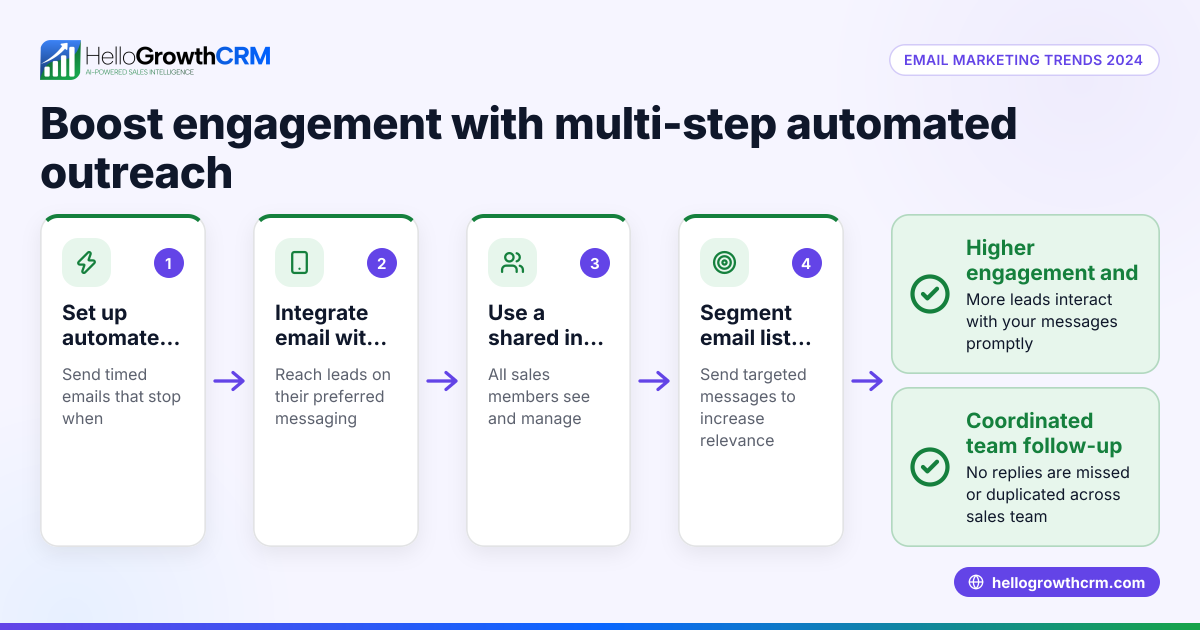
- Overloading prospects with emails. Excessive follow-ups can annoy leads. Prevent this by setting limits and stopping sequences once a reply is received, as in HelloGrowthCRM.
Doing this in HelloGrowthCRM
HelloGrowthCRM offers a shared inbox where replies to quotation emails are visible to your whole team, preventing missed messages on deals. Its sequences and campaigns feature runs automated five-step follow-ups over two weeks, stopping immediately when the prospect replies. For founders without a sales manager, Managed RevOps assigns someone to regularly work the follow-up queue, ensuring timely engagement. Learn more about WhatsApp and SMS CRM and email automation and sequences.
Frequently asked questions
Can email open tracking guarantee a recipient read my email? No, open tracking shows when an email is opened if images load, but recipients can disable images or use clients that block tracking. It’s a helpful indicator but not 100% reliable.
Is email open tracking legal? Email open tracking is subject to privacy laws like CAN-SPAM and GDPR. Always disclose tracking in your privacy policy and honor unsubscribe requests.
Can I track email opens on any email client? Tracking depends on the recipient’s email client loading images or sending read receipts. Some clients block this, so tracking may not work universally.
How can I improve follow-up after tracking email opens? Use automated sequences that trigger follow-ups based on opens or non-responses. HelloGrowthCRM offers this feature to streamline your outreach and increase response rates.
Will tracking slow down sending emails? No, embedding tracking pixels adds negligible size and does not affect sending speed significantly.
Key takeaways
- You can tell when someone opens your email using tracking pixels or read receipts, but it’s not 100% reliable.
- Set up tracking through your email client or CRM and monitor open notifications to prioritize follow-ups.
- Combine tracking with automated sequences to follow up promptly without manual effort.
- Respect privacy laws by disclosing tracking and honoring unsubscribe requests.
- HelloGrowthCRM supports email follow-up with shared inboxes, automated sequences, and Managed RevOps to keep your sales moving.
Start tracking your email opens and improve your follow-up today. Start on the Free Forever plan (200 leads, no credit card).
Ready to put this into practice?
Set up your pipeline, WhatsApp follow-ups, and AI lead scoring in minutes — free, no credit card.
Try HelloGrowthCRM freeGet CRM tips in your inbox
Join thousands of sales professionals who get weekly insights on CRM strategy, AI automation, and pipeline optimization.

The HelloGrowthCRM team publishes guides on CRM strategy, AI sales tools, and revenue operations for small business sales teams.