HelloGrowthCRM software
Built for real small-business sales teams
HelloGrowthCRM helps reps qualify faster, follow up on time, and close more deals—with practical automation in one place.
- AI lead scoring and pipeline visibility
- Built-in dialer, WhatsApp, and email automation
- Sales forecasting and RevOps-ready reporting
Customer service queues are organized systems that list and prioritize all incoming customer requests, such as support tickets, inquiries, or service requests. They ensure that each request is addressed in a timely and efficient manner, preventing delays or lost communications that can frustrate customers and hurt your business.
Why this comes up / what goes wrong
Many small business owners receive customer inquiries through multiple channels like email, phone calls, WhatsApp, SMS, or website forms. Without a clear queue system, these requests can get lost, delayed, or handled inconsistently. For example, a real estate team might get buyer questions via text and email, but without tracking, some requests go unanswered. Sales teams juggling leads and after-sale service without a queue can cause slow follow-up and chaotic workflows. This leads to frustrated customers, missed sales, and poor retention. Implementing customer service queues helps keep requests visible, prioritized, and assigned so no customer falls through the cracks.
Step-by-step
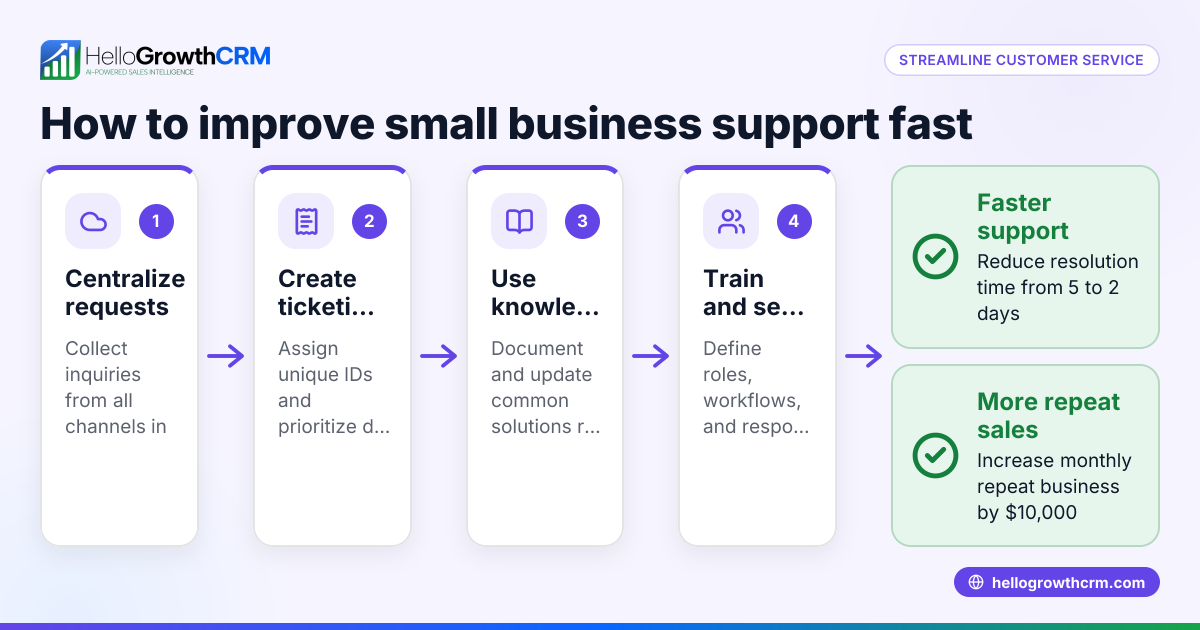
- Identify all customer service channels. List every way customers contact you, including email, phone, WhatsApp, SMS, and web forms. Plan to funnel all requests into one queue system.
- Choose a method to capture requests. Use software or spreadsheets to log each incoming request with a timestamp, customer details, and channel. This creates a clear list to work from.
- Set priority rules. Decide if requests are handled in the order received or by urgency. For example, urgent issues or high-value customers get served first.
- Assign requests to team members. Distribute requests clearly so each ticket has an owner responsible for follow-up and resolution.
- Track status and progress. Update each request’s status (open, in progress, resolved) to keep the queue current and visible.
- Review the queue regularly. Check daily or weekly for bottlenecks, overdue tickets, or unassigned requests to maintain good response times.
- Use customer feedback to improve. Monitor satisfaction scores and adjust queue rules or staffing based on trends.
Using a customer health score can help prioritize high-value customers who need faster service.
Example (fictional figures)
A residential real-estate team in Phoenix, Arizona, receives 50 customer service requests monthly and wants to reduce response delays and lost tickets.
- Total monthly requests: 50
- Average handling time per request: 1 hour
- Current delayed or lost requests: 10 (20%)
The team assigns 2 agents to handle these requests.
Each agent works 40 hours per month dedicated to service.
Calculate capacity per agent: 40 hours × 1 request per hour = 40 requests
Calculate total capacity: 2 agents × 40 requests = 80 requests
Since total capacity (80) exceeds total requests (50), the team can handle all requests without delay if properly queued.
After implementing a queue system, delayed requests drop from 10 to 2, reducing delays from 20% to 4%, greatly improving customer satisfaction.
Common mistakes
- Ignoring multi-channel requests: Prevent this by consolidating all inquiries into one queue system to avoid lost messages.
- No clear ownership: Assign each request to a specific team member to ensure responsibility.
- Lack of priority rules: Define urgency levels and handle accordingly to serve critical requests first.
- Not updating status: Regularly track and mark ticket progress to keep the queue accurate.
- Failing to review the queue: Schedule daily or weekly reviews to catch bottlenecks and overdue tickets.
- Overloading agents: Monitor workload and adjust assignments to prevent burnout.
Integrating a WhatsApp and SMS CRM helps capture messages automatically into your queue, reducing manual errors and missed requests.
Doing this in HelloGrowthCRM
HelloGrowthCRM offers a branded self-service customer portal where customers can submit tickets directly. Service requests stay on the same customer record as the deal, keeping all information connected. The platform includes tickets and a knowledge base to help your team manage inquiries efficiently and provide consistent answers. Referral tracking and a support ticket system help streamline after-sale service, making it easier to maintain customer satisfaction and loyalty.
Frequently asked questions
What is the difference between a customer service queue and a ticketing system? A customer service queue is the organized list of requests waiting to be handled, while a ticketing system is the software that creates, tracks, and manages those requests. Queues determine the order and priority of tickets.
How do I prioritize customer service requests? Prioritize based on factors like customer value, issue urgency, or how long the request has been waiting. Using a customer health score helps identify which customers need faster service.
Can I manage customer service queues without software? Yes, you can start with spreadsheets or manual logs. However, software improves accuracy, tracking, and team collaboration, especially as your business grows.
How does HelloGrowthCRM handle customer service queues? HelloGrowthCRM centralizes service requests on the customer record, supports tickets and a knowledge base, and offers a customer portal for self-service, helping teams stay organized and responsive.
Why is reviewing the queue regularly important? Regular reviews prevent backlog, ensure timely responses, and help identify process improvements to keep customers satisfied.
Key takeaways
- Customer service queues organize and prioritize incoming requests to improve response time.
- Small businesses often lose or delay requests without a proper queue system.
- Set up queues by capturing all requests, assigning ownership, and tracking status.
- Avoid common mistakes like unclear ownership and lack of prioritization.
- HelloGrowthCRM’s customer portal, tickets, and knowledge base help manage service requests efficiently.
Start managing your customer service queues today to keep customers happy and your team organized. Start on the Free Forever plan (200 leads, no credit card).
Ready to put this into practice?
Set up your pipeline, WhatsApp follow-ups, and AI lead scoring in minutes — free, no credit card.
Try HelloGrowthCRM freeGet CRM tips in your inbox
Join thousands of sales professionals who get weekly insights on CRM strategy, AI automation, and pipeline optimization.

The HelloGrowthCRM team publishes guides on CRM strategy, AI sales tools, and revenue operations for small business sales teams.