HelloGrowthCRM software
Built for real small-business sales teams
HelloGrowthCRM helps reps qualify faster, follow up on time, and close more deals—with practical automation in one place.
- AI lead scoring and pipeline visibility
- Built-in dialer, WhatsApp, and email automation
- Sales forecasting and RevOps-ready reporting
An email content management system (CMS) is software that helps businesses organize, store, and manage their email communications and templates efficiently. For small businesses, it means having a centralized place to handle incoming and outgoing emails, automate follow-ups, and keep your team aligned. This article covers why small businesses look for email CMS, how to evaluate options step-by-step, a practical example, common mistakes to avoid, and how HelloGrowthCRM supports these needs.
Why this comes up / what goes wrong
Small-business owners often find themselves juggling multiple tools like email clients, spreadsheets, and notes to manage customer communications. Leads and customer emails get lost or duplicated because there’s no shared system. Follow-ups are slow or inconsistent, causing lost sales opportunities. Without a dedicated email content management system, teams struggle to track conversations, reuse effective email content, and automate outreach sequences. This leads to inefficiency, missed deals, and frustration.
Step-by-step
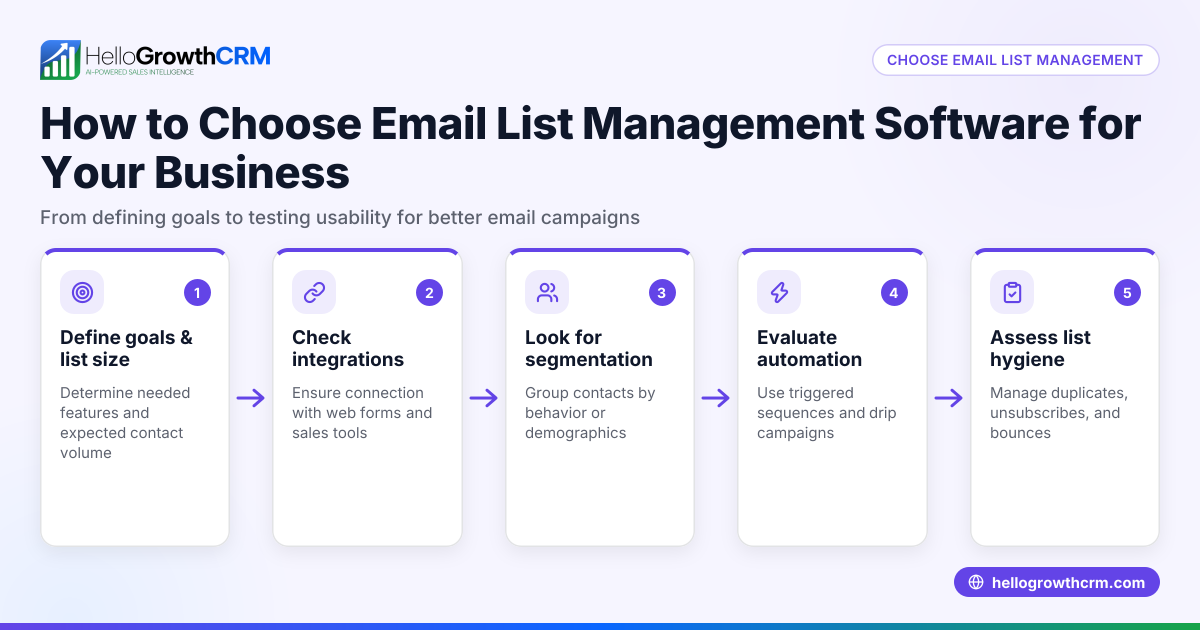
- Identify Your Needs: List what you want from an email CMS. Common needs include shared inboxes, email templates, automation of follow-ups, integration with lead capture, and reporting.
- Check Integration Capabilities: Ensure the system can connect with your existing tools like web forms, CRM, or communication channels such as WhatsApp and SMS.
- Evaluate Email Automation Features: Look for multi-step email sequences that can run on their own and pause when a prospect replies. This saves manual effort and keeps follow-ups timely. See email automation and sequences.
- Assess Team Collaboration Tools: The system should allow multiple team members to access and respond to emails without overlaps or missed messages. A shared inbox visible to the whole team is key.
- Review Lead Management Integration: Check if incoming inquiries from forms, calls, or messaging apps automatically become leads with assigned owners and next steps, rather than scattered notes. This centralization helps keep sales pipelines moving. HelloGrowthCRM’s Leads feature does this well.
- Consider Usability and Adoption: The system must be easy for your team to use daily. Complex setups or separate apps reduce adoption.
- Compare Pricing and Plans: Match features to your budget but prioritize functionality that improves response speed and team coordination.
- Test with a Trial or Demo: Use a trial period to test real workflows and ensure the system fits your business style.
Example (fictional figures)
GreenLeaf Landscaping, a landscaping contractor in Charlotte, North Carolina, wants to improve how they manage email inquiries and follow-ups. They receive about 50 leads monthly through their website and phone calls.
- Monthly leads: 50
- Average deal size: $3,000
- Current conversion rate: 10% (5 deals)
After adopting an email CMS with automation and shared inbox features, they aim to increase conversion to 15% (7.5 deals rounded to 8).
Calculation of additional revenue:
Current revenue: $3,000 × 5 = $15,000
Projected revenue: $3,000 × 8 = $24,000
Additional revenue: $24,000 - $15,000 = $9,000
By improving email follow-up speed and consistency with automated sequences running over two weeks and shared inbox visibility, GreenLeaf expects to gain $9,000 more monthly.
Common mistakes
- Ignoring team visibility: When emails are handled individually without a shared inbox, responses get duplicated or missed. Prevent by choosing a system with shared inbox features like HelloMail.
- Lack of automation: Manually sending follow-ups leads to delays or forgetfulness. Use sequences and campaigns to automate this process. See email automation and sequences.
- No lead assignment: Leads scattered in notebooks or spreadsheets cause confusion. Use a CRM that automatically captures and assigns leads with next steps, such as HelloGrowthCRM’s Leads feature.
- Overcomplicating setup: Complex systems that require multiple apps or integrations reduce team adoption. Choose an integrated system that combines email, lead capture, and messaging.
- Not testing workflows: Skipping trials can lead to buying software that doesn’t fit your workflow. Always test before committing.
- Neglecting multi-channel communication: Limiting follow-ups to email misses chances to reach prospects on WhatsApp or SMS. Consider systems that support these channels. See WhatsApp and SMS CRM.
Doing this in HelloGrowthCRM
HelloGrowthCRM offers a shared inbox called HelloMail where replies to quotation emails are visible to the whole team on the deal, preventing missed or duplicated responses. Every inquiry from forms, calls, or WhatsApp lands as a lead with an owner and a next step, keeping follow-ups organized. The platform also supports sequences and campaigns—automated five-step follow-ups over two weeks that stop as soon as the prospect replies, saving time and improving response rates. Learn more at email automation and sequences.
Frequently asked questions
What is an email content management system? An email content management system organizes and manages your email communications, templates, and follow-ups in a centralized platform. It helps teams collaborate on emails, automate outreach, and keep track of customer interactions.
How does email automation improve sales follow-up? Email automation sends scheduled messages and reminders automatically, ensuring timely follow-ups without manual effort. Automated sequences pause when a prospect replies, preventing over-contacting.
Can an email CMS handle multiple communication channels? Some email CMS platforms integrate other channels like WhatsApp and SMS, allowing you to reach prospects where they are most responsive. This multi-channel approach increases engagement.
Why is a shared inbox important for small teams? A shared inbox lets the entire team see and manage incoming emails together. This prevents duplicated responses, missed messages, and keeps everyone informed on deal status.
How do I know if an email CMS will work for my existing sales process? Look for systems that integrate with your lead capture tools and allow easy assignment of leads with next steps. Testing the system with your team during a trial helps confirm fit.
Key takeaways
- An email content management system centralizes email communication and follow-ups for small businesses.
- Key features include shared inboxes, automated sequences, and integrated lead capture.
- Avoid common mistakes like lack of automation, no lead assignment, and poor team visibility.
- Testing the system before purchase ensures it fits your workflow and team.
- HelloGrowthCRM supports these needs with HelloMail shared inbox, Leads capture, and automated sequences.
Start simplifying your email management and follow-ups today. Start on the Free Forever plan (200 leads, no credit card).
Ready to put this into practice?
Set up your pipeline, WhatsApp follow-ups, and AI lead scoring in minutes — free, no credit card.
Try HelloGrowthCRM freeGet CRM tips in your inbox
Join thousands of sales professionals who get weekly insights on CRM strategy, AI automation, and pipeline optimization.

The HelloGrowthCRM team publishes guides on CRM strategy, AI sales tools, and revenue operations for small business sales teams.