HelloGrowthCRM software
Built for real small-business sales teams
HelloGrowthCRM helps reps qualify faster, follow up on time, and close more deals—with practical automation in one place.
- AI lead scoring and pipeline visibility
- Built-in dialer, WhatsApp, and email automation
- Sales forecasting and RevOps-ready reporting
Cold emails often fail because they feel generic and irrelevant. Personalizing cold emails means making each message feel like it was written specifically for the recipient. This increases the chances they will read and respond. Many small business owners struggle to do this efficiently without wasting time or sounding insincere.
Why this comes up / what goes wrong
Small business owners and sales teams often send cold emails in bulk using generic templates. They might only insert the prospect’s first name, missing deeper personalization that shows understanding of the prospect’s business or challenges. This leads to low response rates and wasted effort. Without a clear process, personalization can seem time-consuming or complicated.
Step-by-step
- Research your prospect: Look up the prospect’s name, job title, company, and recent news or achievements. Check their LinkedIn profile or company website. Confirm spelling and details.
- Identify a specific pain point or need: Based on your research, find one or two challenges your prospect likely faces that your product or service can solve.
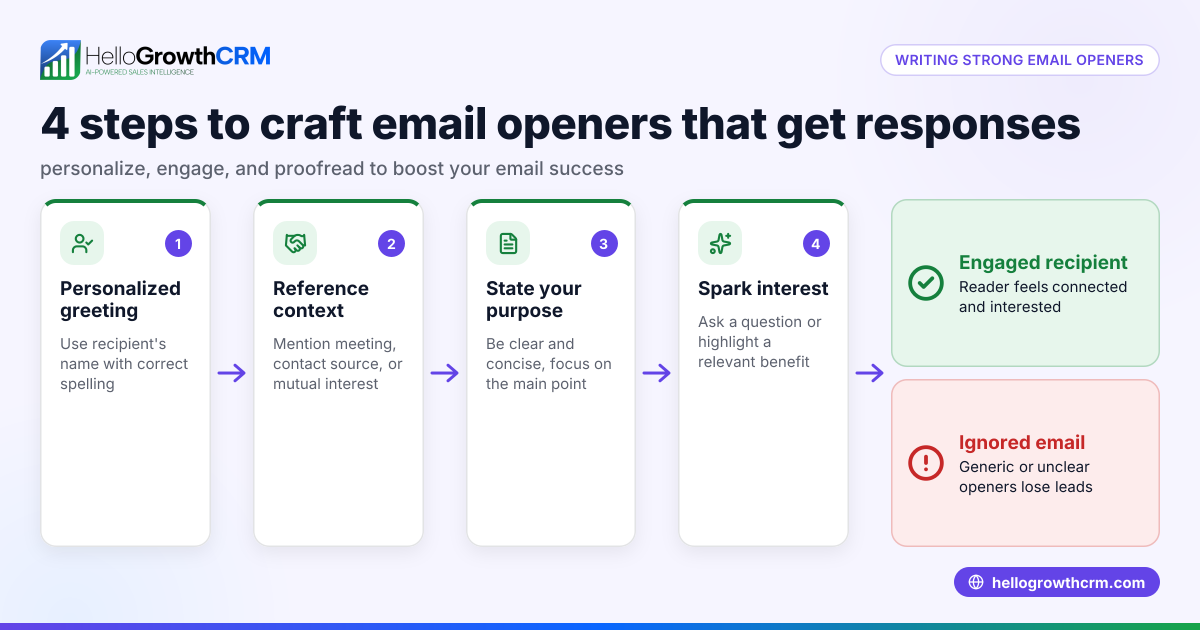
- Write a personalized subject line: Include the prospect’s name or company and hint at the value you offer. Example: “Helping Columbus Dental Practice Boost Patient Retention.”
- Open with a personal connection: Start your email by mentioning something specific about the prospect or their business, such as a recent event or achievement.
- Explain how you can help: Briefly describe how your product or service addresses the pain point you identified.
- Include a clear call to action (CTA): Ask for a meeting, call, or reply to discuss further.
- Proofread and check for errors: Make sure names and details are correct to avoid looking careless.
- Use email automation and sequences to schedule follow-ups if no reply is received. This keeps your outreach consistent without extra manual effort. See email automation and sequences.
- Track responses and update your CRM: Keep notes on replies and next steps.
Example (fictional figures)
A two-location dental practice in Columbus, Ohio, "SmileBright Dental," wants to increase patient retention. You find Dr. Jane Smith is the office manager.
- Research: Dr. Smith recently posted about expanding pediatric services.
- Pain point: Retaining pediatric patients as they grow older.
- Subject line: “Dr. Smith, helping SmileBright Dental keep young patients coming back”
- Email opening: “Hi Dr. Smith, I saw your recent post about expanding pediatric care at SmileBright Dental. Congratulations on the growth!”
- How you help: “Our appointment reminder system reduces no-shows by 20%, which can help keep your young patients engaged as they transition through age groups.”
- CTA: “Could we schedule a 15-minute call next week to discuss how this fits your goals?”
- Proofread: Confirm spelling of "Dr. Smith" and "SmileBright Dental."
- Follow-up: Set an automated email to send if no reply in 3 days.
Common mistakes
- Using generic templates without customization: Prevent by always adding at least the prospect’s name and a relevant detail.
- Missing or misspelling names and company details: Double-check all names and spellings before sending.
- Overloading the email with too much information: Keep messages concise and focused on one main benefit.
- Forgetting a clear call to action: Always include a simple next step.
- Not following up: Use email automation and sequences to schedule polite reminders.
- Ignoring data tracking: Update your CRM with outcomes to refine your approach.
Doing this in HelloGrowthCRM
HelloGrowthCRM includes a built-in dialer that lets reps work a lead list directly inside the CRM. Each call’s outcome is logged on the lead record, keeping contact and deal history organized. This helps sales teams follow up efficiently after sending personalized cold emails and track all communication in one place. Learn more about the dialer at built-in CRM dialer.
Frequently asked questions
How much personalization is enough in cold emails? Personalization should at least include the prospect’s name, company, and a relevant detail showing you understand their business. Over-personalizing can be time-consuming; focus on key points that matter most to the prospect.
Can I automate personalized cold emails? Yes, using email automation and sequences can help you send personalized emails at scale by inserting custom fields like names and company details automatically. See email automation and sequences for options.
What is a good follow-up strategy after a cold email? Wait a few days before sending a polite follow-up email after a cold email. If there’s still no response, try a phone call using a CRM with a built-in dialer. Consistent, respectful follow-ups improve response rates.
How do I avoid sounding salesy in cold emails? Focus on solving a problem or adding value rather than pushing a product. Use a conversational tone and avoid jargon.
Is it better to call or email after sending a cold email? Both methods can be effective. Use email for initial outreach and follow up with calls to build rapport. HelloGrowthCRM’s built-in dialer helps integrate calling into your workflow seamlessly.
Key takeaways
- Personalize cold emails by researching prospects and referencing specific details.
- Keep emails concise with a clear call to action.
- Use email automation and sequences for consistent follow-ups.
- Avoid common mistakes like misspellings and generic templates.
- Track all communications and outcomes in your CRM.
- Combine email with phone calls using a built-in dialer for better results.
Start personalizing your cold emails today and improve your outreach success. To manage your leads and calls in one place, start on the Free Forever plan (200 leads, no credit card).
Ready to put this into practice?
Set up your pipeline, WhatsApp follow-ups, and AI lead scoring in minutes — free, no credit card.
Try HelloGrowthCRM freeGet CRM tips in your inbox
Join thousands of sales professionals who get weekly insights on CRM strategy, AI automation, and pipeline optimization.

The HelloGrowthCRM team publishes guides on CRM strategy, AI sales tools, and revenue operations for small business sales teams.