HelloGrowthCRM software
Built for real small-business sales teams
HelloGrowthCRM helps reps qualify faster, follow up on time, and close more deals—with practical automation in one place.
- AI lead scoring and pipeline visibility
- Built-in dialer, WhatsApp, and email automation
- Sales forecasting and RevOps-ready reporting
Using CRM templates for sales pipelines helps small and mid-sized businesses organize their sales process, track leads, and ensure timely follow-up. This guide will explain why pipeline templates are important, provide a step-by-step method to use them, show a realistic example, highlight common errors to avoid, and describe how HelloGrowthCRM can assist.
Why this comes up / what goes wrong
Many small business owners and sales teams run their sales using scattered tools like text messages, emails, and spreadsheets. This causes leads to slip through the cracks due to slow follow-up or lost information. Without a clear sales pipeline, it’s hard to know which deals need attention or when to follow up. CRM templates for sales pipelines provide a structured way to capture and track leads from first contact to close, reducing lost opportunities and improving sales efficiency.
Step-by-step
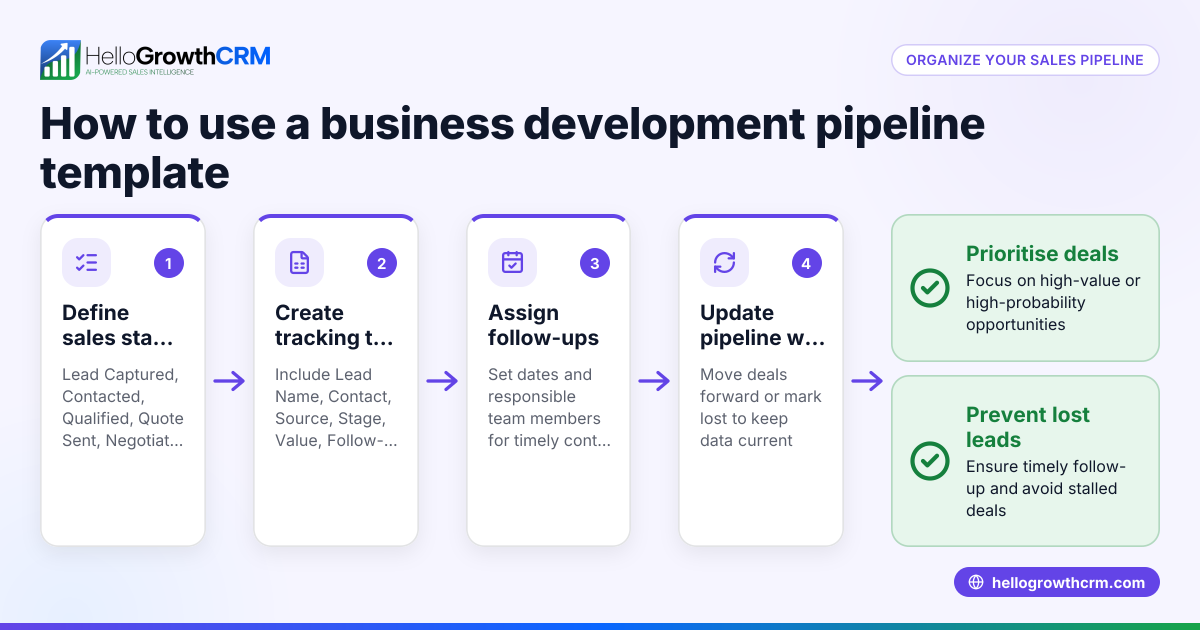
- Choose a CRM template that fits your sales process: Look for a sales pipeline template that includes stages like prospecting, contact made, quote sent, negotiation, and closed (won or lost). Check that the template has fields for deal value, contact info, and follow-up dates.
- Customize the stages and fields: Adjust the pipeline stages to match how your business operates. Rename or add stages if needed. Make sure fields for deal amount, expected close date, and notes are included.
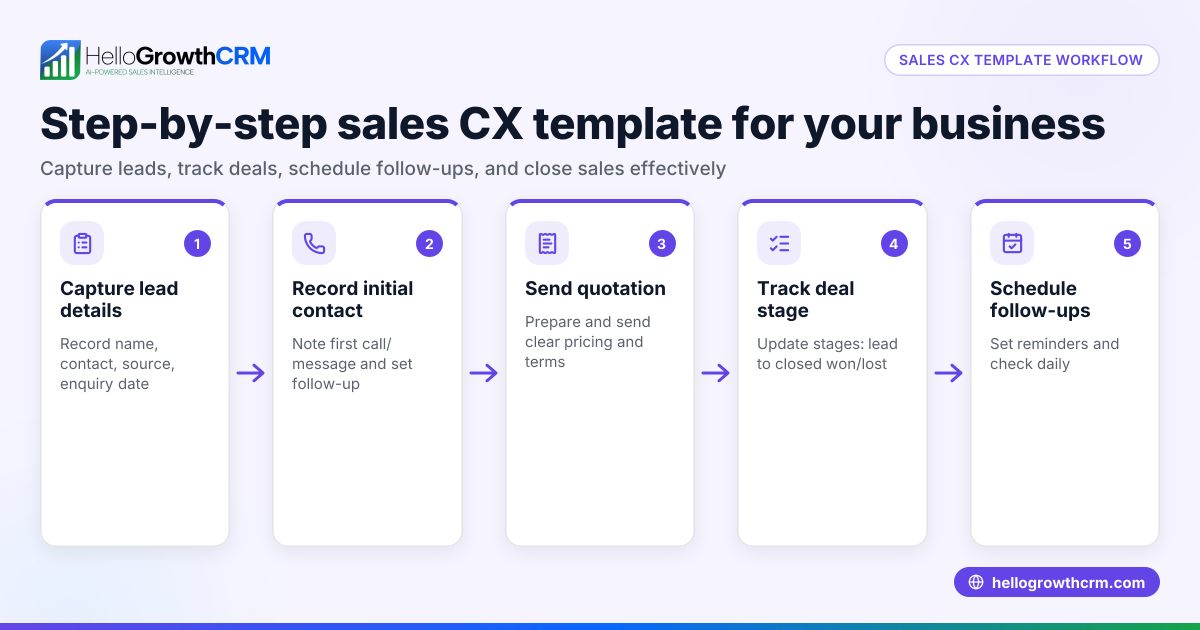
- Import or enter your leads and deals: Add your current leads into the pipeline template. Include all relevant data like contact information, deal value, and any notes.
- Assign follow-up tasks and dates: For each deal, set a follow-up date and task to remind you when to reach out next.
- Track deal progress by moving deals through stages: As you work each lead, update its stage in the pipeline. For example, move a deal from “quote sent” to “negotiation” after the client responds.
- Review and update regularly: Check your pipeline daily or weekly to update deal statuses, follow-up tasks, and add new leads.
- Analyze pipeline health and forecast sales: Use the pipeline data to see how many deals are in each stage and forecast potential revenue.
For more detailed templates, visit sales templates and use free tools at free sales tools and calculators.
Example (fictional figures)
A plumbing company in Austin, Texas, uses a CRM template to manage its sales pipeline. They have five deals currently:
| Deal | Stage | Deal Value | Follow-up Date |
|---|---|---|---|
| A | Quote Sent | $12,000 | 07/10/2024 |
| B | Negotiation | $8,000 | 07/12/2024 |
| C | Prospecting | $5,000 | 07/15/2024 |
| D | Contact Made | $10,000 | 07/09/2024 |
| E | Closed Won | $7,000 | N/A |
On 07/09/2024, the owner reviews the pipeline:
- Deal D is at "Contact Made" and follow-up is due today.
- Deal A is at "Quote Sent" with follow-up on 07/10/2024.
They call the client for Deal D and move it to "Quote Sent".
They forecast expected revenue by multiplying deal values by estimated close probabilities (assumed here):
- Deal A: $12,000 × 60% = $7,200
- Deal B: $8,000 × 50% = $4,000
- Deal C: $5,000 × 30% = $1,500
- Deal D: $10,000 × 60% = $6,000
- Deal E: $7,000 × 100% = $7,000
Total forecasted revenue = $7,200 + $4,000 + $1,500 + $6,000 + $7,000 = $25,700
This forecast helps plan staffing and inventory.
Common mistakes
- Not customizing the template: Using a generic pipeline without adjusting stages or fields can cause confusion. Prevent by tailoring the template to your sales process.
- Failing to update deal stages regularly: Leads can be forgotten if stages are not updated. Set reminders or use tools with follow-up queues.
- Ignoring follow-up tasks: Without scheduled follow-ups, leads go cold. Always assign follow-up dates.
- Overcomplicating the pipeline: Too many stages or fields can overwhelm your team. Keep it simple and clear.
- Not reviewing pipeline data for forecasting: Missing sales forecasts leads to poor business planning. Regularly analyze pipeline health.
For tips on pipeline hygiene and follow-up, see help center.
Doing this in HelloGrowthCRM
HelloGrowthCRM offers a Deals (pipeline) feature that tracks open opportunities from first contact through close. For example, a quotation sent last week appears as a deal at the "quote sent" stage with a follow-up date, so you don’t forget to follow up. If you don’t have a sales manager, HelloGrowthCRM’s Managed RevOps service assigns someone to work your follow-up queue every week. You can also download free sales tools, templates, and calculators, including follow-up cadence and pipeline templates, without needing an account at free sales tools and calculators.
Frequently asked questions
What is a CRM sales pipeline template? A CRM sales pipeline template is a pre-built framework in a CRM system that defines sales stages and fields for tracking deals. It helps organize leads, monitor progress, and manage follow-ups.
How often should I update my sales pipeline? Update your sales pipeline daily or at least weekly. Regular updates ensure no deals are forgotten and your sales forecast stays accurate.
Can I customize CRM templates for my business? Yes, most CRM templates allow you to rename stages, add or remove fields, and adjust workflows to fit your sales process.
How do follow-up tasks work in a sales pipeline? Follow-up tasks are reminders set on deals to contact prospects at specific times. They help maintain timely communication and prevent losing leads.
Is there a free way to get sales pipeline templates? Yes, HelloGrowthCRM offers free sales tools and templates that you can download without signing up at free sales tools and calculators.
Key takeaways
- Choose and customize a CRM sales pipeline template that fits your sales process.
- Input leads, assign follow-up tasks, and update deal stages regularly.
- Use pipeline data to forecast sales and plan resources.
- Avoid overcomplicating your pipeline and neglecting follow-ups.
- HelloGrowthCRM supports pipeline tracking, follow-up queues, and offers free templates.
Start organizing your sales pipeline today to improve follow-up and close more deals. You can start on the Free Forever plan (200 leads, no credit card).
Ready to put this into practice?
Set up your pipeline, WhatsApp follow-ups, and AI lead scoring in minutes — free, no credit card.
Try HelloGrowthCRM freeGet CRM tips in your inbox
Join thousands of sales professionals who get weekly insights on CRM strategy, AI automation, and pipeline optimization.

The HelloGrowthCRM team publishes guides on CRM strategy, AI sales tools, and revenue operations for small business sales teams.