HelloGrowthCRM software
Built for real small-business sales teams
HelloGrowthCRM helps reps qualify faster, follow up on time, and close more deals—with practical automation in one place.
- AI lead scoring and pipeline visibility
- Built-in dialer, WhatsApp, and email automation
- Sales forecasting and RevOps-ready reporting
A meeting cancellation email is a professional way to notify attendees that a scheduled meeting will be canceled. It should be clear, polite, and timely, ensuring all parties are informed and can adjust their plans accordingly. This article covers why meeting cancellations happen, how to write an effective cancellation email, a practical example, common pitfalls to avoid, and how HelloGrowthCRM can support meeting scheduling and follow-up communications.
Why this comes up / what goes wrong
Small-business owners often face unexpected changes such as client emergencies, scheduling conflicts, or internal issues that require canceling planned meetings. Without a proper cancellation email, confusion arises, wasting time and potentially harming relationships. For businesses that rely on quick and clear communication, especially those managing leads and sales conversations via email, WhatsApp, or SMS, a meeting cancellation email ensures everyone stays aligned and professional.
Step-by-step
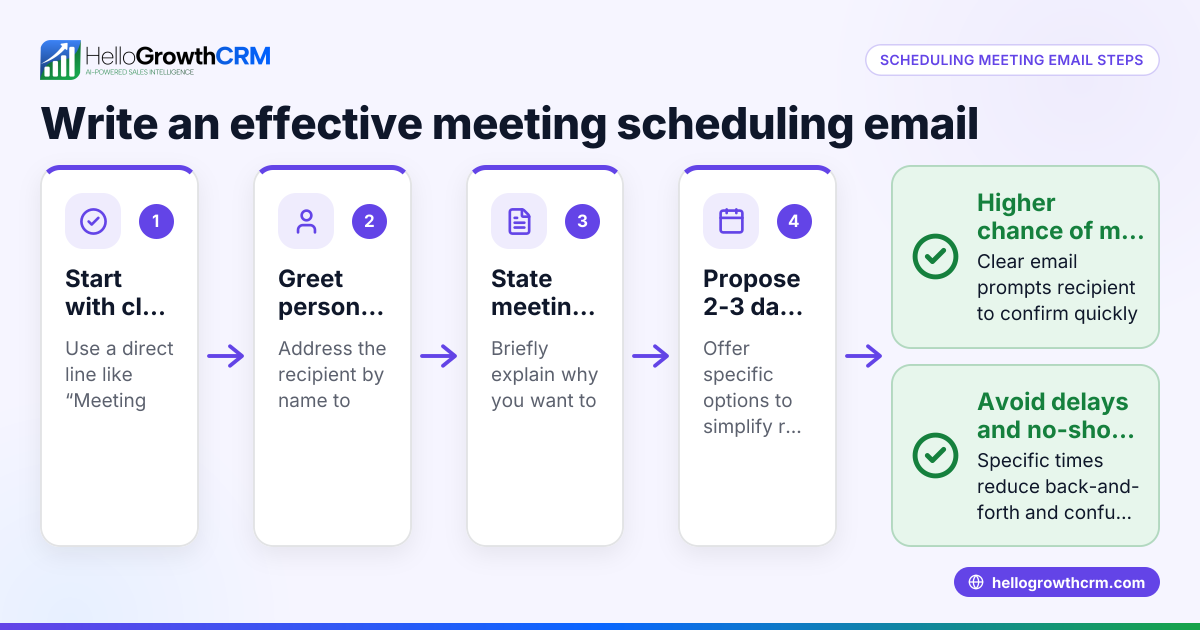
- Start with a clear subject line: Use a subject like "Meeting Cancellation: [Date and Topic]" so recipients immediately know the email purpose.
- Greet the recipient politely: Use their name or a general greeting if multiple attendees.
- State the cancellation upfront: Clearly say the meeting scheduled for the specific date and time is canceled.
- Provide a brief reason if appropriate: Keep it professional and concise, e.g., "due to unforeseen scheduling conflicts."
- Offer next steps: Suggest rescheduling options, invite the recipient to propose new times, or mention when you'll follow up.
- Apologize for any inconvenience: A short apology shows respect for their time.
- Close politely: End with a courteous sign-off and your contact information.
- Proofread before sending: Check for clarity, tone, and correct recipient addresses.
- Send promptly: Notify attendees as soon as you know the meeting must be canceled to minimize disruption.
- Use tools to manage rescheduling: Consider using a meeting scheduler to let attendees pick a new time without back-and-forth emails.
Example (fictional figures)
A residential real-estate team in Phoenix, Arizona, scheduled a client meeting for 06/15/2026 at 2:00 PM to discuss a $450,000 property listing. Due to a sudden client emergency, the meeting must be canceled.
Subject: Meeting Cancellation: Property Discussion on 06/15/2026
Dear Ms. Johnson,
I regret to inform you that our meeting scheduled for 06/15/2026 at 2:00 PM to discuss the $450,000 property listing must be canceled due to an unforeseen scheduling conflict.
I apologize for any inconvenience this may cause. Please let me know a convenient time for you next week, or you can use the following link to select a new slot directly: [meeting scheduler link].
Thank you for your understanding.
Best regards,
John Smith Phoenix Realty Team
This example covers all key points: clear subject, polite greeting, direct cancellation notice, brief reason, apology, and rescheduling option.
Common mistakes
- Delaying the cancellation notice: Send the email as soon as you know to respect everyone’s time. Prevent by setting reminders to review your calendar daily.
- Being vague or unclear: Avoid ambiguous wording that leaves recipients unsure if the meeting is canceled. Prevent by stating cancellation explicitly in the first sentence.
- Not offering rescheduling options: This can frustrate attendees and stall progress. Prevent by including a scheduling link or inviting new time proposals.
- Using an unprofessional tone: Too casual or abrupt emails can harm business relationships. Prevent by proofreading and maintaining polite language.
- Forgetting to check recipients: Sending cancellation to the wrong people wastes time and causes confusion. Prevent by double-checking email addresses before sending.
- Ignoring follow-up: Failure to reschedule or confirm next steps can lose opportunities. Prevent by using sequences and campaigns to automate polite follow-ups until a response arrives.
Doing this in HelloGrowthCRM
HelloGrowthCRM offers features that help small and mid-sized businesses manage meeting cancellations smoothly. Use the HelloMail shared inbox to keep your team updated with all email replies about meeting changes. The scheduling and booking feature allows prospects or clients to pick a new meeting slot from a link, eliminating back-and-forth messages on WhatsApp. Additionally, automated sequences and campaigns can send follow-up reminders or rescheduling prompts over two weeks, stopping automatically when a reply is received. These tools reduce manual effort and improve communication clarity.
Frequently asked questions
What should I include in a meeting cancellation email? Include a clear statement of cancellation, the meeting date and time, a brief reason if suitable, an apology for inconvenience, and options or instructions for rescheduling.
When is the best time to send a meeting cancellation email? Send it as soon as you know the meeting cannot happen. Early notice helps attendees adjust their schedules and shows professionalism.
How can I reschedule a meeting after canceling? Offer alternative dates or share a scheduling link so recipients can pick a new time easily. Tools like HelloGrowthCRM’s meeting scheduler simplify this process.
Is it necessary to apologize in a cancellation email? Yes, a brief apology acknowledges the other party’s time and maintains goodwill.
Can I automate meeting cancellation follow-ups? Yes, using sequences and campaigns in HelloGrowthCRM, you can automate polite follow-ups to reschedule or confirm next steps until you get a reply.
Key takeaways
- Always send a meeting cancellation email promptly and clearly.
- Include the meeting details, cancellation notice, reason, apology, and rescheduling options.
- Avoid vague language, delays, and neglecting follow-up.
- Use scheduling tools to simplify rescheduling and reduce back-and-forth.
- Automate follow-ups with email sequences to maintain communication.
- HelloGrowthCRM features like shared inbox, scheduling, and sequences support efficient meeting management.
To streamline your meeting scheduling and cancellations, start on the Free Forever plan (200 leads, no credit card) with HelloGrowthCRM today.
Ready to put this into practice?
Set up your pipeline, WhatsApp follow-ups, and AI lead scoring in minutes — free, no credit card.
Try HelloGrowthCRM freeGet CRM tips in your inbox
Join thousands of sales professionals who get weekly insights on CRM strategy, AI automation, and pipeline optimization.

The HelloGrowthCRM team publishes guides on CRM strategy, AI sales tools, and revenue operations for small business sales teams.