HelloGrowthCRM software
Built for real small-business sales teams
HelloGrowthCRM helps reps qualify faster, follow up on time, and close more deals—with practical automation in one place.
- AI lead scoring and pipeline visibility
- Built-in dialer, WhatsApp, and email automation
- Sales forecasting and RevOps-ready reporting
Protecting customer information means keeping their personal and payment data safe from theft, loss, or misuse. For small businesses, this involves practical steps like controlling who can access data, using encryption, and having clear procedures for data handling.
Why this comes up / what goes wrong
Small-business owners often collect customer information through sales, appointments, or support requests. Without proper safeguards, this data can be exposed through lost devices, phishing attacks, or careless sharing. This can lead to lost customer trust, legal penalties, or financial harm. Many small businesses struggle because they manage customer info with spreadsheets, email, or text messages without centralized control or security protocols.
Step-by-step
- Identify what customer information you collect. Check if you store names, addresses, phone numbers, payment details, or sensitive data. Knowing this helps you prioritize protection.
- Limit access to customer data. Only allow employees who need the information to see it. Set up user roles and permissions in your systems.
- Use secure storage methods. Avoid unprotected spreadsheets or email attachments. Store data in encrypted databases or CRM systems with built-in security.
- Implement strong passwords and multi-factor authentication. Require complex passwords and, where possible, a second verification step for system access.
- Train your team on data handling and phishing risks. Regularly remind staff not to share passwords or open suspicious links.
- Keep software and security systems updated. Apply patches and updates promptly to fix vulnerabilities.
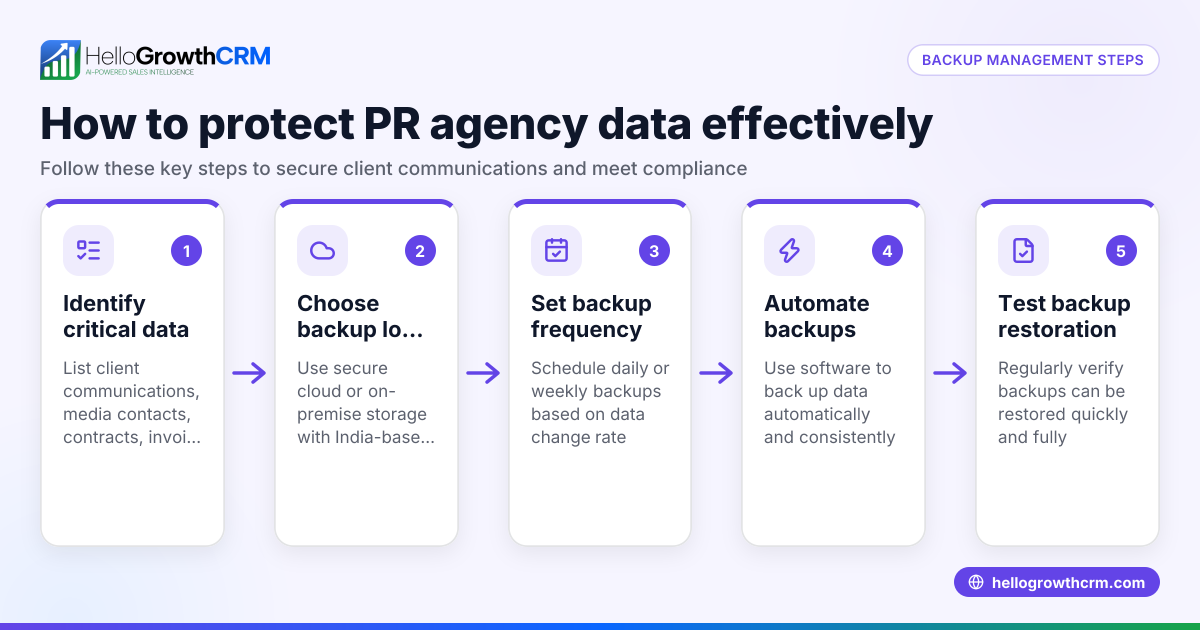
- Back up customer data regularly. Store backups securely to recover from accidental loss or ransomware attacks.
- Establish a clear policy for data sharing and disposal. Only share data with trusted partners and securely delete information no longer needed.
- Monitor access and review logs. Check who accessed customer data and investigate unusual activity.
- Use a CRM designed for secure customer management. HelloGrowthCRM offers features like a customer portal and support tickets that keep service requests linked securely to customer records.
Example (fictional figures)
A two-location dental practice in Columbus, Ohio, wants to protect customer information collected during appointments and billing.
- They identify 5,000 active patient records with names, addresses, phone numbers, and payment info.
- They switch from Excel spreadsheets to a secure CRM.
- They restrict access to billing info to 3 staff members.
- They implement multi-factor authentication on all user accounts.
- They back up data weekly to encrypted cloud storage.
Cost calculation for CRM and security training over 1 year:
$1,200 annual CRM subscription
- $600 staff training and password management tools
= $1,800 total
This investment reduces risk of data breaches and lost patient trust.
Common mistakes
- Using spreadsheets or email to store customer data. Prevent this by adopting a CRM with secure data storage.
- Sharing passwords or using weak passwords. Use strong, unique passwords and enable multi-factor authentication.
- Not training staff on phishing and data security. Conduct regular training sessions.
- Ignoring software updates. Schedule regular updates to patch security holes.
- Failing to back up data. Set up automated encrypted backups.
- Mixing customer service requests with sales data on separate systems. Use HelloGrowthCRM to keep service requests linked to customer records, reducing data fragmentation.
Doing this in HelloGrowthCRM
HelloGrowthCRM helps protect customer information by keeping service requests, referrals, and tickets on the same customer record as the deal. Its branded self-service customer portal lets customers securely access their information. The knowledge base supports consistent, secure communication. These features reduce data fragmentation and improve secure handling of customer interactions. Learn more about HelloGrowthCRM for the United States and its WhatsApp and SMS CRM capabilities to streamline secure communication and data management.
Frequently asked questions
How can I tell if my customer data is at risk? Signs include frequent password resets, unknown login attempts, or data loss incidents. Regularly reviewing access logs and monitoring for suspicious activity helps detect risks early.
What types of customer information require the most protection? Payment details, social security numbers, and health information need the highest protection due to privacy laws and fraud risks. Basic contact info should also be secured but may have fewer restrictions.
Is it enough to have a strong password for my CRM? Strong passwords are essential but not enough alone. Multi-factor authentication adds a second layer of security to prevent unauthorized access.
How often should I back up customer data? At minimum, back up weekly. For high-volume or sensitive data, daily backups are better. Ensure backups are stored securely and tested regularly.
Can HelloGrowthCRM help me comply with data protection regulations? HelloGrowthCRM’s customer portal and ticketing system centralize customer data securely, helping you manage information responsibly. However, compliance depends on your overall policies and practices. Visit the customer health score page to learn more about managing customer data effectively.
Key takeaways
- Identify and limit access to sensitive customer information.
- Use secure storage and multi-factor authentication.
- Train staff regularly on data security and phishing.
- Back up data securely and keep software updated.
- Avoid spreadsheets and email for customer data; use a CRM.
- HelloGrowthCRM keeps service requests linked securely to customer records.
Protecting customer information is essential for maintaining trust and avoiding costly breaches. Start securing your data today with clear steps and tools designed for small businesses.
Start on the Free Forever plan (200 leads, no credit card) at HelloGrowthCRM to manage your customer data securely.
Ready to put this into practice?
Set up your pipeline, WhatsApp follow-ups, and AI lead scoring in minutes — free, no credit card.
Try HelloGrowthCRM freeGet CRM tips in your inbox
Join thousands of sales professionals who get weekly insights on CRM strategy, AI automation, and pipeline optimization.

The HelloGrowthCRM team publishes guides on CRM strategy, AI sales tools, and revenue operations for small business sales teams.