HelloGrowthCRM software
Built for real small-business sales teams
HelloGrowthCRM helps reps qualify faster, follow up on time, and close more deals—with practical automation in one place.
- AI lead scoring and pipeline visibility
- Built-in dialer, WhatsApp, and email automation
- Sales forecasting and RevOps-ready reporting
A sample abandoned cart email is a short, clear message sent to customers who added products to their online shopping cart but left without completing the purchase. It reminds them of the items waiting in their cart and encourages them to return and buy. Small businesses use these emails to recover lost sales and increase revenue. This article explains why abandoned cart emails are needed, shows how to write one step-by-step, provides a realistic example with US figures, highlights common mistakes to avoid, and describes how to automate follow-ups with HelloGrowthCRM.
Why this comes up / what goes wrong
Many small business owners selling online lose sales because customers add items to their cart but leave before buying. Reasons include distractions, second thoughts about price, or complicated checkout processes. Without a timely reminder, customers often forget their cart or decide not to buy. Business owners want a simple, ready-to-use abandoned cart email format they can customize quickly and send manually or automate to save time and recover sales.
Step-by-step
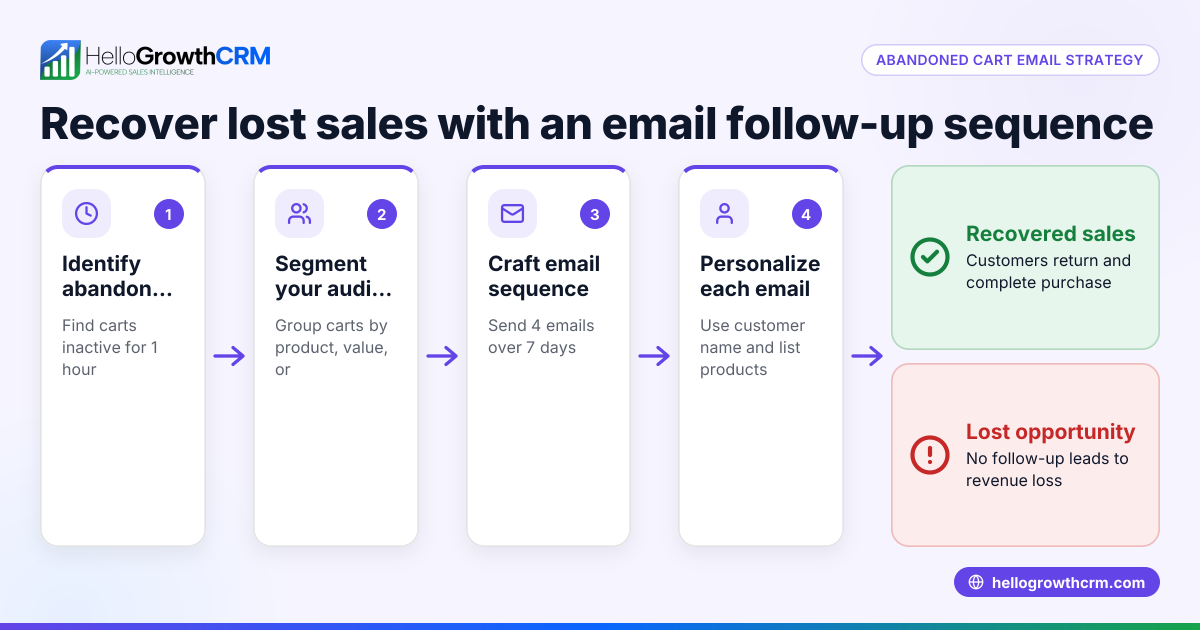
- Identify Abandoned Carts Quickly: Use your e-commerce platform or CRM to find customers who added items but didn’t complete checkout. Aim to send the email within 24 hours for the best chance of recovery.
- Personalize the Greeting: Address the customer by name to make the email friendly and personal. Mention the specific products they left behind clearly.
- Craft a Clear Subject Line: Keep it short and action-oriented, for example, “You left something behind, [Name]!” or “Complete your order for [Product].” This grabs attention in the inbox.
- Write the Email Body:
- Remind them of the items waiting in their cart.
- Include a direct call-to-action button or link that takes them straight back to their cart.
- Optionally, add a limited-time offer, free shipping, or a small incentive to encourage purchase.
- Add Contact Information: Provide a way for the customer to ask questions or get support, such as a reply email or phone number.
- Check Mobile-Friendliness: Many customers open emails on phones. Make sure your email looks good and links work on mobile devices.
- Test the Email: Send a test email to yourself or a colleague to check for errors, broken links, or formatting issues.
- Schedule or Automate Follow-Up: If the first email doesn’t prompt a purchase, send 1-2 follow-up reminders spaced over the next two weeks. Use email sequences to automate this process efficiently.
For more on automating follow-ups, see email automation and sequences.
Example (fictional figures)
GreenLeaf Landscaping, a small landscaping contractor in Charlotte, North Carolina, sells garden tools online. On 04/15/2026, a customer added an electric pruner priced at $150 and a soil tester priced at $50 to their cart but left without buying.
GreenLeaf sends this abandoned cart email 6 hours later:
Subject: "[Name], your garden tools are waiting!"
Body: "Hi [Name],
We noticed you left these items in your cart:
- Electric Pruner: $150
- Soil Tester: $50
Complete your order now and get free shipping if you purchase by 04/17/2026.
[Return to your cart]
Need help? Reply to this email or call us at (555) 123-4567.
Thanks, GreenLeaf Landscaping"
This email reminds the customer of a total of $200:
$150 + $50 = $200
It adds urgency with a free shipping deadline to encourage a quick purchase.
Common mistakes
- Sending the email too late: Waiting more than 24 hours reduces recovery chances. Send the first email within a day.
- Generic, impersonal messages: Avoid vague emails; use the customer’s name and list the exact products left behind.
- No clear call-to-action: Always include a direct link or button to the cart to make it easy to return.
- Ignoring mobile formatting: Many customers check email on phones. Test the email on mobile devices before sending.
- Not following up: One email may not be enough. Use sequences to send multiple reminders.
- Overusing discounts: Too many offers can reduce perceived value. Use discounts or incentives sparingly.
For tips on running multi-step follow-ups, see WhatsApp and SMS CRM.
Doing this in HelloGrowthCRM
HelloGrowthCRM offers a shared inbox called HelloMail where your team can see all replies to quotation or abandoned cart emails on the deal, preventing lost messages. You can also set up automated sequences and campaigns that run a five-step follow-up over two weeks, stopping immediately when the prospect replies. This automation saves time and improves lead recovery. Learn more at email automation and sequences.
Frequently asked questions
How soon should I send an abandoned cart email? Send it within 24 hours of cart abandonment to maximize recovery chances. Early reminders catch customers while interest is still fresh.
How many follow-up emails should I send? A sequence of 2-3 emails spaced over one to two weeks works well. Stop sending if the customer responds or completes the purchase.
Should I offer discounts in abandoned cart emails? Discounts can help but use them sparingly to avoid training customers to wait for a deal. Consider free shipping or a small incentive only if necessary.
Can I automate abandoned cart emails? Yes, automation tools like HelloGrowthCRM’s sequences can send timely, multi-step follow-ups automatically until the customer replies.
What if the customer doesn’t respond? After your sequence ends, consider other marketing channels or retargeting ads. Avoid spamming the customer with too many emails.
For more on automation, see email automation and sequences.
Key takeaways
- Send your abandoned cart email within 24 hours for best results.
- Personalize with the customer’s name and list specific products left behind.
- Include a clear call-to-action linking back to the cart.
- Use multi-step follow-up sequences to increase recovery rates.
- Test emails for mobile friendliness and correct links.
- Automate follow-ups with HelloGrowthCRM to save time and improve sales.
Start recovering lost sales today by creating your own abandoned cart email. To automate and manage follow-ups easily, Start on the Free Forever plan (200 leads, no credit card).
Ready to put this into practice?
Set up your pipeline, WhatsApp follow-ups, and AI lead scoring in minutes — free, no credit card.
Try HelloGrowthCRM freeGet CRM tips in your inbox
Join thousands of sales professionals who get weekly insights on CRM strategy, AI automation, and pipeline optimization.

The HelloGrowthCRM team publishes guides on CRM strategy, AI sales tools, and revenue operations for small business sales teams.