Skip to content
Integration

Manage Instagram DM Enquiries From Your CRM

Manage Instagram DM enquiries from your CRM. All Instagram messages become leads automatically. For D2C brands and product businesses. Rs 899/user/month.

Quick answer

Does HelloGrowthCRM capture all Instagram DMs as leads?

HelloGrowthCRM captures Instagram DMs via the Meta Messaging API. You can configure it to create a CRM lead for every new DM, or only for DMs that match qualification criteria (specific keywords, first-time messagers, or DMs on paid post campaigns).
Last updated:
What you get

Instagram is India's fastest-growing sales channel for D2C brands, fashion businesses, home decor companies, food businesses, and anyone selling visual products. The HelloGrowthCRM Instagram integration connects your Instagram DM inbox to your CRM — so every enquiry is captured, tracked, and followed up.

When a prospect sends you a message on Instagram — asking for price, availability, or placing an order — HelloGrowthCRM captures that conversation as a lead. The rep can reply from the CRM team inbox without switching to Instagram. The full conversation thread is logged against the lead record.

For businesses running Instagram ads with direct message CTAs, the integration ensures no ad-generated message is missed or left unanswered for more than a few minutes. Auto-replies can be configured — an instant acknowledgment message while the rep reviews the enquiry.

The Instagram integration also supports lead capture from Instagram Story links, bio link forms, and Instagram Shopping. Interested customers who engage with your shopping posts or story links are logged as leads in HelloGrowthCRM automatically.

D2C brands using the integration typically see an improvement in Instagram enquiry response time. In a market where the first response wins the sale, this speed advantage converts directly to revenue. HelloGrowthCRM tracks which Instagram leads converted to orders and the average order value per source.

NASSCOM Member. SOC 2 Type II. The Instagram integration is compliant with Meta's Platform Policy and Business API Terms. Customer data from Instagram is processed with the same data protection controls as all CRM data.
Automation workflows

Automation workflows you can build with Instagram DMs and HelloGrowthCRM

Turn DMs into owned leads

First-time enquirers become CRM leads with the conversation attached and source tagged. The enquiry that would have drowned under three days of newer messages now has an owner and a follow-up task.

Route story-reply enquiries to the right person

Replies to product stories and promo posts route by content or keyword to the right team member, with the story context on the lead so the reply doesn't start with 'which post are you asking about?'

Measure enquiry response time

Instagram enquirers expect chat-speed replies. With DMs in the CRM, first-response time becomes a tracked metric per team member — and the single biggest conversion lever for social enquiries becomes manageable.

Move hot conversations to owned channels

When a DM turns into a real buying conversation, capture phone or email into the record and continue on WhatsApp or a call. The relationship stops depending on an algorithmic inbox you don't control.

In practice

How consumer businesses run Instagram with a CRM

Boutique converting product enquiries

Every 'is this available?' DM becomes a lead with the product context attached. Follow-ups on unanswered enquiries go out the next day automatically — sales the old inbox would simply have lost.

Clinic booking consultations from content

Treatment-related story replies route to the front desk with a booking link sent in minutes. Enquiry-to-consultation conversion is tracked per post, telling the clinic which content produces patients, not just likes.

D2C brand connecting DMs to orders

Support and pre-sale DMs land on the same contact record as the order history, so replies are informed and upsells are relevant. The social team stopped being an island.

Setup guide

How to connect — step by step

Takes about 10–15 minutes. No coding required.

Setup at a glance

  • Connect your Instagram Business account
  • Configure the DM inbox
  • Set lead creation rules
  • Connect Instagram Shopping
  • Set up follow-up sequences
  1. 1

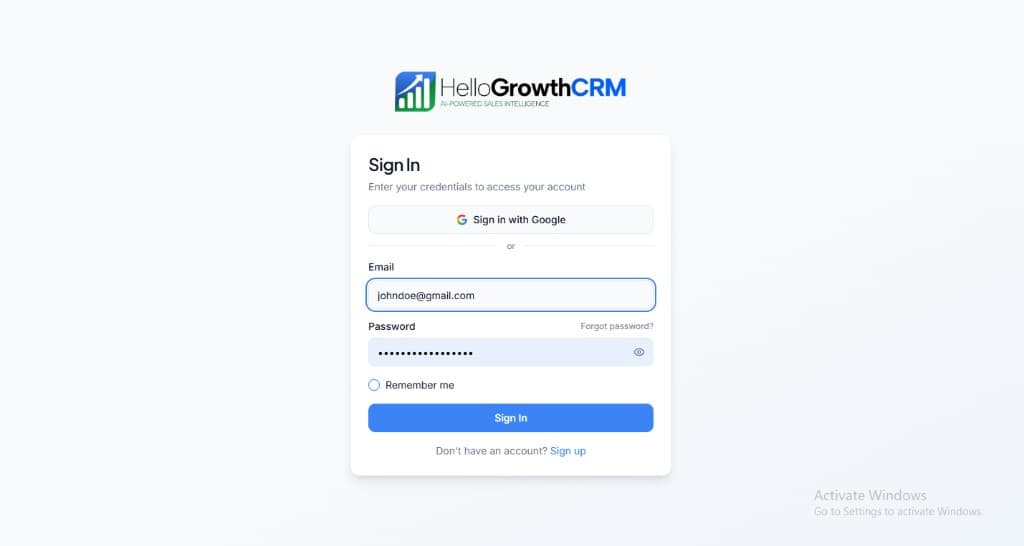
    Sign in or sign up at HelloGrowthCRM. Open the login page, enter your credentials (or use Google), or choose Sign up if you need a new account. You must be signed in before you can open Settings and connect this integration.

    HelloGrowthCRM login screen: Sign in with Google, email and password fields, Remember me, and Sign up link

    Open login page(opens in a new tab)app.hellogrowthcrm.com/login

  2. 2

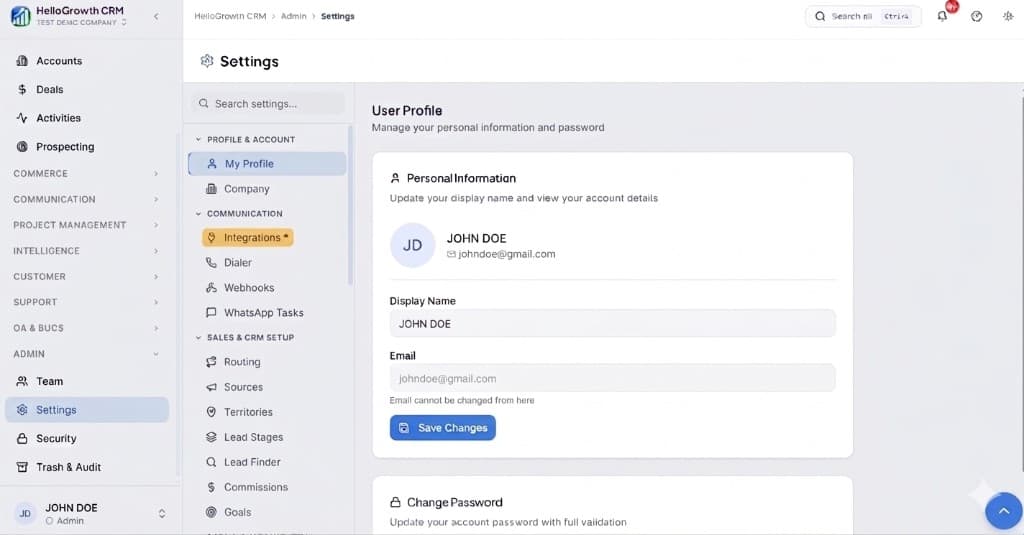
    Open Settings. In the left sidebar, under Admin, click Settings (you will land on the Settings area; the URL is app.hellogrowthcrm.com/settings).

    HelloGrowthCRM Settings: Admin sidebar with Settings selected, secondary menu with Communication and Integrations, and profile area

    Open Settings(opens in a new tab)app.hellogrowthcrm.com/settings

  3. 3

    Go to Integrations. On the Settings screen, use the middle settings menu. Under COMMUNICATION, click Integrations (star icon). Then find and configure this connector—the connector-specific steps below pick up from here.

    HelloGrowthCRM Settings menu highlighting COMMUNICATION and Integrations next to the Admin Settings sidebar

    Open Settings (Integrations)(opens in a new tab)app.hellogrowthcrm.com/settings

  4. 4

    Connect your Instagram Business account

    In HelloGrowthCRM Settings, go to Integrations, then Social Messaging, and click Connect Instagram. You must have an Instagram Business account connected to a Facebook Page to use the API.

  5. 5

    Configure the DM inbox

    Choose which HelloGrowthCRM team inbox receives Instagram DMs. Set auto-reply and assignment rules — for example: auto-reply with a price list link and assign to the product team inbox.

  6. 6

    Set lead creation rules

    Configure when a new CRM lead is created: on every new DM, on DMs containing keywords like price or order, or only when the rep manually qualifies the conversation.

  7. 7

    Connect Instagram Shopping

    If you use Instagram Shopping, connect the product catalogue so product enquiries from shopping posts include the product name and SKU in the CRM lead record.

  8. 8

    Set up follow-up sequences

    Configure an Instagram-sourced lead sequence — initial response template, follow-up after 24 hours if no reply, offer message on day 3.

Need help with setup? Book a 15-minute onboarding call — our team will connect it live with you.
FAQ

Frequently asked questions

Does HelloGrowthCRM capture all Instagram DMs as leads?
HelloGrowthCRM captures Instagram DMs via the Meta Messaging API. You can configure it to create a CRM lead for every new DM, or only for DMs that match qualification criteria (specific keywords, first-time messagers, or DMs on paid post campaigns).
Can I reply to Instagram DMs from HelloGrowthCRM?
Yes. The HelloGrowthCRM team inbox shows Instagram DMs alongside WhatsApp, email, and SMS messages. Reps reply directly from the inbox — the reply appears on Instagram as if sent from the business account. No Instagram app switching required.
Does this work with Instagram Ads with DM as the call to action?
Yes. Instagram ad campaigns with Send Message CTA route prospects to Instagram DM. These conversations are captured in HelloGrowthCRM as leads with the ad campaign name as the source. This gives you campaign-level ROI tracking from ad spend to customer conversion.
What Instagram account type is required?
You must have an Instagram Business account (not a personal account or Creator account). The business account must be connected to a Facebook Business Page. This is required by Meta to access the Instagram Messaging API.
Is the Instagram integration included in the standard plan?
Yes. Instagram DM integration is included in HelloGrowthCRM paid plans from Rs 899/user/month.
Do I need a business account?
Yes — an Instagram professional (business or creator) account connected to a Facebook Page, authorised via Meta's OAuth flow. Personal accounts don't expose the messaging APIs.
Can we reply from the CRM?
Yes, within Meta's messaging window rules — prompt replies go out from the conversation on the record, and any teammate can pick up the thread with history intact.

Want help evaluating the next step?

Book a demo to see HelloGrowthCRM in action, or start a free trial.