Skip to content
Integration

Sarvam AI Integration for HelloGrowthCRM — Indic Voice & Language AI

HelloGrowthCRM's Sarvam AI integration enables voice notes, speech-to-text, and regional-language intelligence in Hindi, Tamil, Telugu.

Quick answer

Does Sarvam AI transcription work offline?

No. Transcription requires an active internet connection to send audio to the Sarvam AI API. Voice notes recorded offline are queued and transcribed when connectivity is restored.
Last updated:
What you get

Sarvam AI is India's leading Indic-language AI model — built specifically for the linguistic diversity of the Indian market. HelloGrowthCRM integrates Sarvam AI natively, giving your sales team the ability to record voice notes, transcribe calls, and work in Hindi, Tamil, Telugu, Kannada, Malayalam, Bengali, Gujarati, Marathi, Punjabi, and English — without switching tools.

Voice notes are the fastest way to log field interactions. Instead of typing on a small screen after a customer visit, reps record a 30-second voice note in their regional language. Sarvam AI transcribes it, attaches it to the contact record, and indexes it for search. Managers can read or listen to field notes in real time — even when reps are in areas with poor connectivity.

Inbound call transcription captures what prospects say during discovery calls. Sarvam AI processes the audio and produces a searchable transcript attached to the lead record. No more 'I forgot what they said' — the conversation is documented automatically, including sentiment indicators that flag objections or strong buying signals.

Regional-language intelligence means your CRM is as useful for a rep working in Coimbatore as it is for one in Mumbai. Forms, notes, and follow-up messages can be drafted in the rep's preferred language. Sarvam AI handles translation between regional languages and English for reporting and management visibility.

For customer-facing WhatsApp communication, Sarvam AI enables regional-language message drafting directly from the CRM. A rep can compose a WhatsApp message in Hindi or Tamil without switching apps — improving response quality for regional customers who prefer their native language.

The Sarvam AI integration is built into the HelloGrowthCRM mobile app. Field teams on Android or iOS get voice note recording, real-time transcription, and regional-language keyboard support out of the box — making the CRM genuinely usable for teams that have traditionally resisted adoption because of language barriers.
Implementation details

Why Indic-language AI matters for Indian sales motion

The dominant pattern in Indian sales is bilingual — reps think in Hindi or another Indic language, converse with customers in that language, and then need to log activity in English-only CRM software. The cognitive overhead of constantly translating between the conversation language and the data-entry language drives much of the CRM-adoption resistance in Indian field teams. Sarvam AI's Indic-language transcription removes that overhead entirely: reps speak naturally in their preferred language, and the transcription appears as searchable, structured CRM activity.

The downstream benefit is data quality. A rep who records a 45-second voice note in Hindi at the customer site captures vastly more detail than the same rep typing a hurried English summary at the end of the day. The note covers actual objections discussed, specific product features the customer asked about, competing brands mentioned, and budget-timing context — precisely the information that informs forecast accuracy and coaching conversations. Most teams piloting Sarvam AI report 2-3x more characters of useful activity context per CRM record than English-only typing produced.

Sarvam AI's strength in code-switching matters more than most buyers anticipate. Real Indian sales conversations mix Hindi, English, and regional language fluidly — a single 30-second voice note may contain Hindi sentence structure with English product names, Tamil numbers, and code-mixed terminology. Generic transcription models built for monolingual English struggle with this; Sarvam AI's models are trained specifically on the code-mixed patterns Indian buyers and sellers use, producing transcripts that read naturally rather than as broken text needing manual cleanup.

Automation workflows

Indian-language AI workflows with Sarvam AI and HelloGrowthCRM

Transcribe and summarise vernacular sales calls

Calls in Hindi, Tamil, Telugu, and other Indian languages transcribe through Sarvam's speech models and summarise onto the deal record. Managers finally review the calls that were previously opaque to text search.

Draft replies in the customer's language

An enquiry in Marathi gets a drafted Marathi response with product details intact. Reps who sell in three languages a day stop mentally translating templates.

Extract intent from vernacular messages

WhatsApp messages in mixed Hindi-English parse into structured fields — requirement, urgency, location — feeding lead scoring the same signals English enquiries produce.

Voice-first data entry for field teams

Field reps speak visit notes in their own language; transcription and summarisation turn them into clean CRM activity records. Data quality goes up precisely because typing goes away.

In practice

Where Indian-language AI changes the game

Tier-2 city dealership

A two-wheeler dealer's calls happen in Kannada. Transcribed summaries mean the owner reviews every enquiry call weekly — coaching that was impossible when review meant listening to hours of audio.

Agri-inputs distributor

Farmer enquiries arrive as Hindi voice notes on WhatsApp. Transcription plus extraction turns them into structured leads with crop and acreage fields — worked by the same pipeline as web leads.

Regional real estate sales

A Chennai builder's site-visit follow-ups draft in Tamil with project specifics merged in. Response rates improved once messages stopped reading like translated English.

Setup guide

How to connect — step by step

Takes about 10–15 minutes. No coding required.

Setup at a glance

  • Generate a Sarvam AI API key
  • Connect Sarvam AI in HelloGrowthCRM
  • Enable voice note transcription
  • Configure regional language preferences per user
  • Test with a voice note on a contact
  1. 1

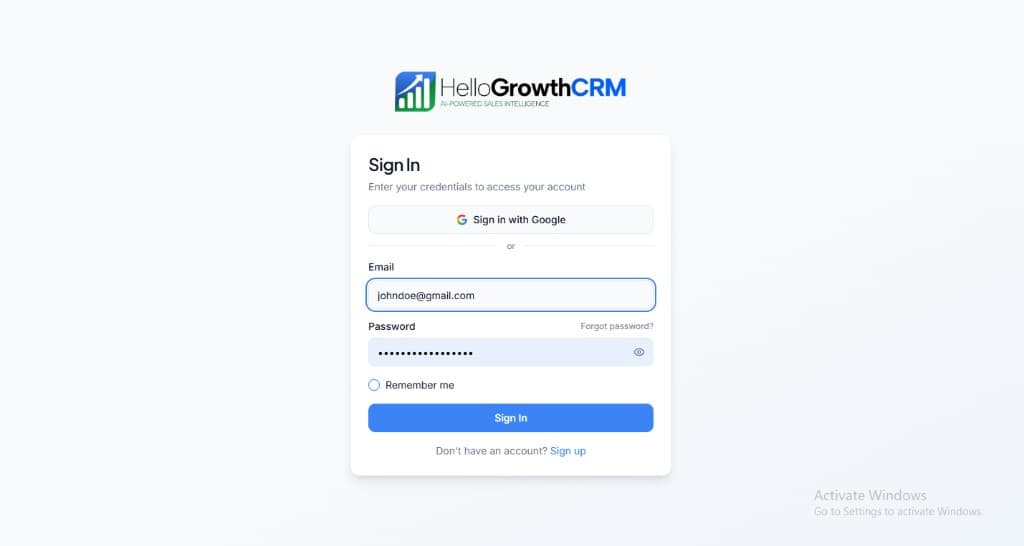
    Sign in or sign up at HelloGrowthCRM. Open the login page, enter your credentials (or use Google), or choose Sign up if you need a new account. You must be signed in before you can open Settings and connect this integration.

    HelloGrowthCRM login screen: Sign in with Google, email and password fields, Remember me, and Sign up link

    Open login page(opens in a new tab)app.hellogrowthcrm.com/login

  2. 2

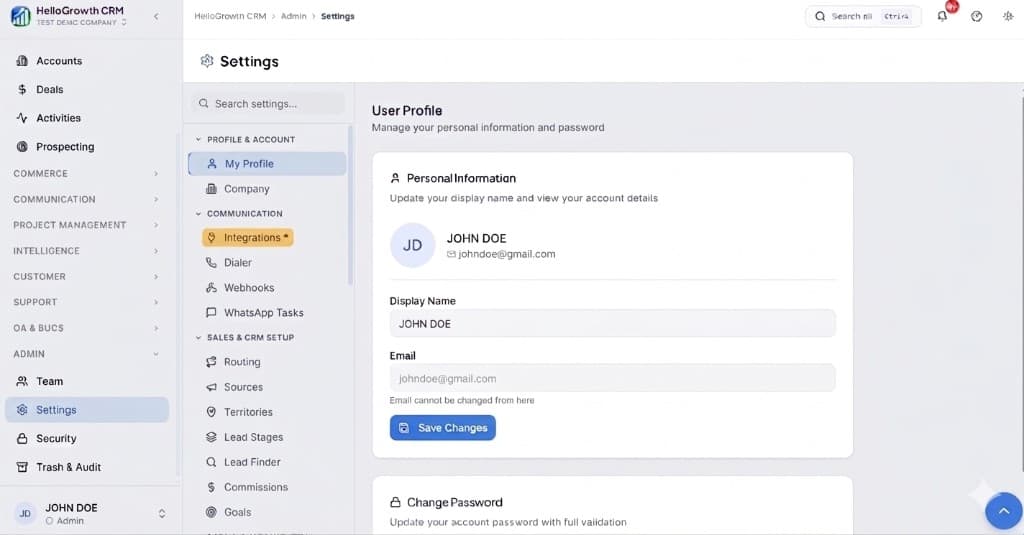
    Open Settings. In the left sidebar, under Admin, click Settings (you will land on the Settings area; the URL is app.hellogrowthcrm.com/settings).

    HelloGrowthCRM Settings: Admin sidebar with Settings selected, secondary menu with Communication and Integrations, and profile area

    Open Settings(opens in a new tab)app.hellogrowthcrm.com/settings

  3. 3

    Go to Integrations. On the Settings screen, use the middle settings menu. Under COMMUNICATION, click Integrations (star icon). Then find and configure this connector—the connector-specific steps below pick up from here.

    HelloGrowthCRM Settings menu highlighting COMMUNICATION and Integrations next to the Admin Settings sidebar

    Open Settings (Integrations)(opens in a new tab)app.hellogrowthcrm.com/settings

  4. 4

    Generate a Sarvam AI API key

    Create an account at sarvam.ai/dashboard. Go to API Keys and generate a new key. Name it 'HelloGrowthCRM' and copy it securely — it will not be shown again.

  5. 5

    Connect Sarvam AI in HelloGrowthCRM

    In HelloGrowthCRM, go to Settings → AI → Sarvam AI. Paste your API key and click Save. Select the primary language for your team — HelloGrowthCRM will default to that language for voice transcription.

  6. 6

    Enable voice note transcription

    Toggle on 'Voice Note Transcription'. Reps using the HelloGrowthCRM mobile app can now tap the microphone icon on any contact or deal record to record a voice note and have it transcribed automatically into the activity log.

  7. 7

    Configure regional language preferences per user

    In User Settings, each rep can set their preferred Indic language for note dictation and message drafting. Supported languages include Hindi, Tamil, Telugu, Kannada, Malayalam, Bengali, Gujarati, Marathi, and Punjabi.

  8. 8

    Test with a voice note on a contact

    Open any contact record in the HelloGrowthCRM mobile app. Tap the microphone icon and record a 10-second voice note in your preferred language. Verify the transcribed text appears in the activity timeline within a few seconds.

Need help with setup? Book a 15-minute onboarding call — our team will connect it live with you.
FAQ

Frequently asked questions

Does Sarvam AI transcription work offline?
No. Transcription requires an active internet connection to send audio to the Sarvam AI API. Voice notes recorded offline are queued and transcribed when connectivity is restored.
Which Indic languages are supported?
Hindi, Tamil, Telugu, Kannada, Malayalam, Bengali, Gujarati, Marathi, Punjabi, and English. Sarvam AI continues to expand language support — check the Sarvam AI documentation for the latest list.
Are voice note recordings stored in HelloGrowthCRM?
Audio files are sent to Sarvam AI for transcription and are not stored long-term in HelloGrowthCRM. Only the text transcript is saved on the activity record.
Which languages does this cover?
Sarvam AI focuses on Indian languages — as of 2026 its models cover the major ones including Hindi, Tamil, Telugu, Kannada, Malayalam, Marathi, Bengali, and Gujarati. Check Sarvam's current documentation for the full list.
How is this different from the CRM's built-in AI?
HelloGrowthCRM's 12 built-in AI agents handle scoring, summaries, and drafting with strong English coverage. The Sarvam integration adds depth for vernacular speech and text where India-first models perform best.

Want help evaluating the next step?

Book a demo to see HelloGrowthCRM in action, or start a free trial.