HelloGrowthCRM software
Built for real small-business sales teams
HelloGrowthCRM helps reps qualify faster, follow up on time, and close more deals—with practical automation in one place.
- AI lead scoring and pipeline visibility
- Built-in dialer, WhatsApp, and email automation
- Sales forecasting and RevOps-ready reporting
An automated follow up email is a pre-scheduled email sent automatically to a prospect or customer after an initial contact or event, without manual intervention. It helps keep communication timely and consistent, increasing the chance of a response. This article explains why automated follow up emails matter for small businesses, how to set them up step-by-step, common pitfalls, and how HelloGrowthCRM supports the process.
Why this comes up / what goes wrong
Many small-business owners in India lose potential sales because their follow-up emails are either forgotten, delayed, or inconsistent. Sales teams often rely on manual methods like spreadsheets, WhatsApp messages, or memory to track leads and send follow-ups. This leads to missed opportunities as prospects lose interest or turn to competitors who respond faster. Without automation, it is hard to keep track of when to send follow-ups and what to say next. Automated follow up emails solve this problem by sending timely, consistent emails without needing manual reminders.
Step-by-step
- Identify the trigger event for the follow-up: Decide what action will start the follow-up sequence, such as sending a quotation, completing a demo, or finishing a first meeting. Ensure your CRM or email tool can detect this event.
- Draft your follow-up email content: Write clear, polite emails focused on next steps or answering questions. Personalise with the prospect’s name and details. Check spelling and contact information.
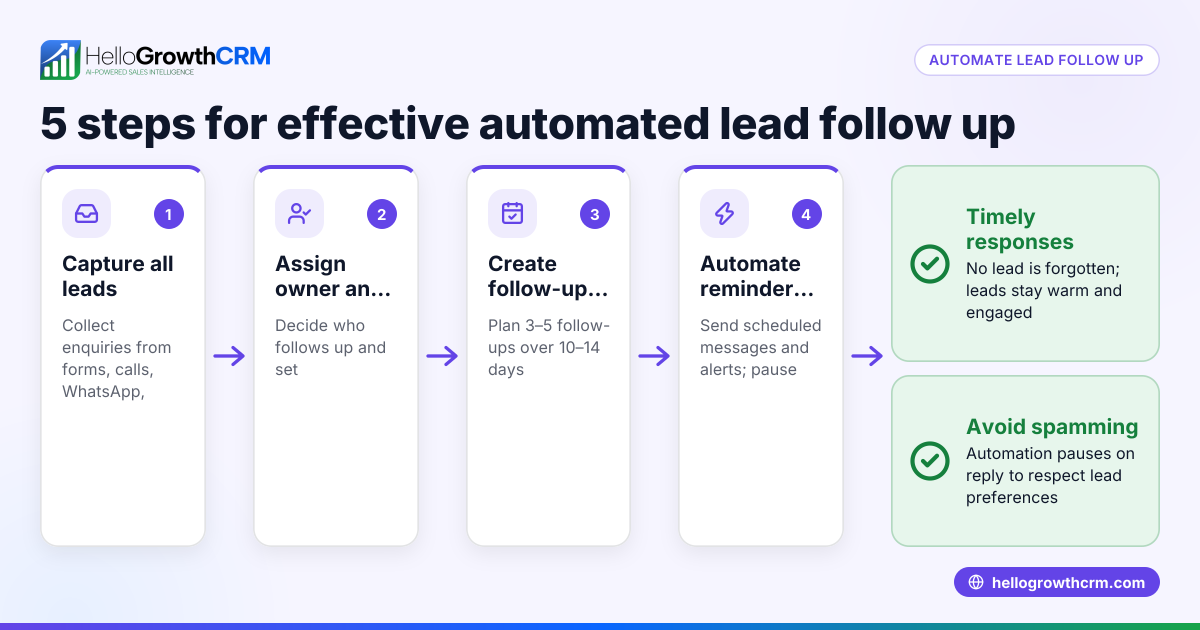
- Set the timing for the automated emails: Plan when each follow-up email should go out. For example, send the first follow-up 2 days after the initial email, then subsequent follow-ups every 3-4 days.
- Create an email sequence or workflow: Use your CRM or email platform to automate sending these emails in order. The sequence should stop automatically when the prospect replies.
- Test the sequence: Send test emails to yourself or a colleague to check timing, links, formatting, and personalization.
- Monitor responses and adjust: Track open and reply rates regularly. If follow-ups are ignored, try changing the message content or timing to improve engagement.
Using a sales task board alongside your email automation helps assign and track follow-up calls or meetings, ensuring no lead is missed. See how sales task boards can help.
Example (fictional figures)
A Delhi-based manufacturer sends quotations worth ₹1,00,000 to leads on 01/03/2024. They set up a 5-step automated follow-up email sequence over two weeks as follows:
- Quotation sent on 01/03/2024.
- First follow-up email sent on 03/03/2024.
- Second follow-up email sent on 07/03/2024.
- Third follow-up email sent on 11/03/2024.
- Fourth follow-up email sent on 15/03/2024.
- Fifth and final follow-up email sent on 17/03/2024.
If the prospect replies after the second follow-up on 07/03/2024, the sequence stops automatically.
This sequence saves the sales team time and ensures consistent contact without manual reminders.
Common mistakes
- Sending too many follow-ups too quickly: This can annoy prospects and reduce response rates. Prevent this by spacing emails 2-4 days apart.
- Using generic, impersonal messages: Leads often ignore messages that feel like mass emails. Personalise with names and relevant details to increase engagement.
- Not stopping the sequence after a reply: Continuing to send follow-ups after a prospect responds annoys them. Use automation that halts when a reply is received.
- Relying only on email without calls or tasks: Some prospects prefer calls or personal contact. Use sales task boards to schedule follow-up calls alongside emails.
- Failing to monitor and adjust: If open or reply rates are low, test different subject lines, message content, or sending times.
Doing this in HelloGrowthCRM
HelloGrowthCRM supports automated follow up emails through its Sequences and campaigns feature, which runs a five-step follow-up over two weeks automatically and stops the moment the prospect replies. Each follow-up becomes a task with a due date on the Activities and task boards, helping your team stay organised without relying on memory. Replies to quotation emails appear in the HelloMail shared inbox, visible to the whole team on the deal, so no reply is missed. Learn more about email automation and sequences and HelloGrowthCRM for India.
Frequently asked questions
What is an automated email follow up? An automated email follow up is a scheduled email sent automatically after an initial contact to remind or engage a prospect. It helps keep communication timely without manual effort.
How do I create an automated email follow up sequence? Create a series of emails with set timings between them using your CRM or email tool. The sequence runs automatically and stops when a prospect replies, saving time and increasing response rates.
Can automated follow up emails be personalised? Yes, you can include personalised fields like the recipient’s name, company, or previous interaction details to make the message more relevant.
How many follow-up emails should I send? Typically, 3 to 5 follow-up emails spaced over 1-2 weeks work well. More than that may annoy prospects.
Can I combine automated emails with calls? Yes, combining emails with scheduled calls improves chances of contact. Use tools like sales task boards to manage calls alongside email sequences.
Key takeaways
- Automated follow up emails send timely reminders without manual effort.
- Set up sequences with clear timing and personalised content.
- Stop the sequence automatically on prospect reply to avoid annoyance.
- Use sales task boards to combine email follow-ups with calls.
- Monitor open and reply rates to improve your follow-up strategy.
- HelloGrowthCRM offers integrated sequences, task boards, and shared inbox features to manage follow-ups efficiently.
Start improving your sales follow-up with automated emails today. Start on the Free Forever plan (200 leads, no credit card).
Ready to put this into practice?
Set up your pipeline, WhatsApp follow-ups, and AI lead scoring in minutes — free, no credit card.
Try HelloGrowthCRM freeGet CRM tips in your inbox
Join thousands of sales professionals who get weekly insights on CRM strategy, AI automation, and pipeline optimization.

The HelloGrowthCRM team publishes guides on CRM strategy, AI sales tools, and revenue operations for small business sales teams.