HelloGrowthCRM software
Built for real small-business sales teams
HelloGrowthCRM helps reps qualify faster, follow up on time, and close more deals—with practical automation in one place.
- AI lead scoring and pipeline visibility
- Built-in dialer, WhatsApp, and email automation
- Sales forecasting and RevOps-ready reporting
The best CRM for payment reminders in the United States is one that integrates payment tracking with automated, multi-channel follow-ups such as WhatsApp and SMS. HelloGrowthCRM offers these features with quotes, invoices, and payment status visible alongside follow-up tasks, plus AI assistance for message drafting. This article covers how to choose the right CRM, step-by-step setup, common pitfalls, and how HelloGrowthCRM supports payment reminders.
Why this comes up / what goes wrong
Small and mid-sized US businesses often struggle to collect payments on time because their sales and collections processes are fragmented. Many rely on separate tools like email, text messages, spreadsheets, or manual phone calls to remind customers of due payments. This leads to missed follow-ups, lost revenue, and strained customer relationships. A CRM that handles payment reminders natively helps by centralizing customer communication, tracking invoice status, and automating reminders on channels customers prefer, such as WhatsApp and SMS.
Step-by-step
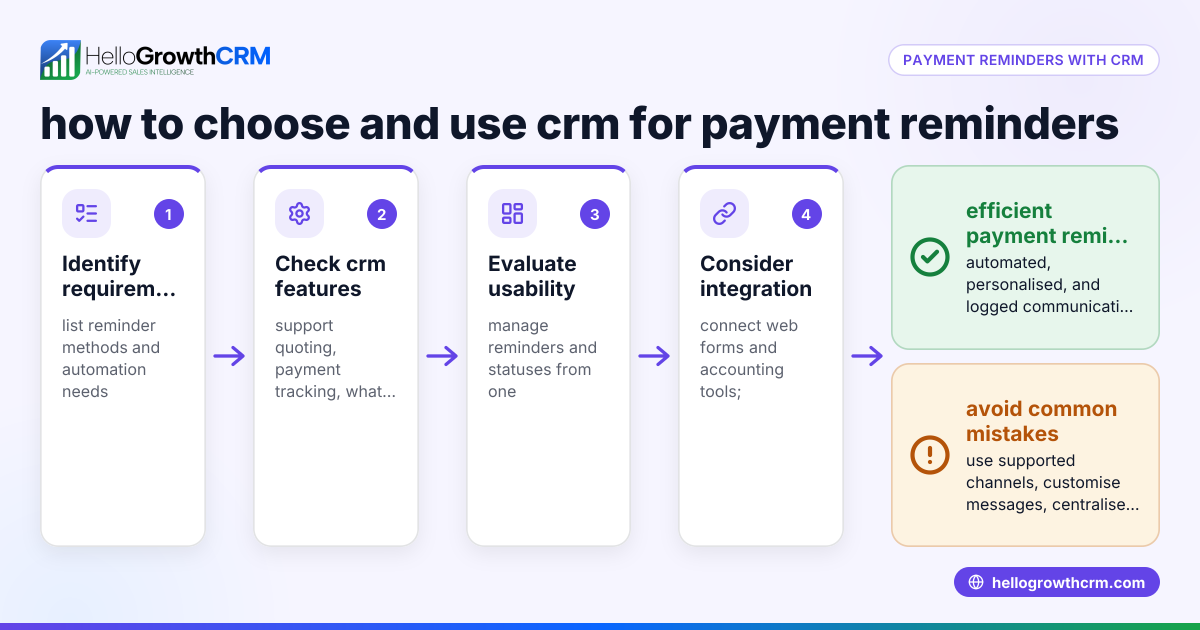
- Identify your payment reminder needs. Determine if you require invoice generation, payment tracking, and multi-channel follow-ups (WhatsApp, SMS, email). Check if your CRM supports these features in one platform.
- Check integration with your sales pipeline. The CRM should link quotes, proposals, and invoices directly to deals so you can see payment status while managing follow-ups.
- Evaluate automation capabilities. Look for AI or workflow automation that drafts or sends follow-up messages based on payment status and timing.
- Confirm multi-channel communication support. Ensure the CRM supports WhatsApp and SMS reminders logged on the customer record to keep all communication in one place.
- Test user experience and adoption. The CRM should be easy for your sales and collections team to use daily, avoiding extra manual work.
- Review reporting and forecasting tools. Payment reminder effectiveness improves when you can track overdue payments and forecast cash flow.
- Compare pricing and plans relevant to US businesses. Ensure the CRM pricing fits your budget and scales with your team size.
For more detailed comparisons, see our guide to compare CRMs and learn about sales task boards for managing follow-ups efficiently.
Example (fictional figures)
A residential real-estate team in Phoenix, Arizona, uses a CRM to manage payment reminders for their clients’ escrow deposits.
- On 03/01/2024, they send a quote and invoice for $25,000.
- The invoice due date is 03/15/2024.
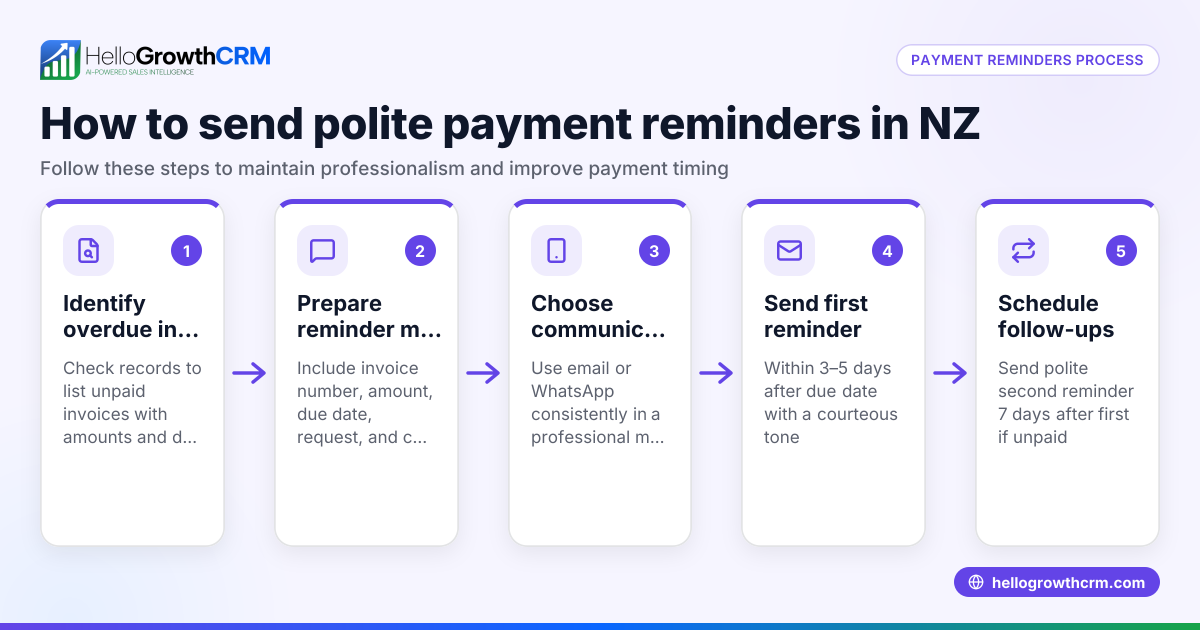
- On 03/16/2024, the CRM flags the payment as overdue.
- An AI agent drafts a WhatsApp reminder message for the client.
- The sales rep reviews and sends the message.
- The client pays $25,000 on 03/20/2024.
- The payment is logged and reconciled automatically.
Calculation:
$25,000 (invoice amount) – $0 (payments received by due date) = $25,000 overdue
The team avoids manual tracking and missed reminders, improving cash flow and client communication.
Common mistakes
- Relying on manual reminders: Leads to missed follow-ups. Prevent by automating reminders linked to invoice status.
- Using separate tools for invoicing and communication: Causes data silos. Prevent by choosing a CRM with integrated quotes, invoices, and messaging.
- Ignoring customer communication preferences: Reduces response rates. Prevent by using multi-channel messaging like WhatsApp and SMS.
- Not tracking payment status in the CRM: Makes follow-ups inefficient. Prevent by ensuring payment reconciliation is tied to deals.
- Overcomplicating workflows: Discourages team adoption. Prevent by selecting user-friendly CRM features and training staff.
Doing this in HelloGrowthCRM
HelloGrowthCRM provides a built-in quoting and proposal tool that lets you create, send, and track quotes and invoices directly from the deal record. The status of each quote or invoice—sent, viewed, or accepted—is visible alongside your follow-up tasks, helping you stay organized. Payment reconciliation is tied to invoices and deals, so you know when payments are received.
For communication, HelloGrowthCRM supports WhatsApp and SMS messaging workflows. WhatsApp conversations with leads or customers are logged on their records, and follow-up messages can be sent directly from the CRM. Additionally, AI agents (available in Beta on the Growth plan) draft follow-up messages after calls, so sales reps only need to review and send them.
Learn more about these features at HelloGrowthCRM for the United States.
Frequently asked questions
What is the best CRM for payment reminders pricing in the United States? Pricing varies by CRM features, user count, and plan levels. Look for plans that include invoicing, payment tracking, and multi-channel messaging without hidden fees. HelloGrowthCRM’s US pricing is available at hellogrowthcrm.com/usa/pricing.
Are there alternatives to CRMs for payment reminders? Yes, alternatives include standalone invoicing software, accounting tools, or manual methods like spreadsheets and email. However, these often lack integrated communication and automation, making CRMs a more efficient choice for follow-ups.
How do I know if my CRM supports WhatsApp and SMS reminders? Check the CRM’s feature list or product documentation. HelloGrowthCRM supports WhatsApp and SMS messaging workflows, logging conversations on the lead record for seamless follow-ups.
Can AI help with payment reminder messages? Yes, some CRMs offer AI agents that draft follow-up messages based on payment status. HelloGrowthCRM includes AI agents that prepare messages after calls, reducing manual work.
How do I compare CRMs for payment reminders? Consider features like invoice integration, multi-channel messaging, automation, ease of use, and pricing. Our compare CRMs page can help you evaluate options side by side.
Key takeaways
- Choose a CRM that integrates quotes, invoices, and payment tracking with follow-up tasks.
- Use multi-channel messaging (WhatsApp, SMS) logged on customer records for effective reminders.
- Automate follow-ups with AI agents or workflows to reduce manual effort.
- Avoid separate tools for invoicing and communication to prevent data silos.
- Evaluate pricing and features relevant to your US business size and needs.
See US pricing and plans to find the best fit for your payment reminder needs at hellogrowthcrm.com/usa/pricing.
Ready to put this into practice?
Set up your pipeline, WhatsApp follow-ups, and AI lead scoring in minutes — free, no credit card.
Try HelloGrowthCRM freeGet CRM tips in your inbox
Join thousands of sales professionals who get weekly insights on CRM strategy, AI automation, and pipeline optimization.

The HelloGrowthCRM team publishes guides on CRM strategy, AI sales tools, and revenue operations for small business sales teams.