HelloGrowthCRM software
Built for real small-business sales teams
HelloGrowthCRM helps reps qualify faster, follow up on time, and close more deals—with practical automation in one place.
- AI lead scoring and pipeline visibility
- Built-in dialer, WhatsApp, and email automation
- Sales forecasting and RevOps-ready reporting
A call back feature is a tool or process that lets businesses schedule and manage follow-up phone calls to leads or customers who requested to be called back. It helps ensure timely responses, improving lead conversion and customer satisfaction. This article explains why the call back feature matters, how to set it up step-by-step, common mistakes to avoid, and how HelloGrowthCRM’s built-in dialer can streamline your call backs.
Why this comes up / what goes wrong
Many small-business owners and sales teams lose leads because they cannot follow up promptly. When a customer asks for a call back, delays or missed calls often result in lost sales opportunities. Managing call backs manually using notes, spreadsheets, or scattered messages can cause confusion and errors. Without a clear system, calls get forgotten, wrong numbers are dialed, and sales momentum stalls. The call back feature addresses these issues by organizing call back requests and scheduling calls efficiently.
Step-by-step
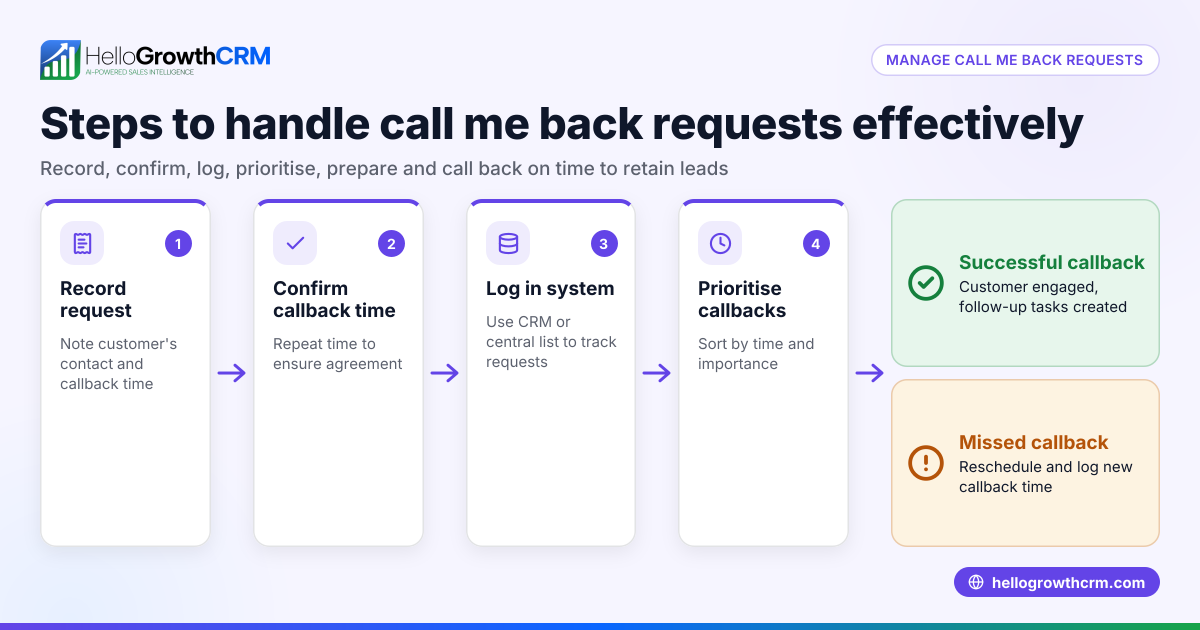
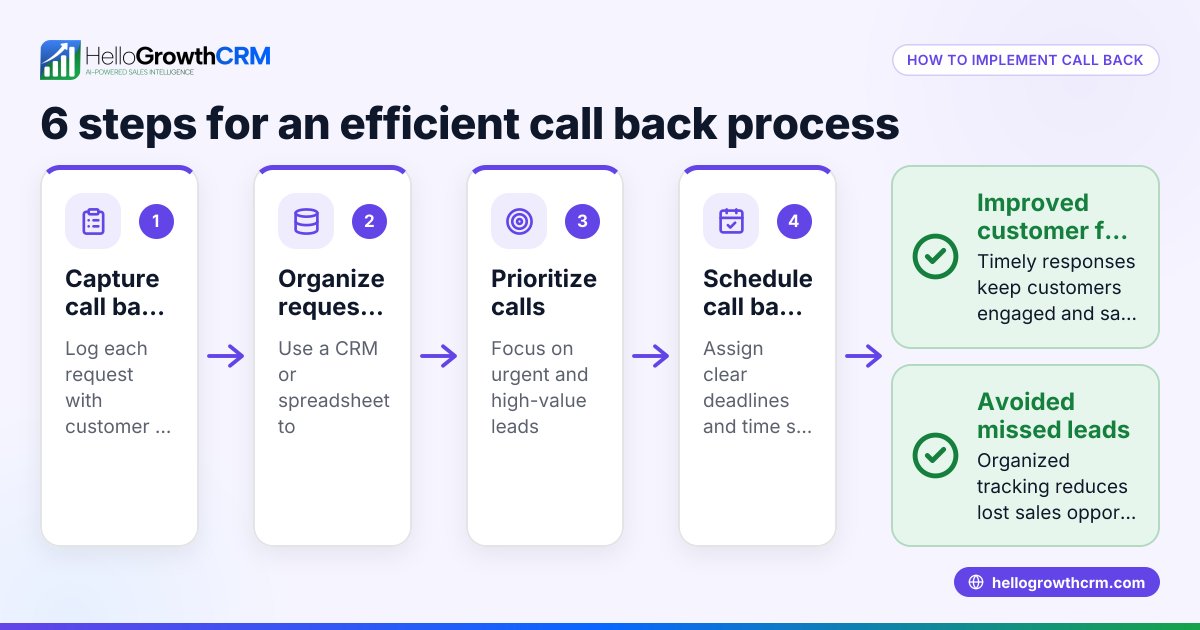
- Capture the call back request immediately: When a lead or customer asks for a call back, note the exact time, preferred call time, and contact details. Confirm the best number to reach them.
- Enter the call back details into your tracking system: Use a CRM or a dedicated tool to log the call back request with all relevant info. This avoids losing or misplacing requests.
- Schedule the call back: Assign a specific date and time for the call back. If possible, set reminders or alerts to notify the sales rep ahead of time.
- Prepare for the call: Before making the call, review the lead’s history, previous conversations, and any notes to personalize the interaction.
- Make the call at the scheduled time: Stick to the agreed time to show professionalism and respect for the lead’s schedule.
- Log the call outcome immediately: Record whether the call was answered, rescheduled, or needs follow-up. Update the lead status accordingly.
- Follow up as needed: If the lead requested another call back or additional info, repeat the process to keep the sales process moving.
Check that your system allows easy tracking and visibility of all pending call backs to avoid missing any. Using a CRM with a built-in dialer can simplify these steps by integrating call scheduling, calling, and logging in one place.
Example (fictional figures)
GreenLeaf Landscaping in Charlotte, North Carolina, receives a call back request from a potential client on 04/15/2026. The client wants a call back on 04/17/2026 at 2:00 PM to discuss a garden design project.
Step 1: Capture request details
- Client: Jane Smith
- Phone: (704) 555-1234
- Requested call back: 04/17/2026, 2:00 PM
Step 2: Enter into CRM
- Create a call back task linked to Jane Smith’s lead record.
Step 3: Schedule and set reminder
- Reminder set for 04/17/2026 at 1:45 PM.
Step 4: Prepare
- Review past inquiries and notes about Jane’s property.
Step 5: Make the call
- Call placed at 2:00 PM.
Step 6: Log outcome
- Call answered; discussed project details.
Step 7: Follow up
- Scheduled an on-site visit for 04/20/2026.
This organized approach ensures GreenLeaf Landscaping doesn’t miss opportunities and keeps communication professional.
Common mistakes
- Not capturing call back details fully: Always get the exact preferred call time and correct phone number to avoid missed connections.
- Failing to schedule and remind: Without a scheduled time and reminders, call backs can be forgotten. Use calendar alerts or CRM tasks.
- Ignoring call back requests or delaying too long: Respond quickly to maintain interest; delays reduce the chance of closing a sale.
- Not logging call outcomes: Without logging, you lose track of what happened and next steps, causing confusion.
- Using separate tools for calls and notes: This causes inefficiency and errors. A unified system is better.
Prevent these mistakes by using a system that lets you capture, schedule, call, and log all call back activities in one place.
Doing this in HelloGrowthCRM
HelloGrowthCRM offers a built-in dialer that lets reps work a list of leads from inside the CRM. When a call back is scheduled, reps can call directly from the CRM and immediately log the outcome on the lead record. This keeps the full call history tied to contacts and deals, making follow-up organized and efficient. Learn more about the built-in CRM dialer and how HelloGrowthCRM supports sales teams in the United States at HelloGrowthCRM for the United States. You can also integrate WhatsApp and SMS sequences for multi-channel follow-up using the WhatsApp and SMS CRM.
Frequently asked questions
What is a call back feature in a CRM? A call back feature in a CRM is a function that helps sales teams schedule, track, and manage follow-up phone calls to leads or customers who requested to be called back. It ensures calls happen on time and outcomes are logged.
How does a call back feature improve sales? It prevents leads from falling through the cracks by organizing call back requests and reminders. Timely follow-up increases the chance of converting leads into customers.
Can I use a call back feature without a CRM? Yes, but it is less efficient. You would need to track call back requests manually using notes or spreadsheets, which increases the risk of errors and missed calls.
How does HelloGrowthCRM support call backs? HelloGrowthCRM’s built-in dialer allows reps to call leads from the CRM and log call outcomes immediately, keeping all call back information centralized and easy to manage.
Is the call back feature useful for small businesses? Absolutely. Small businesses often rely on quick, personal follow-up. A call back feature helps them stay organized and professional without needing complex tools.
Key takeaways
- The call back feature schedules and tracks follow-up calls to leads or customers.
- It helps prevent missed calls and lost sales by organizing requests and reminders.
- Common mistakes include poor data capture, no scheduling, and failing to log outcomes.
- Using a CRM with a built-in dialer simplifies calling and logging in one place.
- HelloGrowthCRM offers a built-in dialer that supports efficient call back management.
Start managing your call backs better today. Start on the Free Forever plan (200 leads, no credit card) and see how HelloGrowthCRM can help your sales team follow up faster and smarter.
Ready to put this into practice?
Set up your pipeline, WhatsApp follow-ups, and AI lead scoring in minutes — free, no credit card.
Try HelloGrowthCRM freeGet CRM tips in your inbox
Join thousands of sales professionals who get weekly insights on CRM strategy, AI automation, and pipeline optimization.

The HelloGrowthCRM team publishes guides on CRM strategy, AI sales tools, and revenue operations for small business sales teams.