HelloGrowthCRM software
Built for real small-business sales teams
HelloGrowthCRM helps reps qualify faster, follow up on time, and close more deals—with practical automation in one place.
- AI lead scoring and pipeline visibility
- Built-in dialer, WhatsApp, and email automation
- Sales forecasting and RevOps-ready reporting
Call to action (CTA) examples are short, clear prompts that tell potential customers exactly what to do next. Examples include "Call Us Today," "Sign Up Now," or "Request a Quote." These phrases motivate action and help convert casual interest into paying customers or qualified leads.
Why this comes up / what goes wrong
Small business owners often face the challenge of turning website visitors, social media followers, or casual inquiries into paying customers. Without effective calls to action, potential leads hesitate or forget to follow through. This results in lost sales opportunities and wasted marketing efforts. Many small businesses use vague or passive language such as "Contact us for more info" instead of clear, compelling CTAs that create urgency or highlight benefits. This lack of clarity causes confusion and reduces conversion rates.
Step-by-step
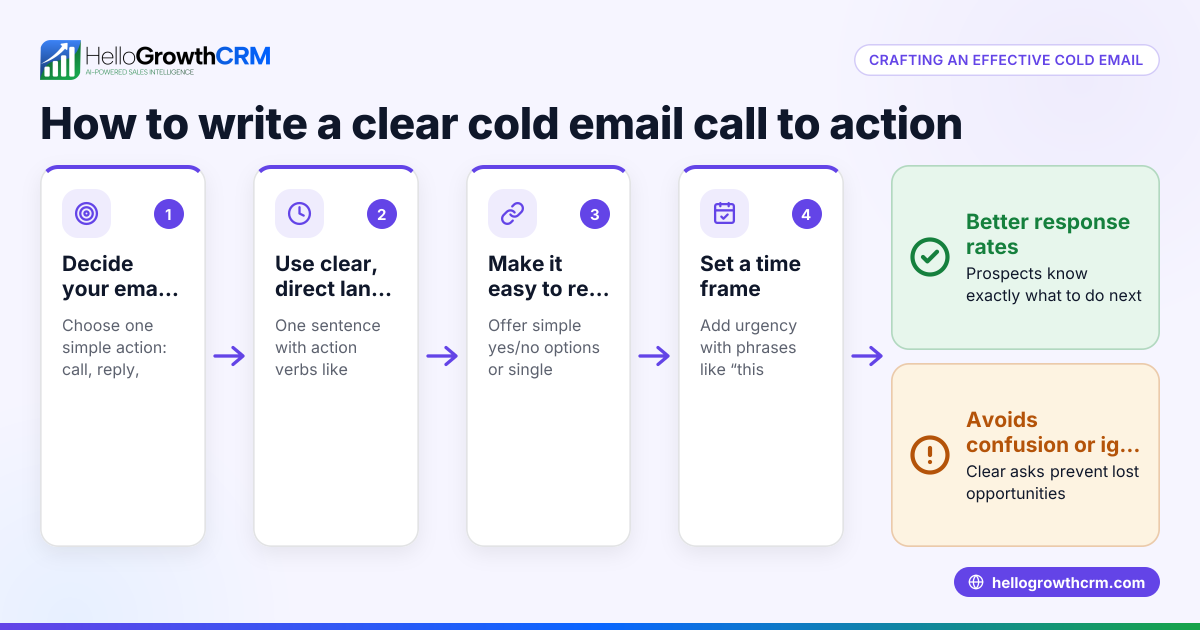
- Identify your goal: Decide what specific action you want your visitor to take. This could be calling your business, booking an appointment, making a purchase, or downloading a resource.
- Choose clear, direct language: Use simple, action-oriented phrases such as "Call Now," "Get a Free Quote," or "Schedule Your Appointment."
- Add urgency or value: Include words like "Today," "Limited Offer," or "Free" to encourage immediate response and make the offer more attractive.
- Place CTAs prominently: Position your call to action where it’s easy to see—on your homepage, emails, social media posts, and near product or service descriptions. Make sure they stand out visually.
- Ensure mobile-friendliness: CTAs must be easy to tap on phones and tablets since many users browse on mobile devices.
- Test and refine: Try different CTAs and track which ones get the best response. Use A/B testing if possible.
- Follow up quickly: Use tools like the HelloGrowthCRM built-in dialer to call leads directly from your CRM and log outcomes, ensuring timely follow-up and better conversion rates. Learn more about the built-in CRM dialer.
Example (fictional figures)
A plumbing company in Austin, Texas, wants to increase appointments through their website.
- Goal: Get visitors to "Schedule a Free Plumbing Inspection Today."
- Website visitors per month: 2,000
- Current conversion rate with weak CTA: 2% (40 appointments)
- Improved CTA conversion rate: 5% (100 appointments)
- Average job value: $250
Calculations:
Current revenue = 40 appointments × $250 = $10,000 Improved revenue = 100 appointments × $250 = $25,000 Increase in revenue = $25,000 − $10,000 = $15,000
By changing to a clear, urgent CTA like "Schedule Your Free Plumbing Inspection Today," the company potentially adds $15,000 in monthly revenue.
Common mistakes
- Vague language: Avoid generic CTAs like "Click here" or "Learn more" without context. Use specific actions that tell visitors exactly what to do.
- Too many CTAs: Don’t overwhelm visitors with multiple conflicting options. Focus on one or two clear next steps.
- Poor placement: CTAs hidden below the fold or mixed in clutter get ignored. Place them where eyes naturally go, such as above the fold or near product descriptions.
- No urgency or incentive: Without a reason to act now, visitors delay or forget. Add time limits, discounts, or free offers.
- Ignoring follow-up: Generating leads without quick follow-up wastes opportunities. Use a CRM with a built-in dialer to call leads promptly and log outcomes.
- Not mobile-friendly: CTAs must be easy to tap on phones and tablets to avoid losing mobile traffic.
Doing this in HelloGrowthCRM
HelloGrowthCRM includes a built-in phone dialer that lets your sales team call directly from the CRM and log call outcomes tied to lead records. This keeps your pipeline organized and follow-up timely, helping small businesses convert more leads from CTAs. Learn more about HelloGrowthCRM for the United States here and its WhatsApp and SMS outreach features here.
Frequently asked questions
What is a call to action (CTA)? A CTA is a prompt that tells your audience what to do next, such as "Call Now" or "Get a Free Quote." It guides potential customers toward completing a desired action and helps improve conversion rates.
How do I create an effective CTA? Use clear, direct, and action-oriented language. Add urgency or a benefit, place it prominently on your website or marketing materials, and test different versions to see what works best.
Where should I place my CTAs? Place CTAs where they are easy to see and act on—homepage banners, product pages, emails, social media posts, and near contact information. Make sure they are visible without scrolling when possible.
Why is follow-up important after a CTA? Prompt follow-up turns interest into sales. Leads lose interest if not contacted quickly. Using a CRM with a built-in dialer helps manage and speed up follow-ups, increasing conversion.
Can I use multiple CTAs on one page? Yes, but limit to one or two clear CTAs to avoid confusing visitors. Each CTA should support a specific goal and not compete with others.
Key takeaways
- Use clear, direct, and action-oriented CTA phrases like "Call Now" or "Get a Free Quote."
- Create urgency or highlight benefits to encourage immediate action.
- Place CTAs prominently and ensure they are mobile-friendly.
- Avoid vague language and too many conflicting CTAs.
- Follow up quickly on leads generated by CTAs using tools like HelloGrowthCRM’s built-in dialer.
Start improving your lead conversion by adding effective calls to action today. To manage leads and follow up efficiently, start on the Free Forever plan (200 leads, no credit card).
Ready to put this into practice?
Set up your pipeline, WhatsApp follow-ups, and AI lead scoring in minutes — free, no credit card.
Try HelloGrowthCRM freeGet CRM tips in your inbox
Join thousands of sales professionals who get weekly insights on CRM strategy, AI automation, and pipeline optimization.

The HelloGrowthCRM team publishes guides on CRM strategy, AI sales tools, and revenue operations for small business sales teams.