HelloGrowthCRM software
Built for real small-business sales teams
HelloGrowthCRM helps reps qualify faster, follow up on time, and close more deals—with practical automation in one place.
- AI lead scoring and pipeline visibility
- Built-in dialer, WhatsApp, and email automation
- Sales forecasting and RevOps-ready reporting
Contact data cleansing means reviewing and correcting your business contact lists to remove duplicates, fix errors, and update outdated information. This process ensures your sales and marketing efforts reach the right people efficiently. This article explains why contact data cleansing matters, provides clear steps to do it yourself, highlights common mistakes to avoid, offers a practical example with realistic figures, and shows how secure contact data management can support your efforts.
Why this comes up / what goes wrong
Small-business owners often gather contacts from multiple sources—web forms, text messages, emails, and spreadsheets. Over time, these contacts can become inaccurate, duplicated, or outdated. For example, a lead may be entered twice with slightly different spellings or phone numbers that no longer work. This leads to slow follow-up, repeated outreach attempts, or lost sales opportunities. Without regular cleansing, your contact list becomes cluttered and unreliable, making it harder for your sales team to prioritize leads and track progress efficiently.
Step-by-step
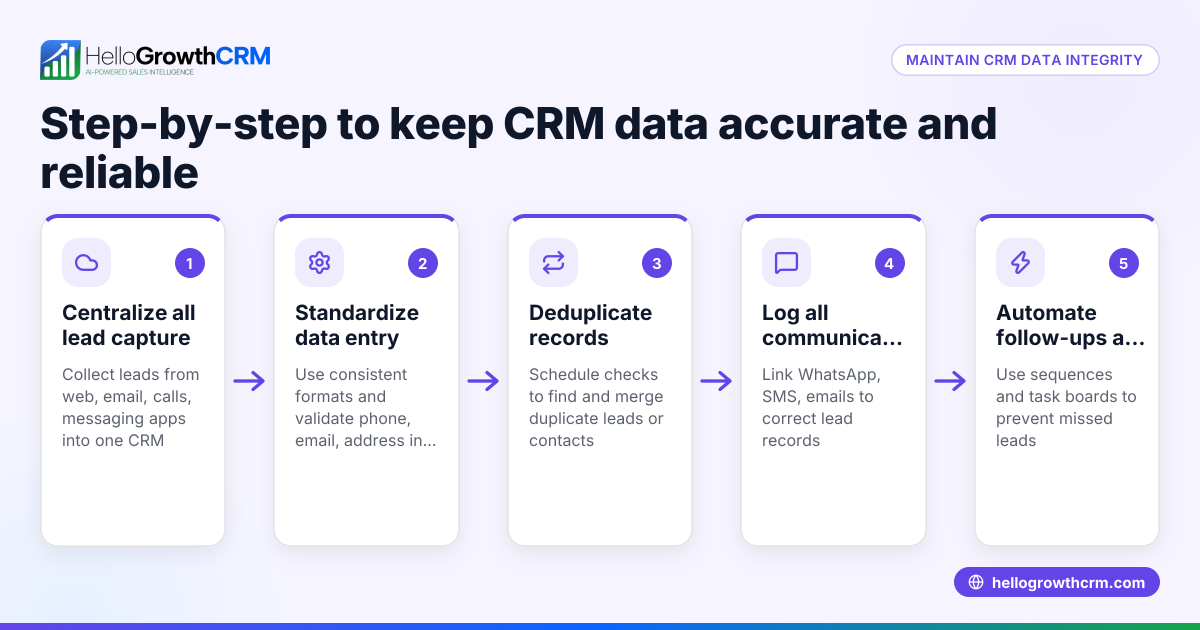
- Export Your Contact List: Collect all contacts from your various sources such as spreadsheets, email lists, and CRM exports into one file, preferably in CSV format.
- Remove Exact Duplicates: Use spreadsheet functions or software tools to find and delete exact duplicate entries.
- Standardize Formats: Ensure phone numbers, email addresses, and names follow a consistent format. For example, format phone numbers as (XXX) XXX-XXXX.
- Verify Contact Information: Identify invalid or outdated contacts by checking for bounced emails, disconnected phone numbers, or leads who no longer respond.
- Correct Errors: Fix typos in names, emails, or company names. Update missing or incomplete fields where possible.
- Segment Contacts: Categorize contacts by status (lead, customer, inactive) or by source to prioritize follow-up efforts.
- Import Cleaned Data Back: Upload the cleansed list into your CRM or contact management system.
- Schedule Regular Cleansing: Set a recurring reminder to repeat this process quarterly or biannually to keep your data fresh.
Using a CRM with features like the WhatsApp and SMS CRM and built-in CRM dialer can help automate parts of this process and keep your contact data organized.
Example (fictional figures)
GreenLeaf Landscaping, a landscaping contractor in Charlotte, North Carolina, collected 5,000 contacts over two years. They found 15% were duplicates and 10% had outdated phone numbers.
- Total contacts = 5,000
- Duplicate contacts = 5,000 × 15% = 750
- Outdated phone numbers = 5,000 × 10% = 500
After removing duplicates:
5,000 - 750 = 4,250 contacts
After updating or removing outdated numbers:
4,250 - 500 = 3,750 valid contacts
By cleansing their data, GreenLeaf focused sales efforts on 3,750 accurate leads, improving follow-up speed and reducing wasted outreach costs.
Common mistakes
- Skipping regular cleansing: Leads to growing data errors and inefficiencies. Prevent this by scheduling regular data reviews every few months.
- Ignoring near-duplicates: Contacts with slight spelling differences or formatting variations can be missed. Use fuzzy matching tools or manual review to catch these.
- Not verifying contact validity: Failing to check for bounced emails or disconnected numbers results in wasted outreach. Regularly verify contact information.
- Failing to standardize formats: Inconsistent phone number or email formats cause confusion and errors. Use clear formatting rules.
- Not backing up data before cleansing: Risk losing important information. Always save a backup before making changes.
- Relying solely on spreadsheets: Manual processes are error-prone and inefficient. Consider a CRM with contact management features to streamline, like the WhatsApp and SMS CRM and built-in CRM dialer.
Doing this in HelloGrowthCRM
HelloGrowthCRM has completed a SOC 2 Type II examination and supports CCPA data-subject rights. This helps meet compliance needs while managing contacts efficiently. Learn more about HelloGrowthCRM's security and compliance features.
Frequently asked questions
What is the difference between contact data cleansing and contact data enrichment? Contact data cleansing focuses on fixing or removing incorrect, duplicate, or outdated contact information. Contact data enrichment adds missing details to contacts, such as company size or social profiles, to improve lead quality and targeting.
How often should I cleanse my contact data? A good rule is to cleanse your contacts at least every three to six months. Frequent cleansing helps maintain accuracy and improves sales follow-up efficiency.
Can I automate contact data cleansing? Some CRM systems offer automation tools to identify duplicates or invalid contacts. However, manual review remains important for accuracy. Using a CRM with integrated lead capture and sequence tools can help maintain clean contact lists.
Does cleansing delete contacts permanently? Cleansing usually involves removing duplicates or invalid contacts, but always back up data before starting. Some systems allow archiving contacts instead of permanent deletion.
What tools can help with contact data cleansing? Spreadsheets with built-in functions, specialized data cleansing software, and CRMs with lead management features are common tools. Using a CRM with WhatsApp and SMS communication features can centralize contacts and keep data updated.
Key takeaways
- Contact data cleansing removes duplicates, errors, and outdated info to improve sales efficiency.
- Regular cleansing every 3-6 months prevents clutter and lost leads.
- Use consistent formatting and verify contacts to maintain data quality.
- Back up your data before cleansing to avoid accidental loss.
- Use CRM tools with communication and dialer features to streamline contact management.
Start managing your contacts better today. Start on the Free Forever plan (200 leads, no credit card) and keep your sales pipeline clean and active.
Ready to put this into practice?
Set up your pipeline, WhatsApp follow-ups, and AI lead scoring in minutes — free, no credit card.
Try HelloGrowthCRM freeGet CRM tips in your inbox
Join thousands of sales professionals who get weekly insights on CRM strategy, AI automation, and pipeline optimization.

The HelloGrowthCRM team publishes guides on CRM strategy, AI sales tools, and revenue operations for small business sales teams.