HelloGrowthCRM software
Built for real small-business sales teams
HelloGrowthCRM helps reps qualify faster, follow up on time, and close more deals—with practical automation in one place.
- AI lead scoring and pipeline visibility
- Built-in dialer, WhatsApp, and email automation
- Sales forecasting and RevOps-ready reporting
Customer service solutions for small business are essential to keep customers satisfied and loyal. These solutions include managing support tickets, offering a self-service portal, tracking referrals, and ensuring timely follow-up on service requests. This article explains why small businesses need these solutions, provides practical steps to implement them, highlights common mistakes, and shows how HelloGrowthCRM supports customer service.
Why this comes up / what goes wrong
Small business owners often struggle with managing customer service because they lack dedicated resources or tools. Without a clear system, customer inquiries can get lost in emails, texts, or spreadsheets, leading to slow responses and unhappy customers. Service requests might be handled separately from sales records, causing confusion and inefficiency. Referrals and repeat business opportunities may be missed without proper tracking. These issues reduce customer satisfaction and can hurt growth.
Step-by-step
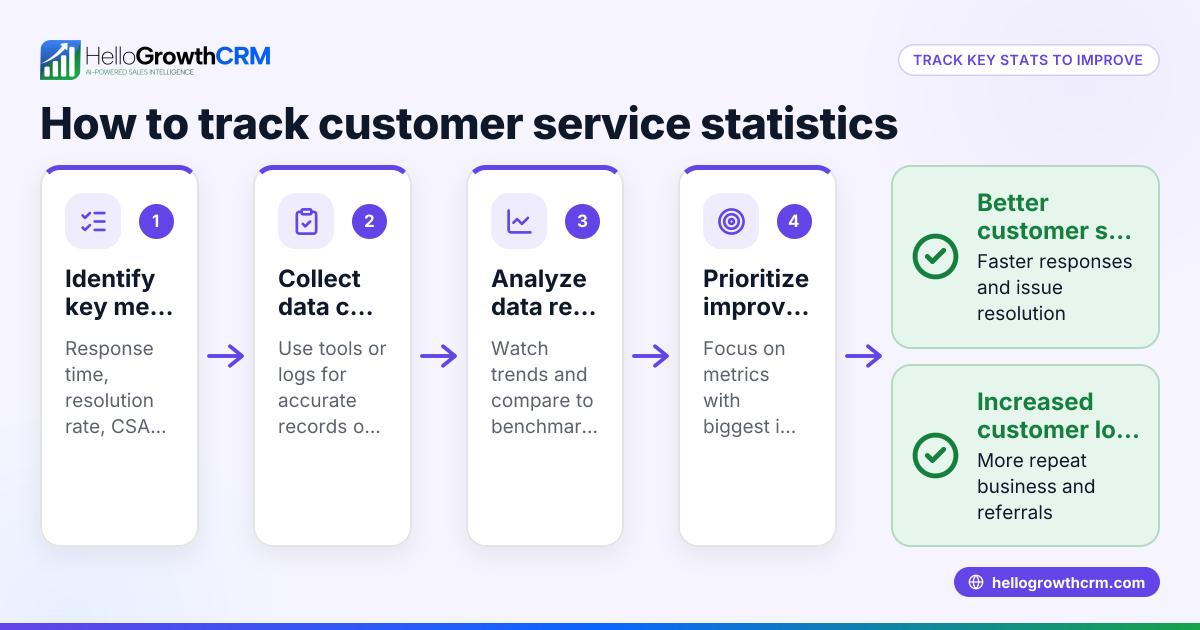
- Set up a customer support system: Choose a platform that centralizes customer inquiries, such as support tickets, to avoid losing requests across channels. Check that it can integrate with your sales records.
- Create a self-service customer portal: Allow customers to find answers via a knowledge base or request support directly. Confirm that the portal is branded to your business for consistency.
- Track referrals and repeat customers: Use referral tracking to reward customers who bring in new business. Verify the system records referrals accurately.
- Keep service requests linked to sales records: Ensure that after a sale, all service tickets and requests stay attached to the customer’s profile. This helps your team see the full history.
- Assign follow-up responsibilities: If you don’t have a sales manager, arrange for someone to manage the follow-up queue weekly to maintain quick responses.
- Monitor customer satisfaction and adjust: Regularly review support ticket resolution times and customer feedback to improve processes.
- Train your team on using the system: Make sure everyone who handles customer service knows how to use the tools effectively.
For a free CRM option that supports these steps, see our free CRM for small business.
Example (fictional figures)
A plumbing company in Austin, Texas, "Austin Flow Plumbing," wants to improve customer service by implementing a support ticket system and referral tracking starting 07/01/2026.
- They estimate 200 service requests monthly.
- Each request takes about 30 minutes to resolve.
- Customer satisfaction is expected to improve, leading to a 10% increase in referrals.
Calculations:
Time saved by using a ticket system instead of email follow-up: 200 requests × 10 minutes saved per request = 2,000 minutes saved 2,000 minutes ÷ 60 = 33.33 hours saved monthly
Value of increased referrals: Current monthly revenue = $50,000 Expected increase = 10% $50,000 × 10% = $5,000 additional revenue monthly
This example shows how organized customer service can save time and increase revenue.
Common mistakes
- Ignoring customer service tools: Relying solely on email or texts leads to lost requests. Prevent this by adopting a ticket system.
- Separating service from sales data: Handling service requests outside the sales record causes confusion. Keep them linked on the same customer record.
- No follow-up owner: Without a responsible person, follow-ups lag. Assign weekly follow-up management, especially if no sales manager is present.
- No self-service options: Customers waste time waiting if no knowledge base or portal exists. Create a branded self-service portal.
- Failing to track referrals: Missing referral tracking loses growth opportunities. Implement referral program tracking.
- Not training staff: Tools are useless if the team doesn’t know how to use them. Provide training and resources.
Learn how to avoid these mistakes with tools like HelloGrowthCRM for the United States.
Doing this in HelloGrowthCRM
HelloGrowthCRM offers a branded self-service customer portal where customers can find answers and submit support tickets. After the sale, all service requests stay on the same customer record as the deal, ensuring your team has full context. Referral program tracking helps you reward customers who bring in new business. If you don’t have a sales manager, HelloGrowthCRM’s Managed RevOps service assigns a revenue specialist to manage your follow-up queue weekly, keeping your service timely and organized. Learn more about these features and how they support your customer service at customer health score.
Frequently asked questions
What is the best way for a small business to manage customer service? The best way is to use a centralized system that handles support tickets, keeps service requests linked to customer records, and offers a self-service portal for customers. This reduces lost inquiries and improves response times.
How can I track customer referrals effectively? Use a referral tracking system that records which customers bring in new leads and sales. This allows you to reward referrers and encourage more referrals.
Do I need a dedicated sales manager for good customer service? Not necessarily. If you don’t have a sales manager, consider a service like Managed RevOps, where a specialist handles follow-up tasks weekly to keep customer service on track.
What should I include in a customer self-service portal? Include a knowledge base with FAQs and guides, a branded interface, and the ability for customers to submit support tickets. This empowers customers to find answers quickly.
Can customer service solutions integrate with sales data? Yes, integrating service requests with sales records on the same platform helps your team see full customer history, improving service quality and sales follow-up.
Key takeaways
- Centralize customer service with a ticket system linked to sales records.
- Provide a branded self-service portal with a knowledge base.
- Track referrals to encourage repeat business.
- Assign follow-up responsibilities weekly, especially if no sales manager exists.
- Train your team to use customer service tools effectively.
- Consider Managed RevOps for ongoing support in follow-up and pipeline hygiene.
Start improving your customer service today with an easy-to-use CRM. Start on the Free Forever plan (200 leads, no credit card).
Ready to put this into practice?
Set up your pipeline, WhatsApp follow-ups, and AI lead scoring in minutes — free, no credit card.
Try HelloGrowthCRM freeGet CRM tips in your inbox
Join thousands of sales professionals who get weekly insights on CRM strategy, AI automation, and pipeline optimization.

The HelloGrowthCRM team publishes guides on CRM strategy, AI sales tools, and revenue operations for small business sales teams.