HelloGrowthCRM software
Built for real small-business sales teams
HelloGrowthCRM helps reps qualify faster, follow up on time, and close more deals—with practical automation in one place.
- AI lead scoring and pipeline visibility
- Built-in dialer, WhatsApp, and email automation
- Sales forecasting and RevOps-ready reporting
Online customer services enable service businesses in the US to support customers digitally through portals, tickets, and knowledge bases, improving response times and customer satisfaction. This article explains why service businesses need online customer services, how to implement them step-by-step, a worked example with figures, common pitfalls, and how HelloGrowthCRM supports these needs.
Why this comes up / what goes wrong
Local service businesses like plumbing, HVAC, or landscaping companies often struggle with managing customer requests efficiently. Without online customer services, they rely on phone calls, texts, or emails scattered across different platforms, leading to missed or delayed responses. Customers want quick answers and easy access to service history, but businesses lack a centralized system. This causes frustration, lost repeat business, and inefficient operations. For service business owners or accountants, setting up online customer services means organizing support digitally to reduce manual follow-up and improve customer retention.
Step-by-step
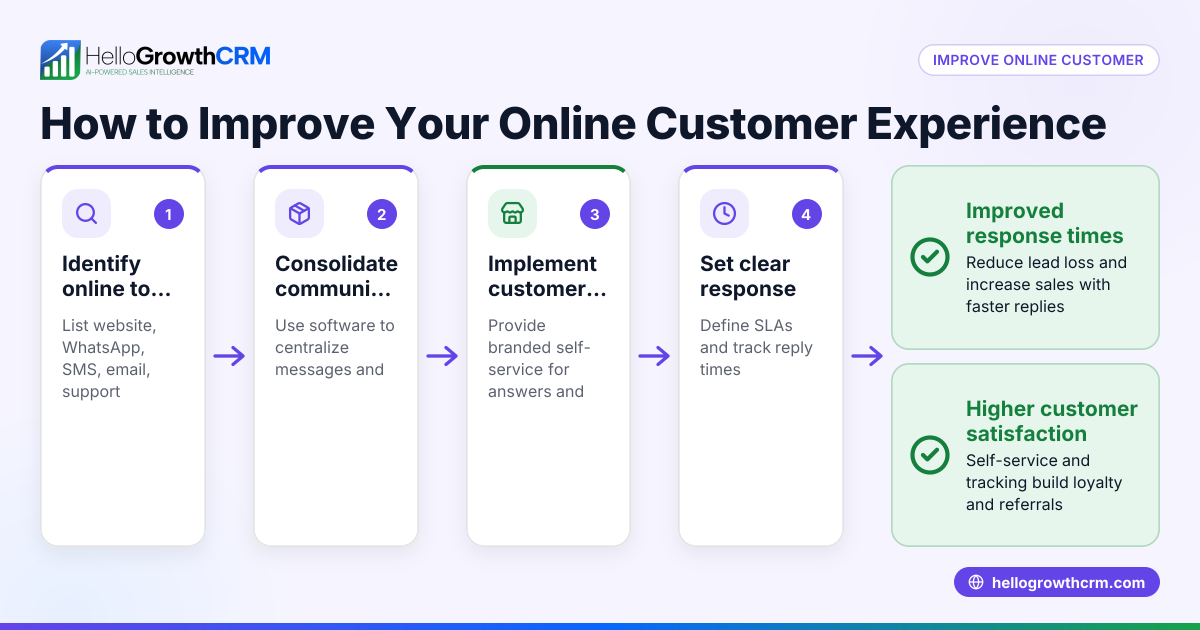
- Identify customer service channels to digitize: Decide if you want customers to submit service requests via a customer portal, email, or messaging apps. Check what your customers prefer and what fits your workflow.
- Choose a platform or software: Look for software that offers a branded customer portal, ticket management, and a knowledge base. Ensure it integrates with your sales and customer records for seamless follow-up.
- Set up the customer portal: Customize it with your branding and make it easy to navigate. Include options for customers to submit tickets, check status, and access FAQs.
- Create a knowledge base: Compile common questions, troubleshooting tips, and service policies. Keep it updated to reduce repetitive tickets.
- Train your team: Make sure your sales and service teams know how to use the system to log tickets, update customer records, and respond promptly.
- Integrate referrals and customer feedback: Encourage satisfied customers to refer others through a referral program linked to your portal.
- Monitor and improve: Track ticket resolution times, customer satisfaction, and common issues. Adjust your knowledge base and processes accordingly.
Check out how HelloGrowthCRM supports these steps with its customer portal, tickets, and knowledge base features, keeping service requests tied to the same customer record as the deal for better tracking. See more about customer health score to measure customer engagement.
Example (fictional figures)
Consider "Austin Plumbing Co.", a plumbing service in Austin, Texas. They decide to implement online customer services starting 07/01/2026.
- They invest $3,000 to set up a branded customer portal and knowledge base.
- Monthly subscription for software: $150.
- Before setup, they lost an estimated $12,000 yearly due to missed calls and slow follow-up.
- After setup, they reduce lost business by 75%, recovering $9,000.
Calculations:
$12,000 × 75% = $9,000 (recovered revenue)
Total first-year cost = $3,000 + ($150 × 12) = $3,000 + $1,800 = $4,800
Net gain first year = $9,000 - $4,800 = $4,200
This example shows that investing in online customer services can pay off quickly by reducing lost leads and improving customer satisfaction.
Common mistakes
- Ignoring customer preferences: Don’t force a channel customers dislike. Prevent this by surveying customers before choosing platforms.
- Overcomplicating the portal: A confusing interface deters use. Keep the portal simple and user-friendly.
- Not training staff properly: Without training, tickets get lost or delayed. Schedule regular team training and updates.
- Neglecting the knowledge base: Outdated information causes repeated tickets. Assign someone to maintain and update FAQs.
- Separating service requests from sales records: This causes fragmented customer views. Use a CRM that keeps service and sales data together, like HelloGrowthCRM.
- Failing to track metrics: Without monitoring, you can’t improve. Use tools to track ticket response times and customer satisfaction.
Learn more about how local service businesses can benefit from these tools at Local service businesses.
Doing this in HelloGrowthCRM
HelloGrowthCRM offers a branded customer portal where your customers can submit service requests that stay linked to their original deal record. It includes ticket management and a knowledge base to provide answers quickly. You can also track referrals through the portal. This keeps customer service organized and accessible in one place, reducing manual follow-up and improving customer retention. For US businesses, see how HelloGrowthCRM supports your needs at HelloGrowthCRM for the United States.
Frequently asked questions
What is an online customer service portal? An online customer service portal is a branded website area where customers can submit support tickets, check the status of their requests, and access helpful resources like FAQs. It centralizes communication and improves transparency.
How does a knowledge base help my service business? A knowledge base provides self-service answers to common questions and issues, reducing the number of support requests your team needs to handle. It saves time and empowers customers.
Can online customer services increase customer retention? Yes, by providing faster responses and easy access to support history, customers feel valued and are more likely to stay loyal. Tracking referrals also helps grow your customer base.
What should I look for in customer service software? Look for features like a branded portal, ticket management, integration with sales records, and a knowledge base. Also, consider ease of use and support for your team.
How do I encourage customers to use online services? Promote the portal through emails, invoices, and your website. Train your team to guide customers to use it for faster service.
Key takeaways
- Online customer services centralize support requests, improving response times and customer satisfaction.
- Choose software that integrates customer service with sales records for a complete view.
- A knowledge base reduces repetitive inquiries and empowers customers to self-serve.
- Training your team and monitoring service metrics ensures consistent quality.
- Using a branded customer portal encourages customer engagement and referrals.
- HelloGrowthCRM offers these features tailored for US local service businesses.
Start improving your customer service today by starting on the Free Forever plan (200 leads, no credit card).
Ready to put this into practice?
Set up your pipeline, WhatsApp follow-ups, and AI lead scoring in minutes — free, no credit card.
Try HelloGrowthCRM freeGet CRM tips in your inbox
Join thousands of sales professionals who get weekly insights on CRM strategy, AI automation, and pipeline optimization.

The HelloGrowthCRM team publishes guides on CRM strategy, AI sales tools, and revenue operations for small business sales teams.