HelloGrowthCRM software
Built for real small-business sales teams
HelloGrowthCRM helps reps qualify faster, follow up on time, and close more deals—with practical automation in one place.
- AI lead scoring and pipeline visibility
- Built-in dialer, WhatsApp, and email automation
- Sales forecasting and RevOps-ready reporting
A voice calling API enables your business software to place and manage phone calls automatically. This helps improve efficiency by automating dialing, tracking call outcomes, and connecting with customers faster. Small businesses that rely on phone outreach but struggle with manual calling and scattered records benefit from integrating a voice calling API into their CRM or sales software.
Why this comes up / what goes wrong
Many small-business owners lose leads or waste time because their sales or support teams make calls manually using personal phones or separate tools. Calls may go untracked, follow-ups delayed, and customer information scattered across spreadsheets or text messages. Without automation, it’s difficult to measure call outcomes or maintain consistent contact records. Integrating a voice calling API centralizes calling, automates dialing, and logs every interaction, improving sales and customer service efficiency.
Step-by-step
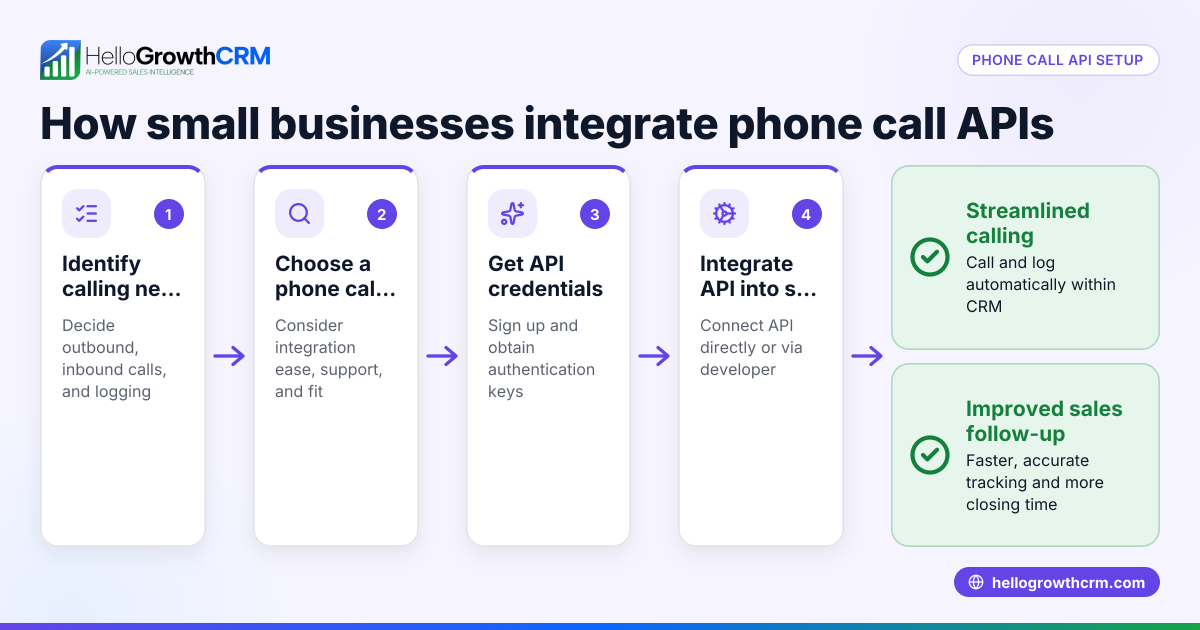
- Identify your business needs for voice calling. Determine if you need outbound calls, inbound call handling, call logging, or automated dialing sequences. Check if your team wants calls linked to lead management or sales pipelines.
- Choose a voice calling API provider or platform. Look for reliable call quality, easy integration, and support for your call volume. Confirm it fits your budget and technical capabilities.
- Set up the API integration. Connect the voice calling API to your CRM or application. This usually involves generating API keys, configuring endpoints, and defining call triggers.
- Test call functionality thoroughly. Place test calls to verify call quality, accurate logging, and workflow triggers.
- Train your sales or support team. Teach them how to use the integrated calling features, log call outcomes, and access call histories.
- Monitor call metrics and adjust. Use call logs and reports to optimize call times, scripts, and follow-up processes.
- Ensure compliance. Follow US laws on automated calling and customer consent to avoid legal issues.
Example (fictional figures)
A residential real-estate team in Phoenix, Arizona, plans to automate outbound calls to 1,000 leads generated from their website by 08/01/2026.
- Each call takes 5 minutes.
- The agent’s hourly wage is $30.
Calculate total calling time:
1,000 leads × 5 minutes = 5,000 minutes
Convert minutes to hours:
5,000 minutes ÷ 60 = 83.33 hours
Calculate labor cost:
83.33 hours × $30/hour = $2,499.90
Using a voice calling API integrated into their CRM, they reduce manual dialing time by 30%, saving:
83.33 hours × 30% = 25 hours saved
Calculate labor cost saved:
25 hours × $30/hour = $750
Final labor cost after savings:
$2,499.90 - $750 = $1,749.90
This efficiency gain allows the team to handle more leads and automatically track call outcomes.
Common mistakes
- Not aligning the API features with business needs. Prevent this by clearly defining call types and volume before selecting a solution.
- Skipping thorough testing. Avoid call failures and poor quality by running comprehensive tests before going live.
- Failing to train the team. Ensure users understand how to use the dialer and log calls to keep data accurate.
- Ignoring compliance requirements. Always get consent before marketing calls or texts and follow US telemarketing and privacy laws.
- Using multiple disconnected tools. Centralize calling within your CRM to avoid lost data and inefficiency. HelloGrowthCRM’s built-in dialer helps here. Learn more about the built-in CRM dialer.
Doing this in HelloGrowthCRM
HelloGrowthCRM offers a built-in phone dialer that lets reps call directly from the CRM, log outcomes, and keep the full call history tied to contacts and deals. This streamlines your calling workflow and ensures no lead is lost due to manual errors. See the WhatsApp and SMS CRM features and integration options at /integrations.
Frequently asked questions
What is a voice calling API used for? A voice calling API allows software to automatically make and receive phone calls. Businesses use it to integrate calling into CRMs, automate outreach, and log call data without manual dialing.
Can a small business use a voice calling API without technical staff? Many providers offer easy-to-use integrations or platforms with built-in dialers that require minimal technical knowledge. Training your team on the CRM’s calling features is essential.
How does a voice calling API improve sales? It speeds up calling workflows, reduces missed calls, automates follow-ups, and keeps accurate call records, helping sales teams be more productive and organized.
Are there legal restrictions on using voice calling APIs? Yes, there are regulations on automated calling, telemarketing, and customer consent. It’s important to understand and comply with these laws in your area.
How can I centralize calls and leads efficiently? Using a CRM with a built-in dialer and API integrations, like HelloGrowthCRM, centralizes calling and lead management, reducing errors and improving follow-up efficiency. Learn more about the built-in CRM dialer.
Key takeaways
- A voice calling API automates phone calls, improving efficiency and tracking.
- Small businesses use it to avoid manual dialing errors and lost leads.
- Setup involves choosing a provider, integrating the API, testing, and training.
- Common mistakes include poor testing, lack of training, and ignoring compliance.
- Centralizing calling in a CRM with a built-in dialer improves workflow.
Start automating your calls and managing leads better by trying HelloGrowthCRM’s features. You can Start on the Free Forever plan (200 leads, no credit card) today.
Ready to put this into practice?
Set up your pipeline, WhatsApp follow-ups, and AI lead scoring in minutes — free, no credit card.
Try HelloGrowthCRM freeGet CRM tips in your inbox
Join thousands of sales professionals who get weekly insights on CRM strategy, AI automation, and pipeline optimization.

The HelloGrowthCRM team publishes guides on CRM strategy, AI sales tools, and revenue operations for small business sales teams.