Overview
Wati is listed in the coming soon · whatsapp & sms providers section of the HelloGrowthCRM catalog as planned. This page documents the workflow it is scoped to cover and the setup path it will follow, so you can judge the fit before it ships — it is not live yet, and we would rather say so than imply otherwise.
WhatsApp business messaging Where it earns its place: Teams researching Wati in the context of coming soon · whatsapp & sms providers use cases before implementation. The point of connecting a coming soon · whatsapp & sms providers tool to your CRM is to stop the same information being typed twice: the record in HelloGrowthCRM stays the single place a rep looks, and Wati keeps doing the job it is good at.
The workflows teams reach for first — Document Wati as part of your coming soon · whatsapp & sms providers stack evaluation; Create a discoverable landing page for Wati while the connector rollout is still planned or partial. Whichever workflow you start with, decide first which system is the source of truth for each field. Contact ownership, lifecycle stage and consent status should have exactly one owner; everything else can be mirrored. That single decision prevents most of the "why did this record change?" questions that follow an integration going live.
Setup starts here: Open HelloGrowthCRM and go to Settings → Integrations → Wati. The full sequence is listed further down this page. Budget time for the mapping step rather than the connection step — authenticating takes a minute, while agreeing what maps to what is the part that decides whether the data is usable afterwards.
What data is involved
- Scope: Wati is grouped with the rest of the coming soon · whatsapp & sms providers tools in HelloGrowthCRM's integrations directory, so it shares the same connection, permission and audit surface as the others in that group.
- Records: decide which HelloGrowthCRM objects are in scope — usually leads and contacts first, then deals and activities once the mapping is proven. Keeping the first pass narrow makes a bad mapping cheap to undo.
- Direction: agree per field whether HelloGrowthCRM writes to Wati, reads from it, or both. Two-way sync on a field that both systems edit is the most common cause of records flipping back and forth.
- Identity: pick one matching key — normally work email, sometimes phone or an external ID — and make sure both sides normalise it the same way. Mismatched casing and stray whitespace are what create duplicate contacts.
- Timing: know whether updates arrive by webhook in near real time or on a schedule. It changes what your team should expect after they hit save, and it changes how you read any report built on the synced data.
- Credentials: before go-live, confirm which API keys, OAuth grants or webhook secrets are in play for Wati, who owns them, and what happens when they expire or the person who created them leaves.
Step-by-step setup
Setup at a glance (3-5 bullets)
- Open HelloGrowthCRM and go to Settings → Integrations → Wati.
- Review your implementation scope first, because this integration is currently planned or scaffolded.
- Add the required credentials, webhook details, or connection information for Wati.
- Map the fields or workflow events you want HelloGrowthCRM to exchange with Wati.
- Run a test connection and confirm data appears as expected before using it in production.
Sign in or sign up at HelloGrowthCRM. Open the login page, enter your credentials (or use Google), or choose Sign up if you need a new account. You must be signed in before you can open Settings and connect this integration.
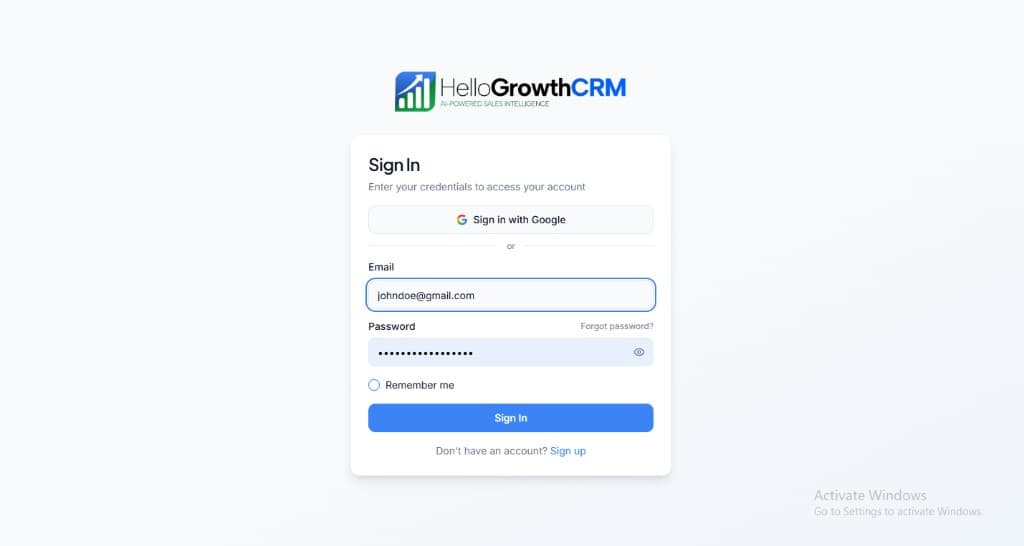
Open login page(opens in a new tab)app.hellogrowthcrm.com/login
Open Settings. In the left sidebar, under Admin, click Settings (you will land on the Settings area; the URL is app.hellogrowthcrm.com/settings).
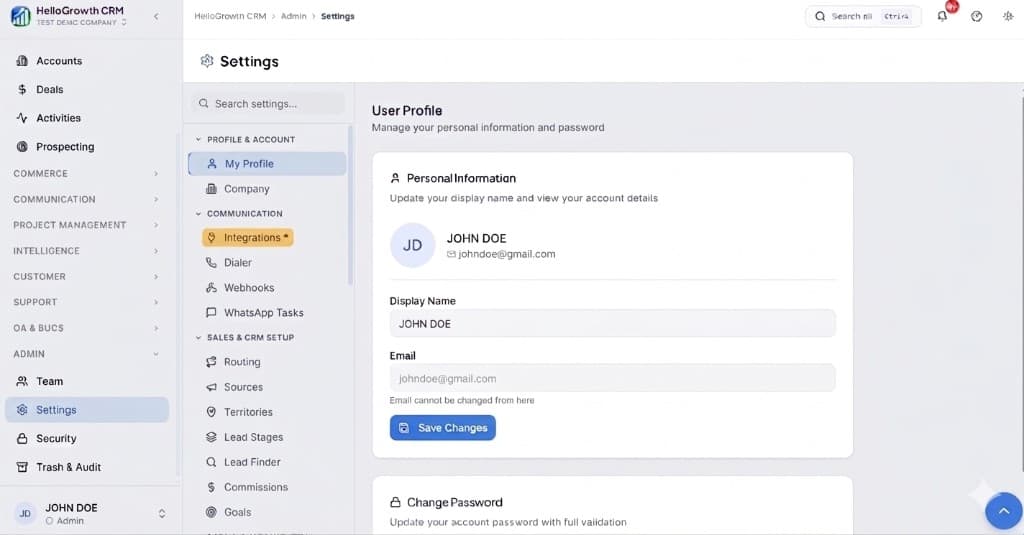
Open Settings(opens in a new tab)app.hellogrowthcrm.com/settings
Go to Integrations. On the Settings screen, use the middle settings menu. Under COMMUNICATION, click Integrations (star icon). Then find and configure this connector—the connector-specific steps below pick up from here.
Open Settings (Integrations)(opens in a new tab)app.hellogrowthcrm.com/settings
- Open HelloGrowthCRM and go to Settings → Integrations → Wati.
- Review your implementation scope first, because this integration is currently planned or scaffolded.
- Add the required credentials, webhook details, or connection information for Wati.
- Map the fields or workflow events you want HelloGrowthCRM to exchange with Wati.
- Run a test connection and confirm data appears as expected before using it in production.
Best practices
- Start with one narrow Wati workflow and one team. Prove it end to end on real records before widening the scope — an integration that quietly writes to the wrong field is harder to unpick than one that was never turned on.
- Write down the field map before you build it. A short table of "HelloGrowthCRM field → Wati field → who wins on conflict" is the document you will actually reach for six months later.
- Test with a small batch of real records, not with a record called "test test". Real data carries the accented names, missing phone numbers and duplicate emails that break mappings in production.
- Give the integration an owner. Someone should be responsible for its credentials, for noticing when a sync stops, and for deciding what changes when either product ships an update.
- Keep API keys, OAuth credentials and webhook secrets for Wati in your normal production secret-management process, and rotate them on the same schedule as everything else. An integration credential is a production credential.
- Check the CRM reports after go-live, not just the connection status. A green connection with a broken field map still shows up as a healthy integration and a pipeline report nobody trusts.
Best for & common use cases
Teams researching Wati in the context of coming soon · whatsapp & sms providers use cases before implementation.
- Document Wati as part of your coming soon · whatsapp & sms providers stack evaluation.
- Create a discoverable landing page for Wati while the connector rollout is still planned or partial.
Expected outcomes
- Faster lead handoff between tools and CRM owners
- Cleaner activity history for follow-up and reporting
- Lower manual copy-paste errors in the pipeline
Troubleshooting
- Nothing is syncing: re-check the credentials first. Expired API keys and revoked OAuth grants account for most "it stopped working" reports, and both fail silently from the CRM side.
- Records sync but land empty: the connection is fine and the field map is not. Compare one record in both systems field by field rather than re-authenticating.
- Duplicates appear: the matching key is not matching. Confirm both systems use the same field, and the same normalisation of it, before running another full sync.
- Updates arrive late: check whether Wati is pushing by webhook or being polled on a schedule. Scheduled syncs are working as designed even when they feel broken.
FAQ
Governance
Treat API keys and webhooks as production secrets. Align field mapping with your privacy policy and regional regulations (GDPR, marketing consent, telemarketing rules). Your admin controls which roles can install or edit integrations.
Related integrations in this category
WhatsApp marketing & automation
Send WhatsApp messages via Interakt BSP.
WhatsApp Business Platform partner
Global SMS, voice & WhatsApp
AI calendar for tasks & habits
Personal & team task management
Personal task manager for Apple
Retail POS & inventory