What lead routing does
Lead Routing automatically assigns each new inquiry to the right owner the moment it arrives. Rules look at territory, source, score, or simple round-robin order and hand the lead to a specific rep with a follow-up task attached — so ownership is decided in seconds, not at tomorrow's standup or whenever a manager checks the inbox.
Without routing, new leads pool in an unassigned queue and speed-to-lead collapses. The loudest rep cherry-picks the best inquiries, quieter territories get ignored, and nobody is accountable when a hot prospect goes cold. Manual assignment also breaks whenever the manager who does it travels, takes leave, or simply gets busy.
How it works in HelloGrowthCRM
Routing rules live in the admin area and fire when a lead is created — from a form, an integration, an import, or manual entry. Each rule checks lead fields such as region, source, or score, then sets the owner and can notify the rep. Growth Engine includes round-robin distribution; RevOps Partner adds fully custom rule sets.
Routing sits between lead capture and follow-up: it consumes scores and territory definitions, then hands assigned leads to workflows, sequences, and speed-to-lead reporting so the first touch happens fast.
See it in action
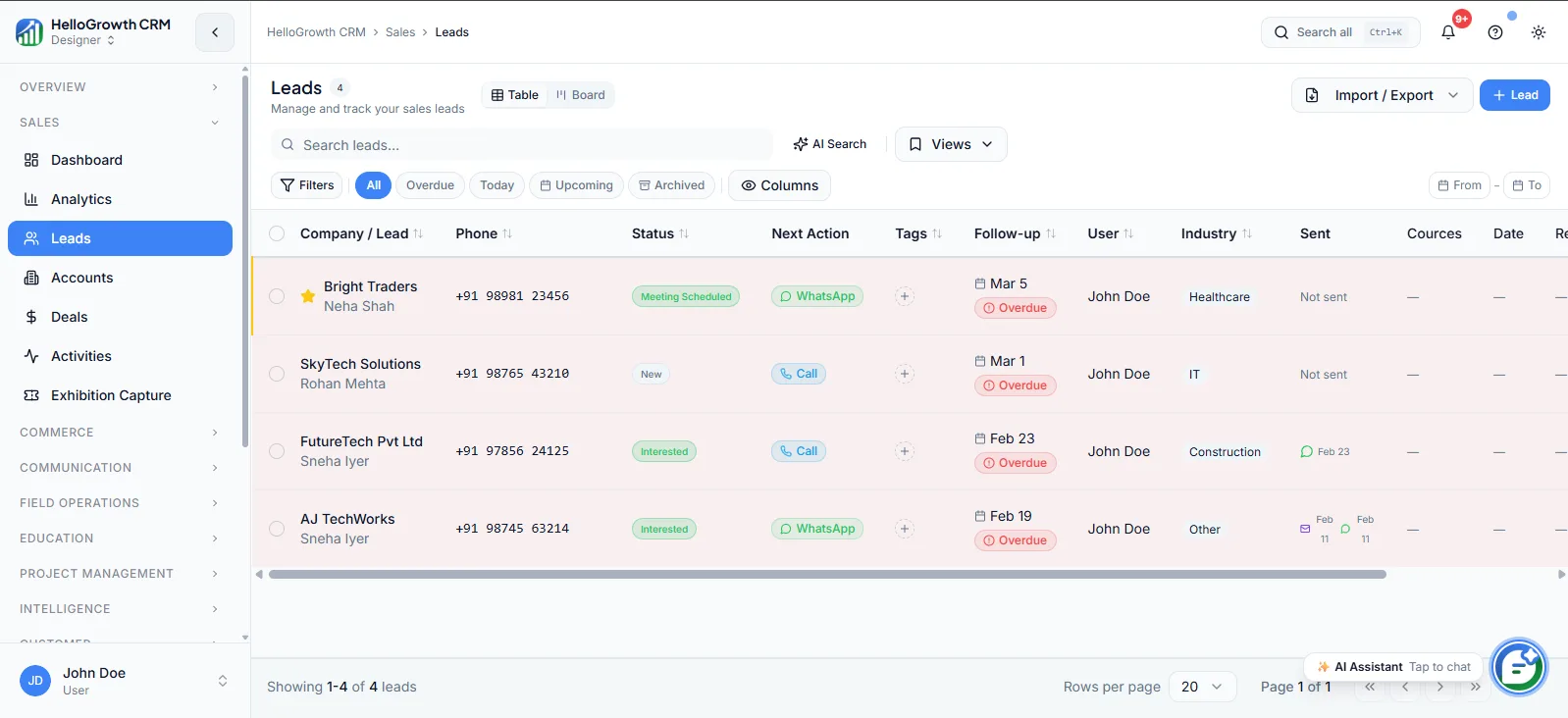
How this capability is packaged by plan
| Plan | Availability |
|---|---|
| Free Forever | |
| Software Only | |
| Growth Engine | Round-robin |
| RevOps Partner | + custom rules |
Setting it up — step by step
- 1
Define ownership logic
Decide whether leads split by territory, source, language, deal size, or simple round-robin before touching any settings.
- 2
Clean your rep roster
Confirm active users, working hours, and capacity so leads never route to someone on leave or overloaded.
- 3
Build rules in order
Create specific rules first and a catch-all round-robin last, since the first matching rule wins.
- 4
Attach a first-touch task
Have each assignment create a follow-up task and notification so the rep knows the clock is running.
- 5
Test with sample leads
Submit test inquiries from each source and confirm every one lands with the intended owner.
Who uses lead routing
Sales manager
Sets the distribution logic, watches assignment reports to keep workload fair, and adjusts rules when reps join, leave, or a territory starts producing more inquiries than one person can work.
SDR/telecaller
Starts each day with a queue of leads already assigned to them, with source context attached, instead of refreshing a shared list and negotiating with teammates over who takes what.
RevOps lead
Maintains the rule set as the org changes, audits leads that slipped through to the catch-all, and ties routing data to speed-to-lead metrics for weekly review.
Lead Routing in practice — industry examples
Real estate
A brokerage routes portal inquiries by project and locality: leads for the east-side development go to the two agents who run site visits there, while premium-budget leads route to senior closers. Every lead gets a call task immediately, so buyers hear back before they contact the next listing.
Insurance agents
An agency routes term-life inquiries round-robin across licensed advisors but sends group-policy and commercial leads straight to the principal. Renewal inquiries route to whichever advisor owns the account, so a ten-year client never gets a cold introduction from a stranger during renewal week.
Education (India)
An institute routes admission inquiries by course and city: engineering-entrance leads go to counsellors in the relevant branch, while online-program leads round-robin across the central telecalling team. Evening form fills are queued with tasks so counsellors call first thing next morning.
Common mistakes to avoid
Building rules without a catch-all, so leads that match nothing sit unowned and invisible until someone audits the queue.
Forgetting to remove departed reps from rotation, sending fresh inquiries to an inbox nobody reads for weeks.
Routing purely round-robin when territories exist, so reps chase leads they cannot serve and hand-offs multiply.
Never reviewing assignment volume, letting one rep quietly receive double the leads of teammates and burn out.
What teams usually care about here
Reduces response time by removing manual assignment from the lead intake process
Growth tier adds round-robin routing; RevOps Partner adds fully custom rule sets
Pairs well with scoring, territories, and speed-to-lead SLA tracking
How this fits the buying decision
Buyers usually do not evaluate lead routing in isolation. They want to know whether it improves execution, reporting, handoffs, and accountability inside the broader CRM workflow. That is why this capability matters most when it is connected to records, ownership, activity history, and manager review rather than living in a separate point tool.
The real decision is often less about whether a box is checked and more about how much depth the team needs. Lower tiers may be enough when the workflow is simple or the volume is small. Higher tiers become more valuable when teams need governance, faster response expectations, specialist execution, or a repeatable operating cadence around the process.
If this capability is important to your rollout, compare it in the context of the whole plan. That includes related workflows, support level, reporting expectations, and whether your team will manage the motion itself or rely on managed RevOps help to keep it consistent.
Frequently asked questions
Which plans include lead routing?
Lead routing starts on the Growth Engine plan, which includes round-robin distribution. The RevOps Partner plan adds fully custom rule sets based on territory, source, score, or any field logic. It is not available on Free Forever or Software Only, where assignment is manual.
How long does routing take to set up?
A simple round-robin across one team is minutes of configuration. Territory- or source-based rule sets take longer because the real work is agreeing the ownership logic; most teams finalise rules in a working session and refine them over the first two weeks.
Does routing work with WhatsApp, dialer, and automation?
Yes. A routed lead can trigger a workflow that creates a call task, notifies the owner, and starts a sequence or WhatsApp template — so assignment and first touch happen together. Dialer calls then log against the same lead for speed-to-lead reporting.
What happens when a rep is on leave?
You adjust the rotation or rules so their share redistributes to active teammates, and reassign anything already queued. Teams on managed plans typically make leave adjustments part of the weekly operating cadence so coverage never depends on memory.
Can leads be re-routed after assignment?
Yes. Ownership can be changed manually at any time, and managers often reassign when a lead turns out to belong to another territory or size band. The routing rules govern first assignment; your team's working agreements govern exceptions afterwards.
Related Pricing Capabilities
Managed RevOps
Done-for-you revenue operations support that turns HelloGrowthCRM from software into an execution system run with specialist help.
Weekly Follow-up Execution
A managed operating cadence where follow-up tasks, outreach queues, and next steps are actively worked every week.
Same-Business-Day Lead SLA
A service commitment around inbound lead handling so new opportunities are worked quickly instead of aging in queues.
Pipeline Cleanup & Hygiene
Ongoing cleanup of stale records, mis-staged deals, missing fields, and messy ownership so reporting stays trustworthy.
Weekly KPI Report
A recurring performance review that turns CRM data into a readable weekly operating update for managers and founders.
Automation Specialist
A dedicated automation resource for refining routing, sequences, field logic, and system workflows as the team scales.