What managed revops does
Managed RevOps is a done-for-you service where specialists run your revenue operations inside HelloGrowthCRM: process execution, follow-up reliability, data cleanup, reporting, and the weekly operating rhythm. You get the outcomes of a revenue operations function — discipline, visibility, consistency — without recruiting, training, and managing one yourself.
The alternative is familiar: the CRM is configured well in month one, then drifts. Follow-up depends on rep mood, reports get stale, and nobody owns the system's health. Teams either accept the decay, burden a salesperson with ops work they resent, or hire a RevOps manager before revenue justifies the salary.
How it works in HelloGrowthCRM
The service runs on a defined cadence inside your CRM account: specialists execute the agreed processes — lead handling review, follow-up queues, pipeline cleanup, weekly KPI reporting — and you see the results as worked queues, clean records, and a readable weekly operating update. It is delivered by people using your account, not a separate tool.
Managed RevOps wraps around the software features: specialists configure and operate routing, workflows, validation, and sequences on your behalf, tuning them as your motion changes.
See it in action
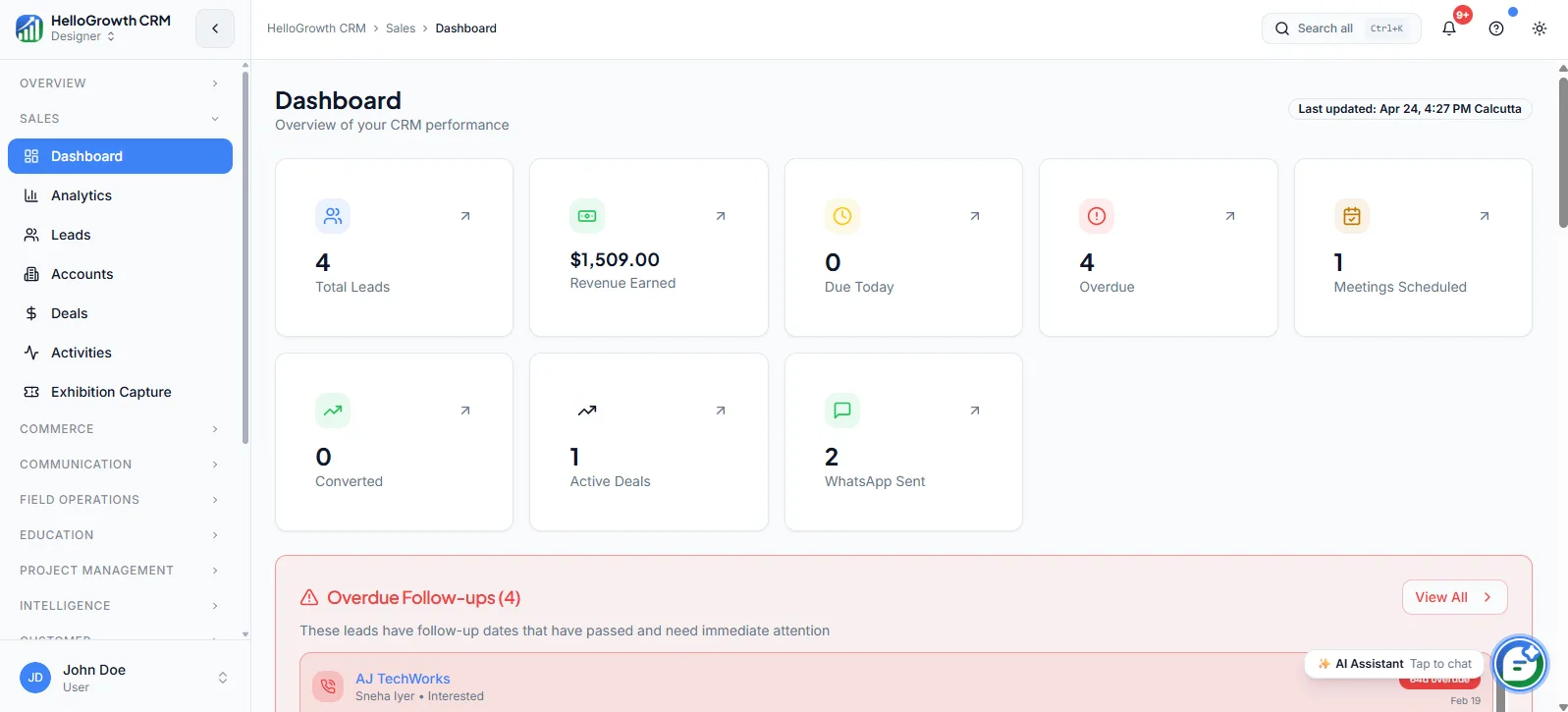
How this capability is packaged by plan
| Plan | Availability |
|---|---|
| Free Forever | |
| Software Only | |
| Growth Engine | |
| RevOps Partner |
Setting it up — step by step
- 1
Run the discovery session
Map your funnel, tools, team structure, and the specific leaks the service should fix first.
- 2
Agree the service scope
Define which processes are managed — lead handling, follow-up, cleanup, reporting — and their standards.
- 3
Configure the foundations
Specialists set up or repair routing, stages, workflows, and views the operating cadence depends on.
- 4
Start the weekly rhythm
Queues get worked, cleanup runs, and the first weekly operating report lands with your team.
- 5
Review and expand monthly
Inspect outcomes against the agreed standards and extend scope as early wins compound.
Who uses managed revops
Founder/owner
Buys back the ops role they were unknowingly performing — reads a weekly report they did not have to build, trusts the pipeline numbers, and postpones a RevOps hire until scale genuinely demands one.
Sales manager
Runs the team against a system someone else keeps healthy: routing works, stale deals get flagged, reports arrive on schedule — so management time goes to deals and coaching rather than CRM maintenance.
RevOps lead
In teams that have one, uses the service as execution capacity — delegating recurring hygiene and reporting work so their own time goes to strategy, tooling decisions, and cross-functional projects.
Managed RevOps in practice — industry examples
Small business
A twelve-person services business has no ops hire and a owner who dreads the CRM. Managed RevOps takes over lead handling standards, weekly cleanup, and reporting; within a quarter the owner runs Monday meetings from a report that arrives ready instead of a pipeline nobody believes.
Law firms
A law firm's partners generate inquiries from referrals and the website but follow up between hearings. The service enforces intake standards, keeps consultation follow-ups worked weekly, and reports which practice areas convert — turning an inquiries inbox into a managed pipeline without partners doing admin.
Hotels
A hotel group's events and corporate-booking inquiries scatter across properties. Managed RevOps standardises how inquiries are captured and staged, keeps proposal follow-ups on schedule through season peaks, and gives the group sales director a weekly view of pipeline by property that no one has to compile manually.
Common mistakes to avoid
Buying the service but ignoring its findings, so the same process leaks get reported monthly without ever being fixed.
Keeping scope vague at onboarding, leading to mismatched expectations about what the specialists own versus the team.
Letting reps treat specialist-maintained standards as optional, which slowly erodes the data the whole service runs on.
Cancelling the weekly review when busy — the cadence is the product; skipping it turns the service into invisible admin.
What teams usually care about here
Best for teams that need follow-up reliability and pipeline discipline without building an ops team first
Includes process execution, reporting, cleanup, and operating support inside the CRM
Designed to improve speed, consistency, and visibility without adding more tools
How this fits the buying decision
Buyers usually do not evaluate managed revops in isolation. They want to know whether it improves execution, reporting, handoffs, and accountability inside the broader CRM workflow. That is why this capability matters most when it is connected to records, ownership, activity history, and manager review rather than living in a separate point tool.
The real decision is often less about whether a box is checked and more about how much depth the team needs. Lower tiers may be enough when the workflow is simple or the volume is small. Higher tiers become more valuable when teams need governance, faster response expectations, specialist execution, or a repeatable operating cadence around the process.
If this capability is important to your rollout, compare it in the context of the whole plan. That includes related workflows, support level, reporting expectations, and whether your team will manage the motion itself or rely on managed RevOps help to keep it consistent.
Frequently asked questions
Which plans include Managed RevOps?
Managed RevOps is included in the Growth Engine and RevOps Partner plans. Growth Engine bundles the software with managed services at a monthly retainer, while RevOps Partner is the full-service tier with deeper scope. Free Forever and Software Only are self-serve software plans.
What is actually delivered each week?
Follow-up queues are worked, new lead handling is reviewed against your standards, stale and mis-staged records are cleaned, and a weekly KPI report lands with a readable narrative. The exact deliverables are agreed at onboarding and refined in monthly reviews.
How is this different from hiring a RevOps manager?
You get the recurring execution and reporting of an ops function without recruitment, salary, and management overhead — useful before scale justifies a full-time hire. What it does not replace is an internal executive owning revenue strategy; it executes and advises within your CRM.
How long until we see results?
The first weekly report typically lands within the opening weeks, and follow-up reliability improves as soon as queues are actively worked. Structural gains — trustworthy pipeline data, cleaner conversion visibility — build over the first quarter as cleanup and standards compound. No specific revenue outcome is guaranteed.
Do the specialists work with our automation and WhatsApp setup?
Yes. Specialists configure and operate routing, workflows, and sequences on your behalf, and fold WhatsApp, SMS, and dialer activity into the follow-up standards they maintain — so automated touches and human touches follow one coherent cadence rather than competing systems.
Related Pricing Capabilities
Lead Scoring Tuning
Periodic refinement of scoring logic so the model better reflects the signals that actually correlate with qualified pipeline.
Monthly Strategy Call
A recurring planning and review session focused on pipeline health, priorities, and revenue-operations decisions for the next cycle.
Support
Plan-based support coverage that ranges from community help to priority queues and a dedicated managed-service contact with strategic guidance — matched to how central the CRM is to your revenue.
API & Integrations
Connectivity tooling for syncing data, triggering workflows, and fitting the CRM into the rest of the operating stack.
Lead Routing
Automated lead assignment rules that distribute new inquiries to the right rep based on territory, source, score, or round-robin logic.
Validation Rules
Field-level data validation rules that enforce required inputs and data quality standards before records can be saved or moved.