What validation rules does
Validation Rules enforce data quality at the moment of entry. They make specific fields required, check formats, and block a record from being saved or moved to the next stage until the data is complete — a lead cannot become qualified without a phone number, a deal cannot reach proposal without a value and close date.
Without validation, data quality depends on every rep's discipline on their busiest day. Pipelines fill with deals missing amounts, leads without contact details, and stages that mean different things to different people. Reporting built on that data misleads, forecasts wobble, and automation misfires because the fields it depends on are empty.
How it works in HelloGrowthCRM
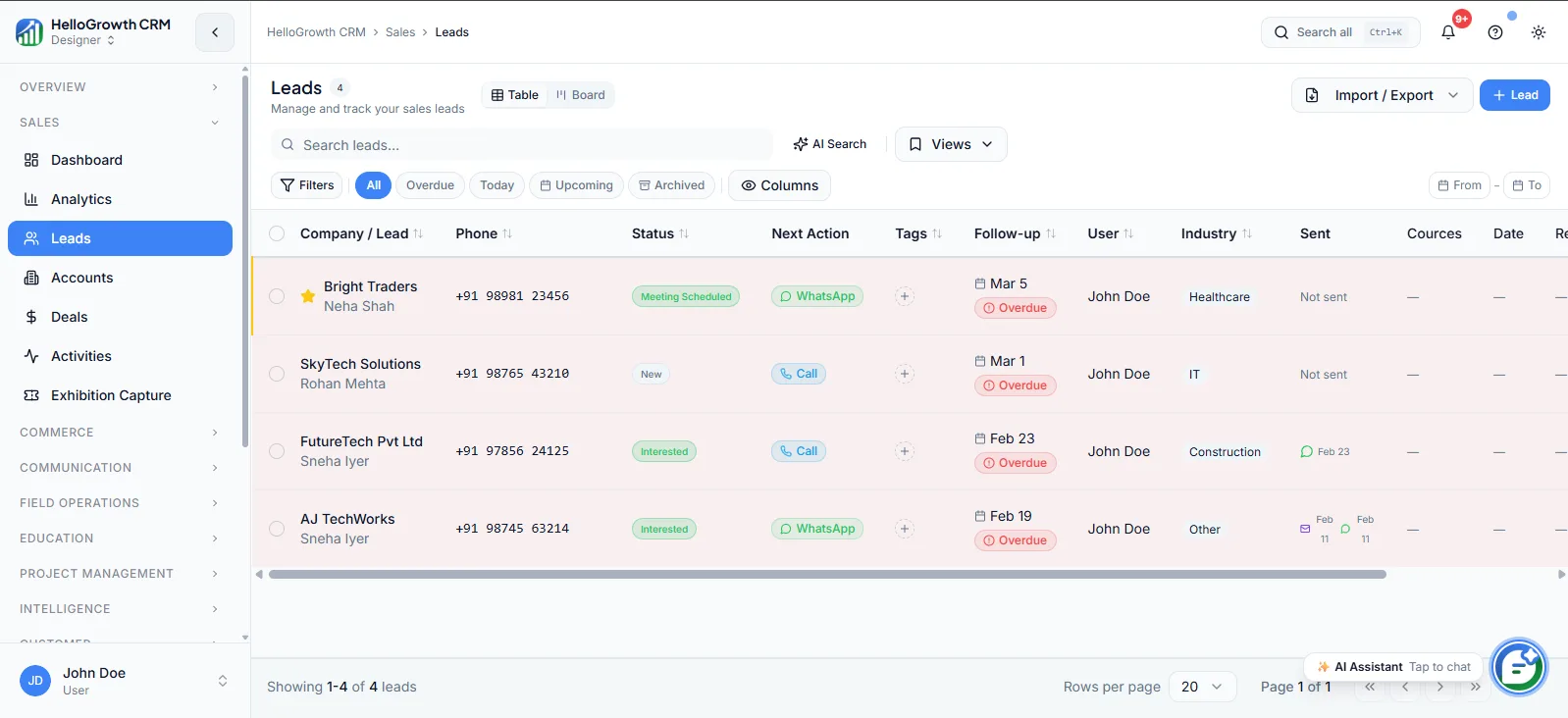
Rules are configured by admins against fields on leads, accounts, and deals. They evaluate whenever a record is created, edited, or moved between stages: if a required field is missing or a value fails the check, the save is blocked and the rep sees exactly what to fix. Stage-gating rules are the most common pattern — each pipeline stage demands its own minimum fields.
Validation underpins everything downstream: routing rules can trust the territory field, workflows can trust the stage, and analytics can trust the numbers, because bad values were stopped at the door.
See it in action
How this capability is packaged by plan
| Plan | Availability |
|---|---|
| Free Forever | |
| Software Only | |
| Growth Engine | |
| RevOps Partner |
Setting it up — step by step
- 1
Audit current data gaps
Run filters for missing amounts, blank sources, and empty phone fields to see which rules matter most.
- 2
Define stage requirements
Agree with sales what must be true — fields filled, next step set — before a deal enters each stage.
- 3
Start with a few rules
Enforce the three or four highest-impact fields first rather than gating everything on day one.
- 4
Write clear error messages
Tell the rep exactly which field to complete and why, not just that the save failed.
- 5
Backfill and tighten gradually
Clean existing records that violate new rules, then add stricter checks once the team adjusts.
Who uses validation rules
RevOps lead
Designs the rule set, balances data quality against rep friction, and reviews which rules trigger most often to find where the process is unclear rather than where reps are careless.
Sales manager
Relies on stage-gated fields to run honest pipeline reviews — every deal in negotiation genuinely has a value, close date, and next step, so inspection time goes to risk, not data chasing.
Finance/ops
Trusts that won deals carry the fields billing needs — legal entity, amounts, payment terms — so invoices go out without a round of back-and-forth to complete missing details.
Validation Rules in practice — industry examples
Financial advisors
An advisory firm requires risk-profile, product interest, and consent fields before a lead can be marked qualified, and blocks deals from closing without the compliance checklist complete. When the annual review comes, every client record has the documented fields the regulator expects to see.
Healthcare
A clinic group requires referral source, preferred location, and contact consent before an inquiry becomes a booked consultation. Front-desk staff cannot skip the consent field on a busy morning, so the outreach team later runs recall campaigns knowing every contact on the list agreed to be messaged.
Mortgage brokers
A brokerage gates the application stage on loan amount, property status, and document checklist fields. Files no longer reach lenders missing key numbers, and the pipeline report finally distinguishes real applications from inquiries a broker optimistically dragged forward before the paperwork existed.
Common mistakes to avoid
Making too many fields required at once, so reps invent junk values to get past the gate and data gets worse.
Writing vague error messages, leaving reps guessing which field blocked the save and losing faith in the system.
Never revisiting rules after process changes, so validation enforces last year's stages and blocks legitimate work.
Skipping a backfill of old records, which then fail validation on every edit and frustrate the whole team.
What teams usually care about here
Prevents dirty data from entering the pipeline and corrupting reporting
Useful for teams with compliance requirements or strict stage-gating rules
Pairs with custom fields and workflows for a complete data governance layer
How this fits the buying decision
Buyers usually do not evaluate validation rules in isolation. They want to know whether it improves execution, reporting, handoffs, and accountability inside the broader CRM workflow. That is why this capability matters most when it is connected to records, ownership, activity history, and manager review rather than living in a separate point tool.
The real decision is often less about whether a box is checked and more about how much depth the team needs. Lower tiers may be enough when the workflow is simple or the volume is small. Higher tiers become more valuable when teams need governance, faster response expectations, specialist execution, or a repeatable operating cadence around the process.
If this capability is important to your rollout, compare it in the context of the whole plan. That includes related workflows, support level, reporting expectations, and whether your team will manage the motion itself or rely on managed RevOps help to keep it consistent.
Frequently asked questions
Which plans include validation rules?
Validation rules are available on the Growth Engine and RevOps Partner plans. They are not included on Free Forever or Software Only, where data quality relies on team convention rather than enforced field checks.
How do we set up validation without annoying reps?
Start with a handful of rules on the fields that actually break reporting — deal value, close date, phone number — with clear error messages. Add stage-gating once those stick. Teams that enforce everything on day one usually train reps to enter junk instead.
Do validation rules affect automation and workflows?
They strengthen it. Workflows, routing, and sequences all read fields, so validated data means automation fires correctly — a WhatsApp template gets a real phone number, routing gets a real territory. A blocked save also stops a half-complete record from triggering downstream actions.
Can rules apply only to certain stages or record types?
Yes, stage-gating is the standard pattern: each pipeline stage can demand its own minimum fields, so early-stage leads stay light-touch while late-stage deals must be complete. Rules can target leads, accounts, or deals separately.
What happens to existing records that violate a new rule?
They remain saved, but the rule triggers on their next edit or stage move. Plan a cleanup pass when introducing rules — filter for violating records and backfill them — so reps are not ambushed by errors on records they did not create.
Related Pricing Capabilities
Weekly Follow-up Execution
A managed operating cadence where follow-up tasks, outreach queues, and next steps are actively worked every week.
Same-Business-Day Lead SLA
A service commitment around inbound lead handling so new opportunities are worked quickly instead of aging in queues.
Pipeline Cleanup & Hygiene
Ongoing cleanup of stale records, mis-staged deals, missing fields, and messy ownership so reporting stays trustworthy.
Weekly KPI Report
A recurring performance review that turns CRM data into a readable weekly operating update for managers and founders.
Automation Specialist
A dedicated automation resource for refining routing, sequences, field logic, and system workflows as the team scales.
Quarterly Funnel Review
A strategic review of conversion, leakage, stage design, and operating performance at the funnel level.