HelloGrowthCRM software
Built for real small-business sales teams
HelloGrowthCRM helps reps qualify faster, follow up on time, and close more deals—with practical automation in one place.
- AI lead scoring and pipeline visibility
- Built-in dialer, WhatsApp, and email automation
- Sales forecasting and RevOps-ready reporting
Calling a number online means using internet-based tools to place phone calls without needing a physical phone line. This is especially helpful for Canadian small-business owners who want to streamline sales or customer support calling without juggling multiple devices or manual record-keeping.
Why this comes up / what goes wrong
Small-business owners often need to call customers, leads, or suppliers from various devices like mobile phones, personal phones, or through messaging apps such as WhatsApp or email. Managing calls this way can lead to scattered contact information, slow follow-up, lost leads, and poor record keeping. Without a central system, tracking call outcomes and scheduling follow-ups becomes difficult, hurting sales and customer service.
Online calling software or services help solve these problems by enabling calls over the internet, centralizing call management, and keeping detailed logs. This makes it easier for sales teams and business owners to stay organised, respond quickly, and improve customer relationships.
Step-by-step
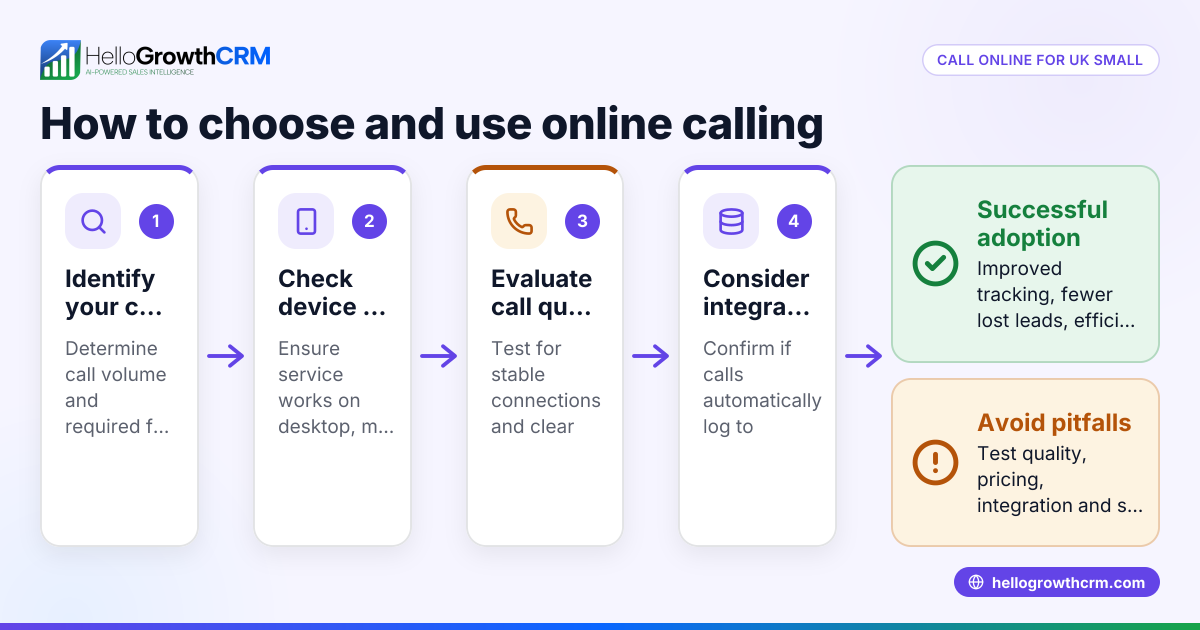
- Identify your calling needs: Determine who you need to call (customers, leads, suppliers), how many calls you expect to make daily, and whether you require local or international calling capabilities.
- Choose a calling platform: Look for software or services that support online calls, such as VoIP platforms, CRM dialers, or apps with built-in calling features. Check for ease of use, reliability, and integration with your current tools.
- Check compatibility and costs: Confirm the platform works on your devices (desktop, mobile) and review pricing models, including subscriptions, pay-as-you-go, or per-minute fees.
- Set up the system: Create user accounts, upload contact lists, and configure call settings such as caller ID, call routing, and call logging.
- Test calling: Make test calls to check call quality, connection stability, and that call outcomes are logged correctly.
- Train your team: Provide training so everyone knows how to use the system effectively, including how to log call results and schedule follow-ups.
- Monitor and adjust: Track call metrics, gather feedback, and adjust processes or software settings to improve efficiency.
For a CRM-integrated option, consider a built-in CRM dialer that lets you call directly from your CRM and automatically logs every call outcome.
Example (fictional figures)
A bilingual insurance agency in Laval, Quebec, wants to improve client calls by using an online dialer. They plan to call 100 leads per week.
- Monthly subscription for the dialer: C$200
- Average call duration: 5 minutes
- Calls per week: 100
- Weeks per month: 4
- Total minutes per month: 100 × 5 × 4 = 2,000 minutes
- Cost per minute included in subscription (flat rate): C$0 (included)
They subscribe to a CRM with a built-in dialer to manage calls and track outcomes efficiently.
This setup saves time by logging calls directly in the CRM and improves follow-up speed and lead management.
Common mistakes
- Using multiple disconnected tools: This leads to lost data and inefficiency. Prevent it by choosing an integrated platform that handles calls and logs outcomes automatically.
- Ignoring call outcome logging: Without logging, you lose track of customer interactions. Ensure your system records call results automatically.
- Not testing call quality: Poor call quality harms customer experience. Make test calls before full deployment.
- Overlooking team training: Without training, users may misuse the system. Provide clear instructions and support.
- Choosing a platform without local support: Some services may not fully support Canadian telecom features. Select platforms familiar with Canadian needs.
- Failing to monitor usage: Without monitoring call metrics, inefficiencies go unnoticed. Regularly review data and adjust.
Doing this in HelloGrowthCRM
HelloGrowthCRM offers a built-in dialer that lets your reps work a list from inside the CRM. Every call is made directly within the system, and the outcome of each call is logged on the lead record automatically. This keeps your call history tied to contacts and deals, helping your team stay organised and follow up efficiently. Learn more about the built-in CRM dialer and how HelloGrowthCRM supports Canadian businesses on HelloGrowthCRM for Canada.
Frequently asked questions
Can I call any number online from my computer? Yes, with an online calling platform or CRM dialer, you can call any phone number reachable by the service. Check if the platform supports local Canadian numbers and international calls if needed.
Do I need special hardware to call online? No special hardware is required beyond a device with internet access, such as a computer, smartphone, or tablet. Some platforms may recommend a headset for better call quality.
How does call logging work with online calling? Many CRM systems and dialers automatically log call details like time, duration, and outcome, linking them to the contact record. This helps track follow-up actions.
Is calling online cheaper than traditional phone calls? Often yes, especially for volume calling or international calls, but costs vary by provider and plan. Always compare pricing carefully.
Can I integrate online calling with WhatsApp or SMS? Some CRMs, including HelloGrowthCRM, combine calling with WhatsApp and SMS messaging to streamline all customer communication in one place. See WhatsApp and SMS CRM for more.
Key takeaways
- Calling a number online uses internet-based software to place calls without a traditional phone line.
- Choose a platform that fits your business needs, is reliable, and integrates with your workflow.
- Test call quality and train your team to avoid common pitfalls.
- Logging call outcomes is essential for managing leads and customer relationships.
- HelloGrowthCRM’s built-in dialer lets you call and log calls directly inside your CRM.
Start simplifying your calling process today. Start on the Free Forever plan (200 leads, no credit card) and see how HelloGrowthCRM can help your team call smarter.
Ready to put this into practice?
Set up your pipeline, WhatsApp follow-ups, and AI lead scoring in minutes — free, no credit card.
Try HelloGrowthCRM freeGet CRM tips in your inbox
Join thousands of sales professionals who get weekly insights on CRM strategy, AI automation, and pipeline optimization.

The HelloGrowthCRM team publishes guides on CRM strategy, AI sales tools, and revenue operations for small business sales teams.