HelloGrowthCRM software
Built for real small-business sales teams
HelloGrowthCRM helps reps qualify faster, follow up on time, and close more deals—with practical automation in one place.
- AI lead scoring and pipeline visibility
- Built-in dialer, WhatsApp, and email automation
- Sales forecasting and RevOps-ready reporting
To create a script, begin by clarifying what you want to achieve with it, who will hear or read it, and the main points you want to communicate. Then write an outline, draft the script in a conversational tone, and revise it to ensure it sounds natural and clear. This article guides you through each step with concrete instructions and a worked example.
Why this comes up / what goes wrong
Small business owners often need scripts for sales calls, customer follow-ups, or marketing videos. Without a clear script, conversations can feel disorganized, important points may be missed, and leads can be lost. Many try to improvise, which wastes time and reduces effectiveness. Creating a script helps ensure consistent messaging, saves time, and improves customer engagement.
Step-by-step
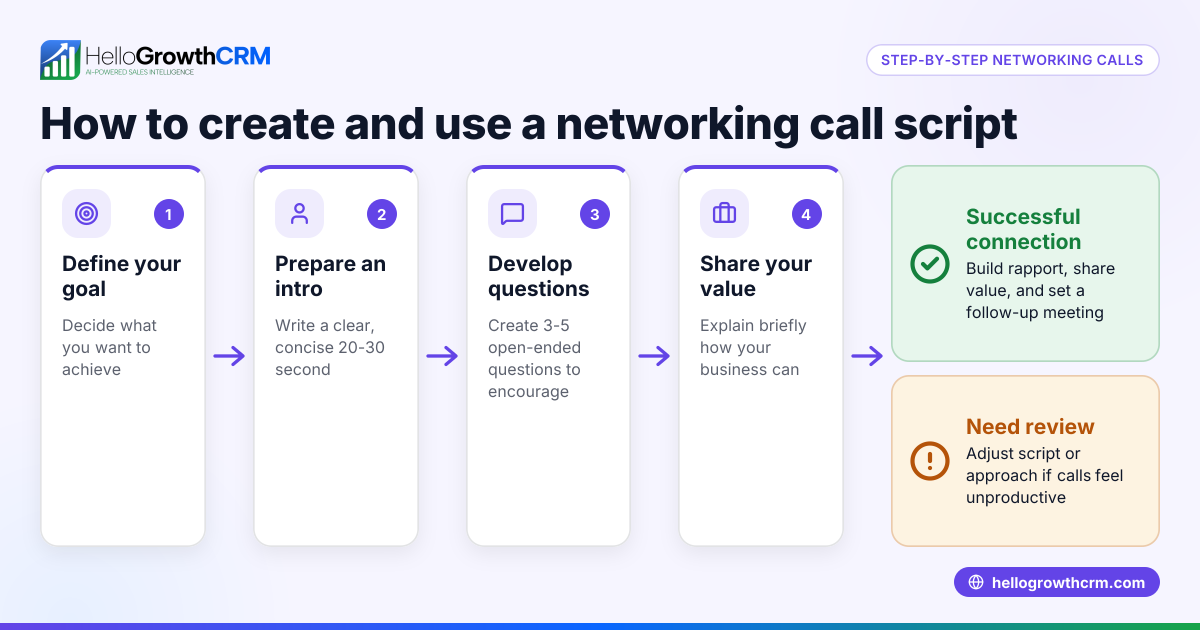
- Define the purpose: Decide what you want the script to achieve (e.g., book a meeting, explain a product).
- Check: Your goal is specific and measurable.
- Identify the audience: Know who will hear or read the script (e.g., new leads, existing customers).
- Check: The language and tone suit this audience.
- List key points: Write down the main messages or questions you need to cover.
- Check: Points are relevant and logically ordered.
- Create an outline: Structure the script with an opening, body, and closing.
- Check: The flow feels natural for a conversation.
- Write the draft: Use simple, clear language; imagine speaking directly to the person.
- Check: Avoid jargon, keep sentences short.
- Include prompts or pauses: Mark where to ask questions or wait for responses.
- Check: These prompts match your sales style.
- Revise and practice: Read aloud, adjust awkward phrases, and time the script.
- Check: The script sounds natural and fits your intended length.
- Get feedback: Share with a team member or mentor and refine.
- Check: They understand the purpose and tone.
- Finalize and save: Keep the script accessible during calls or presentations.
- Check: Format it for easy reading or teleprompting.
Example (fictional figures)
A residential real-estate team in Phoenix, Arizona wants a script to follow up on web leads for home buyers.
Goal: Schedule a viewing appointment.
Key points:
- Greet and introduce
- Confirm interest in buying
- Offer appointment options
- Ask for questions
- Close with next steps
Outline:
- Greeting
- Qualify interest
- Propose appointment
- Handle objections
- Confirm appointment
Draft script excerpt: "Hi, this is Sarah from Phoenix Home Realty. I saw you requested info about homes in Phoenix. Are you still interested in buying a home?"
Practice shows this intro takes about 15 seconds.
They revise to add a prompt: "Are you still interested in buying a home? [Pause for response]"
This script helps them book appointments more consistently.
Common mistakes
- Being too formal or robotic: Use natural language to sound genuine. Practice aloud to avoid stiff delivery.
- Overloading with information: Stick to key points; too much detail confuses the listener.
- Ignoring the listener's responses: Include pauses and questions to engage and adapt.
- Not revising the script: Always test and update based on feedback and results.
- Failing to tailor scripts: Customize for different audiences or sales stages.
- Keeping scripts inaccessible: Store scripts where your team can easily find and use them, such as shared folders or CRM notes.
For more help, download free sales templates like follow-up cadences or pipeline templates at sales templates.
Doing this in HelloGrowthCRM
HelloGrowthCRM offers free sales tools, templates, and calculators to help small businesses create and organize scripts and sales processes. You can download follow-up cadence or pipeline templates without signing up, making it easy to start scripting and tracking your sales interactions. Visit the free tools page to access these resources.
Frequently asked questions
How long should a sales script be? A sales script should be concise enough to hold attention but thorough enough to cover key points. Typically, a script for a cold call or follow-up lasts 1-3 minutes. Practice timing your script to ensure it fits your sales context.
Can I personalize a script for each lead? Yes, scripts should include flexible sections for personalization. Use prompts to ask questions and adapt based on the lead’s responses. Personalization improves engagement and conversion.
Should I memorize the script or read it? Memorizing key points is better than reading word-for-word. Use the script as a guide or prompt sheet to keep conversations natural and responsive.
What if my team resists using scripts? Involve your team in creating or customizing scripts to increase buy-in. Show how scripts save time and improve results. Provide training and encourage feedback to refine scripts.
Where can I find script templates? You can find free sales templates, including follow-up cadences and pipeline templates, at sales templates. These can be adapted into scripts for various sales situations.
How does HelloGrowthCRM support script-based selling? HelloGrowthCRM integrates WhatsApp and SMS communication with pipeline and task boards, helping sales teams follow scripts consistently and track progress. Learn more about its capabilities at WhatsApp and SMS CRM and HelloGrowthCRM for the United States.
Key takeaways
- Define your script’s purpose and audience before writing.
- Structure scripts with clear openings, key points, and closings.
- Use natural language and include prompts for interaction.
- Revise, practice, and get feedback to improve your script.
- Avoid common mistakes like being too formal or ignoring listener responses.
- Use free sales templates from HelloGrowthCRM to jumpstart your scripting process.
Start creating your script today and improve your sales conversations. You can also Start on the Free Forever plan (200 leads, no credit card) to organize your leads and sales process efficiently.
Ready to put this into practice?
Set up your pipeline, WhatsApp follow-ups, and AI lead scoring in minutes — free, no credit card.
Try HelloGrowthCRM freeGet CRM tips in your inbox
Join thousands of sales professionals who get weekly insights on CRM strategy, AI automation, and pipeline optimization.

The HelloGrowthCRM team publishes guides on CRM strategy, AI sales tools, and revenue operations for small business sales teams.