HelloGrowthCRM software
Built for real small-business sales teams
HelloGrowthCRM helps reps qualify faster, follow up on time, and close more deals—with practical automation in one place.
- AI lead scoring and pipeline visibility
- Built-in dialer, WhatsApp, and email automation
- Sales forecasting and RevOps-ready reporting
A CRM connector Zapier allows your UK small or mid-sized business to automate workflows between your CRM and other apps such as email marketing, web forms, or messaging tools. This automation reduces manual data entry, speeds up lead follow-up, and helps your sales team stay organised and responsive.
Why this comes up / what goes wrong
Many small UK businesses manage sales using WhatsApp, email, and spreadsheets, but these tools often work separately. This leads to slow follow-up, lost leads, and missed sales because data is scattered and manual updates are slow. Business owners want a CRM that centralises data and automates repetitive tasks without needing coding skills. Zapier connectors are popular because they link CRMs with hundreds of apps, making automation easier. However, some connectors do not fully support the CRM’s features or fail to handle WhatsApp messaging and lead capture well. This can cause integration gaps that undermine sales efficiency.
Step-by-step
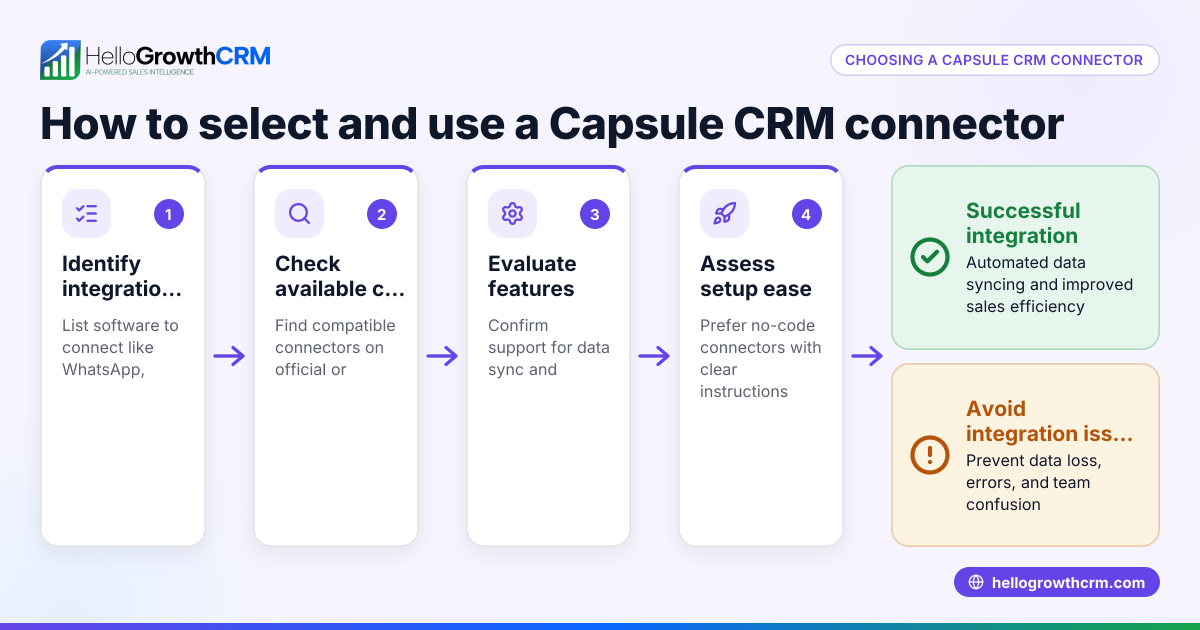
- Identify your CRM and other apps to connect: List the apps you want to automate with your CRM, such as web forms, email marketing, WhatsApp, or spreadsheets.
- Check Zapier compatibility: Visit Zapier’s website or your CRM’s integrations page to confirm if there is a connector supporting your CRM and the apps you want to link.
- Review available triggers and actions: Triggers start workflows (e.g., new lead in CRM), and actions perform tasks (e.g., send WhatsApp message). Make sure these cover your key sales and marketing processes.
- Assess setup complexity: Some connectors require API keys or developer help. Check if you can set up the connector yourself or need technical support.
- Test with sample data: Before full deployment, test the integration with sample leads and messages to ensure data flows correctly and messages send as expected.
- Monitor and adjust workflows: After going live, watch for errors or missed syncs and refine the automation as needed. Use notifications to catch issues early.
Example (fictional figures)
A recruitment consultancy in Bristol wants to automate lead capture from a web form into their CRM and send an immediate WhatsApp follow-up.
- On 01/05/2024, they receive 50 new leads via the web form.
- Each lead represents an average potential fee of £3,000.
- Without automation, it takes 2 days to contact leads, causing 20% to lose interest.
Calculations:
Potential revenue = 50 leads × £3,000 = £150,000 Lost revenue due to delay = 20% × £150,000 = £30,000
By setting up a Zapier connector:
- New leads automatically create CRM records.
- WhatsApp follow-up messages send instantly.
This reduces lost revenue by improving response time and lead engagement.
Common mistakes
- Ignoring compatibility: Trying to connect apps not supported by Zapier or your CRM. Prevent by checking integration pages like integrations.
- Overcomplicating workflows: Creating too many zaps or steps that slow automation. Simplify by focusing on core tasks first.
- Neglecting testing: Launching without testing leads to missed data or failed messages. Always test with sample data.
- Not monitoring errors: Ignoring Zapier task failures causes silent breakdowns. Set up notifications for errors.
- Forgetting data privacy: Sharing sensitive lead info without secure connectors risks compliance issues. Use trusted CRM integrations and secure API connections.
Doing this in HelloGrowthCRM
HelloGrowthCRM supports API and integrations that bring enquiries from platforms like IndiaMART and JustDial directly into the CRM as leads. Its WhatsApp and SMS features log conversations on lead records and allow follow-ups as messages, keeping all communication in one place. Additionally, HelloGrowthCRM offers AI agents (in Beta on Growth plans) that draft follow-up messages after calls, so sales reps only review and send, saving time. Learn more about HelloGrowthCRM’s WhatsApp and SMS CRM and integrations.
Frequently asked questions
Can I connect any CRM to Zapier? Not all CRMs have Zapier connectors. Check Zapier’s app directory or your CRM’s website to confirm compatibility before deciding. Also, verify if the connector supports the specific workflows you need.
Does Zapier support WhatsApp messaging? Zapier can trigger WhatsApp messages via third-party services, but direct WhatsApp Business API integration depends on your CRM or messaging provider. HelloGrowthCRM natively supports WhatsApp messaging logged in the CRM, making follow-ups easier.
How much does it cost to use Zapier connectors? Zapier offers free plans with limited tasks per month and paid plans for higher volumes. Your CRM may also have subscription tiers for API access. Check Zapier’s pricing and your CRM’s plans carefully to understand total costs.
What are the alternatives to Zapier for CRM integration? Other integration platforms include Integromat (Make), Microsoft Power Automate, and native CRM connectors. Choose based on ease of use, supported apps, and pricing. Review your CRM’s integrations to see available options.
How do I keep my data secure when using Zapier? Use strong passwords, two-factor authentication, and only connect trusted apps. Regularly review data access permissions and monitor for unusual activity.
Key takeaways
- A CRM connector for Zapier automates data flow and saves time.
- Check compatibility, triggers, and setup complexity before choosing.
- Test thoroughly to avoid lost leads or errors.
- Avoid overcomplicating workflows and monitor for failures.
- HelloGrowthCRM supports integrations, WhatsApp messaging, and AI follow-up drafting.
Start automating your sales workflows today. Start on the Free Forever plan (200 leads, no credit card) to try HelloGrowthCRM with integrations and WhatsApp messaging.
Ready to put this into practice?
Set up your pipeline, WhatsApp follow-ups, and AI lead scoring in minutes — free, no credit card.
Try HelloGrowthCRM freeGet CRM tips in your inbox
Join thousands of sales professionals who get weekly insights on CRM strategy, AI automation, and pipeline optimization.

The HelloGrowthCRM team publishes guides on CRM strategy, AI sales tools, and revenue operations for small business sales teams.