HelloGrowthCRM software
Built for real small-business sales teams
HelloGrowthCRM helps reps qualify faster, follow up on time, and close more deals—with practical automation in one place.
- AI lead scoring and pipeline visibility
- Built-in dialer, WhatsApp, and email automation
- Sales forecasting and RevOps-ready reporting
CRM email automation is a tool that helps small businesses send follow-up emails automatically to leads and customers. It ensures timely outreach without needing manual effort for every message, improving response rates and sales efficiency. This article covers why small-business owners seek CRM email automation, how to evaluate and implement it step-by-step, common pitfalls, and how HelloGrowthCRM supports these tasks.
Why this comes up / what goes wrong
Many Canadian small-business owners lose leads because follow-up is slow or inconsistent. They might run sales with a mix of text messages, emails, and spreadsheets, which makes tracking and timing difficult. Without automation, reps forget to send follow-ups or send them too late, causing prospects to lose interest or choose competitors. Owners want a system that automates email outreach, tracks responses, and integrates with other channels to keep leads warm without extra manual work.
Step-by-step
- Identify your goals for email automation
- Decide if you want to nurture leads, confirm appointments, send quotations, or re-engage old leads.
- Check what volume of emails you expect and how personalised they need to be.
- Review CRM email automation features
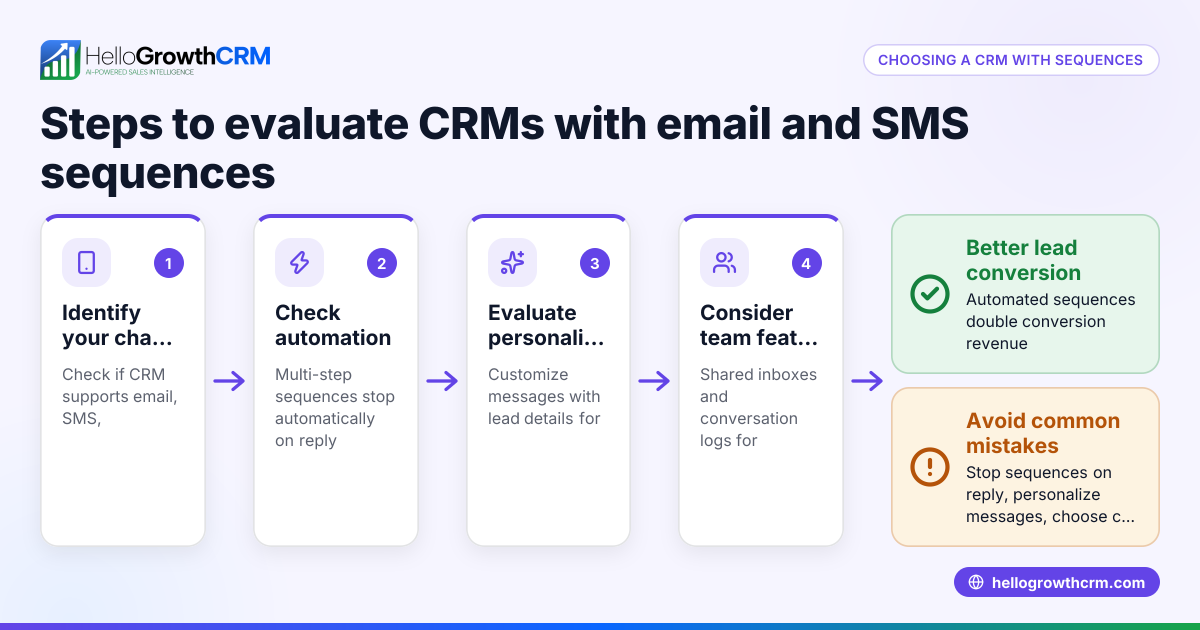
- Look for timed sequences that send multiple follow-ups automatically until a reply.
- Check if the system supports multi-channel outreach (email, SMS, WhatsApp).
- Ensure it can stop sequences immediately when a prospect replies.
- Evaluate integration with your current tools
- Confirm the CRM can capture leads from your website forms and other apps.
- Check if it has a shared inbox for your team to see and manage replies collectively.
- Test ease of use and automation setup
- Try creating a simple email sequence with 3-5 steps over 1-2 weeks.
- Verify if you can personalise emails with lead data easily.
- See if AI assistance is available to draft follow-ups after calls.
- Check reporting and analytics
- Look for tools that show open rates, reply rates, and sequence performance.
- Ensure you can forecast sales impact from automated outreach.
- Assess pricing and plan limits
- Confirm the number of contacts and sequences allowed.
- Check if features like A/B testing or AI agents are included or require higher plans.
- Train your sales team
- Ensure reps understand how automation works and how to review AI-drafted messages.
- Set protocols for when to manually intervene or customise sequences.
Example (fictional figures)
A home-renovation contractor in Calgary, Alberta, wants to automate email follow-ups for new leads captured from their website. They set up a five-step sequence over two weeks to send:
- Day 1: Welcome email with service overview
- Day 4: Follow-up with a recent project case study
- Day 8: Reminder about free consultation
- Day 12: Offer a limited-time discount
- Day 14: Last chance to book
They expect 100 new leads monthly and estimate a 10% reply rate from manual follow-up, hoping to improve it to 15% with automation.
If each converted lead brings an average C$3,000 profit:
Leads per month = 100 Manual replies = 100 × 10% = 10 Automated replies = 100 × 15% = 15
Additional replies due to automation = 15 - 10 = 5
Additional profit per month = 5 × C$3,000 = C$15,000
Over a year:
C$15,000 × 12 = C$180,000
This shows potential revenue increase by automating email follow-ups.
Common mistakes
- Sending generic emails without personalisation: Use lead data fields to tailor messages; avoid one-size-fits-all.
- Ignoring multi-channel communication: Combine email with SMS or WhatsApp for better engagement. See email automation and sequences.
- Setting sequences too long or too frequent: Space out messages to avoid annoying prospects.
- Not stopping sequences when a reply arrives: Automation should pause immediately to avoid redundant messages.
- Overlooking team visibility on replies: Use a shared inbox so all reps can see and act on replies promptly.
- Not training staff on AI-assisted drafting: Reps must review AI messages before sending to keep tone consistent.
Doing this in HelloGrowthCRM
HelloGrowthCRM offers sequences and campaigns that run automated five-step follow-ups over two weeks and stop immediately when a prospect replies. Its AI agents (Beta) draft follow-up messages after calls for reps to review and send, reducing manual workload. The HelloMail shared inbox lets your team see all replies to emails on deals without switching apps. Learn more about these features at AI CRM and email automation and sequences.
Frequently asked questions
What is CRM email automation? CRM email automation is software that automatically sends timed, personalised emails to leads and customers based on workflows. It helps sales teams follow up faster and more consistently without manual effort.
How does email automation improve sales follow-up? It ensures leads receive timely messages that nurture interest and prompt responses. Automation reduces the chance of forgetting leads and allows scaling outreach without extra staff.
Can I combine email automation with other channels? Yes, many CRMs support multi-channel sequences including SMS and WhatsApp. Using multiple channels increases chances of engagement. HelloGrowthCRM supports these channels in its sequences.
How do I know if my automation is working? Track open rates, reply rates, and conversion rates in your CRM reporting. Adjust message timing and content based on these metrics.
Is AI used in CRM email automation? Some CRMs offer AI agents that draft follow-up emails based on call notes or lead data, which reps can review before sending. This saves time and improves message quality.
Do I need a shared inbox for email automation? A shared inbox lets your sales team see all email replies in one place, preventing missed responses and duplications. HelloGrowthCRM includes HelloMail shared inbox for this purpose.
See also HelloGrowthCRM for Canada for local support.
Key takeaways
- CRM email automation sends timed, personalised follow-ups automatically to improve lead engagement.
- Evaluate features like multi-step sequences, multi-channel support, AI drafting, and shared inboxes.
- Avoid common mistakes like generic emails, ignoring replies, and lack of team visibility.
- HelloGrowthCRM offers sequences that stop when prospects reply, AI agents for drafting, and a shared inbox.
- Track performance metrics to refine your email automation strategy.
Start automating your sales outreach with HelloGrowthCRM. Start on the Free Forever plan (200 leads, no credit card) to try sequences, AI agents, and shared inbox features for your Canadian business.
Ready to put this into practice?
Set up your pipeline, WhatsApp follow-ups, and AI lead scoring in minutes — free, no credit card.
Try HelloGrowthCRM freeGet CRM tips in your inbox
Join thousands of sales professionals who get weekly insights on CRM strategy, AI automation, and pipeline optimization.

The HelloGrowthCRM team publishes guides on CRM strategy, AI sales tools, and revenue operations for small business sales teams.